
How to Build an AI Notetaker with AgentMail and MeetStream
Learn how to build an AI notetaker with AgentMail and MeetStream that joins Zoom, Meet or Teams from an email invite and replies with the notes.

Your team already runs on calendar invites. Someone books a call, adds three people, and hits send. Now imagine adding one more guest, notetaker@agentmail.to, and getting structured notes in the same email thread minutes after the call ends. No app to install, no dashboard to open, no bot to configure for each meeting.
To build an AI notetaker with AgentMail, you give the agent its own email inbox with AgentMail, let MeetStream put it in the call, and reply with the notes on the invite's thread. AgentMail handles the asynchronous side: receiving the invite and sending the notes. MeetStream handles the synchronous side: joining Zoom, Google Meet or Microsoft Teams and transcribing the call. In our tests on all three platforms, the notes arrived one to two minutes after the meeting ended.
This pattern matters because email is the one interface every meeting already has. Google Calendar, Outlook and Zoom all send invites in the same iCalendar format, with the time, the link and the attendee list inside. An agent that can read that file knows when to join, where to go and who should get the notes.
In this article, we'll explore why email is a natural interface for a notetaker, what an invite-driven agent has to handle, how the AgentMail and MeetStream integration works, the two ways to build it, and how to run your own in about ten minutes. Let's get started!
Why Email Is the Right Interface for a Notetaker
Most notetakers start with an integration screen. Connect your calendar, grant permissions, pick which meetings to record. That works for the person who set it up, but it breaks down the moment a meeting comes from outside: a customer's invite, a partner's Zoom link, a call booked by someone who has never heard of your tool.
Email avoids all of that. An invite is a standard message with a standard attachment, an .ics file defined by RFC 5545. It carries a unique ID for the meeting, its start and end time, the join link and every attendee. Anyone can add a guest to a meeting, so anyone can invite the notetaker, from any calendar app, without an account.
The agent needs two channels. An inbox where invites arrive and notes go out: AgentMail gives an agent one through an API, with webhooks or WebSockets for new mail and replies that stay on the original thread. And a seat in the live call, which is what a meeting bot API provides.
What an Email-Invited Notetaker Has to Handle
The first version of an invite-driven bot reads the link, joins the call and moves on. It works in a demo. It breaks the first time someone moves a meeting, because calendars don't send a new invite for a change. They send the same invite again with a higher version number.
Every case below arrives as an ordinary email, and each needs a different response:
| Email the agent receives | What the agent should do |
|---|---|
| A new invite | Schedule a bot for the start time and confirm to the sender |
| An updated invite (same UID, higher SEQUENCE) | Move the existing bot, not send a second one |
A cancellation (METHOD:CANCEL) |
Cancel the scheduled bot, or remove it from the call |
A recurring invite (RRULE) |
Join every meeting in the series, with notes after each one |
A change to one meeting of a series (RECURRENCE-ID) |
Move or skip only that meeting's bot |
| A plain email with a Zoom, Meet or Teams link | Join right away |
| An all-day event | Ask for a start time instead of guessing |
| An invite from someone you don't know | Ignore it, without replying |
The last row matters most. An inbox is public by design, and every bot records other people and spends meeting minutes, so the agent needs an allowlist of senders, and an empty allowlist should mean nobody.
Two more problems sit underneath. Webhooks are delivered at least once, so the same invite must not schedule two bots. And the transcript arrives minutes after the call, so the agent has to remember which email thread each bot belongs to.
How the AgentMail and MeetStream Integration Works
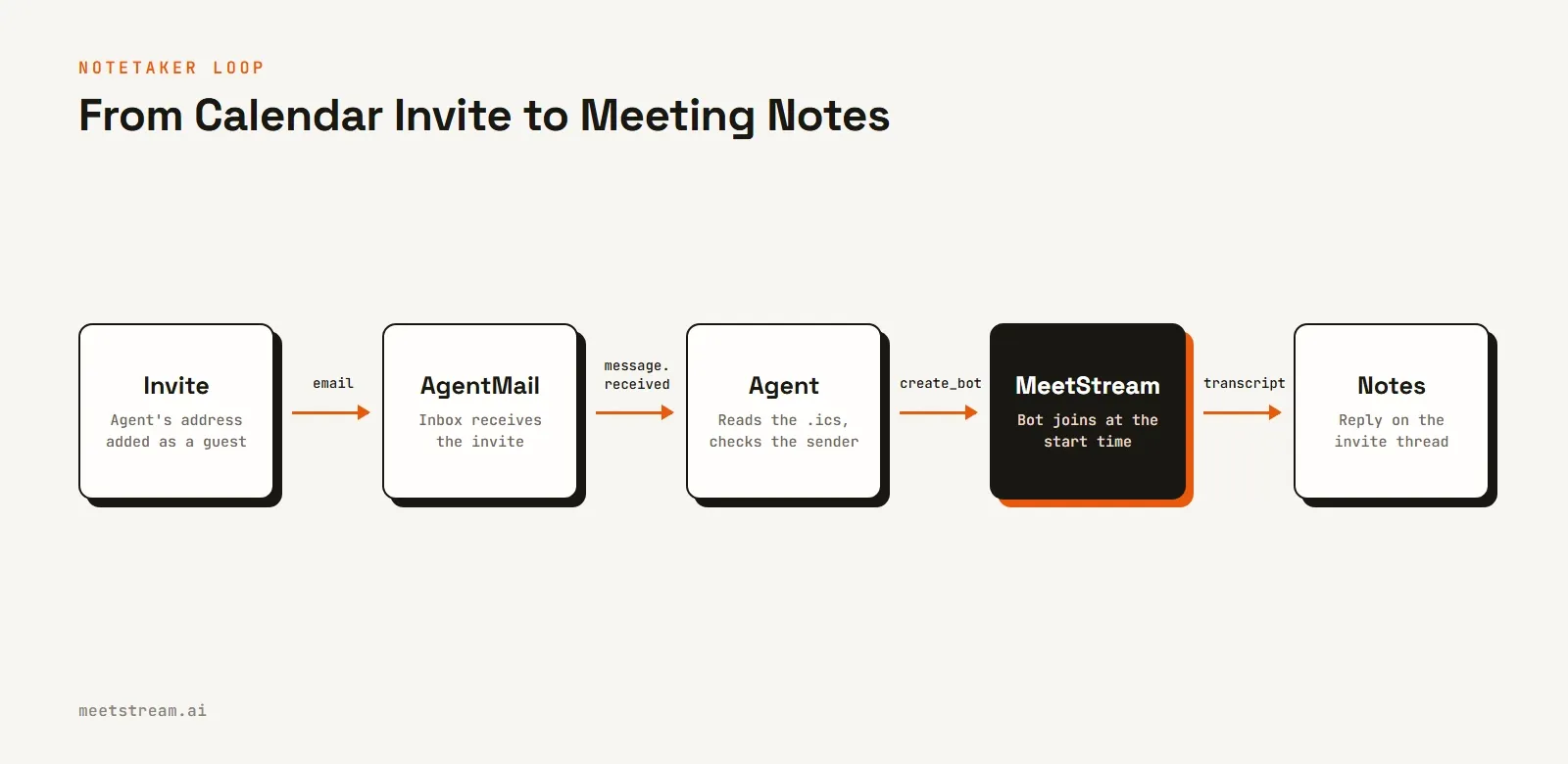
The loop has five steps, each owned by one service: the invite lands in AgentMail, the agent reads it, MeetStream schedules a bot and reports the transcript, and the agent replies with notes through AgentMail.
Receiving the Invite
AgentMail sends a message.received event for every new email, either as a webhook or over a WebSocket. Webhooks are signed, so verify the signature on the raw body before you trust the payload, then drop events you've already seen by their event ID.
The agent then checks the sender against its allowlist and finds the calendar file. Google and Outlook often send it inline rather than as a named attachment, so check the raw message too. Keep the invite's UID and SEQUENCE: together they identify the meeting and tell an update from a late, older copy.
Scheduling the Bot
With the start time and link in hand, one request to MeetStream schedules the bot. Setting join_at makes it a scheduled bot that you can later move or cancel by its ID when the invite changes.
curl -X POST https://api.meetstream.ai/api/v1/bots/create_bot \
  -H "Authorization: Token $MEETSTREAM_API_KEY" \
  -H "Content-Type: application/json" \
  -d '{
    "meeting_link": "https://meet.google.com/abc-defg-hij",
    "bot_name": "AgentMail Notetaker",
    "join_at": "2026-10-27T14:00:00+00:00",
    "callback_url": "https://your-app.example.com/webhooks/meetstream/<random-token>",
    "video_required": false,
    "automatic_leave": {"everyone_left_timeout": 60},
    "recording_config": {
      "retention": {"type": "timed", "hours": 24},
      "transcript": {"provider": {"meetstream": {"language": "auto"}}}
    }
  }'
A notetaker only needs audio, so video_required is off. The bot leaves a minute after the last person does, so the notes aren't held up by an empty call. The retention policy deletes the recording after 24 hours, long enough to write the notes. And the random token in the callback URL ties each bot's events to one meeting.
Writing and Sending the Notes
When the call ends, MeetStream sends a transcription.processed event. The agent fetches the transcript and passes it to a model with a JSON schema for five sections: summary, decisions, action items, open questions and follow-ups. The model records only what was said, so an empty section reads "None recorded".
The agent then replies on the invite's thread, to everyone on the invite, opening with the meeting's details taken from the invite and the transcript rather than from the model:
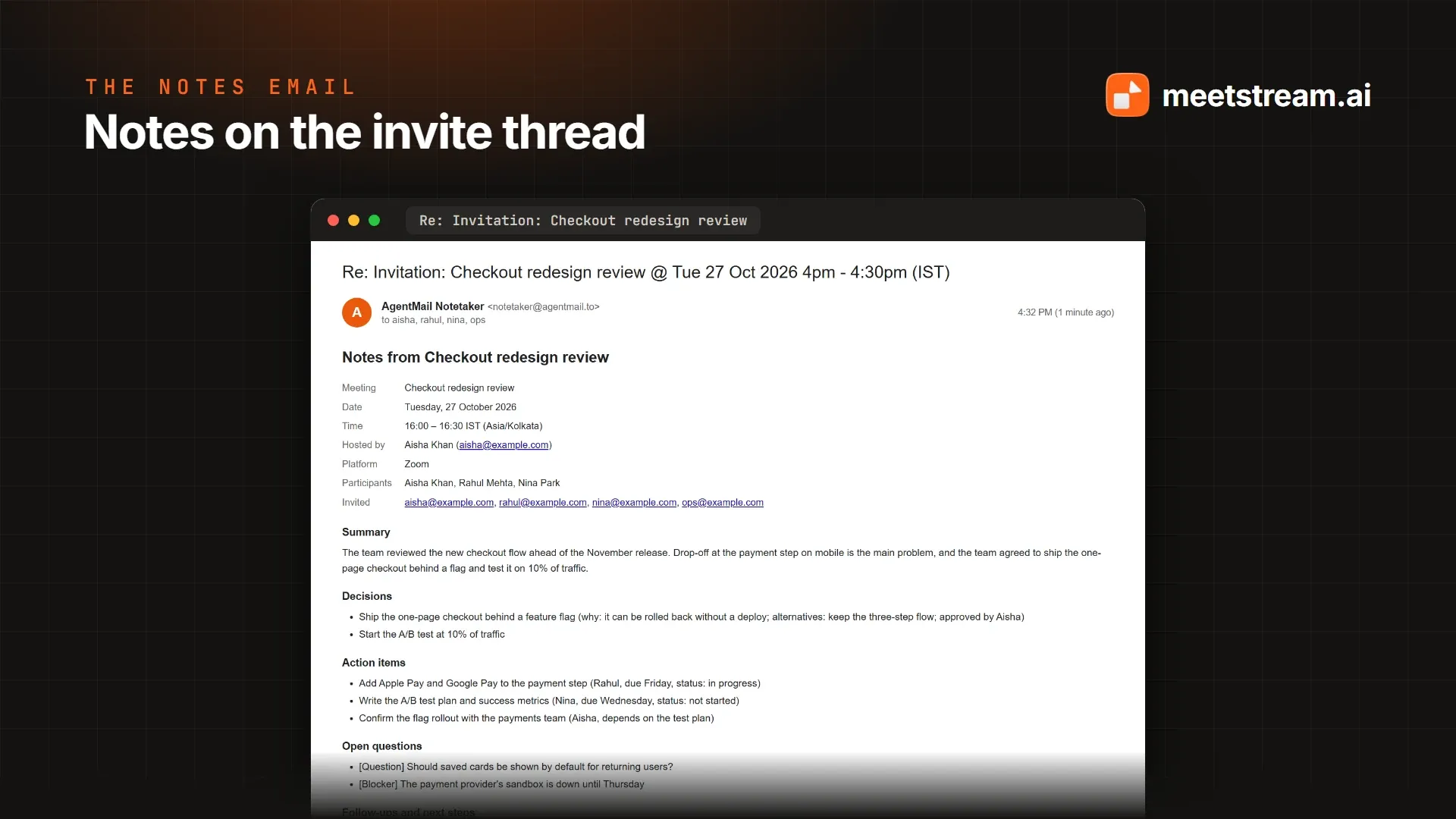
Webhooks can go missing, so a safety net polls MeetStream every couple of minutes for bots that should have finished. If a transcript never comes, the sender is told instead of left waiting.
Two Ways to Build It: Plain Code or an AI Agent
The open-source AgentMail and MeetStream project ships the loop two ways, because teams want different amounts of control.
The reference app is a FastAPI server that does every step in plain code, writing the notes with OpenAI, Grok or Gemini. It can also sync a Google or Outlook calendar through MeetStream, joining only meetings tagged #notetaker, so a work calendar doesn't send a bot into every call.
The toolkit, agentmail-meetstream, packages the same abilities as six tools for your own agent, following the pattern of AgentMail's own agentmail-toolkit: their tools handle email, these handle meetings.
from agentmail import AgentMail
from agentmail_toolkit.openai import AgentMailToolkit
from agentmail_meetstream.openai import MeetStreamToolkit
from agents import Agent

agent = Agent(
    name="Notetaker",
    instructions="When an invite arrives, join it with join_meeting_from_email and confirm. "
    "When a meeting ends, read its transcript and reply to everyone on the invite with the notes.",
    tools=AgentMailToolkit(AgentMail()).get_tools(["reply_to_message"])
    + MeetStreamToolkit(allowed_senders=["@yourcompany.com"]).get_tools(),
)
The agent gets only reply_to_message from AgentMail, so it can answer the thread it was written to but never email an address of its own choosing. The sender check runs inside the meeting tools, before any bot is created.
| Reference app | Toolkit with your agent | |
|---|---|---|
| Who decides what to do | Plain code, the same way every time | Your model, guided by its instructions |
| Frameworks | None needed | OpenAI Agents SDK or LangChain |
| How it hears about email | AgentMail webhooks | AgentMail WebSocket or webhooks |
| Calendar sync (Google, Outlook) | Built in | Through your own code |
| Best for | A ready-to-use team notetaker | Adding meetings to an agent you already have |
How MeetStream Fits In
MeetStream is a meeting bot API for sending bots and AI agents into Zoom, Google Meet and Microsoft Teams. You provide a meeting link and, optionally, a time to join. MeetStream gets the bot into the call, records the audio, produces a speaker-labelled transcript and reports each step through webhooks.
The notetaker leans on a few specific capabilities. Scheduled bots can be moved or cancelled by ID, so a changed invite updates the bot instead of adding a second one. Post-call transcripts come from MeetStream's own engine or from Deepgram, AssemblyAI, Sarvam or JigsawStack with your own keys. Retention is set per bot. And calendar integrations sync a Google or Outlook calendar for teams that would rather connect a calendar than forward invites.
AgentMail supplies the other half: the inbox, the threads and the replies. The agent is the only place the two meet, which keeps each side replaceable. To go further with the transcripts, see our guides to storing and searching meeting transcripts and sending meeting notes to Notion.
How to Run the Notetaker in 10 Minutes
The quickest way to see it work is the example agent. It hears about new email over AgentMail's WebSocket, so it needs no public URL or webhook.
- Get three keys: an AgentMail API key, a MeetStream API key, and an OpenAI key (or an xAI key for Grok).
- Install the project and create the agent's inbox:
git clone https://github.com/meetstream-ai/agentmail-integration.git
cd agentmail-integration
pip install -r requirements.txt "./toolkit[example]"
export AGENTMAIL_API_KEY=am_...
python scripts/create_inbox.py my-notetaker
- Run the agent, allowing only your own address to send it into meetings:
export MEETSTREAM_API_KEY=ms_... OPENAI_API_KEY=sk-...
export AGENTMAIL_INBOX=my-notetaker@agentmail.to ALLOWED_SENDERS=you@yourcompany.com
python toolkit/examples/notetaker_agent.py
- Invite it to a meeting. Add
my-notetaker@agentmail.toas a guest on a Zoom, Meet or Teams event, and admit the bot from the waiting room when it arrives.
Before you run it for a team:
- Keep the allowlist tight. Invites from anyone else are dropped without a reply.
- Tell the people in the call that the notetaker is recording.
- Deploy it as one service with its database on a persistent volume; the reference app ships with a Dockerfile and a deploy guide.
- Keep retention short and store your own copy of the notes, not the recording.
- Screen inbound mail. AgentMail's Agent Armor flags messages that try to manipulate an AI agent.
Conclusion
An AI notetaker doesn't need its own app. With AgentMail giving the agent an inbox and MeetStream giving it a seat in the call, the notetaker fits into the workflow people already use: add a guest, and get the notes on the same thread. The hard parts are the ones calendars hide: updates, cancellations, recurring series and senders you don't know. Handle those by the meeting's UID, an allowlist and a scheduled bot you can move, and the rest is two API calls and a prompt.
Frequently Asked Questions
Do meeting attendees need to install anything?
No. The notetaker is just another guest on the invite. Attendees keep using Zoom, Google Meet or Microsoft Teams as usual, and the notes arrive as an email reply on the invite's thread.
Which meeting platforms does the notetaker support?
Zoom, Google Meet and Microsoft Teams, including meetings that someone else hosts. The bot joins as a guest, so the host admits it from the waiting room or lobby, the same as any external participant.
Can the notetaker join recurring meetings?
Yes. For a recurring invite, the agent keeps the series and schedules a bot for the next meeting, then the one after that once it ends. Moving or cancelling a single meeting changes only that meeting's bot, and cancelling the series stops it.
Who receives the meeting notes?
Everyone on the invite: the organizer and every attendee, as a reply on the invite's thread. For a meeting sent as a plain link, the notes go to the sender and anyone in the email's To or CC fields.
How do I stop strangers from sending the bot into meetings?
Set an allowlist of addresses or domains. The agent ignores invites from anyone else without replying, and an empty allowlist means nobody can send it anywhere, so a public inbox can't become a way to record other people's calls.
Ready to build your own? Get the AgentMail and MeetStream project on GitHub and create your first MeetStream bot to try it on your next meeting.