
AI Game Show Host: Built With MeetStream

 DeepWiki
"Good evening, and welcome! Let's begin. Question 1, worth 100 points: What is 7 plus 8?"
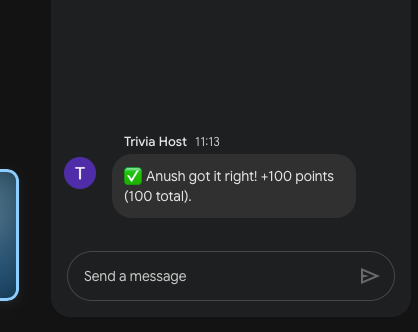
That's the first thing you hear when our bot joins your Google Meet. No dial tone, no "Notetaker has joined," just a game show host in a cheerful synthetic voice, already on the first question. Someone unmutes and shouts "fifteen." A second later the chat lights up: ✅ Dana got it right! +100 points. Question 2 is already in the chat. Your 3pm sync has turned into a game show.
I built an AI trivia host because a game show is one of the hardest things you can ask a meeting bot to do. A notetaker can sit quietly and process everything after the call. A host has to perform: speak on cue, hear who answered, work out who answered first, react in seconds, and keep a scoreboard that a room full of competitive coworkers will absolutely argue about. If a bot can host trivia, most other jobs in a meeting look easy by comparison.
So meetstream-gameshow-host is a showcase: a virtual game show host that demonstrates what MeetStream can do in a call beyond recording it. This article takes it apart: how it's built, what each MeetStream feature does in it, and what live testing taught us.
The Mechanics Behind It All
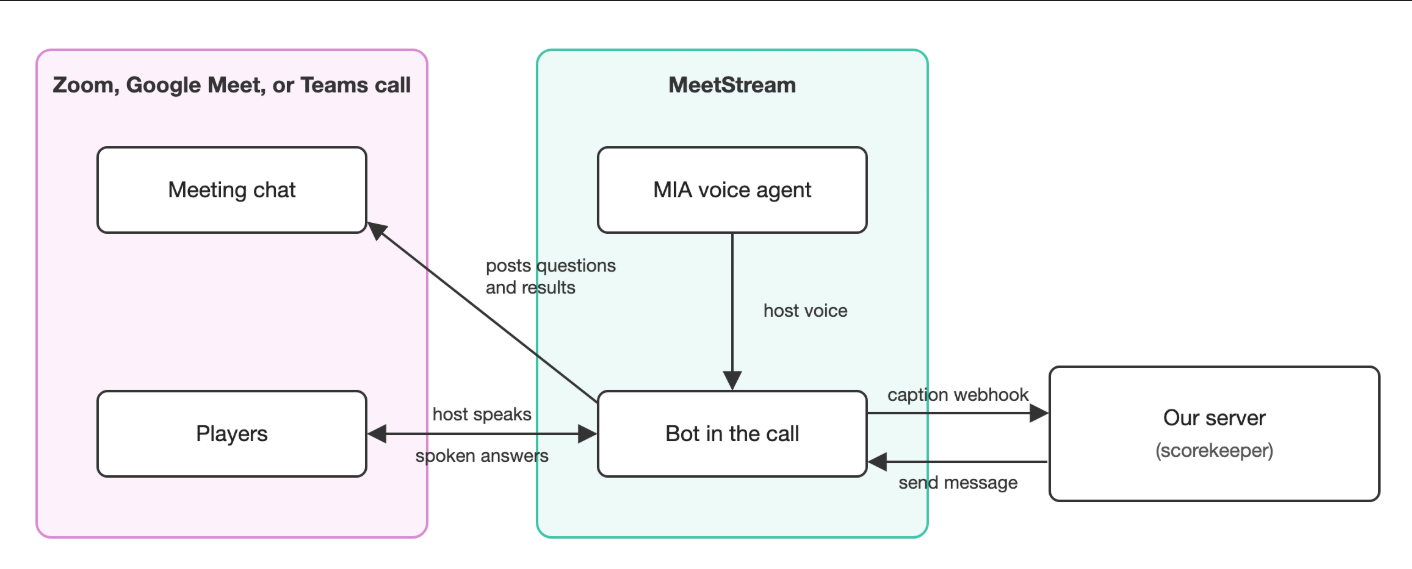
An AI game show host is a meeting game bot: it joins a Zoom, Google Meet, or Microsoft Teams call like any other participant and runs a game for everyone in it. Ours has four jobs:
- Talk. A voice welcomes the room and reads out the questions.
- Listen. It picks up spoken answers and knows who said them.
- Keep score. It checks each answer, gives the points to whoever got it right first, and moves on.
- Show results. It posts questions, correct answers, and the final leaderboard in the meeting chat.
MeetStream handles each of those jobs, and one integration works on all three platforms. The same code is a Zoom trivia bot, a Google Meet trivia game, and a Microsoft Teams trivia bot.
What is MeetStream?
MeetStream is an API for putting bots into video meetings. Give it a meeting link, and a bot joins the call as a real participant, with a name in the attendee list, on Zoom, Google Meet, or Microsoft Teams. There's no separate build for each platform, and nobody on the call has to install anything.
Most teams use it for the quiet stuff: recording calls and getting transcripts afterward. The interesting part is that the same bot can also take part. It can talk, listen as the conversation happens, post in chat, and show images on its camera. That's the side of MeetStream this project is built to show off.
The voice
The host's voice comes from MIA, MeetStream's built-in voice agent. MIA is a complete voice pipeline running on MeetStream's servers. It transcribes what it hears, passes that to an AI model, and speaks the reply in a text-to-speech voice. It's set up once as an agent config through MeetStream's API, with each piece chosen separately. We picked OpenAI's GPT-4o as the brain, an OpenAI voice, and Deepgram's Nova-3 for listening. MeetStream brings the provider accounts, so there are no extra keys to manage.
The one line we fully script is the opening. The moment the bot joins, it says the same thing every time: a welcome followed by Question 1. That gets the game going with no awkward pause while everyone waits for something to happen.
We also tell MIA that it's the entertainment, not the referee. It keeps the energy up, and the scoring happens somewhere else.
Getting the voice into a meeting takes one step. When our server asks MeetStream to create a bot, it passes along the ID of that agent config, and the bot joins already speaking as the host. We don't make a new config for every game. We update the same one with the latest questions, so changing the quiz means editing a list of questions, not rebuilding the host.
The scorekeeper
The scoring happens in a small piece of our code on our server. It knows which question is live, what the right answer is, and who has how many points. It never guesses. It compares what people said with the answer key and follows the rules.
It learns what people said through MeetStream's live transcription webhook. When we create the bot, we tell MeetStream two things: use the meeting platform's own captions as the transcript source, and send each caption to our server the moment it arrives. Every caption comes with the speaker's name attached. So when Dana shouts "fifteen," the scorekeeper sees Dana: fifteen and awards the point.
Replying is just as simple. The scorekeeper posts questions, results, and the leaderboard through MeetStream's send message endpoint, which puts the text straight into the meeting chat under the bot's name. MeetStream's lifecycle webhooks tell the scorekeeper when the bot is actually in the call, so Question 1 never goes up to an empty room.
A few rules keep the game fair:
- First correct answer wins. Once someone gets it, that question is locked.
- Every question has a timer. If nobody gets it in time, the host reveals the answer and moves on.
- The host can't play. The bot ignores its own voice, so it doesn't score points for reading out the question.
- Ties are allowed. If two people finish level, they share the win.
One surprise from testing: captions write spoken numbers as words. Someone says "42" and the caption reads "forty two." At first, every correct spoken answer was marked wrong. Now the scorekeeper accepts both forms. Because the scoring is plain code and not an AI's judgment, that bug was easy to find and fix.
How it all fits together
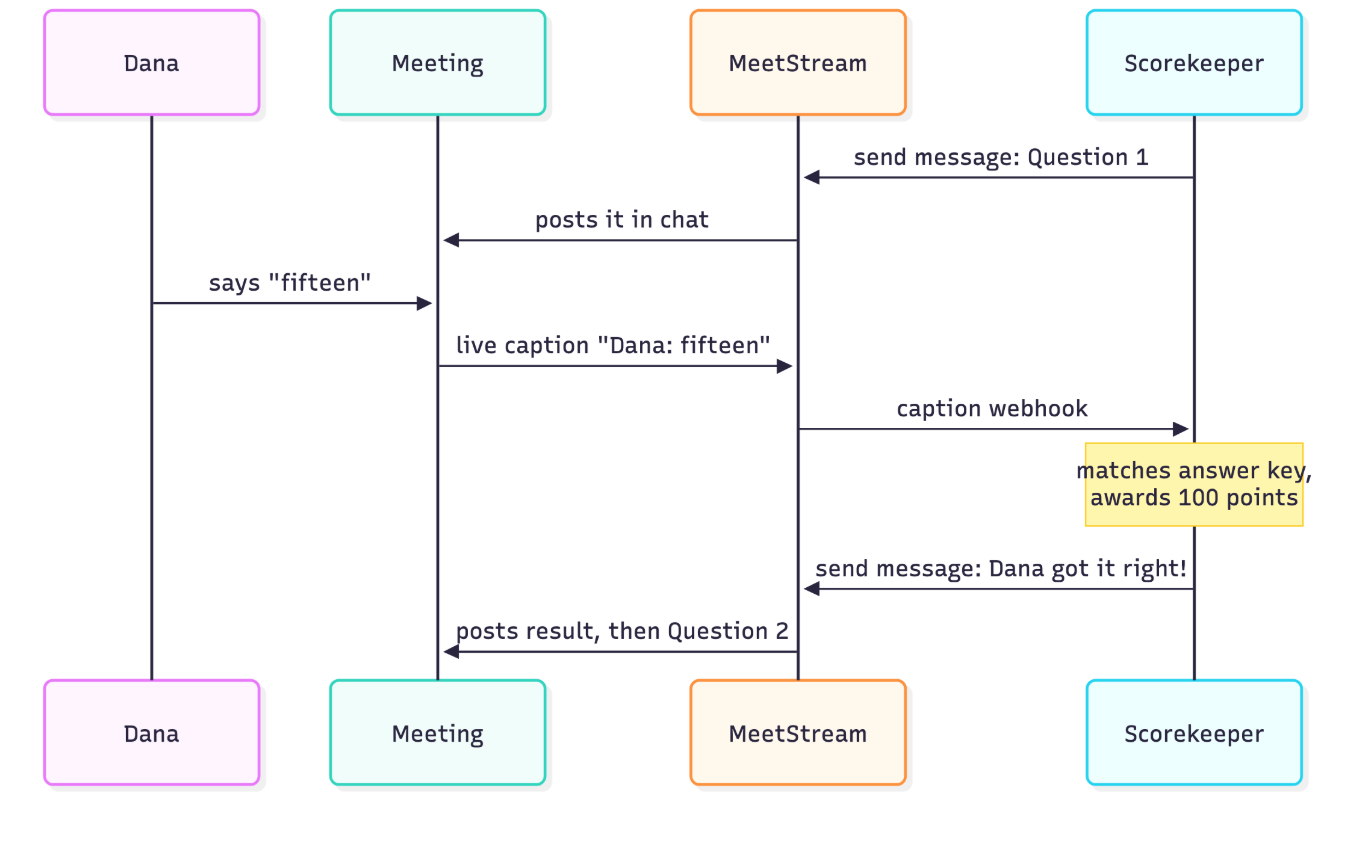
Starting a game takes a meeting link and nothing else. Here's what happens when someone pastes one in:
- Set up the voice. The host's personality and today's questions go into MIA through MeetStream's agent config API.
- Send the bot. One create-bot request to MeetStream sends a bot into the meeting with the MIA voice attached and live captions routed to our server.
- Wait for the room. MeetStream fires a webhook once the bot is in the meeting. The bot says its opening line, and the scorekeeper posts Question 1 in chat.
- Play. People shout answers. MeetStream sends the captions over, the scorekeeper checks them, and the results go back into chat through MeetStream.
- Wrap up. After the last question, the leaderboard goes up and a winner is named. The bot's status can be checked at any point, and one more call to MeetStream removes it from the meeting.
The voice and the scorekeeper run side by side. The voice gives it the feel of a show, and the scorekeeper makes sure the right person wins. Chat also keeps a written record of every question and result, so anyone who missed a moment can catch up.
Nobody has to install anything. The bot joins like a person would, so the same setup works on Zoom, Google Meet, and Microsoft Teams.
What testing taught us
We played real games in real Google Meet calls. Here's what we took away.
The voice nails the entrance. In every test, the bot joined and delivered its opening line clearly and on cue.
Let the voice host and let code referee. A scoreboard is the one part of a game where nobody accepts a judgment call, so we kept it in plain code. MIA sets the mood, the scorekeeper settles the arguments, and every point can be traced back to a caption and a rule.
Captions are the best ears in the room. The platform's own live captions turned out to be the most reliable way to hear who said what, as it happened.
How MeetStream fits in
MeetStream is an API for putting bots into meetings, which makes it a practical meeting bot API for games. A MeetStream game show host uses four of its features:
- Join any meeting from a link, on Zoom, Google Meet, or Teams.
- Speak through MIA, MeetStream's built-in voice agent.
- Listen by receiving the meeting's live captions, with speaker names.
- Post messages (and images) into the meeting.
Sending the host into a call is a single request:
curl -X POST "https://api.meetstream.ai/api/v1/bots/create_bot" \
  -H "Authorization: Token <YOUR_API_KEY>" \
  -H "Content-Type: application/json" \
  -d '{
    "meeting_link": "<YOUR_MEETING_LINK>",
    "bot_name": "Trivia Host",
    "agent_config_id": "<YOUR_MIA_AGENT_ID>",
    "live_transcription_required": { "webhook_url": "https://your-app.com/webhooks/meetstream" },
    "recording_config": { "transcript": { "provider": { "meeting_captions": {} } } }
  }'
That one request brings the bot into the call, gives it the host's voice, and starts sending captions to our server. An AI assistant can start games too: the project includes a small add-on, so saying "start a trivia game in this meeting" is enough.
Beyond the game show
Trivia only uses part of what MeetStream can do. The same API also offers:
- Recordings and transcripts. Audio and video of the whole call, plus a transcript with speaker labels, delivered by webhook once the meeting ends.
- Live transcription from either source. The meeting platform's own captions, as we used, or a streaming speech-to-text provider such as Deepgram or AssemblyAI, with text arriving as people speak.
- Separate audio for each person. Because the bot is a real participant, it can capture each speaker on their own track. That makes it much easier to tell who said what, even when people talk over each other.
- One dashboard. Bots, webhooks, and calendars are managed in one place.
These are the same features behind notetakers, live sales coaches, interview assistants, and agents that speak up in standups. Trivia is just the most fun way to show them off.
Conclusion
A trivia host is a silly thing to build, and that's exactly why we built it. To pull it off, a bot has to join a call, talk, listen, keep track of who said what, and react in seconds, all live. MeetStream covers each of those, and the trick that makes the game hold up is simple: let the AI voice do the entertaining, and let plain code keep the score. Interactive games for virtual meetings turn out to be a good stress test for a meeting bot, and MeetStream passed it. More about MeetStream is at meetstream.ai.