
Meeting Automation for Marketing Teams: From Client Calls to Insights

Marketing teams run on conversations. Client calls, agency briefings, and research interviews contain the raw material for better strategy: how clients describe their problems, which messages land, and what competitors come up. Most of this high-value content evaporates 24 hours after the meeting ends.
The solution is not just another note-taker. The real opportunity is to move from passive recording to active participation. Instead of only analyzing calls after they happen, an AI agent can join as a participant, understand the conversation as it unfolds, and provide real-time assistance or capture structured data with perfect recall. This is the core of modern marketing meeting automation.
This approach treats meeting conversations as a real-time data stream. For an agency, it means capturing every client commitment. For a product marketing team, it means tracking how a new value proposition is received across dozens of calls. It’s about building a system of record for the voice of the customer, directly from the source.
This article covers the technical patterns for building these systems. We will cover deploying agents into calls, structuring the data pipeline for analysis, extracting specific marketing insights like competitor mentions and feedback, and the architecture required to make it scalable. Let's get into it.
The Foundation: Deploying Agents into Client Calls
The first step is getting an automated participant into every client and agency call. The goal is reliable, low-touch deployment across Zoom, Google Meet, and Microsoft Teams. A single API integration should handle all three platforms.
A bot is created with a single API call. You provide the meeting link, a name for the bot, and a webhook URL to receive events about the meeting lifecycle. For marketing use cases, this is also where you pass metadata, like a client or project ID, which helps organize data later.
curl -X POST "https://api.meetstream.ai/api/v1/bots/create_bot" \
  -H "Authorization: Token <YOUR_API_KEY>" \
  -H "Content-Type: application/json" \
  -d '{
    "meeting_link": "<YOUR_MEETING_LINK>",
    "bot_name": "Acme Marketing Bot",
    "callback_url": "https://your-app.com/webhooks/meetstream",
    "custom_attributes": {
      "client_id": "client-123",
      "project_id": "project-abc"
    },
    "recording_config": {
      "transcript": {
        "provider": { "meetstream": {} }
      }
    }
  }'
In a multi-tenant application for a marketing agency, the custom_attributes field is critical. It allows you to associate a bot and its resulting data with a specific client account from the moment of creation. When your webhook handler receives an event like transcription.processed, the payload will include these attributes, ensuring the data is routed and stored in the correct client's namespace.
Speaker labels from the transcript are essential for context. The API will provide diarization, separating speakers as "Speaker 0", "Speaker 1", and so on. A common pattern is to build a speaker resolution step in your application that maps these generic labels to actual participant names from calendar invite data, providing much richer context for analysis.
Structuring the Transcript-as-Data-Source Pipeline
To enable sophisticated queries, you must treat transcripts as a structured data source, not as text documents. This mental model shift is what separates a simple archive from a true intelligence tool. A document is filed away; a data source is queried repeatedly to find new patterns.
The technical foundation is a clean data model. A minimal schema includes a meetings table (with IDs, date, client, and attendees), a segments table for each utterance (with speaker, timestamps, and text), and an extracted_items table (for things like feedback, competitor mentions, or action items). This structure is flexible enough to support all the queries a marketing team would need.
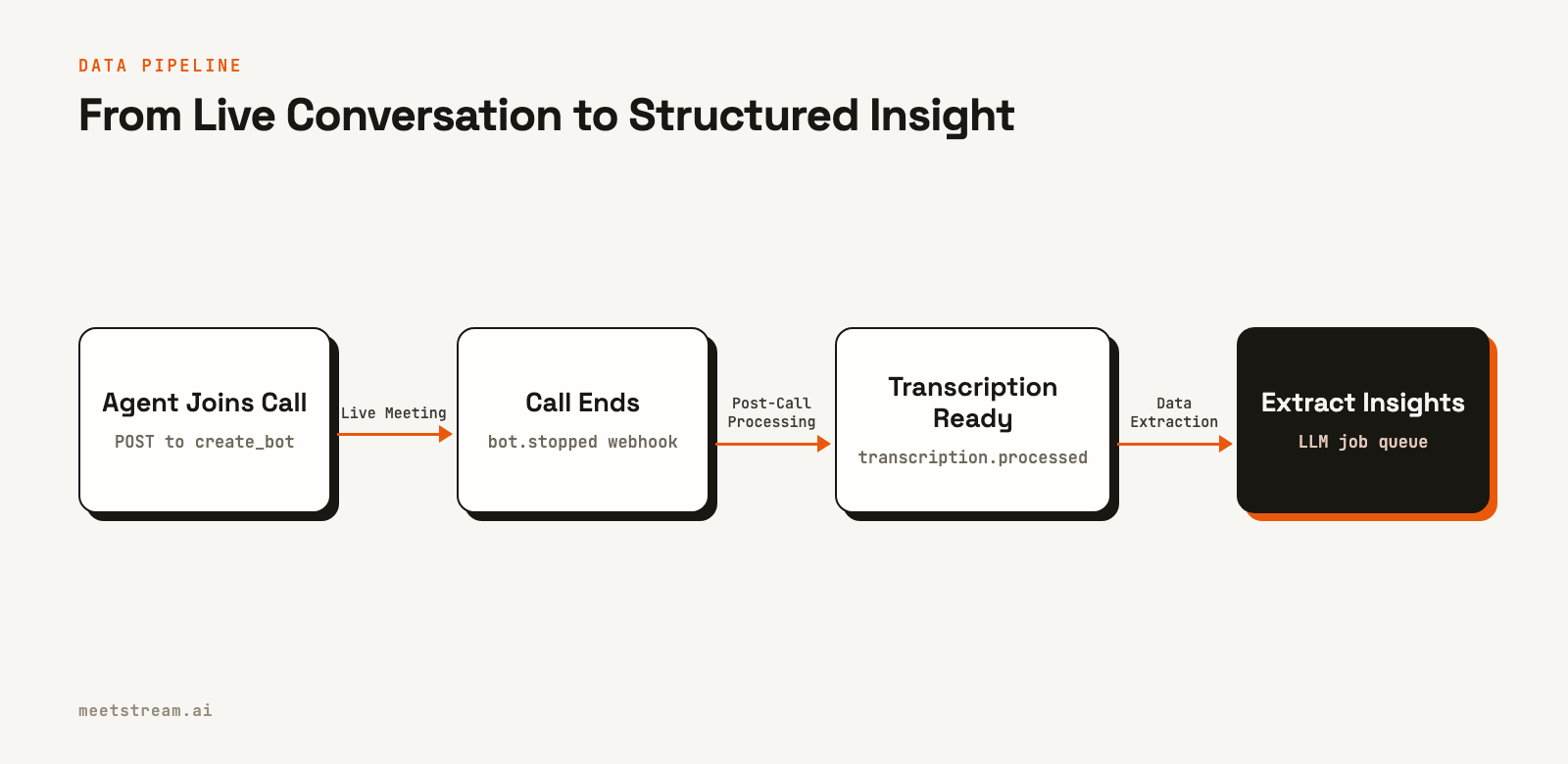
The processing pipeline should be asynchronous and event-driven. When the transcription.processed webhook arrives, your application should enqueue a series of jobs. One job extracts feedback, another finds competitor mentions, and a third analyzes messaging effectiveness. Each job runs independently, writing its findings to the extracted_items table. This architecture is resilient; if one extraction task fails, it can be retried without affecting the others.
This pipeline is the engine for meeting insights marketing. The product experience you build is the query interface on top of this structured data. It could be a web dashboard with filters or even a natural language interface that translates questions into database queries.
Extracting Competitor Mentions and Feedback Themes
With a data pipeline in place, you can start extracting high-value signals. A single client mentioning a competitor is an anecdote. Six clients mentioning the same competitor in a week is a market signal that demands a strategic response. Structured extraction makes this visible.
The extraction schema for marketing calls should be specific. You are not just summarizing. You are looking for: feedback items (positive, negative, neutral), feature requests, competitor mentions with context (are they evaluating them, switching from them, or just comparing?), and commitments made by either party.
For competitor mentions, simple keyword matching is brittle. A better approach is to use a large language model (LLM) prompted with an explicit entity list. A prompt like "Extract any mentions of the following competitors: [list], along with the surrounding context" produces much cleaner output than a generic request to find all competitors.
Once extracted, these items can be aggregated to answer critical business questions:
- Which competitors were mentioned most frequently in client calls this quarter?
- What feedback themes are unique to our enterprise clients versus SMBs?
- Which of our new messaging points generated the most follow-up questions?
This turns qualitative call data into a quantitative asset for strategic decision-making, surfacing trends that would otherwise be invisible.
Tracking Messaging Effectiveness Across Calls
One of the most powerful applications of client call transcription marketing is measuring message resonance. Marketing teams spend weeks crafting new positioning, but the feedback loop on its effectiveness can be months long, waiting for campaign results. Call transcripts provide a leading indicator.
The technical approach involves maintaining a messaging framework in your system, a list of key value propositions and positioning statements. As you process call transcripts, your extraction jobs can detect when a team member uses one of these messages and classify the customer's response: engaged (asked a follow-up question), neutral (acknowledged), or skeptical (challenged the claim).
Aggregating these classifications provides a clear, data-backed view of what works. A report showing "Message A had a 65% engagement rate, while Message B had only 30%" is far more valuable than anecdotal feedback. It allows teams to iterate on messaging based on real-world reactions, not just A/B tests on landing pages.
This capability is a true differentiator. It moves a tool from being a passive note-taker to an active partner in shaping marketing strategy. By tracking this data over time, you can measure the impact of a messaging refresh from one quarter to the next, providing concrete evidence of what is resonating with the market.
Real-Time Agents: The Next Layer of Automation
While post-call analysis is powerful, the ability for an agent to act during a meeting is useful. This requires a platform that provides not just recording, but real-time access to meeting audio and the ability for an agent to participate by sending messages or even speaking.
This is possible with an architecture that supports real-time audio streaming via WebSockets. The agent receives the live audio, processes it through a speech-to-text and LLM pipeline, and uses API commands to interact with the meeting. This creates a tight feedback loop that can augment the marketing team's performance during the call itself.
How MeetStream Fits In
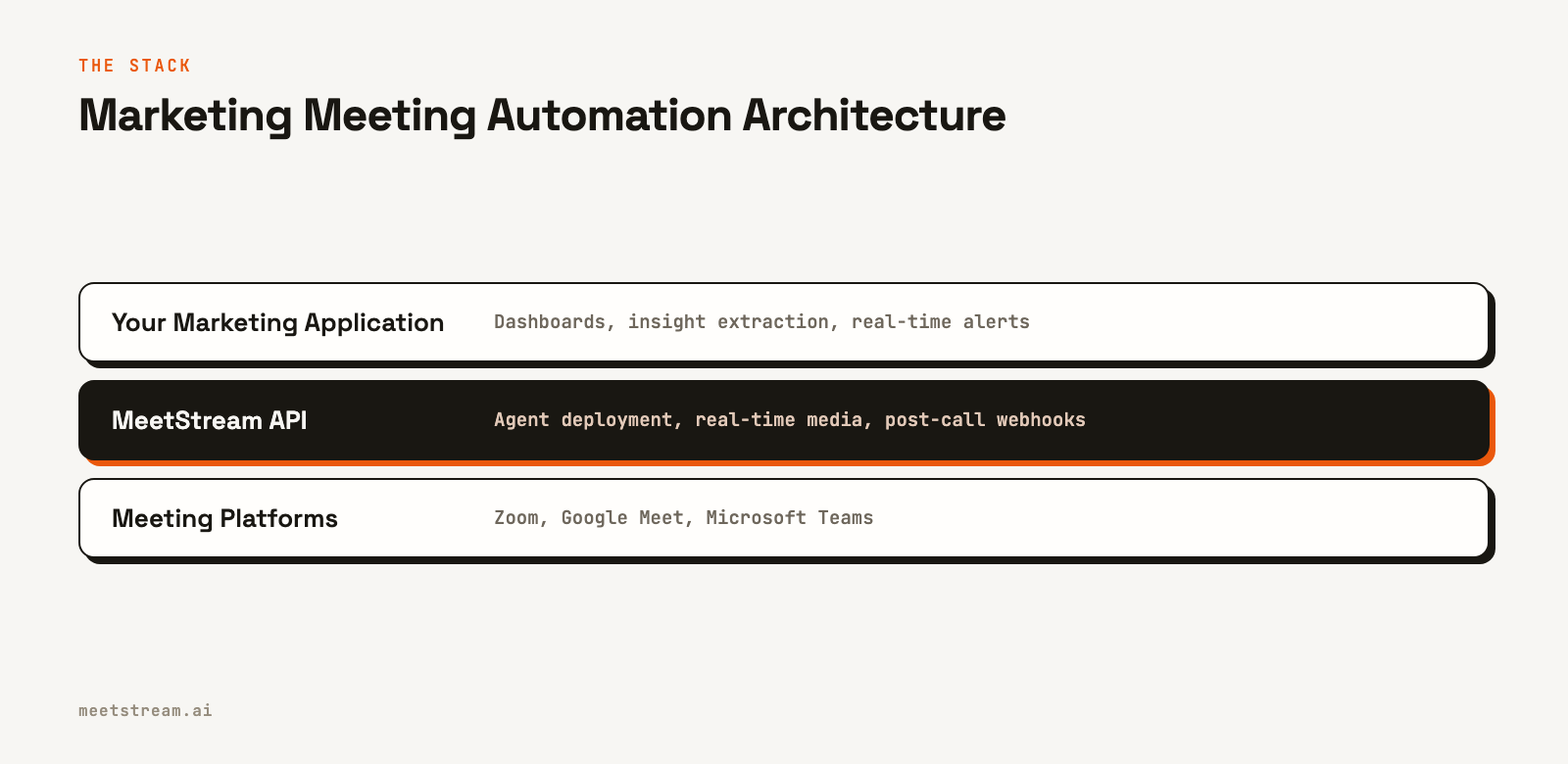
MeetStream provides the agent-first infrastructure to build these marketing automation tools. The platform is designed around the concept of an active AI participant, not just a passive recorder. A single API lets you deploy bots into Zoom, Google Meet, and Microsoft Teams.
Our API provides both post-call webhooks for asynchronous analysis and real-time WebSocket connections for live, in-meeting agents. You can start by building a post-call insights tool and later add real-time capabilities without changing your core integration. We manage the complexity of bot deployment, scaling, and multi-platform media processing, so you can focus on building the marketing intelligence features that differentiate your product.
The custom_attributes field, webhook-driven architecture, and configurable data retention policies are all designed for building scalable, multi-tenant applications like those needed by marketing agencies. The platform provides the reliable foundation for your transcript-as-data-source pipeline.
Conclusion
Effective marketing meeting automation is not about generating simple summaries. It is about treating conversations as a primary data source and building a system to extract, structure, and analyze the insights within. By deploying AI agents as active participants, teams can capture competitor mentions, track message effectiveness, and surface client feedback at scale.
This approach changes unstructured conversations into a strategic asset, providing leading indicators on market trends and customer sentiment. The foundation is a reliable API for getting agents into meetings and accessing the data they capture. See the full API reference at docs.meetstream.ai.
Related guides
Frequently Asked Questions
How do marketing agencies handle call recording consent?
The standard practice is to include a call recording disclosure in the client services agreement. The bot's name in the meeting participant list also serves as a visible, in-call notification. For clients in regulated industries, consult legal counsel for any additional requirements.
How accurate is tracking messaging effectiveness in unstructured calls?
Accuracy is highest when your team is trained to deliver specific messages. For more conversational calls, the analysis should focus on semantic similarity rather than exact keyword matching. By comparing transcript segments to your messaging framework using embeddings, you can reliably detect thematic alignment even without a script.
Can you track competitor mentions over time as a market signal?
Yes, this is a high-value use case. A dashboard showing the frequency of competitor mentions by month or quarter can reveal shifts in the competitive landscape. The context of these mentions, whether clients are evaluating, switching, or comparing, provides an early warning system for market dynamics.
What is the best way to structure a shareable call summary for a client?
Keep it concise and action-oriented. A good structure is: meeting objective (one sentence), key decisions (a short bulleted list), and action items with owners and due dates. The goal is for a stakeholder to understand the outcomes in 90 seconds without reading the full transcript.
How do you ensure data isolation in a multi-tenant agency tool?
Your database architecture must enforce strict data separation. Use row-level security where every query is filtered by the client ID associated with the authenticated user. This is a critical security measure to prevent one client's sensitive data from ever being exposed to another.


