
How to Deploy a Meeting Bot: Architecture and Best Practices

You have built the logic for your AI agent. It can join a meeting, capture audio, and perform a useful task. Then you try to deploy it and discover the hard part was never the agent, but the infrastructure holding it up. A browser instance per meeting, persistent WebSocket connections, unpredictable meeting durations, and bursts of 50 concurrent calls on a Tuesday afternoon. Most teams spend more engineering time on deployment scaffolding than on the product itself.
Meeting bots are not stateless HTTP handlers. They are long-running, resource-intensive processes with non-deterministic lifetimes, which is why a simple serverless deployment fails under load. This is the core challenge of building reliable AI voice agents for meetings. The infrastructure must be designed for stateful, persistent sessions, not short-lived requests.
There are three common deployment models for meeting bots: serverless triggers for orchestration, container-based fleets, and persistent VM pools. Each has a distinct tradeoff profile around cost, latency, and operational overhead. The choice depends on your concurrency expectations, latency tolerance on join, and how much infrastructure you want to own and operate.
Why Meeting Bot Deployment Is Different
Standard web service deployment assumes short, stateless requests. Meeting bots violate every one of those assumptions. Each bot needs a headless browser or a native meeting client SDK, which consumes 500 MB to 1 GB of RAM per instance before any media processing begins. WebSocket connections to the meeting platform must stay alive for the entire meeting duration. Media streams, typically 48kHz audio plus video, arrive continuously and must be processed in real time or buffered responsibly.
The result is that each active bot is effectively a small server process, not a request handler. This has direct implications for how you provision, schedule, and terminate bot instances. At MeetStream, we have processed over 1,000,000 meeting minutes, and this resource-intensive, stateful nature is the primary source of deployment complexity.
Deployment Model 1: Serverless Triggers
Serverless functions like AWS Lambda or Google Cloud Functions are not suitable for running bot processes directly. A Chromium instance alone can exceed memory caps, and the typical 15-minute execution limit breaks for any meeting longer than that. Serverless cold starts of several seconds are also unacceptable when a bot needs to join before the first speaker finishes their introduction.
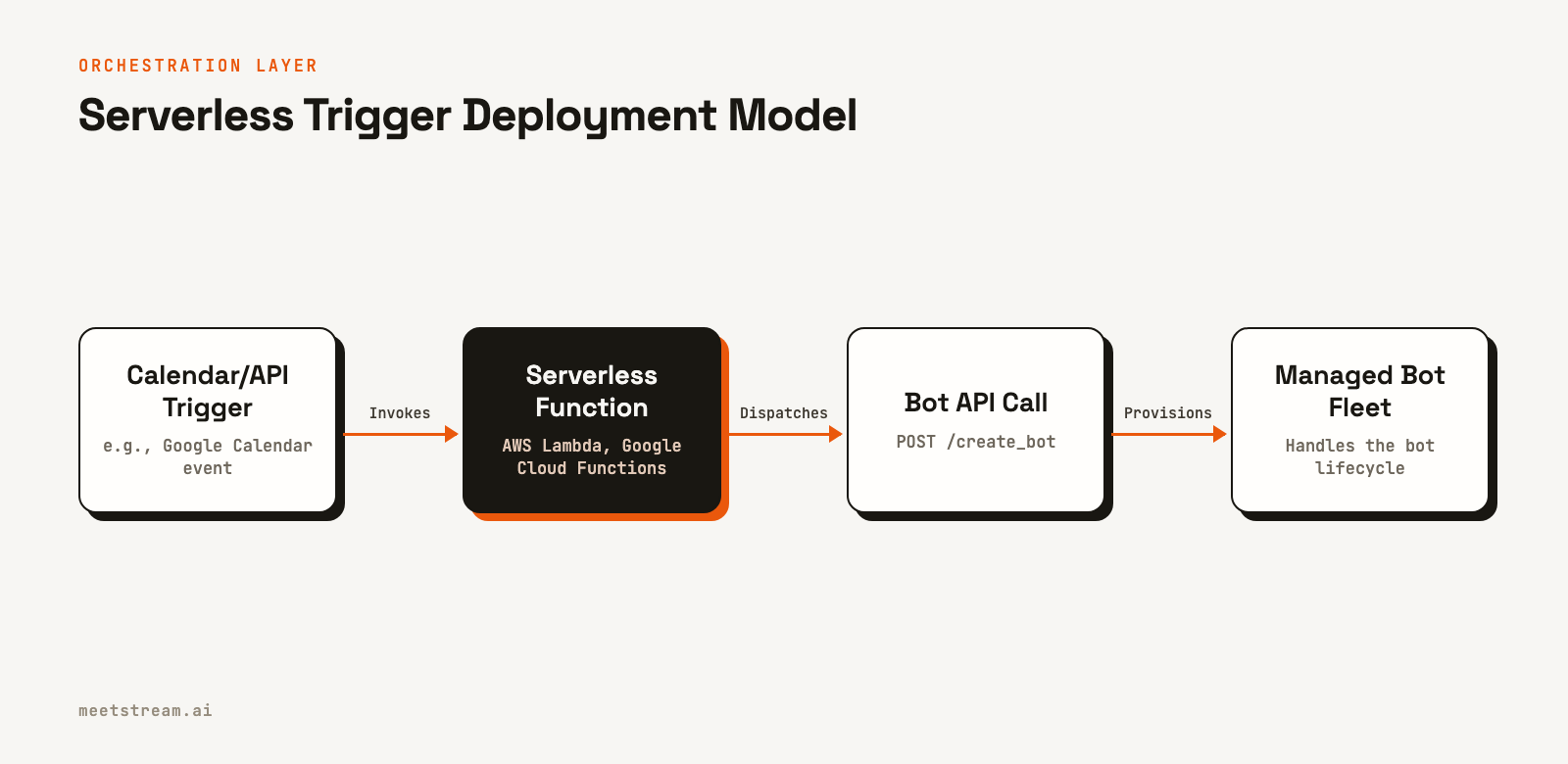
Where serverless works well is in the orchestration layer. This is a thin layer that receives a trigger, such as a calendar event or webhook, dispatches a bot creation request to a dedicated fleet or an external API, and records the resulting bot ID. The actual bot process runs elsewhere.
# Lambda handler: trigger bot creation on calendar event
import json
import os
import urllib.request

def handler(event, context):
    meeting_url = event['meeting_url']
    payload = json.dumps({
        "meeting_link": meeting_url,
        "bot_name": "Notetaker",
        "callback_url": os.environ['WEBHOOK_URL'],
        "live_transcription_required": {
            "webhook_url": os.environ['TRANSCRIPTION_WEBHOOK_URL']
        }
    }).encode()

    req = urllib.request.Request(
        "https://api.meetstream.ai/api/v1/bots/create_bot",
        data=payload,
        headers={
            "Authorization": f"Token {os.environ['MEETSTREAM_API_KEY']}",
            "Content-Type": "application/json"
        },
        method="POST"
    )
    with urllib.request.urlopen(req) as resp:
        result = json.loads(resp.read())
    return {"bot_id": result["bot_id"], "status": "dispatched"}
This pattern keeps the serverless function responsible for dispatch logic only. The bot lifecycle of joining, recording, and leaving runs in a separate, persistent process environment.
Deployment Model 2: Containerized Bot Fleets
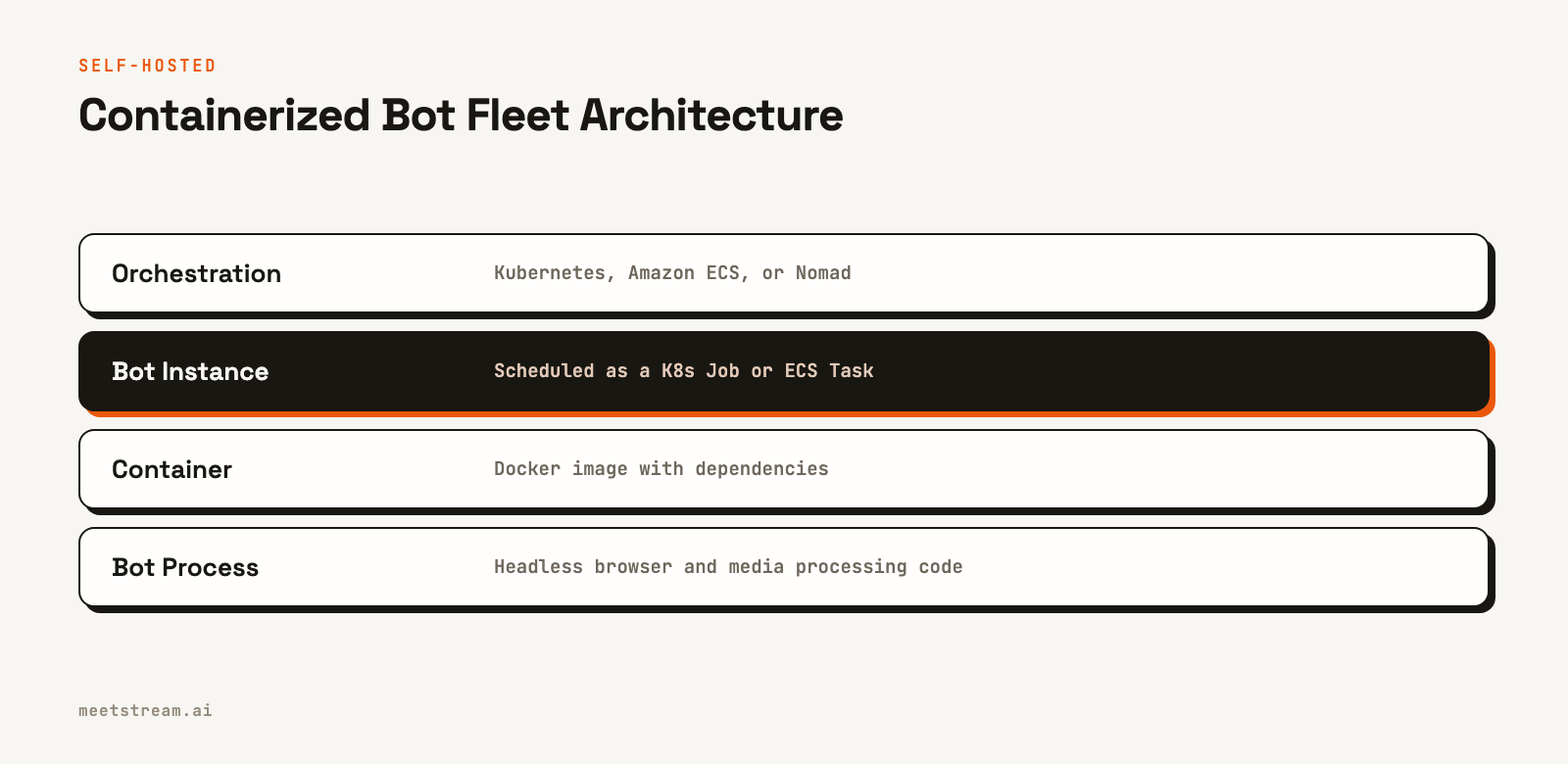
For teams running their own meeting bot deployment, containers are the most common production choice. Each bot instance runs in its own Docker container with a Chromium binary, the meeting platform's web app, and your processing code. An orchestrator like Kubernetes or Amazon ECS handles scheduling, health checks, and restarts.
The core challenge is resource planning. A single Chromium-based bot needs approximately 600 MB to 1 GB of RAM, one to two vCPU cores during active media capture, and a reliable network with low jitter. On a c5.2xlarge instance with 8 vCPUs and 16 GB of RAM, you can safely run 8 to 12 concurrent bots. Budgeting 2 GB per bot is a safe starting point.
# docker-compose.yml for a single bot runner
version: '3.8'
services:
  bot-runner:
    image: your-org/meeting-bot:latest
    shm_size: '2gb'          # Chromium requires large /dev/shm
    environment:
      - MEETING_URL=${MEETING_URL}
      - API_KEY=${API_KEY}
      - CALLBACK_URL=${CALLBACK_URL}
    deploy:
      resources:
        limits:
          memory: 2G
          cpus: '2.0'
    restart: "no"            # Bots are ephemeral, do not restart after meeting ends
The shm_size: '2gb' directive is important. Chromium uses /dev/shm for shared memory between its processes, and without sufficient space, it can crash silently on media-heavy pages. For Kubernetes, use a Job for each bot instance. A Job terminates when its process exits, which maps cleanly to the bot lifecycle. A Deployment would try to restart the container after the meeting ends, wasting resources.
Deployment Model 3: VM Pool with Pre-Warmed Instances
For latency-sensitive applications where a bot must join within seconds of a trigger, pre-warmed VM pools are the most reliable approach. This model maintains a fleet of idle VMs with Chromium already initialized, ready to receive a meeting URL and join immediately.
The tradeoff is cost, as you pay for idle capacity to minimize cold-start time. The economics can work at scale, typically over 100 concurrent bots, but are difficult to justify below that threshold. A typical implementation uses a pool manager that maintains a queue of idle bot processes, assigns jobs as they arrive, and replenishes the pool to maintain a minimum number of ready instances.
Handling Cold Starts
Cold starts in meeting bot infrastructure are painful because meetings do not wait. If your bot takes 45 seconds to initialize, it will miss the first few minutes of the call, which often contain the most important context. A few strategies can reduce this impact.
- Pre-warm browsers: Initialize Chromium when the container starts, before any meeting URL is provided. Keep the browser open at a neutral page.
- Use scheduled joins: If you know the meeting start time, schedule the bot to join a few minutes early. The MeetStream API has a
join_atparameter that handles this. - Set waiting room timeouts: Use a parameter like
automatic_leave.waiting_room_timeoutto prevent bots from lingering indefinitely if a host never admits them.
POST https://api.meetstream.ai/api/v1/bots/create_bot
Authorization: Token YOUR_API_KEY
Content-Type: application/json

{
  "meeting_link": "https://meet.google.com/abc-defg-hij",
  "bot_name": "Notetaker",
  "join_at": "2027-06-15T14:58:00Z",
  "callback_url": "https://yourapp.com/webhooks/meetstream",
  "automatic_leave": {
    "waiting_room_timeout": 300,
    "everyone_left_timeout": 60,
    "voice_inactivity_timeout": 600
  }
}
Managing State Across Bot Sessions
Each bot session has a lifecycle that you can track with meeting bot webhooks. Your system needs to track which bot ID corresponds to which meeting, user, or calendar event, and what to do when the bot stops.
A minimal state schema for a bot session should include the bot ID, meeting URL, associated user or event IDs, and current status. Store this in a fast key-value store like DynamoDB or Redis, keyed by bot_id. Your webhook handler can then look up state by bot ID on every incoming event and update it accordingly. See the full API reference for the complete webhook event schema.
Scaling to Concurrent Bots
At low concurrency, under 20 simultaneous bots, a single well-resourced VM is often enough. Above 50, you need horizontal scaling. Because bots do not share state during a session, each is independent. This makes horizontal scaling straightforward as long as your webhook handler is stateless and your state store is external.
A self-hosted fleet at this scale requires a job queue, a pool of worker VMs, an external state store, and a stateless webhook handler. This is a significant engineering investment to build and operate, before handling platform-specific requirements like Zoom's On-Behalf-Of (OBF) token flow, which requires an OAuth app and token management.
How MeetStream Fits In
MeetStream is an API platform that provides the agent-first voice infrastructure for meetings. It abstracts the entire deployment layer described above. With a single API call to deploy a meeting bot, you can send an agent into Zoom, Google Meet, or Microsoft Teams. MeetStream handles provisioning, cold starts, session state, and cleanup, allowing you to focus on what your agent does in the meeting, not how it gets there. Google Meet and Teams require no platform setup, while Zoom integration is handled through our pre-approved App Marketplace application.
Conclusion
Deploying meeting bots at scale requires choosing a model that matches your concurrency profile and latency requirements. Serverless triggers handle orchestration but cannot run the bot processes. Container fleets offer flexibility at the cost of operational overhead. Pre-warmed VM pools minimize cold starts but carry idle costs. For any self-hosted approach, external state management and idempotent webhook handling are critical. If you want to skip the infrastructure build-out entirely, you can create your first bot with our API.
Frequently Asked Questions
What is the minimum infrastructure needed to deploy a meeting bot?
At minimum, you need a process environment that supports a headless browser, persistent WebSocket connections, and enough RAM to handle media streams, roughly 1 to 2 GB per concurrent bot. A single VM works for low concurrency, while container orchestration becomes necessary above 20 to 30 simultaneous bots.
Why can't I run a meeting bot in AWS Lambda?
AWS Lambda's memory limits and 15-minute execution timeout make it unsuitable for running a Chromium-based meeting bot process directly. Lambda works well as an orchestration layer that dispatches bot creation requests to a managed API or an external fleet, but the bot process itself needs a persistent runtime environment.
How do I handle meeting bot cold starts?
The most effective strategies are pre-warming the browser before receiving a meeting URL, scheduling bots to join a few minutes before the meeting starts using a parameter like join_at, and maintaining a pool of idle, pre-initialized instances for latency-sensitive deployments.
What happens when a bot session ends unexpectedly?
Your webhook handler will receive distinct events for terminal states. These include bot.denied if a host rejects the bot, bot.notallowed for platform restrictions, or bot.failed for other errors. A normal exit triggers the bot.stopped event, so your state machine should handle each case appropriately.
How do I track which bot corresponds to which user or calendar event?
Store a mapping of the bot_id to your internal identifiers, like a user ID or calendar event ID, in an external store like DynamoDB or Redis when you create the bot. When webhooks arrive with a bot_id, you can look up the associated context to process the event correctly. Never store this mapping in local memory if you run multiple instances.


