Meeting Bot API for Zoom, Google Meet, and Microsoft Teams
A meeting bot API sends a bot into a Zoom, Google Meet or Microsoft Teams call from one request. MeetStream's bot records and transcribes the call, streams live audio to your server, and can speak and act for your AI agent.

What is a meeting bot API?
It puts a participant into a video call from your code, then hands the media back to your application.

Should you build meeting bots yourself?
Build it and each platform sets its own terms. That is the reason most teams stop at two.
Realtime Media Streams gives per-participant media, if your users install your Marketplace app.
The Meet Media API is a developer preview, capped at three rotating audio streams.
An application-hosted media bot must be C# on Windows Server in Azure.
Three auth models, three sets of plan rules, and one codebase to keep current.
A bot from a meeting link
One request puts a bot in the call, under a name you choose.
- One API for all major meeting platformsZoom, Google Meet and Microsoft Teams, plus Webex, GoTo Meeting, Slack huddles and WhatsApp calls in Beta.
- Works on accounts you do not controlNo host permission on Meet and Teams, and no paid meeting plan.
- Outbound actionsThe bot can post a chat message, send an image, or speak through voice agents.
 Priya
Priya Daniel
What you get back from every meeting
Recordings, streams and transcripts, all from that one request.
Every lifecycle event, as it happens
Eighteen webhook events from dispatch to done, so your backend never polls.
- Participant eventsJoin, leave and admission, plus the chat, on your endpoint.
- Real-time audio and videoOver a secure WebSocket, at roughly 200ms.
- Calendar integrationConnect a calendar and bots are booked up to three months ahead with the Calendar API.
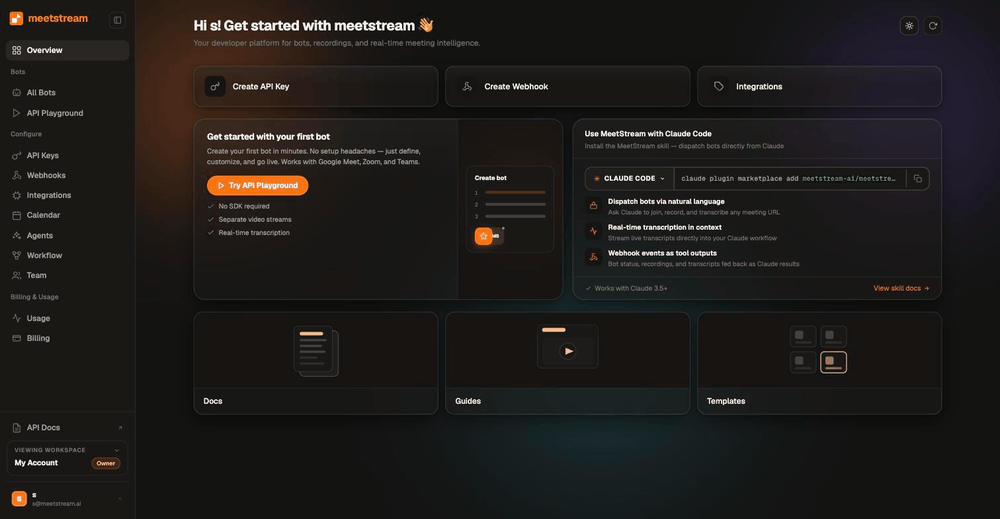
Send a bot into any meeting with one request
The same call works for Zoom, Google Meet and Microsoft Teams. MeetStream reads the platform from the link.
curl -X POST https://api.meetstream.ai/api/v1/bots/create_bot \
  -H "Authorization: Token $MEETSTREAM_API_KEY" \
  -H "Content-Type: application/json" \
  -d '{
    "meeting_link": "https://zoom.us/j/74648392",
    "bot_name": "Acme Notetaker",
    "recording_config": { "transcript": { "provider": { "meetstream": {} } } },
    "callback_url": "https://your-app.example.com/meetstream"
  }'
What a bot gets you that a native API does not
Native recording depends on the host: their plan, their settings and their admin.
- No paid host plan neededA bot records what it receives as a participant, so a free host account is enough.
- Accounts you do not controlSend a bot into a customer meeting without an admin install on their side.
- One request, three platformsMeetStream reads the platform from the link, so the same call serves all three.
- Admission your app can seeParticipant events tell your product the moment a bot is admitted.
Platform coverage
MeetStream works on Zoom, Google Meet and Microsoft Teams, plus Webex, GoTo Meeting, Slack huddles and WhatsApp calls in Beta. Each platform sets its own rules on who may record, and on which plan.


On Zoom the bot joins through the Zoom Meeting SDK. Notice and admission rules live in full on the Zoom, Google Meet and Microsoft Teams pages. Beta platforms are enabled per workspace. Contact us for access.
Meeting bot API pricing
A bot costs $0.35 per bot-hour, and the rate falls toward $0.25 at volume. MeetStream's in-house transcription adds $0.10 per hour. Deepgram, AssemblyAI, Sarvam, JigsawStack and the meeting's own captions are also available, with your own provider keys.
Thirty days of storage is included. The pricing page has the full breakdown, and the Recall.ai comparison sets out the differences.
What teams build on the meeting bot API
Pick a use case to see what the same one request gives you.
PriyaDanielWe can ship the notetaker next sprint if the bot handles Teams.
It does, same request as Meet.
Then let us start with the pilot accounts.
PriyaDanielWe can ship the notetaker next sprint if the bot handles Teams.
It does, same request as Meet.
Then let us start with the pilot accounts.
PriyaDanielWe can ship the notetaker next sprint if the bot handles Teams.
It does, same request as Meet.
Then let us start with the pilot accounts.
PriyaDanielWe can ship the notetaker next sprint if the bot handles Teams.
It does, same request as Meet.
Then let us start with the pilot accounts.
PriyaDanielWe can ship the notetaker next sprint if the bot handles Teams.
It does, same request as Meet.
Then let us start with the pilot accounts.
PriyaDanielWe can ship the notetaker next sprint if the bot handles Teams.
It does, same request as Meet.
Then let us start with the pilot accounts.
Enterprise-level security, keep your data private.
The certificate, the audit status and the Trust Center are all on the security page.
MeetStream is ISO 27001 certified, GDPR compliant, and HIPAA compliant with a BAA on request. SOC 2 Type 2 is under audit.
Ask us anything before you build. The contact page reaches the team.
Keep thirty days of storage, or write every file into your own S3 bucket.



Meeting bot limits and defaults
Ask for a longer session on the create request, and the create bot reference names the field.
Got a question? We got the answer.
Common questions about how a bot joins, what comes back, and what it costs.
Which meeting platforms are supported?
Zoom, Google Meet and Microsoft Teams, plus Webex, GoTo Meeting, Slack huddles and WhatsApp calls in Beta. Beta platforms are enabled per workspace. Contact us for access. Zoom, Google Meet and Microsoft Teams each have a page with the platform-specific rules.
Do I need the host to be on a paid plan?
No. That is the main reason to use a bot rather than a platform's native recording API. Zoom cloud recording requires a paid plan, and Google Meet recording requires specific Workspace editions. A bot records what it receives as a participant, whatever the host's plan.
Will the bot always get into the meeting?
The host decides on every platform, and MeetStream tells your app the result. Microsoft Teams sends external bots to the lobby by default, and Google Meet denies bots under some access settings. Participant events report whether the bot was admitted, denied or is still waiting.
Can I get separate audio and video per participant?
Yes, on Zoom, Google Meet and Microsoft Teams. Turn on audio_separate_streams and video_separate_streams, and each participant gets a separate audio stream and a separate video stream. Names come from the meeting, not from a diarization guess. Per-participant capture on all three platforms is one of MeetStream's strengths, from $0.35 per bot-hour.
How fast does a bot join?
Bots created on demand join in under ten seconds on average. Scheduled bots join at the scheduled time. A bot can be scheduled up to three months in advance.
Which meeting bot API is the most stable?
No vendor publishes comparable uptime, so judge stability at the edges: the lobby, host consent and dropped connections. MeetStream reports each of those as a webhook event with a status code and a message, and lets you set the waiting-room and everyone-left timeouts per bot.
Which meeting bot API is the easiest to use?
For Google Meet and Teams, one POST to create_bot with a meeting link is the whole integration; Zoom adds a one-time Marketplace app. There is no headless browser or platform SDK to run, typed SDKs exist for TypeScript and Python, and an MCP server lets AI agents send bots directly.
How long can a bot stay in a meeting?
Four hours by default, and up to five hours when you ask for a longer session on the create request. There is no cap on how many bots run at the same time.
What does it cost?
$0.35 per bot-hour for recording, $0.45 per hour with transcription, dropping toward $0.25 per bot-hour at volume. Thirty days of storage is included rather than metered, and every account starts with $5 of free credit.
Where are recordings stored, and for how long?
Thirty days by default. Connect your own S3 bucket and everything lands in your account from the first byte, so your retention policy governs it. The default region is the United States. EU, Australia, Japan and the Middle East are available, and other regions on request.
Can the bot do something during the call, not just after it?
Yes. Real-time audio and video stream over a secure WebSocket at roughly 200ms. The bot can also post chat messages, send images, and speak in the meeting through the voice agents API.
Do participants know a bot is in the call?
Yes, by design. The bot appears in the participant list under a name you choose. All three platforms show their own recording indicators. On Zoom that indicator shows to external participants on every plan.
Which security certifications does MeetStream hold?
MeetStream is ISO 27001 certified, GDPR compliant, and HIPAA compliant with a BAA on request. SOC 2 Type 2 is under audit. Media stays in the region you choose, and you can write every file into your own S3 bucket. The security page has the Trust Center and the full detail.
Access and analyze meeting data straight from your app.
One request in. Recordings, per-participant streams, transcripts and events out.
Ship your first bot today
$5 of free credit, self-serve API keys, and no sales call between you and your first meeting.