
Speaker Diarization Guide: Models, Accuracy and Latency

Speaker diarization identifies and labels distinct speakers in an audio recording, answering the question of who spoke and when. Without diarization, a meeting transcript is an unstructured block of text. With it, you can attribute each sentence to a specific person, calculate talk time, and understand conversational dynamics for downstream AI tasks.
This process is the foundation for building reliable AI notetakers and voice agents. MeetStream is an agent-first platform that provides the voice infrastructure for these applications. Our API gives you access to real-time, speaker-labeled audio streams from Zoom, Google Meet, and Microsoft Teams, which is a direct way to get accurate diarization without running complex models yourself.
The core challenge is that real meetings are messy. Speakers interrupt each other, background noise bleeds across channels, and participants join through compressed codecs. A reliable diarization system must handle these conditions. The approach you take depends heavily on whether your application needs to act during the meeting or after it ends.
Why Standard Transcription Is Not Enough
Most transcription services convert speech to text. Diarization segments an audio timeline into regions and assigns each region a speaker label. Combining the two produces a structured transcript where every word is attributed to a voice. This structure is what makes features like conversation intelligence and action item extraction possible.
A diarization system’s output is a sequence of intervals, each tagged with a speaker ID, like Speaker_0: 0.0s-12.4s, Speaker_1: 12.6s-31.2s. The system does not know the speakers' actual names. It only identifies that the voice in segment A is different from the voice in segment B.
Assigning real names is a separate step. You can use voice biometrics with pre-enrolled voice prints, but a more direct method for meeting bots is to use the identity metadata from the meeting platform itself. This is the approach MeetStream uses, providing both a stable speaker_id and the participant's display name in every audio frame.
Why Speaker Names Matter for AI Features
Large language models depend on structured input. Give a model a transcript without reliable speaker labels and it has to guess who said what, and any automation built on that guess becomes untrustworthy. Take four lines from a project meeting:
# Without speaker labels
"We need to get the final designs from the client."
"I can follow up with them this afternoon."
"Great. Also, the staging server needs a reboot."
"I'll take care of the server."

# Action items an LLM can extract
- Follow up with the client for designs. Owner: unknown
- Reboot the staging server. Owner: unknown
The same lines with names taken from the meeting platform's participant list produce action items you can actually assign:
# With speaker labels
Priya: "We need to get the final designs from the client."
David: "I can follow up with them this afternoon."
Priya: "Great. Also, the staging server needs a reboot."
Chloe: "I'll take care of the server."

# Action items an LLM can extract
- Follow up with the client for designs. Owner: David
- Reboot the staging server. Owner: Chloe
The words are identical. The labels are what make the output usable, and the same holds for sales coaching, compliance monitoring and talk-time analysis.
How Diarization Models Work Under the Hood
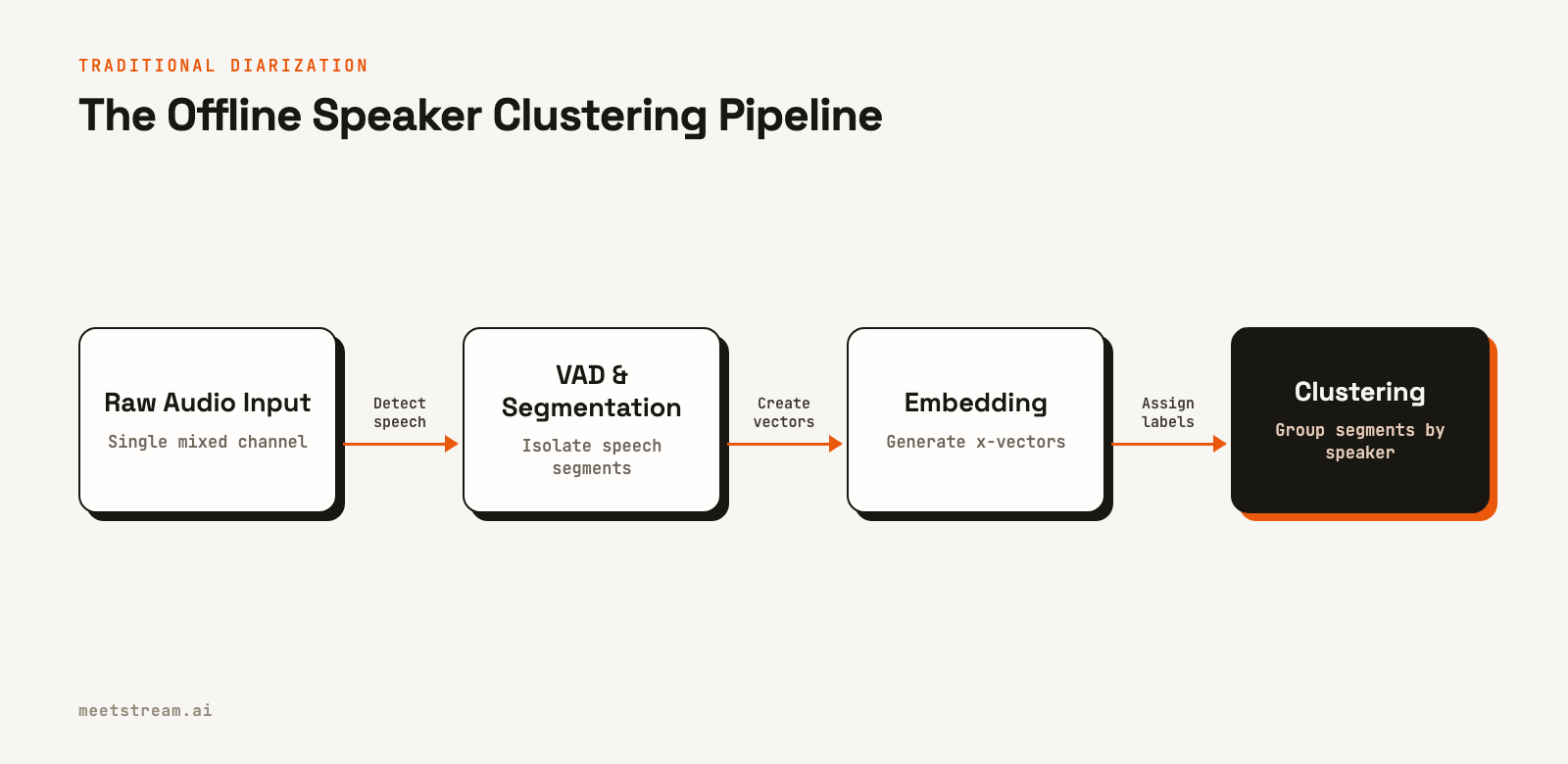
Traditional diarization systems use a multi-stage pipeline. First, voice activity detection (VAD) finds the parts of the audio that contain speech. Second, speaker change detection identifies the exact boundaries between different speakers. Third, a clustering algorithm groups all the speech segments from the same person under a single label.
A common technique for the clustering stage involves speaker embeddings. A model, often a Time Delay Neural Network (TDNN), converts short audio segments into fixed-size vectors, known as x-vectors. In this vector space, audio from the same speaker is geometrically close. An algorithm like agglomerative hierarchical clustering can then group these x-vectors. This approach works well on clean recordings but struggles with short speaker turns and overlapping speech.
More recent methods use end-to-end neural models. These systems, like the EEND (End-to-End Neural Diarization) family, treat diarization as a single sequence-labeling problem. They take audio features as input and directly output per-frame probabilities for multiple speakers. This allows them to handle overlapping speech, a common occurrence in real meetings that clustering-based methods cannot model effectively.
Where Acoustic Diarization Breaks Down in Meetings
On a single mixed recording, four meeting conditions cause most diarization errors:
- Crosstalk. When two people talk at once, a mixed track gives the model one blended signal. Most systems either merge the speakers or give the overlap to the wrong one.
- Similar voices. Speakers with similar pitch and timbre produce embeddings that sit close together, so their speech can land in one cluster.
- Uneven audio. The same person sounds different on a headset, a laptop microphone and a phone in a car. Those differences can split one speaker into several clusters.
- Short turns. Interjections like "right" or "agreed" carry too little audio for a reliable embedding, so they are often misattributed.
Each of these comes from the same root cause: the model is reverse-engineering voices that the meeting platform mixed together. The most reliable fix is to avoid the mix.
The Accuracy vs. Latency Tradeoff
The main engineering decision when implementing a speaker diarization API is choosing between post-call processing and real-time streaming. Your choice determines the accuracy and latency your users will experience.
Post-call diarization runs its models on the complete audio file after the meeting has ended. It has full context, which allows for more accurate speaker clustering and boundary detection. This method produces the highest quality results, with a lower Diarization Error Rate (DER), and is best for applications like generating meeting summaries or populating a CRM.
Real-time diarization must make decisions with only a few hundred milliseconds of audio context. This is much harder. Offline clustering is not an option, and streaming end-to-end models can accumulate errors over time. For this reason, the most reliable real-time systems do not run their own diarization models. Instead, they get speaker identity directly from the source: the meeting platform itself.
Getting Speaker Labels from the Platform
Platforms like Zoom, Google Meet, and Microsoft Teams already know who is speaking because they manage each participant's audio. Accessing this information is the key to accurate, low-latency attribution.
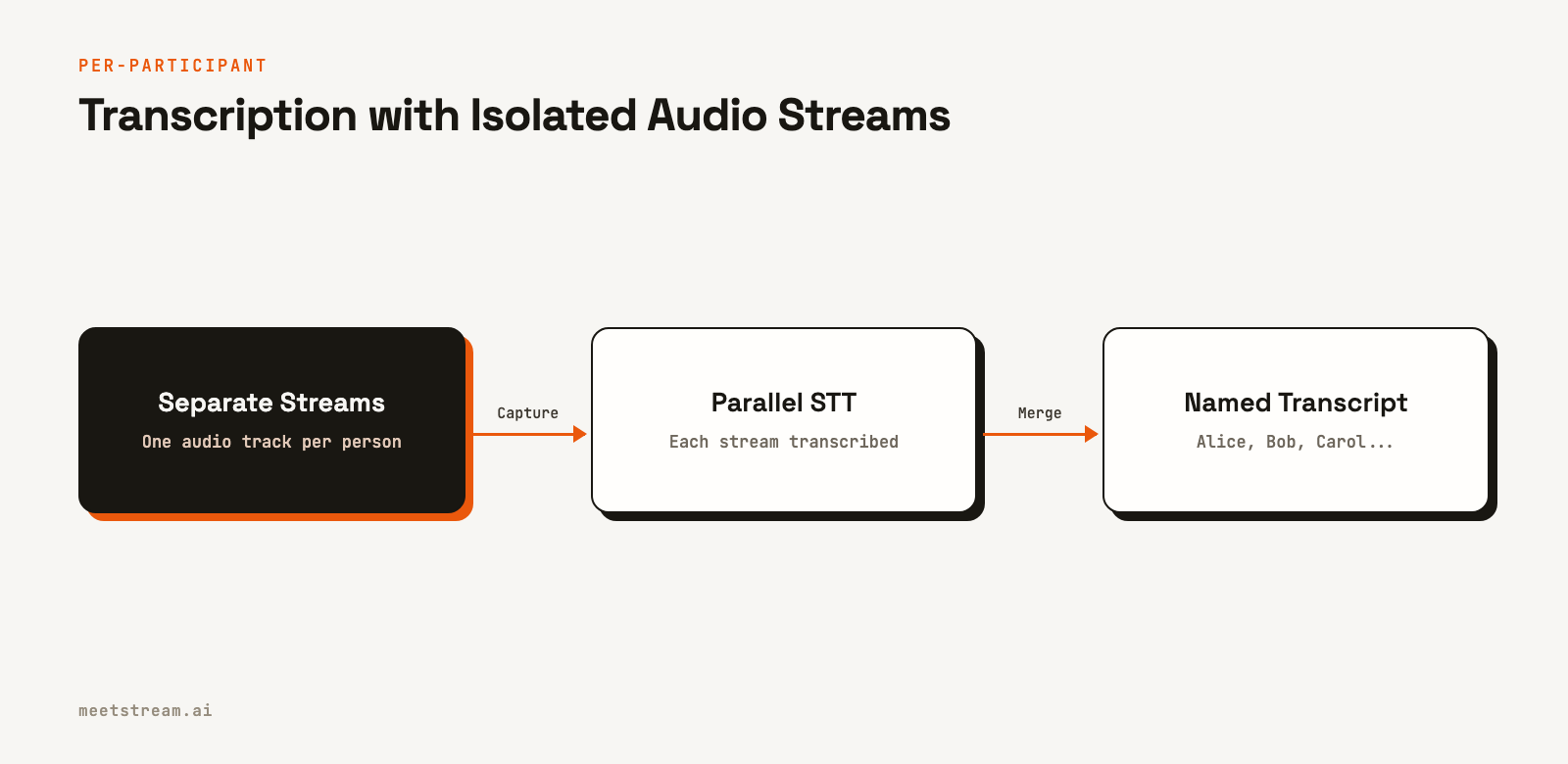
A meeting bot can use that knowledge directly. MeetStream delivers a separate audio stream for each participant on Zoom, Google Meet and Microsoft Teams, so each speaker's audio arrives on its own, tagged with that speaker's identity. On all three, the speaker's identity comes from the platform, not from acoustic guessing.
The challenge for developers is that integrating with each platform’s SDK and real-time media stack is a significant infrastructure project. This is the problem a unified meeting bot API solves.
Two Ways to Attach Real Names
Diarization gives you Speaker_0 and Speaker_1. Speaker identification turns those labels into people, and it needs an outside source of truth.
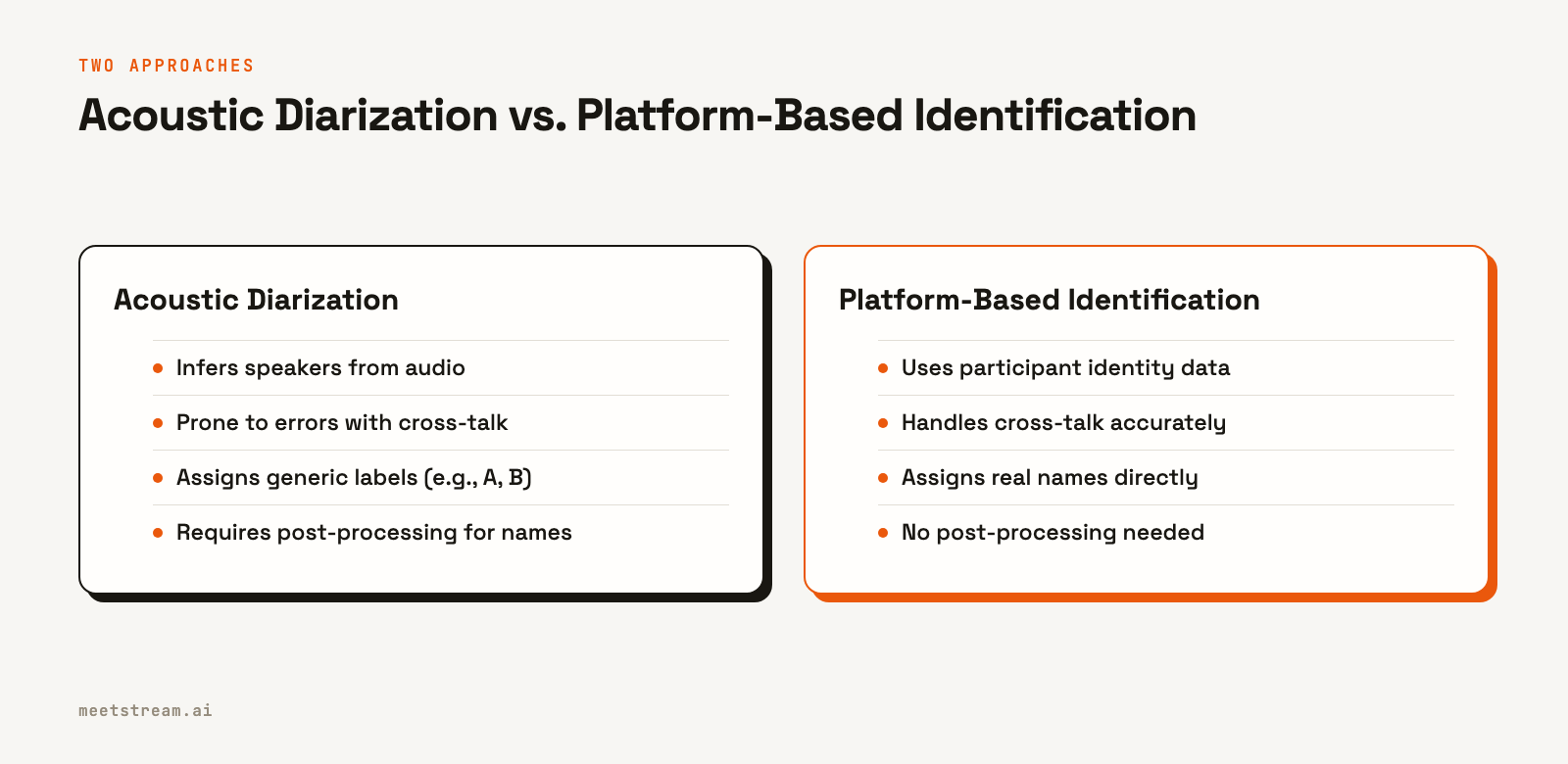
Platform identity. In a Zoom, Google Meet or Teams call, participants are already signed in or named, and the platform knows who is talking. A meeting bot that joins as a participant receives audio tagged with that identity, so there is nothing to infer. This is the most reliable way to get a transcript with speaker labels for meetings on these platforms.
Voiceprint enrollment. For recordings with no platform metadata, such as phone calls or uploaded files, you can enroll each known speaker with a short, clean sample of their voice and store the resulting embedding as a voiceprint. At transcription time, you compare each segment's embedding with the enrolled voiceprints and accept the closest match above a confidence threshold. It works, but you now run a voiceprint store with its own security and consent obligations, and accuracy depends on the quality of both the enrollment samples and the meeting audio.
If you already have a post-call transcript with generic labels, you can map them to names by fetching the meeting's participant list and aligning the two with heuristics such as speaking order. Treat that mapping as a best guess, and prefer platform identity wherever it is available.
Diarization vs. Per-Participant Audio
Per-participant audio moves speaker attribution from a probabilistic inference problem to a data routing problem. If you know which stream a sound came from, you know who said it.
| Factor | Diarization on a mixed track | Per-participant audio |
|---|---|---|
| How speakers are found | Inferred from voice characteristics | Taken from the platform's identity for each stream |
| Crosstalk | Overlapping speech is merged or misattributed | Each speaker's audio is captured on its own (Zoom, Google Meet and Teams) |
| Speaker labels | Generic (Speaker 0, Speaker 1), mapped to names afterward | Display names from the meeting |
| When you get it | After the call | During the call (about 200 ms behind the room), and as files after it |
| Best for | Uploaded recordings and phone audio | Live agents, real-time coaching, accurate notes |
Many teams use both: live, attributed audio for in-meeting features, and a post-call transcript for the permanent record.
Implementing Diarization with MeetStream
MeetStream gives you speaker attribution in three forms from one create_bot call, on Zoom, Google Meet and Microsoft Teams alike. All of them abstract away the work of integrating with each meeting platform.
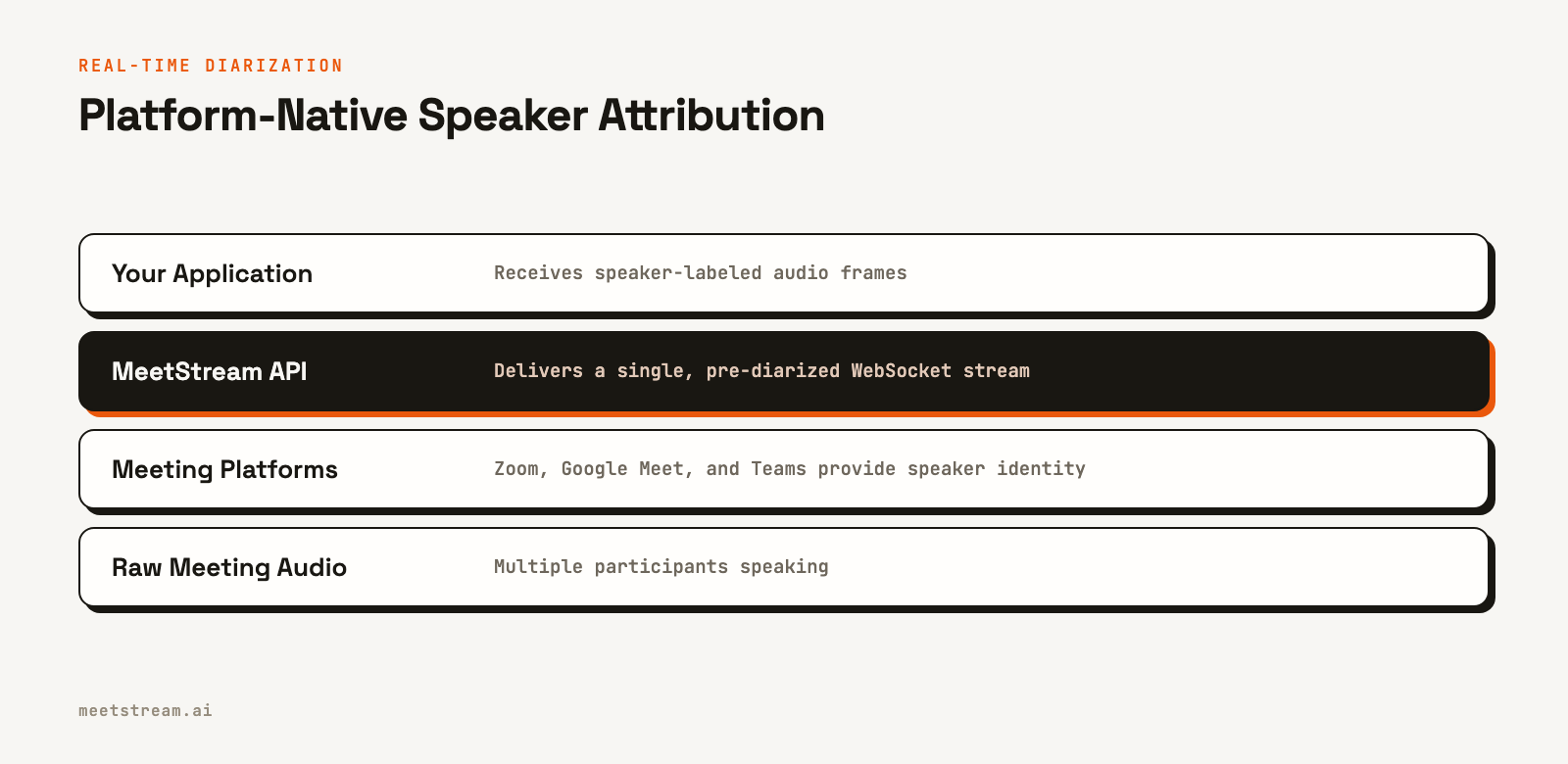
Live audio, already attributed. Set live_audio_required with the URL of your WebSocket server. MeetStream connects to it, sends a JSON ready message, and then streams binary audio frames for the rest of the meeting. Each frame carries the speaker's ID and display name in front of the raw PCM audio, so you can route every speaker to a separate transcription process with no diarization model at all. The audio arrives with latency around 200 ms.
curl -X POST "https://api.meetstream.ai/api/v1/bots/create_bot" \
  -H "Authorization: Token <YOUR_API_KEY>" \
  -H "Content-Type: application/json" \
  -d '{
    "meeting_link": "https://meet.google.com/abc-defg-hij",
    "bot_name": "Live Agent",
    "live_audio_required": {
      "websocket_url": "wss://your-server.com/audio"
    }
  }'
Byte 0 of each frame is the message type. Google Meet and Teams frames (0x01) carry 48 kHz audio. Zoom frames (0x04) put the sample rate and channel count in the header first. Both are signed 16-bit little-endian mono PCM:
import struct

def parse_meetstream_frame(raw: bytes):
    """Parse one binary audio frame from MeetStream's live audio WebSocket."""
    if len(raw) < 5:
        return None
    msg_type = raw[0]
    if msg_type == 0x01:        # Google Meet and Microsoft Teams: 48 kHz mono
        offset, sample_rate = 1, 48000
    elif msg_type == 0x04:      # Zoom: sample rate and channel count in the header
        sample_rate = struct.unpack_from('<I', raw, 1)[0]
        offset = 6
    else:
        return None             # skip message types you do not handle

    sid_length = struct.unpack_from('<H', raw, offset)[0]
    offset += 2
    speaker_id = raw[offset:offset + sid_length].decode('utf-8')
    offset += sid_length

    sname_length = struct.unpack_from('<H', raw, offset)[0]
    offset += 2
    speaker_name = raw[offset:offset + sname_length].decode('utf-8')
    offset += sname_length

    return {
        "speaker_id": speaker_id,
        "speaker_name": speaker_name,
        "sample_rate": sample_rate,
        "pcm_data": raw[offset:],
    }
Live transcript with names. If you want text rather than audio during the call, choose the meetstream_streaming provider and set live_transcription_required with a webhook URL. Transcript segments arrive while people talk, each with the speaker's name from the meeting.
Post-call transcript with speaker labels. For notes, summaries and CRM updates, MeetStream's in-house transcription engine processes the full recording after the call. You configure it once in recording_config, and each segment of the transcript comes back with a speaker, the text, start and end times, and a words array. Add audio_separate_streams to also get one audio file per speaker, aligned to the meeting timeline, next to the mixed recording.
import requests

# Create a bot for a post-call, speaker-labeled transcript
bot_payload = {
    "meeting_link": "https://meet.google.com/xyz-abcd-efg",
    "bot_name": "Notetaker Bot",
    "callback_url": "https://your-app.com/webhooks/meetstream",
    "audio_separate_streams": True,
    "recording_config": {
        "transcript": {
            "provider": {
                "meetstream": {"language": "auto"}
            }
        }
    }
}

response = requests.post(
    "https://api.meetstream.ai/api/v1/bots/create_bot",
    json=bot_payload,
    headers={"Authorization": "Token YOUR_API_KEY"}
)

# After the meeting, a 'transcription.processed' webhook will fire.
# Fetch the transcript with the transcript_id from this response.
Use the real-time stream for live agent interactions and the post-call transcript for a permanent, accurate record. For the per-speaker files, see our guide to recording each participant separately.
Conclusion
Speaker diarization is a critical component for any application that analyzes conversations. While traditional methods rely on complex, offline audio processing models that struggle with crosstalk and short turns, modern meeting bot infrastructure can get more accurate speaker labels directly from the meeting platform. This platform-native approach provides the low-latency, high-accuracy data needed to build the next generation of AI meeting agents.
By using a unified API, you can get reliable, named speaker attribution across Zoom, Google Meet, and Teams without building and maintaining separate integrations. See the full API reference at docs.meetstream.ai.
Frequently Asked Questions
What is the difference between speaker diarization and speaker identification?
Speaker diarization answers "who spoke when" by assigning generic labels like Speaker_0 and Speaker_1. Speaker identification matches a voice to a known person from a pre-registered database. Meeting bots typically use platform metadata, like a participant's display name, for identification instead of voice biometrics.
How is diarization accuracy measured?
Accuracy is measured by Diarization Error Rate (DER), which is the sum of speaker confusion, missed speech, and false alarm speech. A lower DER is better. State-of-the-art models achieve a DER below 10% on clean recordings, but this can increase with more speakers, cross-talk, and poor audio quality.
Does speaker diarization provide names?
It depends on the implementation. A pure diarization model only outputs speaker labels. However, an API like MeetStream's provides the participant's display name from the meeting platform along with the audio, giving you named speakers out of the box.
Can diarization handle overlapping speech?
Modern end-to-end neural models can handle overlapping speech better than older clustering-based methods. However, the most accurate way to handle overlap is to capture each speaker's audio separately, which MeetStream does on Zoom, Google Meet and Microsoft Teams.
How do I map generic speaker labels to real names?
If a transcript only has labels like "Speaker 0", fetch the meeting's participant list and align the two, for example by speaking order. That mapping is a heuristic. Platform identity, where each audio frame already carries the speaker's display name, removes the step entirely.
Can I get a real-time transcript with speaker labels?
Yes. With MeetStream, set a streaming transcription provider and live_transcription_required with a webhook URL. Transcript segments arrive during the call, each with the name of the person speaking, taken from the meeting platform.
How do I get a speaker-labeled transcript?
You can combine the output of a diarization system with a speech-to-text engine. A simpler path for meetings is a meeting bot API: MeetStream's post-call transcript returns every segment with its speaker, and its live audio stream is already labeled by speaker, so you can pass each speaker's audio to a streaming transcription service.


