
Named Entity Recognition in Python for Meeting Transcripts

Extracting structured data like company names, products, and deal values from a meeting transcript is a common task for AI sales tools. Named entity recognition (NER) in Python is the standard approach, but generic models fail on the conversational language of meetings. An NER pipeline must correctly identify "Alice" as a PERSON, "Salesforce" as an ORG, and "$25k" as a DEAL_VALUE to be useful.
MeetStream provides the agent-first voice infrastructure for meetings. Our API lets you deploy bots that join calls, capture clean audio, and generate speaker-labeled transcripts. This transcript is the input for any downstream natural language processing (NLP) task, including NER. Building a meeting-specific NER pipeline requires combining a strong base model with custom rules that account for how people actually talk.
Standard NER models trained on news articles or Wikipedia struggle with meeting transcripts. Speakers use first names, product names overlap with common words, and deal values appear in conversational forms like "around fifty K". A successful pipeline must handle this ambiguity.
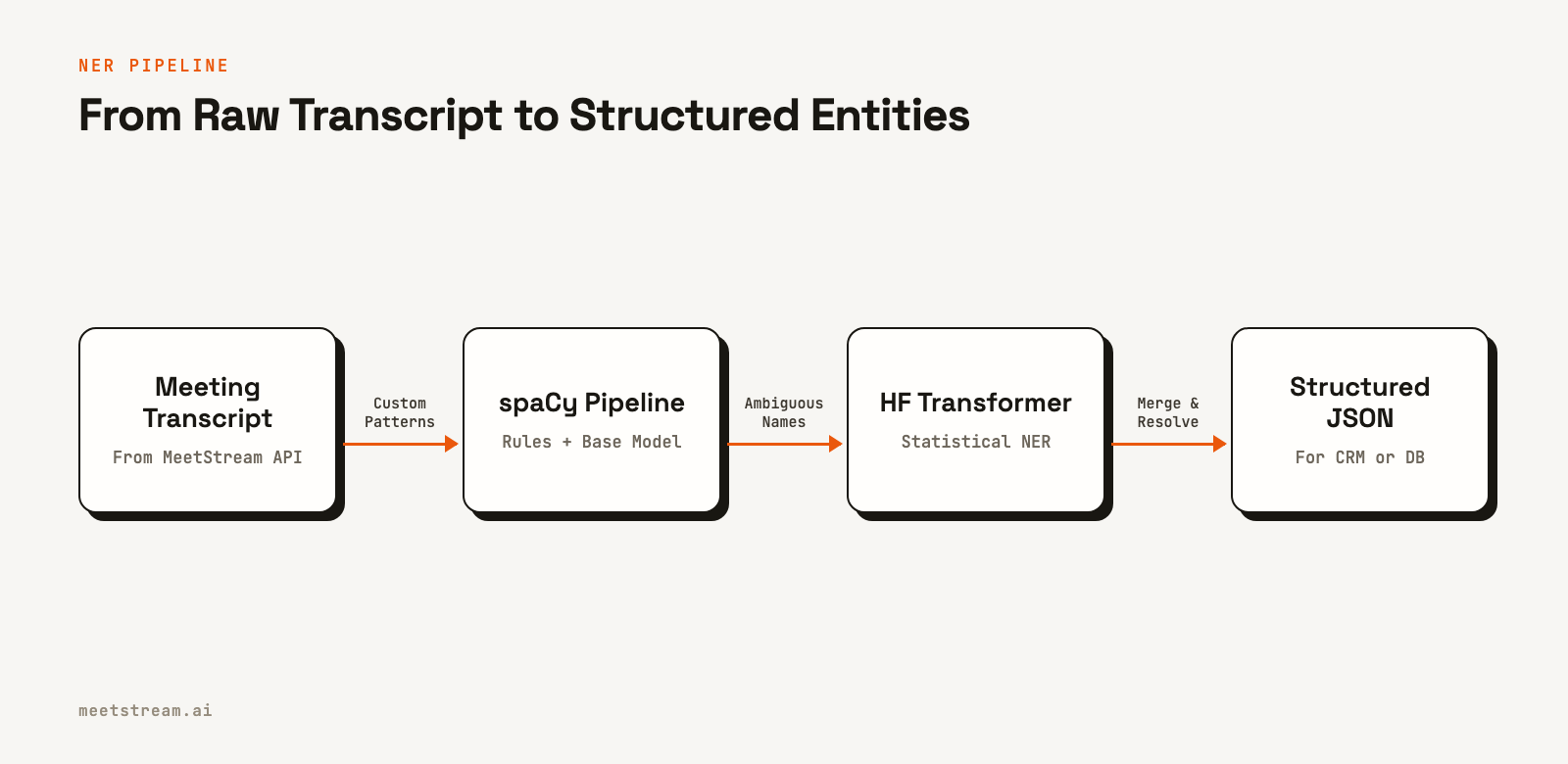
This article shows how to build an NER pipeline in Python using spaCy and Hugging Face transformers. We will apply it to MeetStream transcript output and produce a structured JSON entity record for each meeting. We will cover base model setup, custom entity types, pattern-based rules, and integration with the transcript format from the MeetStream API.
Setting Up spaCy with a Large English Model
The right starting point for meeting NER is spaCy's en_core_web_lg model. The large model uses word vectors for disambiguation, which is important when the same word can be a person's name or a common noun depending on context. The medium model is an option, but it misses more ambiguous cases.
# Install dependencies
# pip install spacy transformers torch
# python -m spacy download en_core_web_lg

import spacy

nlp = spacy.load("en_core_web_lg")

# Test on a meeting excerpt
text = "Sarah mentioned that Acme Corp is evaluating us against a rival vendor. " \
       "They're running about 50 reps and their deal size is around $18K annually."

doc = nlp(text)
for ent in doc.ents:
    print(f"{ent.text:25} {ent.label_:12} {spacy.explain(ent.label_)}")

# Sarah                     PERSON       People, including fictional
# Acme Corp                 ORG          Companies, agencies, institutions, etc.
# 50                        CARDINAL     Numerals that do not fall under another type.
# around $18K annually      MONEY        Monetary values, including unit
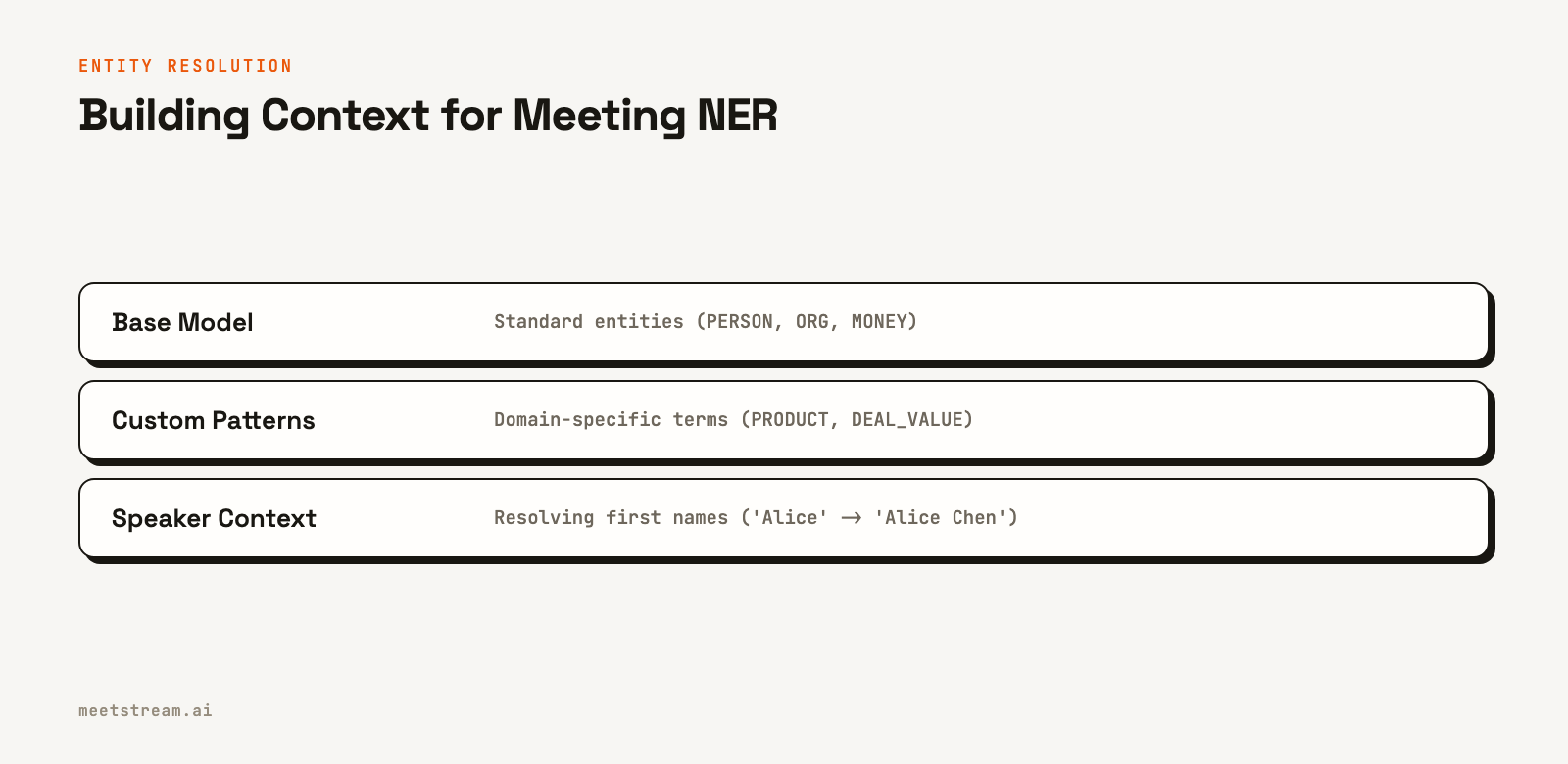
The base model handles standard entities well. The gaps appear with meeting-specific patterns: product names that look like common words, deal values expressed informally, and speaker references by first name only. These require custom rules built on top of the base model.
Adding Custom Entity Types for Meetings
Standard spaCy entity types include PERSON, ORG, DATE, and MONEY. For meeting analytics, you often need additional types like PRODUCT, DEAL_VALUE, and COMPETITOR. The cleanest way to add these is with an EntityRuler component inserted into the spaCy pipeline before the main NER component.
from spacy.pipeline import EntityRuler

# Assumes 'nlp' is a loaded spaCy model
if "entity_ruler" not in nlp.pipe_names:
    ruler = nlp.add_pipe("entity_ruler", before="ner")
else:
    ruler = nlp.get_pipe("entity_ruler")

# Product and integration patterns
product_patterns = [
    {"label": "PRODUCT", "pattern": "Slack"},
    {"label": "PRODUCT", "pattern": "Salesforce"},
    {"label": "PRODUCT", "pattern": "HubSpot"},
    {"label": "PRODUCT", "pattern": "Notion"},
    {"label": "PRODUCT", "pattern": [{"LOWER": "slack"}, {"LOWER": "integration"}]},
]

# Informal deal value patterns
deal_patterns = [
    {"label": "DEAL_VALUE", "pattern": [
        {"LOWER": {"IN": ["around", "about", "sub"]}},
        {"TEXT": "$", "OP": "?"},
        {"LIKE_NUM": True},
        {"LOWER": {"IN": ["k", "thousand", "million"]}, "OP": "?"}
    ]},
    {"label": "DEAL_VALUE", "pattern": [
        {"TEXT": "$", "OP": "?"},
        {"LIKE_NUM": True},
        {"LOWER": {"IN": ["k", "thousand", "million", "per", "a"]}, "OP": "+"}
    ]},
]

ruler.add_patterns(product_patterns + deal_patterns)
These rules use token attributes like LOWER (lowercase text) and LIKE_NUM (resembles a number) to create flexible matches. The entity ruler ensures these specific patterns are always identified correctly, overriding the statistical model if needed.
Using Hugging Face Transformers for Higher Accuracy
While spaCy's rules cover known entities, a transformer-based NER model from Hugging Face often performs better on unknown or ambiguous names. The dslim/bert-base-NER model is a good default. It is fine-tuned on the CoNLL-2003 dataset and handles conversational text well.
from transformers import pipeline
from typing import List, Dict

# Initialize the pipeline once
hf_ner = pipeline(
    "ner",
    model="dslim/bert-base-NER",
    aggregation_strategy="simple"
)

def extract_entities_hf(text: str) -> List[Dict]:
    results = hf_ner(text)
    return [
        {
            "text": r["word"],
            "label": r["entity_group"],
            "score": round(r["score"], 3),
            "start": r["start"],
            "end": r["end"]
        }
        for r in results
        if r["score"] > 0.85  # Confidence threshold
    ]

# Example output for a meeting excerpt:
# text = "Marcus said Datadog is the main competitor."
# extract_entities_hf(text)
# > [{"text": "Marcus", "label": "PER", "score": 0.997, "start": 0, "end": 6},
# >  {"text": "Datadog", "label": "ORG", "score": 0.991, "start": 12, "end": 19}]
The aggregation_strategy="simple" parameter is important. It merges subword tokens, like "Data" and "##dog", into a single entity span. Without it, "Acme Corporation" might be identified as three separate tokens instead of one ORG entity.
Building a Combined NER Pipeline
A production pipeline should combine both approaches: spaCy for rule-based entities and Hugging Face for statistical NER. This hybrid method gives you coverage that neither provides alone. The final step is to merge and deduplicate the results, preferring one source for certain entity types.
from collections import defaultdict

def run_ner_pipeline(text: str) -> List[Dict]:
    # 1. spaCy pass (rules + statistical)
    doc = nlp(text)
    spacy_entities = [
        {
            "text": ent.text,
            "label": ent.label_,
            "start": ent.start_char,
            "end": ent.end_char,
            "source": "spacy"
        }
        for ent in doc.ents
    ]

    # 2. Hugging Face pass
    hf_entities = [
        {**e, "source": "hf", "label": e["label"].replace("PER", "PERSON")}
        for e in extract_entities_hf(text)
    ]

    # 3. Merge and deduplicate by character span overlap
    all_entities = spacy_entities + hf_entities
    seen_spans = set()
    merged = []
    # Sort to process longer entities first
    for ent in sorted(all_entities, key=lambda e: (e["start"], -len(e["text"]))):
        span = (ent["start"], ent["end"])
        # Check for overlap with already added entities
        if not any(s[0] <= ent["start"] < s[1] or ent["start"] <= s[0] < ent["end"] for s in seen_spans):
            merged.append(ent)
            seen_spans.add(span)

    return merged
This merging logic prevents adding multiple labels for the same text span. For example, if both models identify "Sarah", this code ensures it is only added to the final list once.
Processing the MeetStream Transcript Format
To run this pipeline, you first need a transcript. After you create a meeting bot, MeetStream generates a transcript available via our API. The `create_bot` call returns a `transcript_id`, which you use to fetch the data once the `transcription.processed` webhook fires.
import httpx

def fetch_and_extract_entities(transcript_id: str, api_key: str) -> Dict:
    # The transcript_id comes from the create_bot API response
    api_url = f"https://api.meetstream.ai/api/v1/transcript/{transcript_id}/get_transcript"
    headers = {"Authorization": f"Token {api_key}"}

    try:
        response = httpx.get(api_url, headers=headers)
        response.raise_for_status()
        transcript_segments = response.json()
    except httpx.HTTPStatusError as e:
        print(f"Error fetching transcript: {e}")
        return {}

    meeting_entities = defaultdict(lambda: defaultdict(set))

    for segment in transcript_segments:
        speaker = segment.get("speaker", "Unknown")
        text = segment.get("transcript", "")
        entities = run_ner_pipeline(text)

        for ent in entities:
            # Track which speakers mentioned each entity
            meeting_entities[ent["label"]][ent["text"]].add(speaker)

    # Convert to a serializable structure
    result = {}
    for label, entity_map in meeting_entities.items():
        result[label] = [
            {"text": text, "mentioned_by": list(speakers)}
            for text, speakers in entity_map.items()
        ]
    return result

# Example output:
# {
#   "PERSON": [{"text": "Sarah", "mentioned_by": ["Marcus", "Alice"]}],
#   "ORG": [{"text": "Acme Corp", "mentioned_by": ["Marcus"]}],
#   "PRODUCT": [{"text": "Slack", "mentioned_by": ["Alice", "Marcus"]}],
#   "DEAL_VALUE": [{"text": "$18K", "mentioned_by": ["Marcus"]}]
# }
Processing the transcript segment-by-segment preserves the speaker attribution for each entity. This context is valuable for tasks like assigning action items or tracking who mentioned a competitor.
Resolving Speaker Names
First-name-only references are one of the hardest problems in meeting NER. A model has no way to know that "Alice" refers to participant "Alice Chen" without more context. A lookup table built from the meeting's participant list can resolve this ambiguity.
# This lookup would be populated dynamically from meeting metadata
PARTICIPANT_LOOKUP = {
    "alice": "Alice Chen",
    "marcus": "Marcus Webb",
    "sarah": "Sarah Lindqvist"
}

def resolve_person_entities(entities: List[Dict]) -> List[Dict]:
    resolved = []
    for ent in entities:
        if ent["label"] == "PERSON":
            # Check if the extracted text is a known first name
            full_name = PARTICIPANT_LOOKUP.get(ent["text"].lower())
            if full_name:
                ent = {**ent, "text": full_name, "resolved": True}
        resolved.append(ent)
    return resolved
In a production system, you can populate this lookup automatically. The MeetStream API provides participant metadata for Zoom, Google Meet, and Microsoft Teams meetings, which you can use to build the resolution map for each call.
How MeetStream Fits In
This entire NER workflow depends on a clean, speaker-labeled transcript. MeetStream is designed to provide this as a simple API call. You send a meeting URL, and our platform handles deploying a bot, capturing multi-platform audio, and generating the transcript. This lets you focus on the NLP logic rather than the meeting infrastructure.
The `create_bot` endpoint is the entry point. You can specify a `callback_url` to receive webhooks for events like `bot.inmeeting` and `transcription.processed`. For real-time analysis, you can also subscribe to a live transcription stream. This infrastructure provides the reliable data feed needed to build tools that can extract action items or analyze sales calls.
Conclusion
Named entity recognition in Python can convert unstructured meeting transcripts into structured data suitable for a CRM or analytics database. A hybrid approach, combining spaCy's rule-based matching with a Hugging Face transformer model, provides the best results for conversational text. By processing a high-quality transcript from an API like MeetStream, you can build a reliable pipeline for extracting key business information from every meeting.
To run this NER pipeline on a real meeting, you can get started free at meetstream.ai.
Frequently Asked Questions
What is named entity recognition in Python and how does it work?
Named entity recognition is an NLP task that finds and classifies named entities in text into categories like PERSON, ORG, or DATE. In Python, libraries like spaCy use statistical models and rule-based systems, while libraries like Hugging Face's `transformers` use large pre-trained models for higher accuracy on complex text.
Which spaCy model is best for meeting transcript NER?
The en_core_web_lg model is the recommended starting point. Its use of word vectors helps it disambiguate words that can be both names and common nouns, a frequent issue in conversational transcripts. While larger transformer-based models exist, en_core_web_lg offers a good balance of performance and accuracy.
How do I handle entity extraction for informal language?
Use custom rules to supplement a statistical model. spaCy's EntityRuler is designed for this. You can define patterns to match informal phrases like "around fifty K" for deal values or specific product names, ensuring they are correctly identified before the statistical model runs.
Can I run NER in real time on a live meeting?
Yes. To do this, use a real-time transcription service. With MeetStream, you provide a webhook URL in the `live_transcription_required` parameter of your `create_bot` call. Your server will receive small chunks of the transcript as they are generated, allowing you to run your NER pipeline with very low latency.
How is NER different from zero-shot classification?
NER extracts and labels specific phrases (entities) within the text, like "Acme Corp". Zero-shot classification assigns a label to the entire block of text, such as "Competitor Mention". They are often used together: NER extracts the "what," and classification provides the "why."


