
Zero-Shot Topic Classification on Meeting Transcripts

To classify topics in a meeting transcript without labeled training data, you can use a zero-shot text classification model. This approach uses natural language inference to determine if a transcript segment matches a predefined topic label, allowing you to categorize dynamic meeting content like "pricing objections" or "technical blockers" on the fly.
This is a powerful technique for building meeting intelligence applications. Traditional supervised models require thousands of manually labeled examples and must be retrained whenever your topic categories change. For the fluid nature of sales, engineering, or support calls, this is often impractical. Zero-shot models sidestep this by reasoning about the relationship between the text and a simple, human-readable label, no training data required.
Building this requires a reliable source of clean, speaker-labeled transcript data. MeetStream is an agent-first platform for deploying bots into meetings that can listen, speak, and act. One of its foundational capabilities is providing low-latency, speaker-diarized transcripts from Zoom, Google Meet, and Microsoft Teams, which serves as the perfect input for a classification pipeline.
This article walks through building a meeting topic classifier using Hugging Face Transformers. We will cover how to get transcript data from the MeetStream API, classify each speaker turn, and build a structured topic timeline for a meeting. Let's get into it.
Why Supervised Classification Fails for Meeting Topics
Most text classification systems rely on supervised learning. You define a fixed set of categories, gather and manually annotate thousands of transcript examples for each, and then fine-tune a model like BERT or RoBERTa. This works well for stable, well-defined problems.
Meeting analysis is rarely stable or well-defined. A sales team might want to track "competitor mentions" this quarter, but "feature gaps" next quarter. An engineering team's "blockers" are specific to their current sprint. A customer success team might need to identify new "churn signals" as the product evolves. Each change in focus would traditionally require a new data annotation project, which is slow and expensive.
Zero-shot classification avoids this bottleneck entirely. Because it doesn't learn from specific examples, you can change your topic labels at any time just by updating a list of strings in your code. This flexibility is essential for building applications that can adapt to changing business needs.
How Zero-Shot Classification Works
The technique repurposes models trained on natural language inference (NLI). An NLI model takes two sentences, a premise and a hypothesis, and determines if the premise entails, contradicts, or is neutral towards the hypothesis. For example, the premise "The dog is outside" entails the hypothesis "An animal is outside."
To perform zero-shot classification, we frame the task as an NLI problem. The transcript segment is the premise, and we create a hypothesis for each of our candidate labels, like "This text is about a technical discussion." The NLI model then calculates an entailment score for each label. These scores are normalized to create a probability distribution, and the label with the highest probability is chosen.
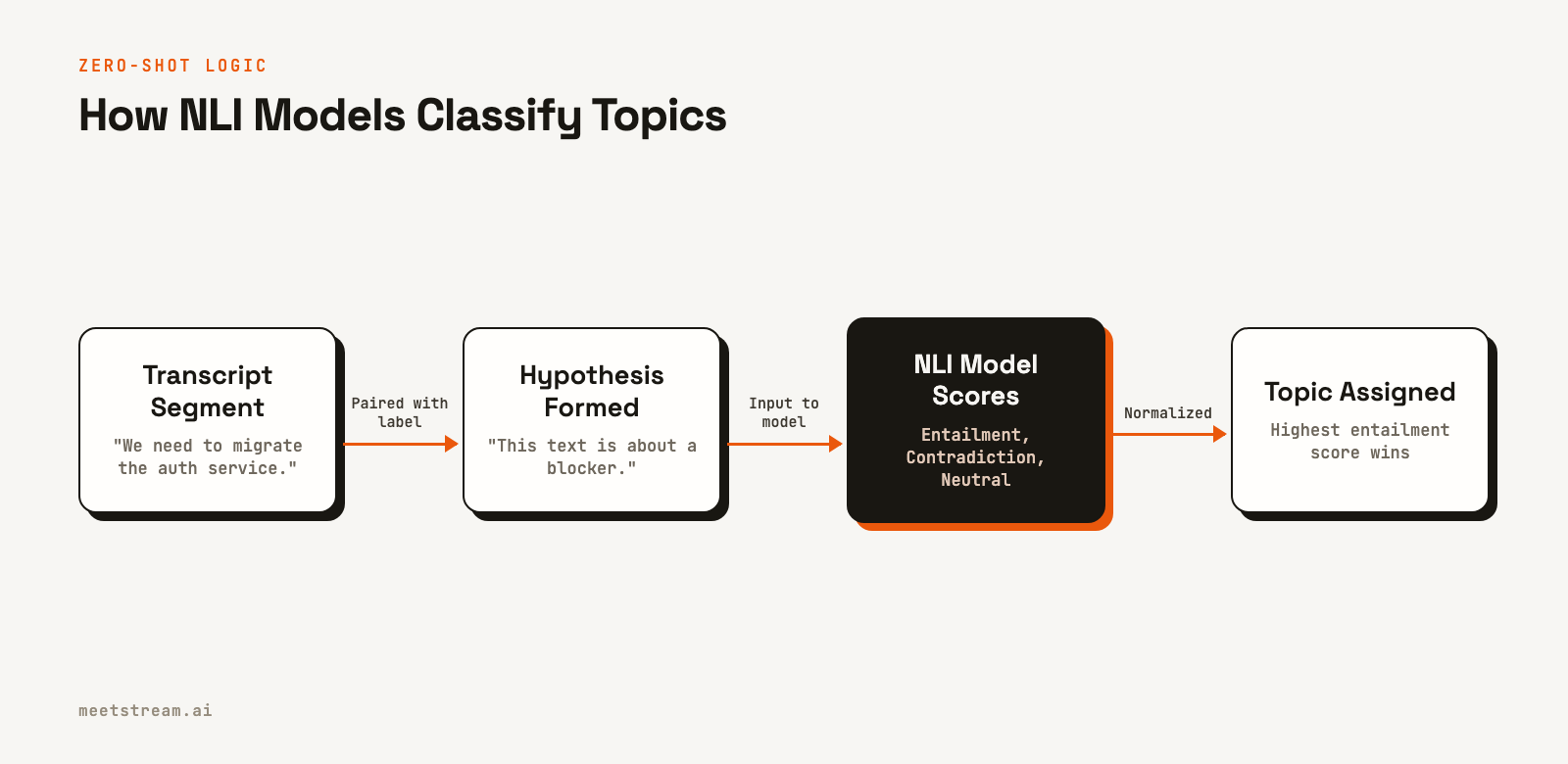
The Hugging Face transformers library makes this simple with its pipeline function. The default model, facebook/bart-large-mnli, is accurate but resource-intensive. For production systems processing many meetings, a smaller model like cross-encoder/nli-deberta-v3-small offers a better balance of speed and accuracy.
from transformers import pipeline

classifier = pipeline(
    "zero-shot-classification",
    model="cross-encoder/nli-deberta-v3-small"
)

labels = ["action item", "technical discussion", "blocker", "decision made", "open question"]

text = "We need to migrate the auth service before we can ship the new login flow. That is blocking the entire release."

result = classifier(text, candidate_labels=labels)
print(f"{result['labels'][0]}: {result['scores'][0]:.3f}")
# blocker: 0.847
Getting Transcripts from a MeetStream Bot
Before you can classify topics, you need the transcript. A MeetStream bot can provide this data in two ways: as a complete file after the meeting ends, or as a real-time stream of utterances during the meeting. To get a post-call transcript, you first send a request to create and join a bot to your meeting.
import httpx

API_KEY = "YOUR_API_KEY"
MEETING_URL = "https://meet.google.com/abc-defg-hij"

response = httpx.post(
    "https://api.meetstream.ai/api/v1/bots/create_bot",
    headers={"Authorization": f"Token {API_KEY}"},
    json={
        "meeting_link": MEETING_URL,
        "bot_name": "Topic Classifier",
        "recording_config": {
            "transcript": {
                "provider": {"meetstream": {}}
            }
        }
    }
)

data = response.json()
bot_id = data.get("bot_id")
transcript_id = data.get("transcript_id") # Store this ID
After the meeting, you can use the transcript_id returned in the initial response to fetch the full, speaker-labeled transcript. You can also get this ID from the transcription.processed webhook event if you configure a callback_url.
# After the meeting ends and the transcript is processed...
response = httpx.get(
    f"https://api.meetstream.ai/api/v1/transcript/{transcript_id}/get_transcript",
    headers={"Authorization": f"Token {API_KEY}"}
)

transcript_data = response.json()
# Returns a list of segments, e.g., [{"speaker": "Priya", "transcript": "...", "start_time": 1.2, "end_time": 4.5}]
Each object in the returned list represents a speaker's turn, which is the ideal unit of text for topic classification. These turns are typically one to four sentences long, providing enough context for the model without being so long that they contain multiple distinct topics.
Implementing the Classification Pipeline
With the transcript data, you can build a pipeline to classify each turn. While you can process turns one by one, batching them significantly improves performance, especially on a GPU. The function below takes a list of transcript turns, classifies them in batches, and returns an annotated list with the predicted topic and confidence score for each turn.
from typing import List, Dict

# Assuming 'classifier' is initialized as shown previously
TOPIC_LABELS = [
    "action item",
    "technical discussion",
    "blocker",
    "decision made",
    "open question",
    "small talk"
]

def classify_turns(turns: List[Dict]) -> List[Dict]:
    texts = [t["transcript"] for t in turns]
    # Use batching for much faster inference on multiple texts
    results = classifier(texts, candidate_labels=TOPIC_LABELS, batch_size=16)

    annotated = []
    for turn, result in zip(turns, results):
        top_label = result["labels"][0]
        top_score = result["scores"][0]

        # Filter low-confidence predictions
        if top_score < 0.45:
            top_label = "uncertain"

        annotated.append({
            "speaker": turn["speaker"],
            "transcript": turn["transcript"],
            "start_time": turn.get("start_time"),
            "topic": top_label,
            "confidence": round(top_score, 3)
        })
    return annotated
Notice the confidence threshold of 0.45. Zero-shot models will always predict a label, even if none of the options are a good fit. Setting a threshold helps filter out noise. Utterances like "Okay, right" or "Mmhmm" will correctly fall below this threshold and can be excluded from analysis.
Building a Live Topic Detection Webhook
For real-time applications, such as a live coaching tool for sales reps, you can process transcripts as they are generated. By setting the live_transcription_required parameter when creating a bot, MeetStream will send a webhook for each speaker utterance.
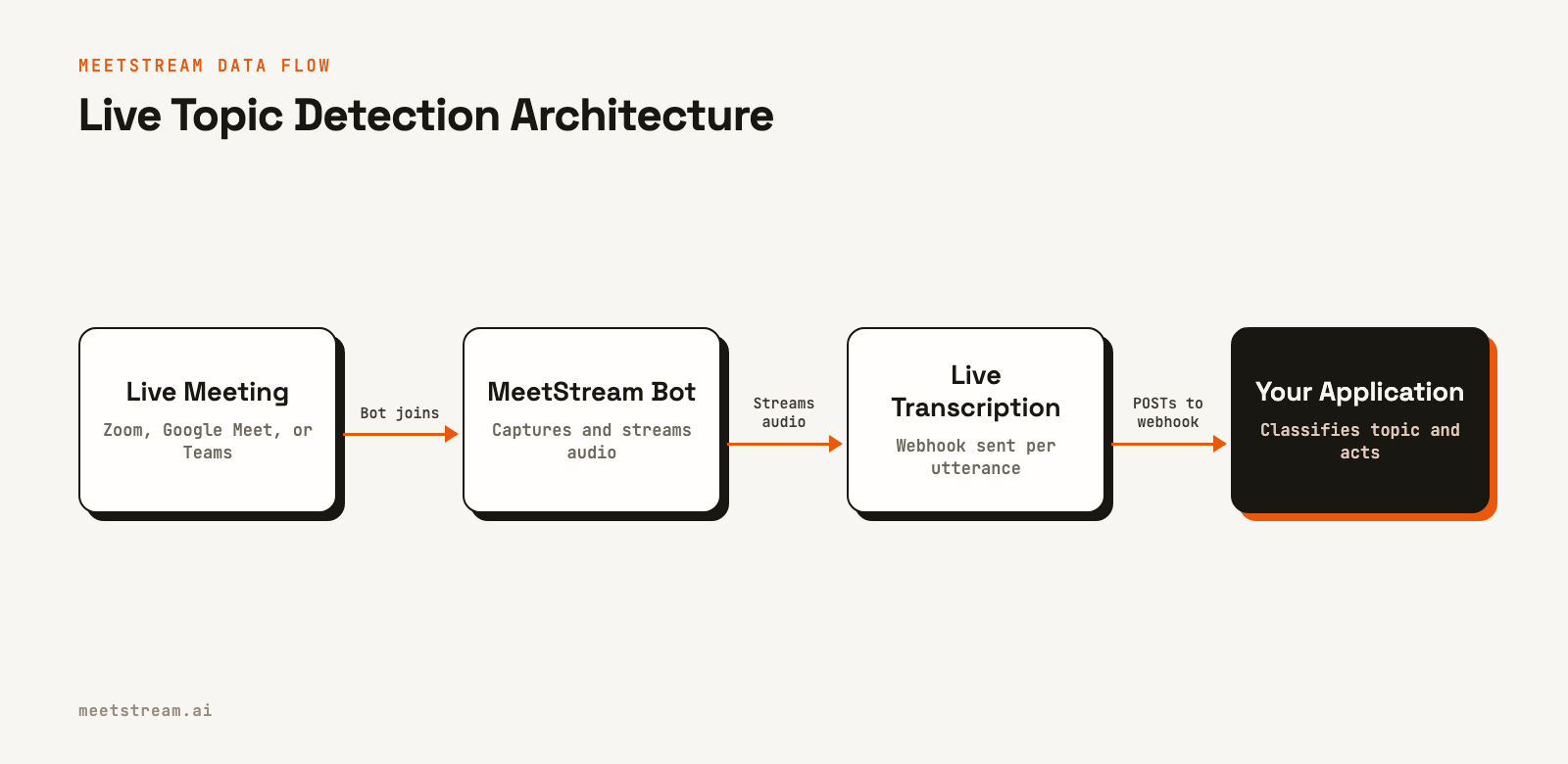
The following example uses FastAPI to create a webhook endpoint that receives live transcriptions, classifies them, and prints the result. A production system would push this structured data to a database or a real-time dashboard.
from fastapi import FastAPI, Request, Response

app = FastAPI()

# Initialize classifier (as before)
# Define TOPIC_LABELS (as before)

@app.post("/webhooks/meetstream")
async def handle_transcription(request: Request):
    payload = await request.json()

    # The main text from the live transcript payload
    text = payload.get("transcript", "")
    speaker = payload.get("speakerName", "Unknown")

    # Avoid classifying very short, empty, or non-final utterances
    if len(text.strip()) < 10:
        return Response(status_code=204)

    result = classifier(text, candidate_labels=TOPIC_LABELS)
    topic = result["labels"][0]
    confidence = result["scores"][0]

    if confidence > 0.45:
        # In a real app, you would send this to a database, message queue, or WebSocket client.
        print(f"[{speaker}] - {topic.upper()}: {text}")

    # Respond quickly with 2xx to acknowledge receipt.
    # MeetStream keeps a delivery log, so you can resend any event from the dashboard.
    return {"status": "received", "topic": topic}
This architecture enables you to build applications that react to conversations as they happen. For example, you could detect a "pricing objection" on a sales call and automatically surface relevant battle cards to the sales representative in another window.
How MeetStream Enables This Workflow
Building reliable meeting intelligence features requires a solid data foundation. MeetStream provides the core infrastructure to deploy AI voice agents into meetings across all major platforms with a single API. While this article focuses on classification, the transcript is just one of several data streams available.
Our platform handles the complexity of joining calls, managing bot lifecycles, and capturing low-latency audio and video. This lets you focus on the NLP and application logic that creates value, rather than on building and maintaining brittle meeting capture infrastructure. Whether you need post-call analysis or real-time audio streaming, the data is delivered via clean, well-documented APIs and webhooks.
Conclusion
Zero-shot topic classification is a highly effective technique for analyzing meeting transcripts without the overhead of data annotation. By combining the flexibility of Hugging Face's NLI models with the reliable, speaker-labeled data from MeetStream's API, you can quickly build sophisticated meeting intelligence tools. This approach allows your application to adapt to new topics and changing business priorities, providing durable value. See the full API reference at docs.meetstream.ai.
Related guides
Frequently Asked Questions
What is zero-shot text classification?
Zero-shot text classification is a method for categorizing text into labels the model has never seen during training. It uses a pre-trained natural language inference model to score how well a piece of text entails a hypothesis like "This text is about [label]", making it flexible for dynamic categories.
Which model is best for zero-shot classification on meeting transcripts?
For most applications, cross-encoder/nli-deberta-v3-small provides a good balance of speed and accuracy on the short, conversational text found in meetings. If maximum accuracy is the priority and latency is less of a concern, facebook/bart-large-mnli is a slightly stronger, but larger, alternative.
How do I handle short or irrelevant utterances in transcripts?
Filter out utterances under a certain word count (e.g., five words) before sending them to the classifier. Additionally, use a confidence threshold on the model's output (e.g., 0.45) to label low-confidence predictions as "uncertain," effectively ignoring filler speech like "uh-huh" or "right, okay."
Can I use custom topic labels for my specific industry?
Yes, this is the primary advantage of the zero-shot approach. You can define any set of labels relevant to your domain, such as "adverse event reporting" for pharma or "compliance check" for finance, and pass them to the model at inference time without any retraining.
How is topic classification different from named entity recognition?
Topic classification assigns a single category to an entire text segment (e.g., "blocker"). Named entity recognition (NER) identifies and extracts specific entities within the text (e.g., "Jira ticket PM-123"). They are often used together for a more complete understanding of the conversation.


