
Capture Clean Audio from Meeting Bots: Format and Quality Guide

To build a responsive AI voice agent for meetings, you need low-latency access to raw audio, not just a post-call transcript. The ability to process audio as it happens is fundamental for applications that must react mid-conversation, like sales coaching tools that surface real-time suggestions or agents that can be interrupted and respond naturally. A transcript tells you what was said; raw audio lets you build something that listens and participates.
This is where meeting bot audio streaming over a WebSocket becomes necessary. It provides a direct pipeline from the meeting to your application. When you deploy a bot and subscribe to the live audio feed, you get a stream of audio data that you can feed into a custom speech-to-text engine, an emotion detection model, or the input of a conversational agent.
The data you receive is not a common media file format. It is a stream of binary frames containing raw pulse-code modulation (PCM) audio data. To use it, you must parse the custom binary protocol at the byte level. This approach is efficient and low-latency but requires a clear understanding of the data structure.
This guide provides the complete specification for MeetStream's live audio WebSocket stream. We will cover the connection architecture, the precise byte-level frame format, and provide working server examples in Python and Node.js to get you started.
Why Raw Audio Access Matters
Most meeting APIs deliver a transcript after the call ends. This is useful for summarization, note-taking, and asynchronous analysis. However, a growing class of AI meeting applications requires real-time interaction, which is only possible with direct access to the audio stream.
Consider building an AI agent that answers questions during a team meeting. The agent needs to process speech as it occurs to detect its wake word, understand the query, and generate a response. A 30-second delay while waiting for a full transcript segment makes the interaction feel slow and unnatural. A real-time audio stream, with latency under 200ms, is the foundation for this kind of experience.
Similarly, applications for sales coaching or compliance monitoring benefit from analyzing audio in real time. An application can detect keywords, measure speaking pace, or identify sentiment changes during a live sales call, providing immediate feedback. This requires processing the raw audio signal, not just the text it represents.
The Streaming Architecture: Bot as a Client
A key aspect of the MeetStream architecture is that the bot acts as a WebSocket client. Your application runs a WebSocket server that must be publicly accessible. When you create a bot, you provide your server's URL in the live_audio_required parameter. When the bot successfully joins the meeting, it initiates a WebSocket connection to your server.
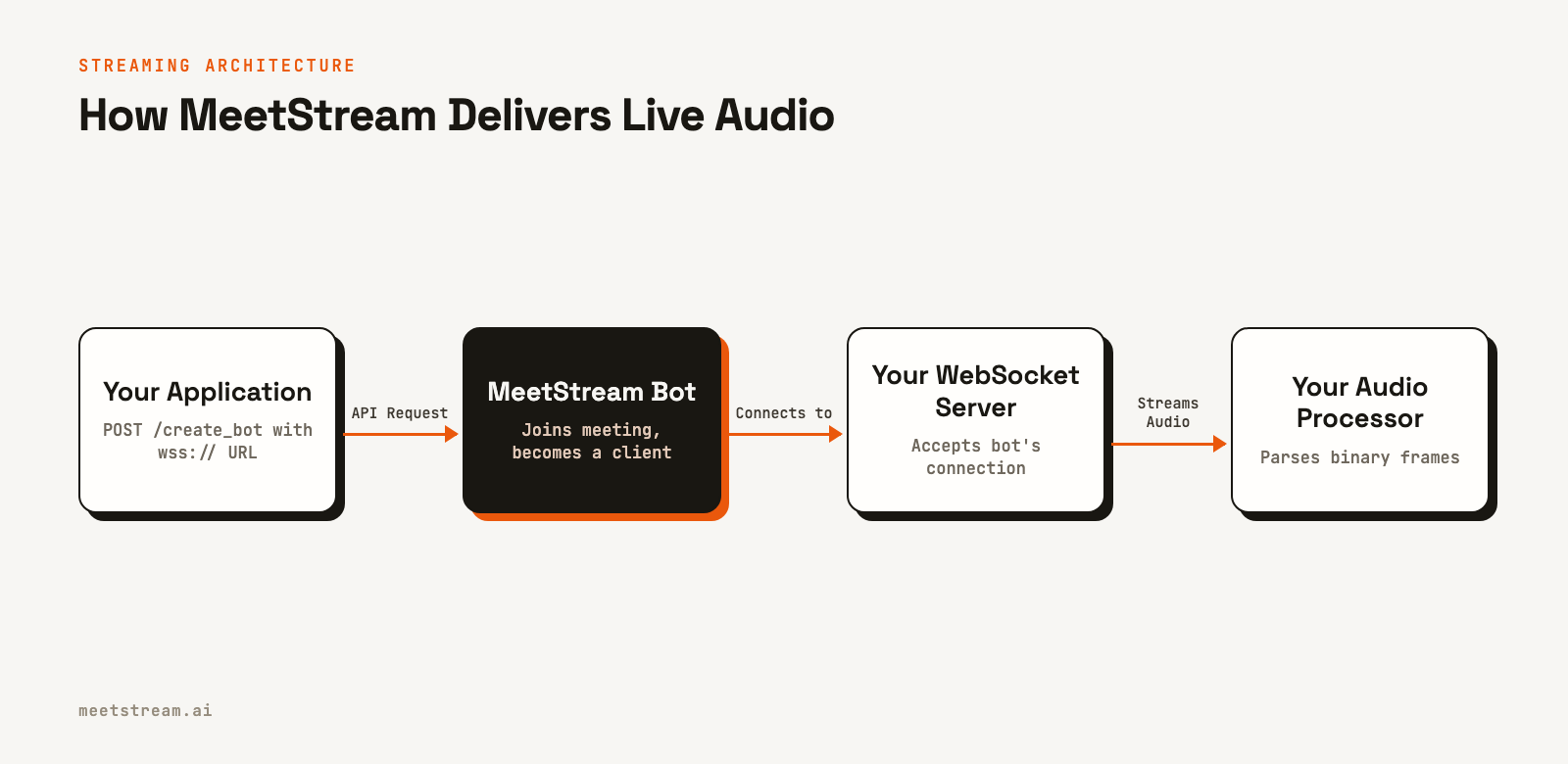
This model simplifies setup because you do not need to manage outbound connections or poll an API. You expose a single, stable endpoint, and bots connect to it as they become active. The lifecycle is straightforward: the connection is established when the bot joins and is terminated when the bot leaves. You can track these states using our meeting bot webhooks.
curl -X POST "https://api.meetstream.ai/api/v1/bots/create_bot" \
  -H "Authorization: Token <YOUR_API_KEY>" \
  -H "Content-Type: application/json" \
  -d '{
    "meeting_link": "https://meet.google.com/abc-defg-hij",
    "bot_name": "AudioBot",
    "live_audio_required": {
      "websocket_url": "wss://your-server.example.com/audio"
    }
  }'
For local development, you can use a tunneling service like ngrok to expose your local server to the internet. For production, the WebSocket endpoint must use Transport Layer Security (TLS), so the URL should start with wss://.
WebSocket Frame Format: A Byte-Level Breakdown
The first message your server receives is a JSON text handshake to confirm the connection is ready. After that, each binary message is a single audio frame. The frame has a small header containing speaker information, followed immediately by the raw audio data. There are no intermediate containers or codecs.
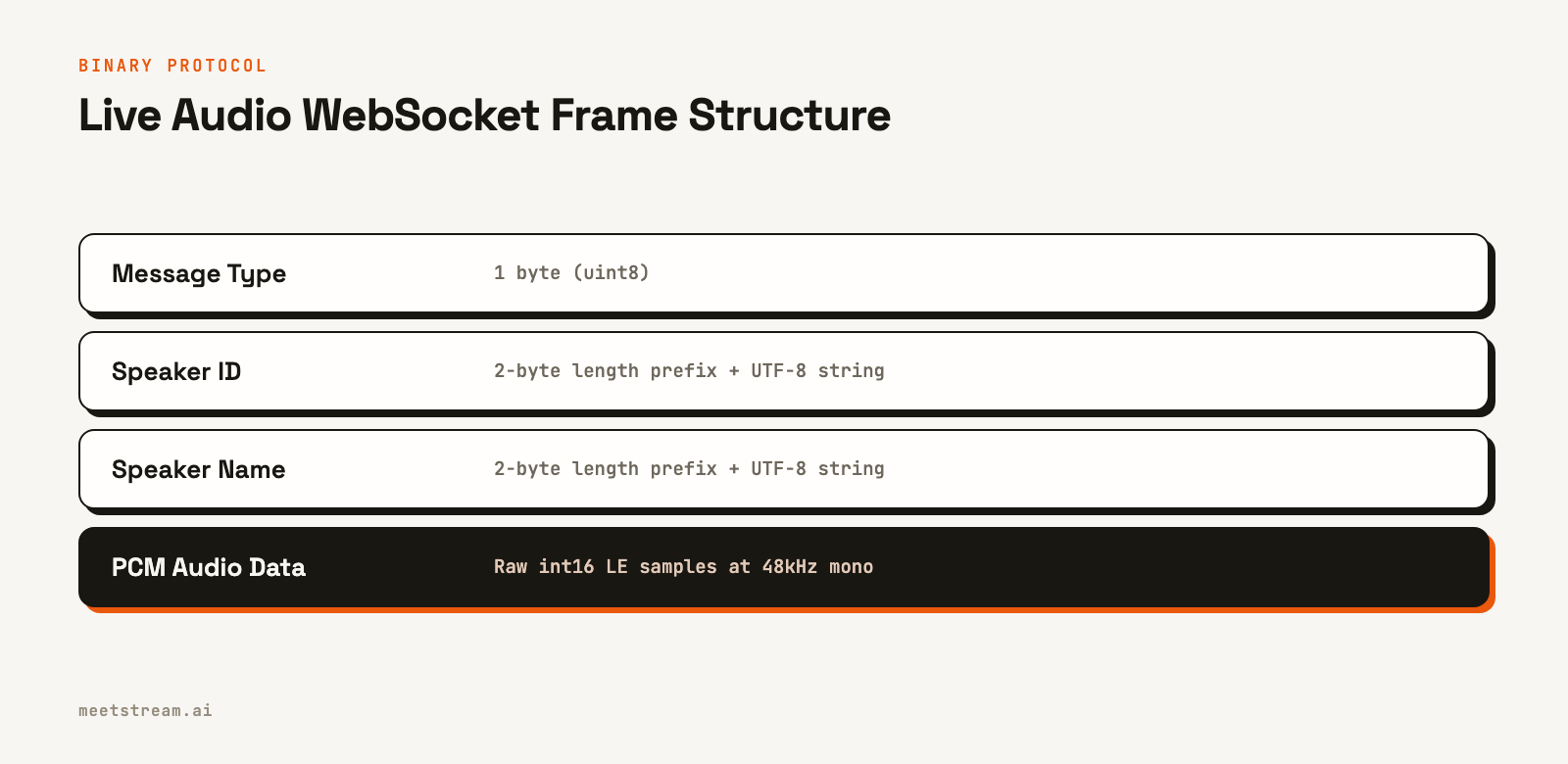
The audio is mixed, meaning you receive a single stream containing audio from all participants. Each frame is tagged with the dominant speaker at that moment, allowing for speaker-attributed processing. Here is the exact layout of each frame:
| Field | Size | Type | Description |
|---|---|---|---|
msg_type |
1 byte | uint8 | Message type identifier. 0x01 for Google Meet and Microsoft Teams audio, 0x04 for Zoom audio. |
sample_rate, channels |
4 bytes, 1 byte | uint32 LE, uint8 | Zoom frames (0x04) only: sample rate in Hz and channel count. |
sid_len |
2 bytes | uint16 LE | Length of the speaker_id string in bytes. |
speaker_id |
sid_len bytes |
UTF-8 string | A unique identifier for the speaker in this meeting. |
sname_len |
2 bytes | uint16 LE | Length of the speaker_name string in bytes. |
speaker_name |
sname_len bytes |
UTF-8 string | The display name of the speaker. "NoSpeaker" if unattributed. |
audio |
Variable | PCM int16 LE | Raw audio samples, mono: 48kHz on Google Meet and Teams, the header rate on Zoom. |
All multi-byte integers are little-endian. The audio data itself has a sample rate of 48,000 Hz on Google Meet and Teams (Zoom frames give the rate in the header), uses a signed 16-bit integer format (int16), and is single-channel (mono). Each sample is two bytes. A typical 20ms frame would contain 960 samples, or 1920 bytes of audio data.
Implementation: A Python WebSocket Server Example
This Python example uses the websockets library and asyncio to create a server that can receive and parse these audio frames. The parse_frame function reads the binary data sequentially using the struct module to unpack the header fields.
import asyncio
import struct
import json
import numpy as np
from websockets.server import serve
from typing import Optional
from dataclasses import dataclass

@dataclass
class AudioFrame:
    msg_type: int
    sample_rate: int  # 48000 on Google Meet and Teams; from the header on Zoom
    speaker_id: str
    speaker_name: str
    samples: np.ndarray  # int16, mono

def parse_frame(data: bytes) -> Optional[AudioFrame]:
    if len(data) < 5:
        return None

    pos = 0
    msg_type = data[pos]
    pos += 1

    if msg_type == 0x01:    # Google Meet and Microsoft Teams: 48 kHz mono
        sample_rate = 48000
    elif msg_type == 0x04:  # Zoom: sample rate and channels in the header
        if len(data) < 8:
            return None
        sample_rate = struct.unpack_from("<I", data, pos)[0]
        pos += 5
    else:
        return None

    sid_len = struct.unpack_from("<H", data, pos)[0]
    pos += 2

    if pos + sid_len > len(data):
        return None
    speaker_id = data[pos:pos + sid_len].decode("utf-8", errors="replace")
    pos += sid_len

    if pos + 2 > len(data):
        return None
    sname_len = struct.unpack_from("<H", data, pos)[0]
    pos += 2

    if pos + sname_len > len(data):
        return None
    speaker_name = data[pos:pos + sname_len].decode("utf-8", errors="replace")
    pos += sname_len

    audio_bytes = data[pos:]
    if len(audio_bytes) % 2 != 0:
        audio_bytes = audio_bytes[:-1]  # Ensure even number of bytes for int16

    samples = np.frombuffer(audio_bytes, dtype=np.int16)
    return AudioFrame(msg_type, sample_rate, speaker_id, speaker_name, samples)

async def audio_handler(websocket):
    remote = websocket.remote_address
    print(f"Bot connected from {remote}")
    try:
        # The first message is a JSON text handshake.
        handshake_msg = await websocket.recv()
        if isinstance(handshake_msg, str):
            try:
                handshake = json.loads(handshake_msg)
                if handshake.get("type") == "ready":
                    bot_id = handshake.get("bot_id", "unknown")
                    print(f"Handshake successful for bot: {bot_id}")
                else:
                    print(f"Warning: Received unexpected JSON: {handshake}")
            except json.JSONDecodeError:
                print(f"Warning: Could not parse handshake: {handshake_msg}")
        else:
            print("Warning: Expected text handshake, received binary. Ignoring.")

        # Process subsequent binary audio frames.
        async for message in websocket:
            if not isinstance(message, bytes):
                print(f"Received unexpected text message: {message}")
                continue

            frame = parse_frame(message)
            if frame:
                # Your processing logic here
                print(f"  [{frame.speaker_name}] received {len(frame.samples)} samples at {frame.sample_rate} Hz")

    except Exception as e:
        print(f"Connection error: {e}")
    finally:
        print(f"Bot disconnected from {remote}")

async def main():
    async with serve(audio_handler, "0.0.0.0", 8765):
        print("Listening on ws://0.0.0.0:8765")
        await asyncio.Future()

if __name__ == "__main__":
    asyncio.run(main())
Handling Concurrent Bots and Production Concerns
A single WebSocket server is designed to handle connections from many bots at once. Each connection is independent, and the speaker_id is unique only within the context of a single meeting. To associate incoming audio with the correct meeting or customer, you need a way to identify which bot is connecting.
The recommended pattern is to include a unique identifier, like the bot_id, as a query parameter in the WebSocket URL you provide during bot creation. Your server can then parse this identifier from the connection request path.
# In your create_bot call, generate a unique ID for the session
session_id = "some-unique-identifier"
websocket_url = f"wss://your-server.example.com/audio?session_id={session_id}"

# In your Python server, access the ID
async def audio_handler(websocket):
    session_id = "unknown"
    try:
        # Example: parsing 'path' which might be '/audio?session_id=...'
        path, _, query_string = websocket.path.partition('?')
        if query_string:
            params = dict(p.split('=') for p in query_string.split('&'))
            session_id = params.get("session_id", "unknown")
    except ValueError:
        pass # Handle malformed query strings

    print(f"Bot for session {session_id} connected")
    # ... rest of the handler
This allows you to route audio frames from each connection to the appropriate processing pipeline, ensuring data from different meetings remains separate.
How MeetStream Fits In
MeetStream is an API platform for deploying bots and real-time AI agents into Zoom, Google Meet, and Microsoft Teams. The live audio streaming feature is a core part of this platform, designed to provide the low-latency infrastructure needed for building interactive voice applications.
You can enable live audio on any bot with a single parameter in the create bot API call. We manage the complexity of joining meetings across different platforms, capturing the audio, and streaming it to your endpoint in a consistent format. This lets you focus on your application's core audio processing logic rather than on meeting infrastructure.
Conclusion
Access to a clean, low-latency audio stream is the foundation for building the next generation of interactive AI meeting agents. MeetStream's live audio WebSocket provides this foundation with a simple architecture and a well-defined binary protocol for efficiency. By handling the raw PCM data directly, you can build applications that go beyond simple transcription to perform sophisticated, real-time audio analysis and power truly conversational agents. See the full API reference at docs.meetstream.ai.
Frequently Asked Questions
What audio format does MeetStream stream over WebSocket?
MeetStream streams audio as raw PCM data, at 48kHz on Google Meet and Teams; Zoom frames carry their sample rate in the header. The format is signed 16-bit little-endian integers and single-channel mono. Each binary frame contains a block of these samples, prefixed with a small header to identify the speaker.
How does the live audio streaming work?
When you create a bot and specify a WebSocket URL for the live_audio_required parameter, the MeetStream bot acts as a client. Once it joins the meeting, it connects to your server's URL and begins sending binary audio frames. The connection remains active until the bot leaves the meeting.
Is the audio from each participant on a separate stream?
The live audio WebSocket provides a single, mixed audio stream containing the audio from all participants. However, each frame of audio data is tagged with metadata identifying the dominant speaker at that moment. For post-call analysis, MeetStream also offers per-participant audio recordings.
How can my server identify which bot is connecting?
The best practice is to embed a unique identifier, such as a session ID or bot ID, as a query parameter in the WebSocket URL you provide to the create bot API. Your server can then parse this identifier from the incoming connection request to associate the audio stream with the correct meeting.
What is the typical latency of the audio stream?
The end-to-end latency for the live audio stream is typically around 200 milliseconds. This low latency is critical for building real-time applications, such as conversational AI agents, that need to respond quickly during a live meeting.


