
Detect Speaker Changes in Meeting Audio: Active Speaker Events

Detecting the active speaker in a live meeting involves parsing metadata from a real-time audio stream. Each audio packet, or frame, from the stream is tagged with an identifier for the person speaking at that moment. By tracking changes to this identifier across consecutive frames, an application can build a precise timeline of who spoke and when.
This capability is a fundamental building block for creating interactive AI voice agents. An agent that knows who is speaking can attribute comments correctly, wait for a natural pause in conversation before responding, or trigger different workflows based on the speaker. It is a core component of the voice infrastructure required to build agents that can participate in meetings intelligently, rather than just passively recording them.
This real-time approach differs from post-call analysis. Instead of inferring speakers from a finished audio file, you receive speaker identity directly from the meeting platform as the conversation happens. The audio itself is a single mixed stream containing all participants' voices, but each frame is tagged with the dominant speaker. This provides reliable, named attribution without the ambiguity of acoustic-based speaker clustering.
Let's walk through the binary frame format and a Python implementation for tracking these speaker turns from a live WebSocket stream.
How Real-Time Speaker Detection Works
When a MeetStream bot joins a meeting with live audio streaming enabled, it establishes a WebSocket connection to your server. Through this connection, it sends a continuous stream of binary messages. Each message is a self-contained audio frame that represents a small slice of the meeting's audio.
What matters is that this is a single, mixed audio stream. You are not receiving separate audio channels for each participant. Instead, the audio from all speakers is combined into one stream. To provide attribution, each frame includes metadata identifying the dominant speaker during that audio segment. If the conversation switches from one person to another, the speaker ID and name in subsequent frames will change to reflect the new speaker.
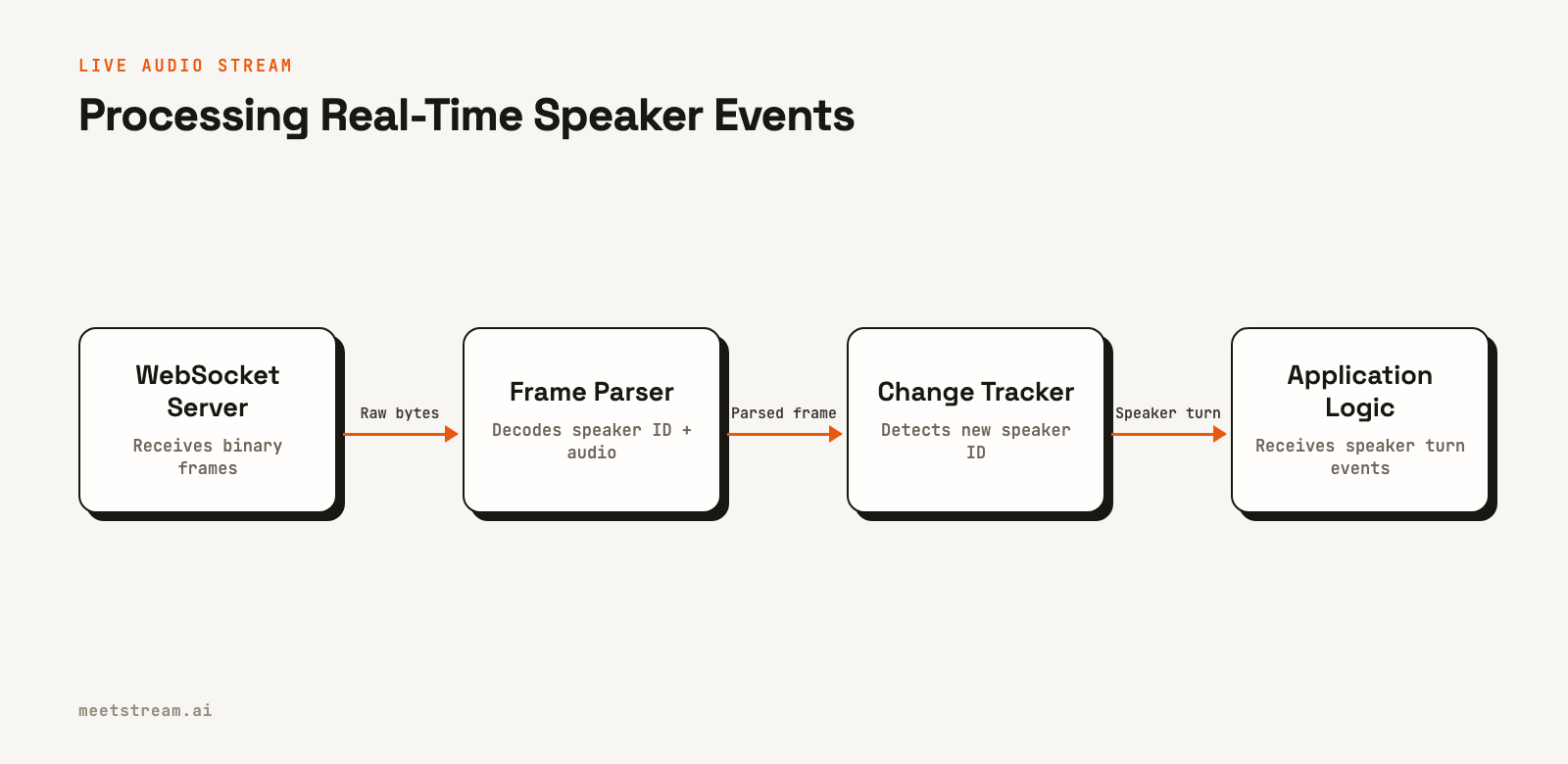
Your application's task is to parse these binary frames, extract the speaker identifier from each one, and notice when it changes. This signals the end of one person's speaking turn and the beginning of another's. By buffering the audio associated with each speaker ID, you can reconstruct complete, speaker-separated utterances.
Understanding the MeetStream Audio Frame Format
The live audio stream sends binary WebSocket messages, where each message is a single frame with a specific byte layout. Using a binary format minimizes overhead and latency compared to alternatives like JSON with base64-encoded audio.
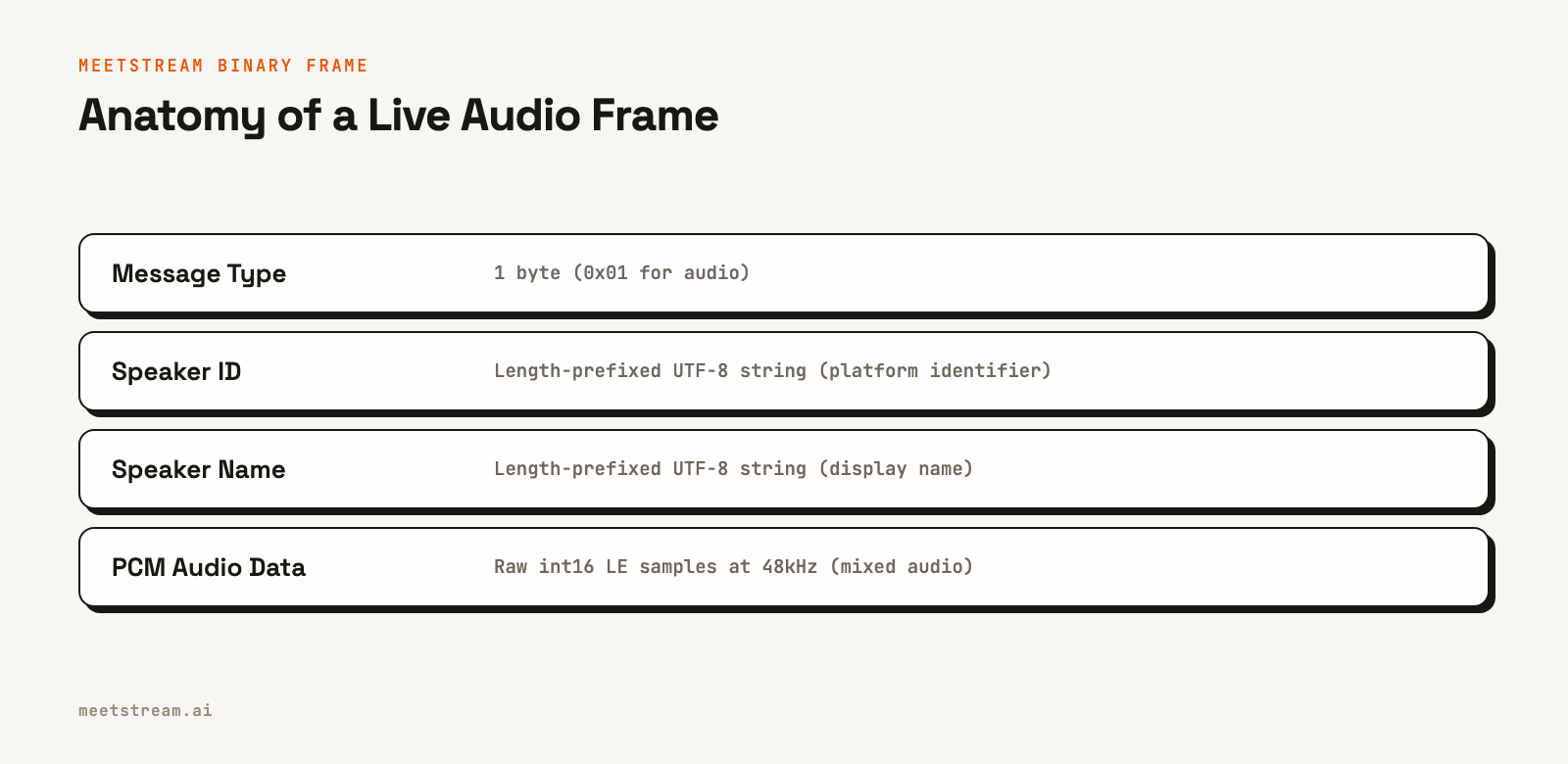
The structure is as follows:
| Field | Size | Type | Description |
|---|---|---|---|
msg_type |
1 byte | uint8 | 0x01 for Google Meet and Microsoft Teams audio, 0x04 for Zoom audio. |
sample_rate, channels |
4 bytes, 1 byte | uint32 LE, uint8 | Zoom frames (0x04) only: sample rate in Hz and channel count. |
sid_length |
2 bytes | uint16 LE | Byte length of the speaker_id string. |
speaker_id |
sid_length bytes |
UTF-8 | Stable platform-assigned speaker identifier. |
sname_length |
2 bytes | uint16 LE | Byte length of the speaker_name string. |
speaker_name |
sname_length bytes |
UTF-8 | Participant display name from the meeting. |
pcm_data |
remaining bytes | int16 LE | Raw audio samples, mono, mixed: 48kHz on Google Meet and Teams, the header rate on Zoom. |
A few things to keep in mind. The length fields are little-endian unsigned shorts, which corresponds to the <H format code in Python's struct module. The audio data is signed 16-bit PCM samples, at 48kHz on Google Meet and Teams and at the header's sample rate on Zoom. Most speech-to-text models expect 16kHz, so you will need to downsample the audio before transcription.
Implementing a Frame Parser in Python
The first step is to parse the binary format. The following Python code defines a simple data class for a parsed frame and a parser class that safely decodes the raw bytes. It validates the message type, correctly handles the variable-length string fields, and returns a structured object.
import struct
from dataclasses import dataclass
from typing import Optional

@dataclass
class AudioFrame:
    speaker_id: str
    speaker_name: str
    pcm_bytes: bytes
    sample_count: int
    sample_rate: int = 48000

class FrameParser:
    """
    Parses MeetStream binary audio frames from a mixed stream.
    Each frame is tagged with the dominant speaker.
    """
    MEET_TEAMS_MSG_TYPE = 0x01  # Google Meet and Microsoft Teams: 48 kHz mono
    ZOOM_MSG_TYPE = 0x04        # Zoom: sample rate and channels in the header
    BYTES_PER_SAMPLE = 2  # int16

    def parse(self, raw: bytes) -> Optional[AudioFrame]:
        if not raw:
            return None

        offset = 0

        # Message type
        msg_type = raw[offset]
        offset += 1
        if msg_type == self.MEET_TEAMS_MSG_TYPE:
            sample_rate = 48000
        elif msg_type == self.ZOOM_MSG_TYPE:
            if offset + 5 > len(raw):
                raise ValueError("Frame too short for Zoom audio header")
            sample_rate = struct.unpack_from('<I', raw, offset)[0]
            offset += 5  # sample rate (4 bytes) + channels (1 byte)
        else:
            return None

        # speaker_id
        if offset + 2 > len(raw):
            raise ValueError("Frame too short for sid_length")
        sid_length = struct.unpack_from('<H', raw, offset)[0]
        offset += 2
        if offset + sid_length > len(raw):
            raise ValueError(f"Frame too short for speaker_id of length {sid_length}")
        speaker_id = raw[offset:offset + sid_length].decode('utf-8')
        offset += sid_length

        # speaker_name
        if offset + 2 > len(raw):
            raise ValueError("Frame too short for sname_length")
        sname_length = struct.unpack_from('<H', raw, offset)[0]
        offset += 2
        if offset + sname_length > len(raw):
            raise ValueError(f"Frame too short for speaker_name of length {sname_length}")
        speaker_name = raw[offset:offset + sname_length].decode('utf-8')
        offset += sname_length

        # PCM audio data
        pcm_bytes = raw[offset:]
        sample_count = len(pcm_bytes) // self.BYTES_PER_SAMPLE

        return AudioFrame(
            speaker_id=speaker_id,
            speaker_name=speaker_name,
            pcm_bytes=pcm_bytes,
            sample_count=sample_count,
            sample_rate=sample_rate
        )
Tracking Speaker Changes
With the parser handling the binary decoding, the next layer tracks speaker turns. A turn begins when a new speaker_id appears and concludes when a different one is detected. The tracker accumulates audio for the current speaker and fires a callback with the completed turn data, including the buffered audio and timing information.
from typing import Callable, List

@dataclass
class SpeakerTurn:
    speaker_id: str
    speaker_name: str
    start_sample: int
    end_sample: int
    sample_rate: int
    pcm_bytes: bytes

    @property
    def start_seconds(self) -> float:
        return self.start_sample / self.sample_rate

    @property
    def end_seconds(self) -> float:
        return self.end_sample / self.sample_rate

class SpeakerChangeTracker:
    """
    Tracks speaker changes in a stream of AudioFrames.
    Fires on_turn_complete callback when a speaker turn ends.
    """
    def __init__(
        self,
        on_turn_complete: Callable[[SpeakerTurn], None],
        min_turn_samples: int = 2400  # 50ms at 48kHz
    ):
        self.on_turn_complete = on_turn_complete
        self.min_turn_samples = min_turn_samples
        self._current_speaker_id: Optional[str] = None
        self._current_speaker_name: Optional[str] = None
        self._turn_start_sample: int = 0
        self._turn_audio_buffer: List[bytes] = []
        self._total_samples: int = 0
        self._sample_rate: int = 48000

    def process(self, frame: AudioFrame) -> None:
        self._sample_rate = frame.sample_rate  # 48000 on Meet and Teams; Zoom sends its rate
        if self._current_speaker_id is None:
            # First frame, initialize
            self._current_speaker_id = frame.speaker_id
            self._current_speaker_name = frame.speaker_name
            self._turn_start_sample = 0

        if frame.speaker_id != self._current_speaker_id:
            # Speaker changed, flush the completed turn
            self._flush_turn()
            self._current_speaker_id = frame.speaker_id
            self._current_speaker_name = frame.speaker_name
            self._turn_start_sample = self._total_samples
            self._turn_audio_buffer = []

        self._turn_audio_buffer.append(frame.pcm_bytes)
        self._total_samples += frame.sample_count

    def flush(self) -> None:
        """Call at the end of the stream to emit the final turn."""
        if self._turn_audio_buffer:
            self._flush_turn()

    def _flush_turn(self) -> None:
        turn_samples = sum(len(b) // 2 for b in self._turn_audio_buffer)
        if turn_samples < self.min_turn_samples:
            return  # Skip short noise bursts

        turn = SpeakerTurn(
            speaker_id=self._current_speaker_id,
            speaker_name=self._current_speaker_name,
            start_sample=self._turn_start_sample,
            end_sample=self._total_samples,
            sample_rate=self._sample_rate,
            pcm_bytes=b''.join(self._turn_audio_buffer)
        )
        self.on_turn_complete(turn)
Connecting to the Live Audio Stream
To receive this audio stream, you must provide a publicly accessible WebSocket URL when you create a bot using the MeetStream API. Set the live_audio_required parameter in your request. MeetStream's infrastructure will then connect to your WebSocket server as a client and begin sending audio frames once the bot is in the meeting.
curl -X POST "https://api.meetstream.ai/api/v1/bots/create_bot" \
  -H "Authorization: Token <YOUR_API_KEY>" \
  -H "Content-Type: application/json" \
  -d '{
    "meeting_link": "<YOUR_MEETING_LINK>",
    "bot_name": "AudioBot",
    "live_audio_required": {
      "websocket_url": "wss://your-server.com/audio"
    }
  }'
Your server will need to accept this incoming WebSocket connection. The handler can then wire the parser and tracker together. As binary messages arrive, they are parsed into frames and passed to the tracker, which in turn emits completed speaker turns for your application to process.
How MeetStream Enables Real-Time Applications
Detecting speaker changes is one part of MeetStream's broader platform for building on live meetings. Our unified API provides the core voice infrastructure to deploy bots and AI agents into Zoom, Google Meet, and Microsoft Teams. The real-time audio stream is designed for applications that need to react to conversation dynamics as they happen.
This is useful for building sales coaching tools that provide live feedback, AI notetakers that attribute action items to the correct person, or voice-controlled agents that can interact with meeting participants. By providing platform-native speaker identities alongside the audio, MeetStream removes the guesswork from speaker attribution. You can focus on your application's logic instead of building complex audio processing pipelines.
See the full API reference at docs.meetstream.ai.
Frequently Asked Questions
What is active speaker detection?
Active speaker detection is the process of identifying who is speaking at any given moment in a multi-party conversation. In the context of the MeetStream API, this is achieved by analyzing metadata sent with each audio frame that tags the dominant speaker, rather than through acoustic analysis.
How is real-time speaker detection different from post-call diarization?
Real-time detection uses speaker identity provided by the meeting platform (e.g., Zoom, Google Meet) during the live call. Post-call speaker diarization is an offline process that analyzes a completed audio recording to cluster and label speakers based on voice characteristics, without knowing their actual identities.
How do you handle simultaneous speech?
When multiple people speak at once, the underlying audio is mixed together. The speaker metadata tag in each frame will identify the dominant (usually loudest) speaker for that short time slice. This may result in rapid alternations between speaker IDs, which your application can interpret as overlapping speech.
Can I get separate audio tracks for each participant?
Yes. For post-call analysis, MeetStream offers per-participant audio recording on Zoom, Google Meet and Microsoft Teams, with a separate audio file for each speaker. The real-time WebSocket stream carries a mixed audio track with dominant speaker metadata.
What meeting platforms are supported?
The MeetStream API supports deploying bots to capture audio from Zoom, Google Meet, and Microsoft Teams through a single integration. This allows you to build applications that work consistently across the major meeting platforms. Webex, GoTo Meeting, Slack huddles and WhatsApp calls are supported in Beta. Beta platforms are enabled per workspace. Contact us for access.


