
What Is a Meeting Bot API? How to Choose One in 2026

A meeting bot API provides the infrastructure to programmatically send software agents into online meetings to capture audio, video, and metadata. This allows developers to build applications on top of conversations happening in Zoom, Google Meet, and Microsoft Teams. The core function is getting reliable, real-time access to what is being said and by whom.
Modern APIs go beyond simple recording. They provide the foundation for building AI voice agents that can participate in calls, listening, speaking, and acting in real time. Instead of just analyzing a meeting after it ends, you can build bots that answer questions, update a CRM, or provide live coaching during the conversation. This shifts the focus from passive data collection to active, in-meeting automation.
Many teams first look for a meeting API after realizing the manual work involved in note-taking and data entry. A basic bot that joins a call and produces a transcript is a common starting point. But the real value appears when you treat meeting data, audio streams, and transcripts as a rich source for building interactive agents and intelligent workflows.
What Are the Core Use Cases for a Meeting Bot API?
Developers are building many applications using meeting bot APIs as their infrastructure layer. These use cases generally fall into two categories: post-call analysis, which processes data after a meeting ends, and real-time interaction, which involves agents acting during the live meeting.
1. Sales Coaching with Real-Time Objection Detection
Sales managers can only review a small fraction of their team's calls, making coaching reactive and inconsistent. A sales coaching bot can analyze every call automatically, surfacing patterns and providing systematic feedback. This is a powerful application of a conversation intelligence API.
The implementation starts by deploying a bot with a parameter like live_transcription_required: { webhook_url: 'https://your-app.com/live-transcripts' }. As the call progresses, the API streams transcript segments to your backend. Your application can process each segment with an NLP model to detect objection patterns like pricing pushback or competitor mentions. When a pattern is detected, you can log it for post-call review or push a real-time suggestion to the sales rep through a private chat message.
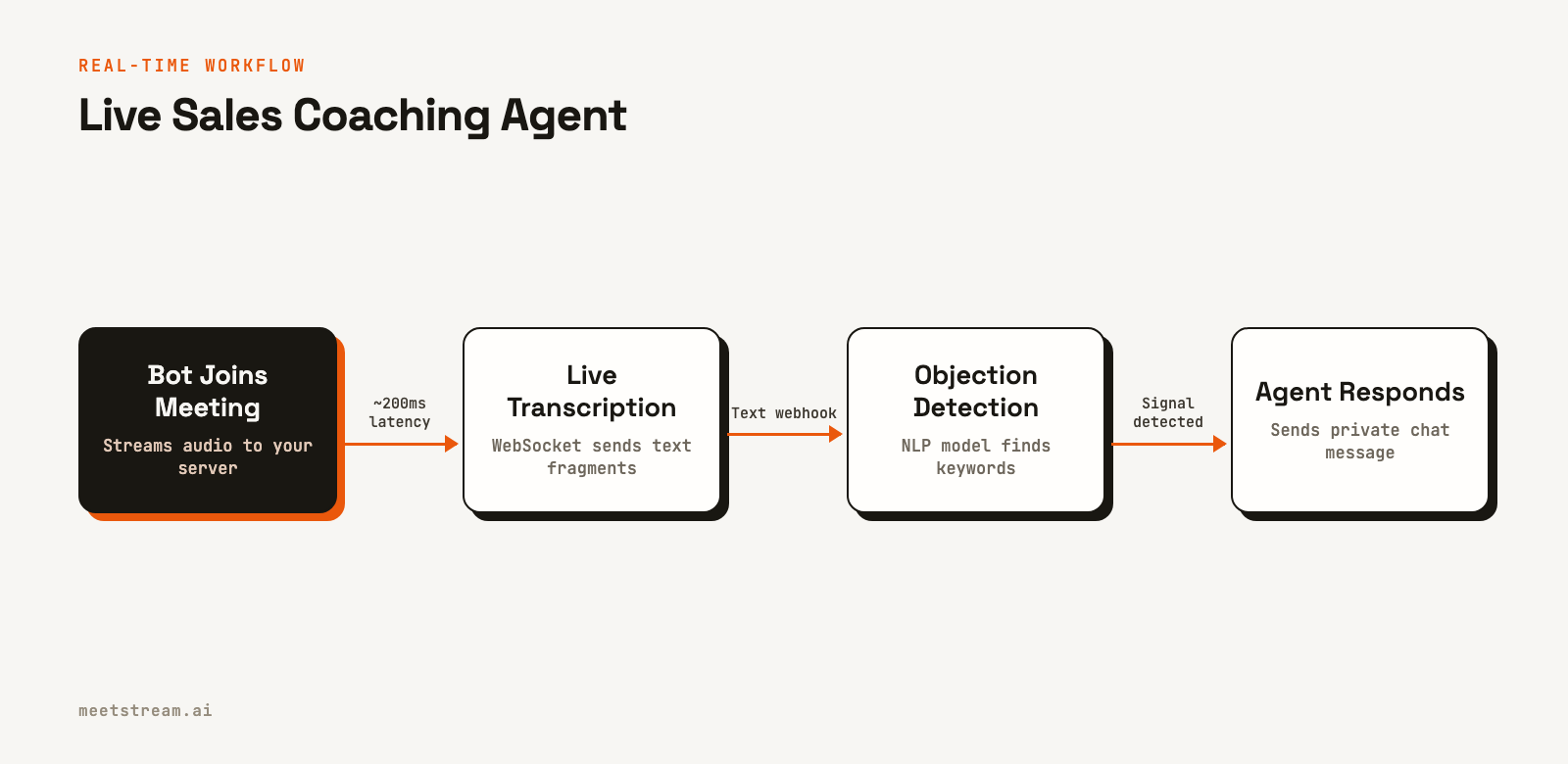
After the call, the transcription.processed webhook delivers the full, finalized transcript. Your system can then generate a coaching report analyzing talk-time ratio, question count, and objection frequency. This creates a valuable dataset for tracking a rep's performance over time.
2. Automated Note-Taking with Structured Extraction
Automated note-taking is more than just generating a summary. The goal is to extract structured data, a typed schema of decisions, owners, and deadlines that can be written directly into a project management tool like Notion or Asana. This saves hours of manual data entry.
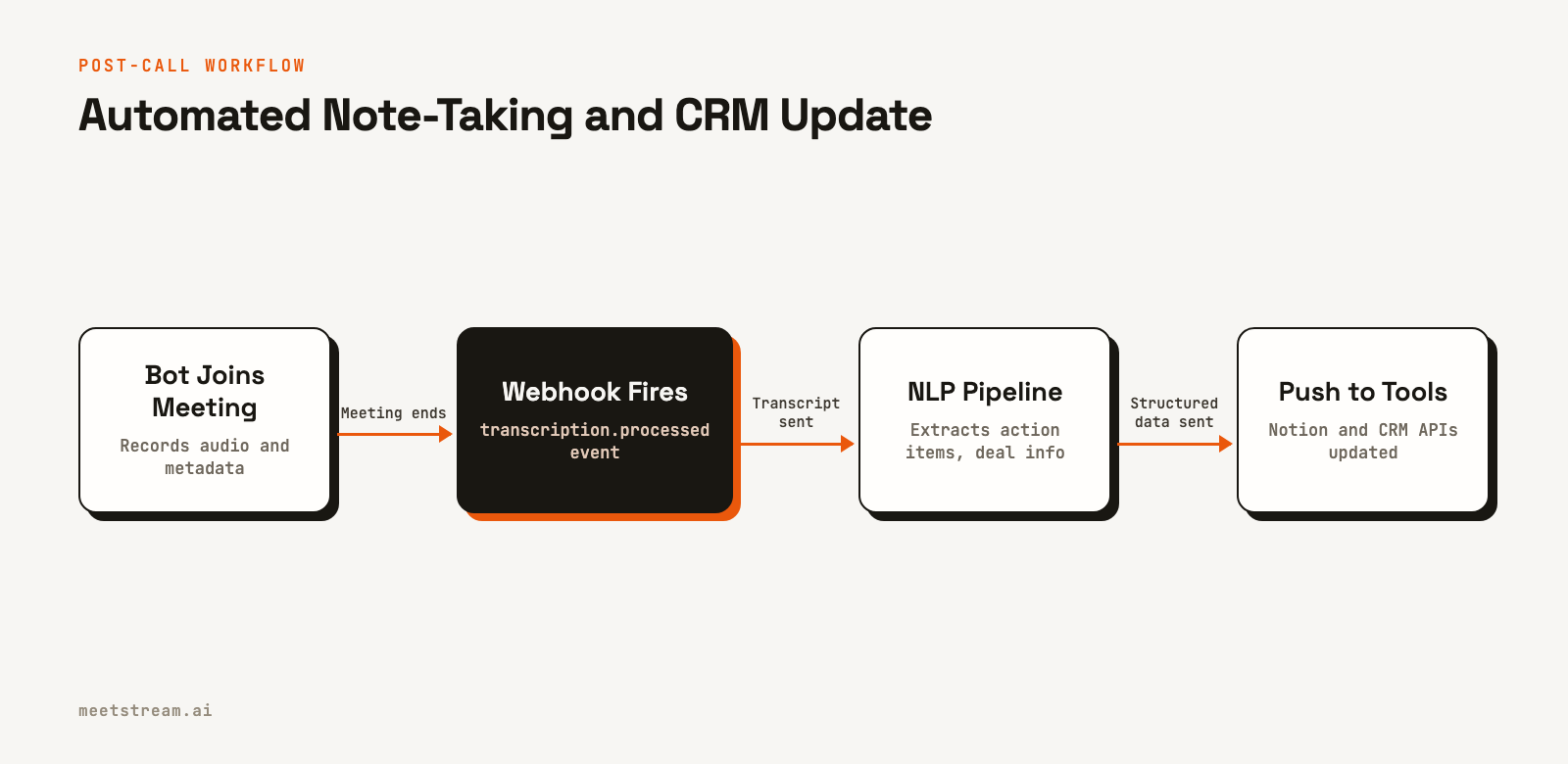
To build this, you deploy a bot with a callback_url to receive webhooks. You do not need a live transcript, so you can wait for the transcription.processed event after the meeting ends. When this webhook fires, you send the full transcript to an extraction pipeline. A well-designed large language model prompt can reliably extract action items as structured JSON, like { "owner": "string", "task": "string" }.
With the structured data, you can use the Notion API to create a new database row for each action item. The meeting metadata, like participants and date, can be written to a separate database and linked to the tasks. The result is a fully automated system that turns conversations into actionable tasks.
3. CRM Automation and Deal Updates
Sales reps often spend up to an hour a day on administrative work, logging call notes in a CRM. This is a perfect task for automation. An AI agent can listen to a sales call, summarize it, and update the relevant fields in Salesforce or HubSpot automatically.
The pipeline processes the transcript post-call. When you create the bot, you can pass a CRM deal ID in the custom_attributes field. When the transcription.processed webhook fires, your handler can use this ID to look up the correct deal. Your NLP model then extracts next steps, prospect objections, and deal stage signals from the transcript. Each extracted field maps to a specific field in your CRM, which you update via its API.
For something as critical as deal stage updates, it is a good practice to use a human-in-the-loop system initially. The bot can suggest a stage change, which a sales manager can approve, ensuring data hygiene while still saving significant time.
4. Customer Success Analytics and Churn Prediction
For customer success teams, understanding account health requires tracking sentiment and issues across many calls over time. A single unhappy call might be an anomaly, but a pattern of declining sentiment is a clear churn signal. A meeting bot makes it possible to build this kind of longitudinal analysis.
The data model involves scoring each call for sentiment on a per-speaker basis. Each time a bot joins a customer call, the transcript is processed and scored. You store a time series of this data: account ID, call date, speaker, and sentiment scores. Over time, you can build dashboards that visualize these trends and flag at-risk accounts automatically. This allows CS teams to focus their attention where it is needed most.
5. Compliance Recording for Regulated Industries
Industries like finance, healthcare, and legal services have strict requirements for call recording and retention. Using a meeting bot API gives you precise control over the recording lifecycle, which is essential for proving chain of custody during an audit.
When creating a bot, you can set the recording_config to specify the retention period and storage location. All bot lifecycle events, from bot.joining to bot.stopped, are sent to your webhook endpoint and can be stored in an immutable audit log. This log, combined with a hash of the recording file, provides a verifiable record that the recording has not been tampered with.
6. Voice-Controlled Actions and CRM Updates
A more advanced use case is building an agent that can respond to spoken commands during a call. A sales rep could say, "Hey agent, log this as a high-priority follow-up and remind me tomorrow," and the action is completed without them ever leaving the conversation.
This requires a real-time audio streaming architecture. The bot streams audio to your server via a WebSocket connection. Your application uses a wake-word detection model to listen for a command prefix. When detected, the subsequent audio is sent to a speech-to-text engine and then to a command parser. The parser maps the natural language command to a CRM API call. The agent can confirm the action was completed with a brief chat message or audio response.
How MeetStream Provides the Infrastructure
MeetStream is an agent-first voice infrastructure platform for meetings. Our unified API allows you to deploy bots and AI agents into Zoom, Google Meet, and Microsoft Teams with a single integration. You provide a meeting link, and MeetStream handles the complexities of joining the call, capturing media, and streaming data.
For post-call use cases, you can use our webhooks to receive full, speaker-diarized transcripts. For real-time applications, you can connect to a WebSocket to receive low-latency audio and live transcripts. Our MIA platform provides a higher-level abstraction for building conversational agents that can listen and speak in meetings.
Here is an example of creating a bot that will deliver a transcript after a call:
curl -X POST "https://api.meetstream.ai/api/v1/bots/create_bot" \
  -H "Authorization: Token <YOUR_API_KEY>" \
  -H "Content-Type: application/json" \
  -d '{
    "meeting_link": "<YOUR_MEETING_LINK>",
    "bot_name": "Notetaker",
    "callback_url": "https://your-app.com/webhooks/meetstream",
    "recording_config": {
      "transcript": {
        "provider": { "meetstream": {} }
      }
    }
  }'
The core idea is to provide developers with the raw materials, clean audio, video, and text, so you can focus on building your application's unique logic, not on managing headless browsers or reverse-engineering meeting clients.
Choosing a Starting Point
If you are deciding which use case to build first, start with your users' most time-consuming manual task. Note-taking automation offers a fast feedback loop, and users feel the value immediately. CRM automation provides a clear return on investment for any product sold to sales teams.
While post-call analytics provide value, the most powerful applications are agents that act during the meeting. The ability for a bot to provide information, answer questions, or perform tasks in real time is what differentiates a simple recording tool from a true AI assistant. Even if your first version focuses on post-call processing, designing your data model to support real-time interaction will make it easier to add these capabilities later.
A key benefit of using a unified meeting bot API is that these use cases work across Google Meet, Zoom, and Microsoft Teams with the same code. You write the bot deployment logic once, and the API handles the platform-specific details, like Zoom's OAuth requirements, at the infrastructure layer.
See the full API reference at docs.meetstream.ai.
Frequently Asked Questions
What are the most common AI meeting bot use cases?
The most common deployments are automated note-taking, CRM data entry, and sales coaching. These applications provide a clear and immediate return on investment by saving time and improving team performance. Compliance recording is also a critical use case in regulated industries.
How does live transcription differ from post-call transcription?
Live transcription enables interactive use cases that happen during a meeting, like real-time coaching or voice commands. Post-call transcription is used for analysis and automation after a meeting ends, such as generating summaries or updating a CRM. Most products start with post-call and add live features later.
Can one meeting bot work across Zoom, Meet, and Teams?
Yes, a unified API like MeetStream allows you to use the same code to deploy a bot to any supported platform. You send a meeting link to the API, and it handles the platform-specific connection details. This saves significant development time compared to building separate integrations for each platform.
What data does a meeting bot API provide?
A meeting bot API provides access to raw audio and video streams, speaker-diarized transcripts, and rich metadata. This includes participant join and leave times, speaking duration, and in-meeting chat messages. This data serves as the foundation for building analytics and AI-powered features.
How do I deploy a bot to a meeting I did not schedule?
For ad-hoc meetings, you can build a trigger in your application, such as a user pasting a meeting link. Calendar integrations are another common method. When a new meeting with a video link is detected on a user's calendar, you can automatically trigger a bot to join it three minutes before the start time.


