
Meeting Bot Webhooks: Event-Driven Architecture Guide

Your bot joined a meeting, recorded it, and left, but your application state is stuck. The database shows a pending status, and the transcript never arrived. Checking the logs reveals your webhook endpoint returned a 500 error because of a slow database query. Your application missed the state change.
This happens when webhooks are treated as a simple notification system instead of the core of a bot's asynchronous state machine. For AI agents that act inside meetings, webhooks are the primary mechanism for receiving state transitions and processed data like transcripts. An unreliable handler means an unreliable product. MeetStream is an agent-first platform, and this event-driven architecture is fundamental to building on it.
Workspace webhooks are signed and logged, and you can resend any delivery from the dashboard. To avoid the failure above, your handler must be fast and reliably return a 200 status code. The correct pattern is to accept the event, write it to a durable queue, return 200 immediately, and process it asynchronously. This approach ensures you never lose an event.
This guide covers the complete event lifecycle with accurate payload examples, signature verification, idempotency patterns, and a queue-backed handler design in Node.js that you can adapt for production use.
The Meeting Bot Event Lifecycle
A bot session produces a sequence of events that represent its state. Building a state machine that correctly handles every transition, including failures, is key to a reliable integration. A common success path involves the bot joining, participating, and then leaving, after which post-call processing events are fired.
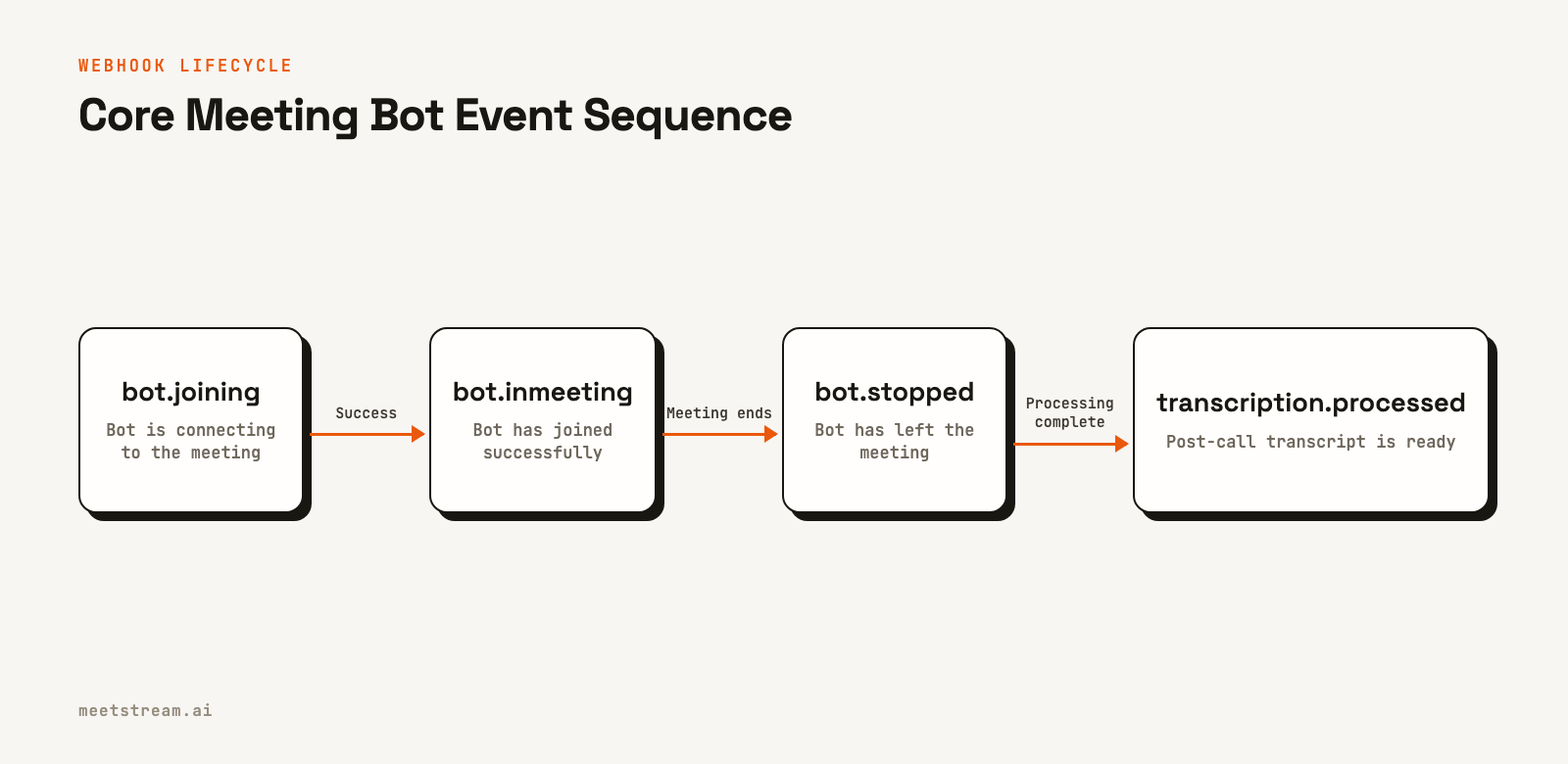
However, the full lifecycle includes intermediate and failure states. For example, a bot might wait in a lobby (bot.in_waiting_room), be denied entry by the host (bot.denied), or encounter a critical error (bot.failed). A production system must handle these events to update its internal state correctly. The bot.stopped event is for a graceful exit, while bot.failed indicates an unrecoverable error during the session.
Each event payload contains a bot_event field identifying its type and a bot_id linking it to the original API request. Here are examples of common webhook payloads you will receive.
Example bot.inmeeting payload:
{
  "bot_event": "bot.inmeeting",
  "bot_id": "604c0a0b-973d-4eb1-a5bf-2c7513f6bbe0",
  "bot_status": "InMeeting",
  "message": "Bot joined the meeting",
  "status_code": 200,
  "timestamp": "2026-02-27T07:11:51+00:00",
  "custom_attributes": {"customer_id": "cust_123"}
}
Example bot.failed payload:
{
  "bot_event": "bot.failed",
  "bot_id": "604c0a0b-973d-4eb1-a5bf-2c7513f6bbe0",
  "bot_status": "Error",
  "message": "Failed to join meeting: Invalid meeting link",
  "status_code": 500,
  "timestamp": "2026-02-27T07:10:45+00:00",
  "custom_attributes": {"customer_id": "cust_123"}
}
Example transcription.processed payload:
{
  "bot_event": "transcription.processed",
  "bot_id": "604c0a0b-973d-4eb1-a5bf-2c7513f6bbe0",
  "bot_status": "Done",
  "message": "Transcription processing is complete",
  "status_code": 200,
  "timestamp": "2026-02-27T08:05:10+00:00",
  "custom_attributes": {"customer_id": "cust_123"}
}
Webhook Signature Verification
Any public endpoint that accepts webhooks is a potential security risk. Without signature verification, an attacker who discovers your URL could send fabricated events, injecting fake data or triggering incorrect state changes in your application. This is why verifying signatures on a webhook is so important.
MeetStream signs each delivery to a workspace endpoint with an X-MeetStream-Signature header. This header contains an HMAC-SHA256 signature of the raw request body, keyed with your unique webhook secret. You must verify this signature before processing any event. For production, use a secure workspace webhook endpoint.
const crypto = require('crypto');

function verifySignature(rawBody, signature, secret) {
  const expected = 'sha256=' + crypto
    .createHmac('sha256', secret)
    .update(rawBody)  // rawBody must be the unparsed bytes
    .digest('hex');

  // Use timingSafeEqual to prevent timing attacks
  try {
    return crypto.timingSafeEqual(Buffer.from(signature), Buffer.from(expected));
  } catch {
    return false;
  }
}
Two details are critical for a correct implementation. First, compute the HMAC over the raw request body as bytes, not the parsed JSON object. JSON serialization is not deterministic, and subtle differences will cause valid signatures to fail verification. Second, use a timing-safe comparison function like crypto.timingSafeEqual to prevent timing attacks that could otherwise be used to forge signatures.
The Queue-Backed Handler Pattern
Your handler architecture must be designed for reliability. The handler's only jobs are to verify the signature, do a basic sanity check on the payload, and push it to a durable queue before returning a 200 OK status code. All significant work should be done by a separate consumer process.
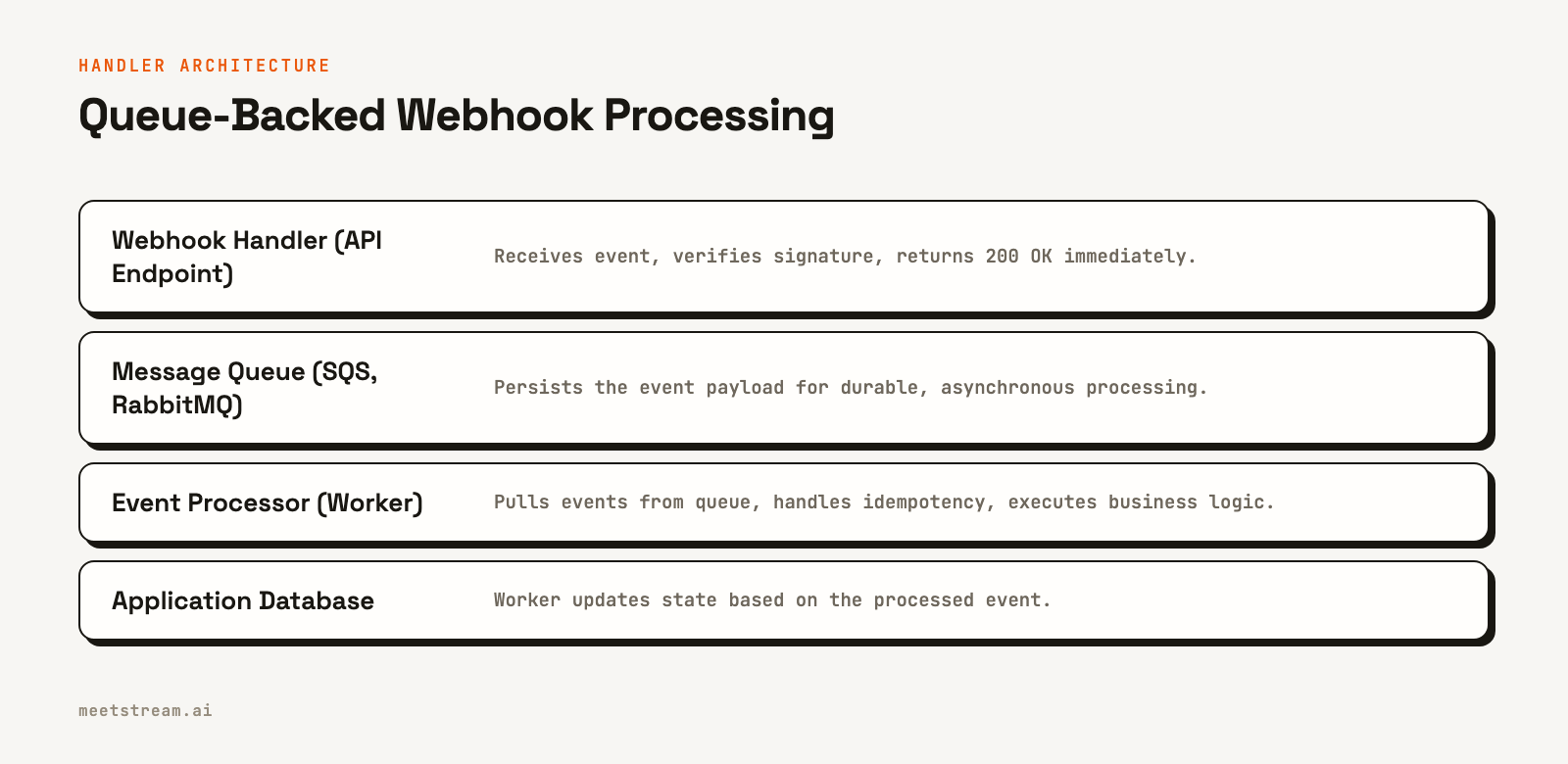
This code shows a minimal handler using Express.js and the AWS SDK for SQS.
const express = require('express');
const { SQSClient, SendMessageCommand } = require('@aws-sdk/client-sqs');

const app = express();
const sqs = new SQSClient({ region: 'us-east-1' });

// Use raw body middleware to access bytes for signature verification
app.use('/webhooks/meetstream', express.raw({ type: 'application/json' }));

app.post('/webhooks/meetstream', async (req, res) => {
  // 1. Verify signature first
  const signature = req.headers['x-meetstream-signature'];
  if (!verifySignature(req.body, signature, process.env.MEETSTREAM_WEBHOOK_SECRET)) {
    return res.status(401).json({ error: 'invalid signature' });
  }

  // 2. Parse the payload
  let payload;
  try {
    payload = JSON.parse(req.body.toString('utf8'));
  } catch (e) {
    return res.status(400).json({ error: 'invalid json' });
  }

  // 3. Write to a queue for async processing
  try {
    await sqs.send(new SendMessageCommand({
      QueueUrl: process.env.BOT_EVENT_QUEUE_URL,
      MessageBody: JSON.stringify(payload),
      MessageGroupId: payload.bot_id // For FIFO queues
    }));
  } catch (err) {
    console.error('Failed to enqueue webhook event', err);
    // Still return 200 to prevent MeetStream from dropping the event
  }

  // 4. Always return 200 immediately
  return res.status(200).json({ received: true });
});

app.listen(3000);
Using a FIFO queue with the MessageGroupId set to the bot_id ensures that events for a single meeting are processed in the order they were sent, preventing race conditions where, for example, a transcription.processed event is handled before the corresponding bot.stopped event.
Handling Idempotency
Network issues or infrastructure retries can sometimes cause duplicate webhook deliveries. Your event processor must be idempotent, meaning that processing the same event multiple times produces the same result as processing it once. A common pattern is to use a database table to track processed event IDs.
A unique key for an event can be formed by combining the bot_id, bot_event, and timestamp. Before processing an event, your worker can attempt an atomic write of this key to a deduplication table. If the write succeeds, the event is new and can be processed. If it fails because the key already exists, the event is a duplicate and can be safely ignored.
// Example event processor logic (runs from a queue worker)
async function processEvent(payload) {
  const dedupeKey = `${payload.bot_id}:${payload.bot_event}:${payload.timestamp}`;

  // Atomically check and set to see if we've processed this before
  const isDuplicate = await hasBeenProcessed(dedupeKey);
  if (isDuplicate) {
    console.log(`Skipping duplicate event: ${dedupeKey}`);
    return;
  }

  // Process the event, now safe to run exactly once
  switch (payload.bot_event) {
    case 'bot.inmeeting':
      // Update your DB: bot is now active in the meeting
      break;
    case 'transcription.processed':
      await handleTranscriptReady(payload);
      break;
    // ... handle other events
  }

  // Mark as processed after successful handling
  await markAsProcessed(dedupeKey);
}
Fetching Post-Call Transcripts
When you receive a transcription.processed event, the transcript is ready to be fetched. This event does not contain the transcript data itself. Instead, you use the transcript_id that was returned in the initial response from your POST /bots/create_bot call. You should store this ID alongside the bot_id when you first create the bot.
Your event processor can then use this stored ID to fetch the full transcript data from the API.
async function handleTranscriptReady(event) {
  // Retrieve transcript_id from your database, stored when the bot was created
  const session = await db.sessions.find({ bot_id: event.bot_id });
  if (!session || !session.transcript_id) {
    console.error('No transcript_id found for bot', event.bot_id);
    return;
  }

  const transcriptUrl = `https://api.meetstream.ai/api/v1/transcript/${session.transcript_id}/get_transcript`;
  const resp = await fetch(transcriptUrl, {
    headers: { 'Authorization': `Token ${process.env.MEETSTREAM_API_KEY}` }
  });
  const transcript = await resp.json();

  // Store transcript and trigger downstream jobs like summarization
  await db.sessions.update(
    { bot_id: event.bot_id },
    { transcript: transcript, status: 'completed' }
  );
}
How MeetStream Fits In
MeetStream provides the complete eventing infrastructure for building on top of live meetings. When you create a bot, you can specify a callback_url or configure a workspace-level endpoint to receive all lifecycle and data processing events. This event-driven model is the foundation for creating responsive, stateful AI agents that can react to what's happening in a meeting in real time. The full webhook reference documents every event and payload field.
Conclusion
Meeting bot webhooks are the core of a reliable, event-driven system. The most critical architectural choice is to decouple event ingestion from processing with a queue. Always verify signatures using a constant-time comparison on the raw request body. Design your event workers to be idempotent to handle duplicate deliveries gracefully. With these patterns, you can build a resilient system for processing meeting events at scale.
Frequently Asked Questions
What happens if my webhook endpoint returns a 500 error?
MeetStream treats any non-2xx response as a failed delivery. MeetStream keeps a delivery log, and you can resend any event from the dashboard. It is still essential to build a handler that accepts the event, enqueues it for later processing, and returns a 200 status code as quickly as possible.
How do I verify a MeetStream webhook signature?
You compute an HMAC-SHA256 hash of the raw request body using your webhook secret. Then, you compare your computed hash to the one provided in the X-MeetStream-Signature header. The comparison must be done in constant time to prevent timing attacks.
In what order do webhook events arrive?
Lifecycle events for a single bot generally arrive in chronological order, for example, bot.joining, then bot.inmeeting, then bot.stopped. Post-processing events like audio.processed and transcription.processed fire after bot.stopped. To process them in a fixed order, use a FIFO queue grouped by bot_id.
How should I handle duplicate webhook events?
Your processing logic must be idempotent. A common method is to use a database like Redis or DynamoDB to store a unique identifier for each event you process (e.g., a combination of bot_id, bot_event, and timestamp). Before processing, check if the identifier exists, if it does, you can safely skip the event.
What is the difference between bot.stopped and bot.failed?
The bot.stopped event indicates a graceful exit. This can happen when the meeting ends, everyone leaves, or an automatic leave timer is triggered. The bot.failed event indicates an unrecoverable error occurred, such as being unable to connect to the meeting platform or a critical internal failure.


