
Which Meeting Bot API Supports Speaker Diarization?

MeetStream supports speaker diarization on Zoom, Google Meet and Teams. Its speaker diarization API can also skip the guesswork: with per-participant audio on, speaker labels come from the meeting's own streams, one per participant on Zoom, Google Meet and Microsoft Teams, rather than a model splitting one mixed track.
Getting accurate, speaker-attributed text is the foundation for any application that understands conversations. Without it, downstream features like summaries, action item detection, or sales coaching operate on poor quality input. Our infrastructure has processed over one million meeting minutes, and we see a clear pattern: the quality of the initial transcript determines the quality of the final product. This is why we treat transcription not just as an output, but as a core component of our agent-first voice infrastructure.
Meeting audio is a difficult environment for transcription. Unlike clean, single-speaker audio, meetings have frequent interruptions, background noise, and domain-specific jargon. A generic speech-to-text service often struggles. Choosing the right transcription architecture and provider for your specific use case is a critical first step.
Why Meeting Audio is a Hard Transcription Problem
Standard speech-to-text benchmarks rarely reflect real-world performance on meeting audio. Several factors make meeting recordings acoustically challenging for even the best models.
First, there is overlapping speech. When multiple participants talk at once, their audio streams mix, making it difficult for a model to separate the words and attribute them correctly. Second, audio quality is inconsistent. Participants join with different microphones, from different rooms, and with varying network quality. The audio is also compressed by the meeting platform itself. Finally, conversations are filled with context-specific vocabulary like product names, acronyms, and technical terms that are not in a standard model’s dictionary.
Speaker diarization, the process of identifying who spoke when, adds another layer of complexity. Diarization models need enough audio data to build a unique voiceprint for each participant. They can struggle with short utterances, speakers with similar vocal characteristics, and the first few seconds of a meeting before profiles are established.
Streaming vs. Post-Call Transcription
When building with a meeting transcription API, your first architectural choice is between two modes: streaming and post-call. Each has distinct tradeoffs in latency and accuracy, making them suitable for different use cases.
Streaming transcription delivers text in near real-time, usually with latency under a few seconds. It sends a series of small data chunks to your application as people speak. This is essential for live features like displaying captions, triggering real-time coaching alerts, or building conversational voice agents that need to respond immediately. The tradeoff is lower accuracy, as the model has limited context and must work quickly.
Post-call transcription processes the entire audio recording after the meeting has concluded. Because the model has access to the full context of the conversation, it can produce a significantly more accurate transcript. This makes it the right choice for creating an authoritative record, generating summaries, extracting action items, or populating a CRM. The obvious tradeoff is latency; the result is not available until minutes after the call ends.
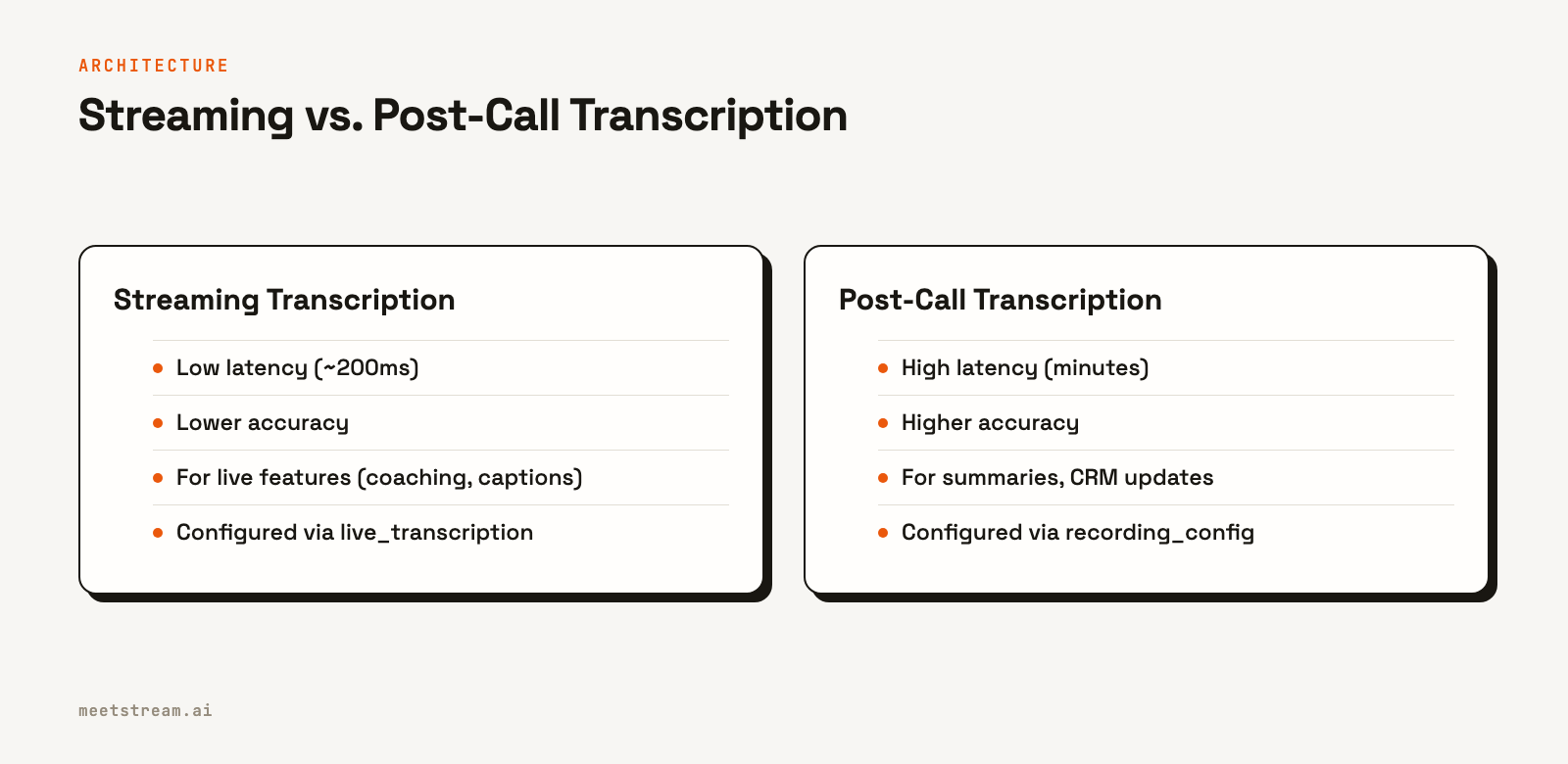
Many applications use a hybrid approach. They use streaming transcripts for live, in-meeting features and then replace them with the more accurate post-call transcript for analysis and record-keeping.
How to Get a Post-Call Transcript with Diarization
To get a high-accuracy transcript with speaker labels after a meeting, you configure a transcription provider when you create the bot. Here’s how it works with the MeetStream API.
You make a single `POST` request to the `/bots/create_bot` endpoint. In the request body, you specify the `meeting_link`, a `bot_name`, your `callback_url` for webhooks, and the `recording_config`. The `provider` object within `recording_config` is where you select and configure your speech-to-text engine, such as `meetstream`, `deepgram`, or `assemblyai`.
curl -X POST "https://api.meetstream.ai/api/v1/bots/create_bot" \
  -H "Authorization: Token <YOUR_API_KEY>" \
  -H "Content-Type: application/json" \
  -d '{
    "meeting_link": "https://meet.google.com/abc-defg-hij",
    "bot_name": "Notetaker",
    "callback_url": "https://your-app.com/webhooks/meetstream",
    "recording_config": {
      "transcript": {
        "provider": {
          "assemblyai": {
            "api_key": "YOUR_ASSEMBLYAI_KEY",
            "speaker_labels": true
          }
        }
      }
    }
  }'
The API call returns a `bot_id` and a `transcript_id`. Store these IDs in your database. Once the bot leaves the meeting and the audio is processed, MeetStream sends a `transcription.processed` event to your `callback_url`. Your webhook handler should then use the stored `transcript_id` to fetch the final result from the `GET /api/v1/transcript/{transcript_id}/get_transcript` endpoint.
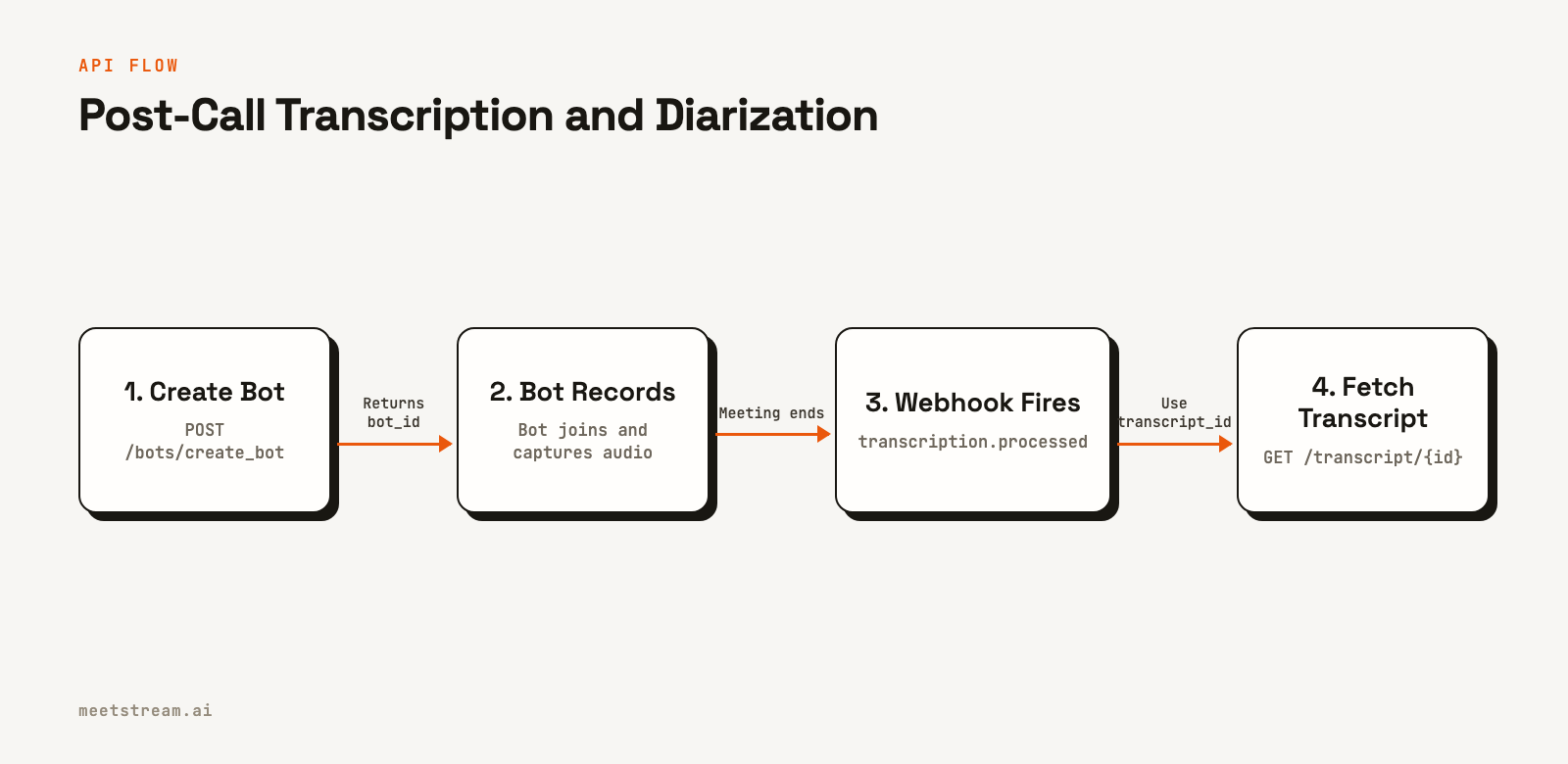
Here is a simple Python example of a webhook handler that fetches the transcript.
import requests
import os

# Store these IDs when you create the bot
BOT_DATA = {} # e.g., { "bot_id_123": "transcript_id_456" }

def fetch_transcript(transcript_id: str) -> dict:
    url = f"https://api.meetstream.ai/api/v1/transcript/{transcript_id}/get_transcript"
    headers = {"Authorization": f"Token {os.environ['MEETSTREAM_API_KEY']}"}
    response = requests.get(url, headers=headers)
    response.raise_for_status()
    return response.json()

# In your webhook handler (e.g., a Flask route)
def handle_meetstream_webhook(payload: dict):
    if payload.get("bot_event") == "transcription.processed":
        bot_id = payload["bot_id"]
        transcript_id = BOT_DATA.get(bot_id)
        if transcript_id:
            transcript = fetch_transcript(transcript_id)
            # The transcript is a list of speaker-labeled segments
            for segment in transcript:
                print(f"{segment['speaker']}: {segment['transcript']}")
    return {"status": "received"}
How to Get a Real-Time Transcript with Diarization
For live features, you need a stream of transcript data. You can configure this by including the `live_transcription_required` object in your `create_bot` request. You provide a `webhook_url` where MeetStream will `POST` transcript segments as they are generated.
curl -X POST "https://api.meetstream.ai/api/v1/bots/create_bot" \
  -H "Authorization: Token <YOUR_API_KEY>" \
  -H "Content-Type: application/json" \
  -d '{
    "meeting_link": "https://meet.google.com/abc-defg-hij",
    "bot_name": "Live Assistant",
    "live_transcription_required": {
      "webhook_url": "https://your-app.com/webhooks/live-transcript",
      "provider": {
        "deepgram_streaming": {
          "api_key": "YOUR_DEEPGRAM_KEY",
          "model": "nova-2",
          "diarize": true
        }
      }
    }
  }'
Your webhook endpoint will receive a continuous stream of `POST` requests, each containing a JSON payload with the latest text. The payload includes the `speakerName`, the full `transcript` for the current utterance, and a list of individual `words` with timing and confidence scores. Your handler should respond with a `2xx` status code immediately and process the payload asynchronously, so it keeps up with the stream of segments.
from flask import Flask, request, jsonify

app = Flask(__name__)

@app.route('/webhooks/live-transcript', methods=['POST'])
def handle_live_transcript():
    payload = request.json

    # Example: Print the live, attributed transcript segment
    speaker = payload.get("speakerName", "Unknown")
    text = payload.get("transcript", "")

    if text:
        print(f"LIVE [{speaker}]: {text}")
        # Here you would push to a WebSocket, trigger an alert, etc.

    # Acknowledge receipt immediately
    return jsonify({"received": True}), 200
Practical Ways to Improve Transcription Accuracy
Beyond choosing a provider, you can take steps to improve the accuracy of your meeting transcripts.
One of the most effective methods is providing a list of custom vocabulary. If your users frequently discuss specific product names, technical terms, or acronyms, you can supply these to the transcription model. This significantly reduces errors on domain-specific words. For example, with AssemblyAI, you can use the `word_boost` parameter.
"provider": {
  "assemblyai": {
    "api_key": "...",
    "speaker_labels": true,
    "word_boost": [
      "MeetStream", "MIA Agent", "WebRTC", "diarization"
    ]
  }
}
Another factor is language specification. While some providers offer automatic language detection, it can add latency and is not always accurate for short segments of speech. If you know the primary language of the meeting, always specify it explicitly in the provider configuration. This helps the model perform better and avoids potential misidentification.
How MeetStream Fits In
MeetStream provides a single, unified API to deploy bots and AI agents into Zoom, Google Meet, and Microsoft Teams. The platform handles the complexities of audio and video capture, allowing you to focus on your application's logic. MeetStream's in-house transcription engine is built in, and the API abstracts away the differences between providers, so you can switch to Deepgram, AssemblyAI, Sarvam or JigsawStack with your own provider keys, or to the meeting's own captions, by changing a single configuration parameter, without rewriting your integration.
Whether you need a post-call transcript for analysis or a real-time audio stream for a live agent, the integration pattern is the same. This lets you experiment with different providers and architectures to find the best fit for your product. You can find all provider options in the diarization documentation.
Conclusion
Using a speech-to-text API for meetings requires choosing between a low-latency streaming architecture for live features and a high-accuracy post-call architecture for analysis. The best choice depends on your product's needs. By providing custom vocabulary and explicitly setting the language, you can further improve the quality of your transcripts. A platform like MeetStream simplifies this process by providing a single API for capturing audio and configuring multiple transcription providers across all major meeting platforms. See the full API reference at docs.meetstream.ai.
Related guides
Frequently Asked Questions
What is the difference between streaming and post-call speech-to-text for meetings?
Streaming transcription provides text in near real-time, which is necessary for live features like captions. Post-call transcription processes the entire recording after the meeting for higher accuracy, making it better for summaries and analysis.
How does speaker diarization work in meeting transcription?
Speaker diarization analyzes voice characteristics like pitch and cadence to create a unique profile for each speaker. It then assigns labels like `SPEAKER_0` and `SPEAKER_1` to segments of the transcript, allowing you to know who said what.
Which speech-to-text provider is most accurate for sales call transcription?
Accuracy depends heavily on the specific audio and vocabulary. The best approach is to test multiple providers like AssemblyAI and Deepgram on a sample of your own call recordings to see which performs best for your specific domain and use case.
How do I handle multilingual meetings in transcription?
Some providers offer automatic language detection, which can identify the language spoken. For the best results, if the language is known beforehand, you should explicitly specify it in the API request to avoid potential errors and reduce latency.
What is a common Python integration pattern for a meeting speech-to-text API?
A common pattern is to call a `create_bot` endpoint with a webhook URL. When the transcript is ready, your webhook receives an event. Your code then uses an ID from that event or the initial call to fetch the final JSON transcript via a second API call.

