
Which Meeting Recording API Has the Best Transcript Accuracy?

The most accurate meeting transcripts come from clean, per-speaker audio, because the engine no longer has to untangle crosstalk. MeetStream records per-participant audio on Zoom, Google Meet and Microsoft Teams and lets you choose the engine per bot: its own in-house engine, or Deepgram, AssemblyAI, JigsawStack or Sarvam with your own provider keys, or the meeting's captions.
MeetStream is an agent-first platform that provides this capability. Our API deploys a bot as an active participant into Zoom, Google Meet, or Microsoft Teams. This bot captures audio streams and makes them available to your application, allowing you to feed clean, single-speaker audio into your chosen transcription engine. This includes our own in-house model or one of several integrated third-party providers.
Many products built on meeting intelligence hit a wall when transcription that worked in a demo fails in production. A sales call has background noise, an engineering standup has ten speakers, or a customer has a strong accent, and the resulting transcript has enough errors to make downstream summaries unusable. Getting meeting transcription right is about managing the entire audio pipeline, not just picking a vendor.
The good news is that modern transcription providers like Deepgram and AssemblyAI are very effective on clean audio. The challenge is that production audio is rarely clean. This guide explains how to close that gap by choosing the right provider, configuring your audio pipeline correctly, and implementing a complete workflow for post-call transcription.
Which Transcription Provider Should You Use?
The transcription market offers several strong, well-differentiated options. Understanding their specific strengths helps you make the right architectural choice for your use case. MeetStream integrates with all of them through a single API.
MeetStream In-House is our own transcription engine, available as a cost-effective add-on. It provides a solid, general-purpose model that is a good default for applications that need reliable transcription without the complexity of managing multiple third-party accounts.
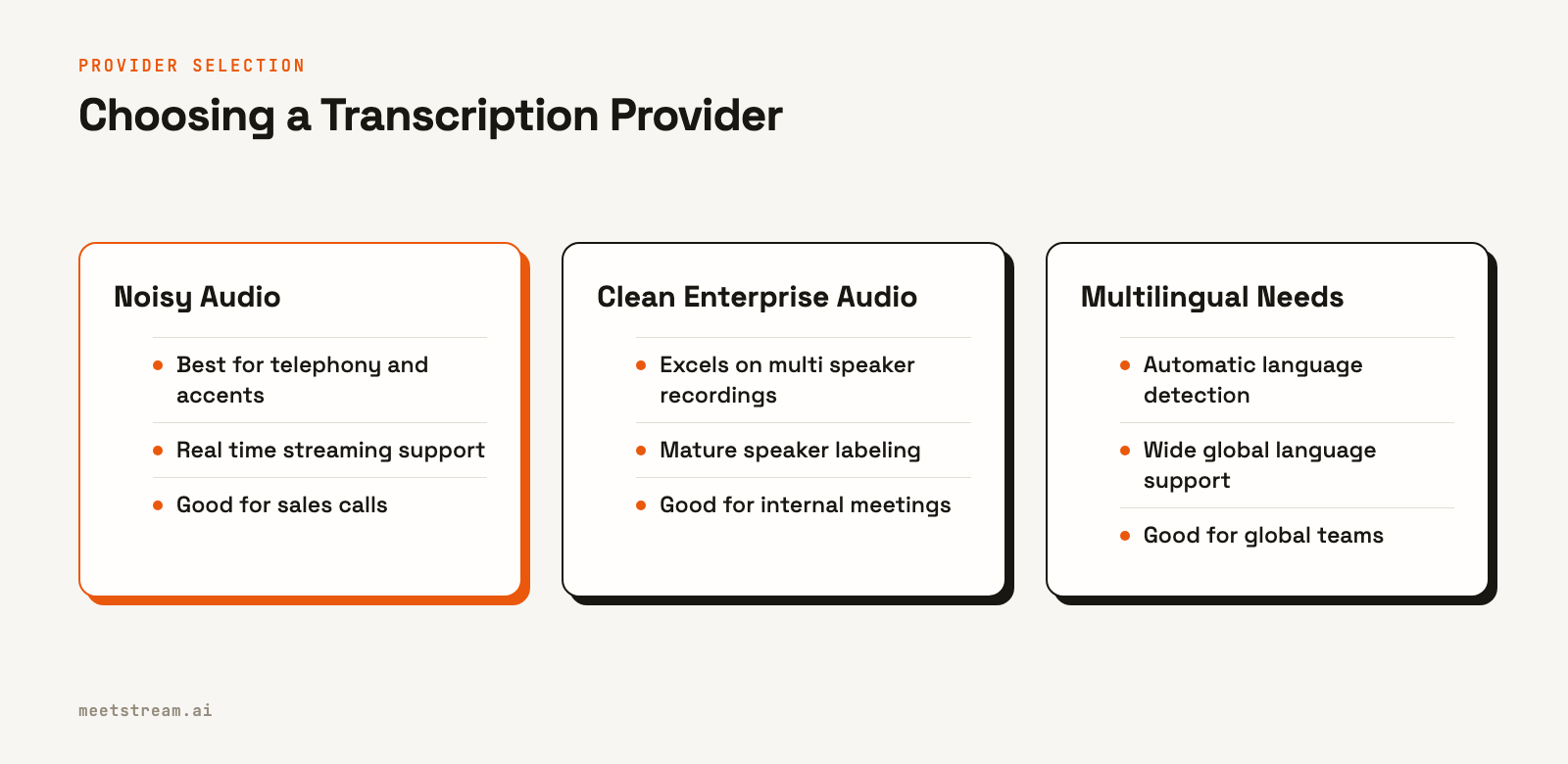
Deepgram Nova-2 is a strong choice for noisy, real-world audio. It was trained on a large volume of telephony and call center data, so it handles degraded audio, strong accents, and variable quality better than many alternatives. It also offers a real-time streaming model.
AssemblyAI Universal-1 produces excellent results on clean, multi-speaker recordings from enterprise environments. Its speaker labeling is mature, and its utterance-level transcript format is easy to parse. It is often preferred for internal meetings where participants use quality headsets.
JigsawStack fills a specific niche for language diversity. Its automatic language detection and broad support make it a good option for global teams where the meeting language is uncertain or participants might switch between languages.
Native Meeting Captions use the platform’s own speech recognition (e.g., Zoom's live captions). Accuracy varies by platform and is generally lower than dedicated providers, but it can be a useful option when data residency rules prevent using an external service.
Provider Comparison at a Glance
| Provider | Best For | Streaming Support | Speaker Labels | Language Range |
|---|---|---|---|---|
| MeetStream | Cost-effective default | Yes | Yes | Auto-detected |
| Deepgram | Noisy audio, accents | Yes | Yes | European + Asian |
| AssemblyAI | Clean enterprise meetings | Yes | Yes | European |
| JigsawStack | Multilingual, auto-detect | No | Yes | Wide global range |
| Meeting Captions | Data residency constraints | Yes (native) | No | Platform-dependent |
How Audio Quality Determines Accuracy
Your choice of provider matters less than the quality of the audio you send it. The best engine in the world cannot reliably transcribe audio with a low signal-to-noise ratio (SNR). Before optimizing your provider, you need to understand the audio quality your users actually produce.
The main factors are microphone type, background noise, and speaker overlap. The single highest-impact improvement you can make is to move from a mixed-channel recording to per-participant audio streams. This eliminates speaker overlap, which is a primary source of transcription errors. MeetStream provides per-participant audio from all supported platforms.
This works the same way on Zoom, Google Meet and Microsoft Teams: each participant's audio arrives as its own stream, the best input for accurate multi-speaker transcription.
Selecting a Provider for Your Scenario
There is no single best provider. The optimal choice depends on your specific use case, audio characteristics, and language needs. Here is a simple decision framework:
- If you need a reliable, integrated, and cost-effective option, use the MeetStream provider.
- If your users are in noisy environments or on phones, start with Deepgram.
- If your meetings are internal enterprise calls with good audio, start with AssemblyAI.
- If your users span multiple languages, use JigsawStack.
- If accuracy is critical, run a sample of your own recordings through multiple providers to measure the word error rate (WER) and pick the winner for your specific audio.
API Configuration for Each Provider
You can select and configure your transcription provider with each API call to create a bot. This allows you to dynamically route meetings to different providers based on the use case. The configuration is passed inside the recording_config object.
import requests

API_KEY = "YOUR_API_KEY"
BASE_URL = "https://api.meetstream.ai/api/v1"

def create_transcription_bot(meeting_link: str, transcript_config: dict, bot_name: str = "Transcriber") -> dict:
    """Creates a MeetStream bot with a specific transcription configuration."""
    response = requests.post(
        f"{BASE_URL}/bots/create_bot",
        json={
            "meeting_link": meeting_link,
            "bot_name": bot_name,
            "callback_url": "https://your-app.com/webhooks/meetstream",
            "recording_config": {
                "transcript": transcript_config
            }
        },
        headers={"Authorization": f"Token {API_KEY}"}
    )
    response.raise_for_status()
    # Returns bot_id and transcript_id for later use
    return response.json()

# Config A: Deepgram with diarization for noisy audio
deepgram_config = {
    "provider": {"deepgram": {"model": "nova-2", "diarize": True}}
}

# Config B: AssemblyAI with speaker labels for clean audio
assemblyai_config = {
    "provider": {"assemblyai": {"speech_model": "universal", "speaker_labels": True}}
}

# Config C: MeetStream's in-house engine
meetstream_config = {
    "provider": {"meetstream": {}}
}

# Example: Create a bot using the Deepgram configuration
bot_data = create_transcription_bot(
    meeting_link="https://meet.google.com/abc-defg-hij",
    transcript_config=deepgram_config,
    bot_name="Sales Call Recorder"
)
print(f"Bot created: {bot_data['bot_id']}. Transcript ID: {bot_data['transcript_id']}")
# You must store this bot_data to map bot_id in webhooks to the correct transcript_id
The Full Post-Call Workflow
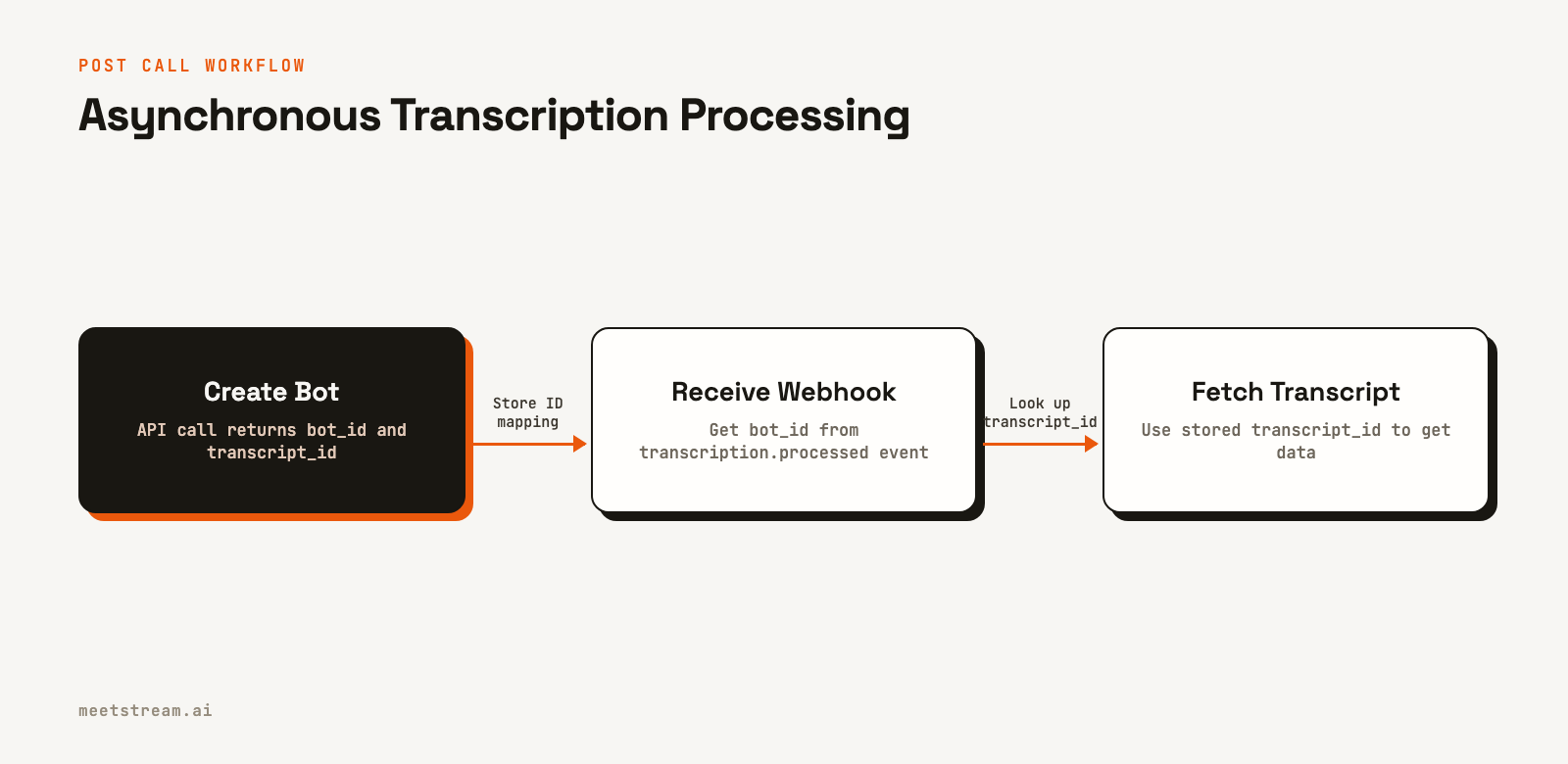
A reliable transcription workflow requires handling asynchronous events. When you create a bot, you get a bot_id and a transcript_id. You should store this mapping. MeetStream will send webhook events to your server as the bot moves through its lifecycle. The final transcript is ready only after the transcription.processed event arrives.
from flask import Flask, request, jsonify
import requests
import os

app = Flask(__name__)
API_KEY = os.environ.get("MEETSTREAM_API_KEY")

# In a real application, use a database (e.g., Redis, PostgreSQL)
# For this example, we'll use a simple in-memory dictionary
BOT_SESSIONS = {}

# Assume create_transcription_bot from the previous example is called
# and the result is stored in BOT_SESSIONS
# e.g., BOT_SESSIONS[bot_data['bot_id']] = bot_data['transcript_id']

@app.route("/webhooks/meetstream", methods=["POST"])
def handle_meetstream_webhook():
    payload = request.json
    event_type = payload.get("bot_event")
    bot_id = payload.get("bot_id")

    if not bot_id:
        return "Invalid payload", 400

    print(f"Received event '{event_type}' for bot '{bot_id}'")

    if event_type == "transcription.processed":
        # Look up the transcript_id you stored when creating the bot
        transcript_id = BOT_SESSIONS.get(bot_id)
        if transcript_id:
            print(f"Transcript is ready for bot {bot_id}. Fetching transcript {transcript_id}.")
            fetch_and_process_transcript(transcript_id)
        else:
            print(f"Error: transcript_id not found for bot {bot_id}")

    # Acknowledge the webhook quickly
    return jsonify({"status": "received"}), 200

def fetch_and_process_transcript(transcript_id: str):
    """Fetches a completed transcript by its ID."""
    url = f"https://api.meetstream.ai/api/v1/transcript/{transcript_id}/get_transcript"
    headers = {"Authorization": f"Token {API_KEY}"}

    try:
        response = requests.get(url, headers=headers)
        response.raise_for_status()
        transcript_data = response.json()

        # Your logic to process the transcript goes here
        print(f"Successfully fetched and processed transcript {transcript_id}")
        # For example, save to a database or send to an NLP model

    except requests.exceptions.RequestException as e:
        print(f"Failed to fetch transcript {transcript_id}: {e}")
This example shows the correct flow: store the transcript_id from the initial API response, then use the bot_id in the webhook to look up the correct transcript to fetch. For a guide on building this out, see our tutorial on a post-call transcription bot.
How MeetStream Provides Accurate Transcription
MeetStream is designed to be the infrastructure layer for building AI meeting agents and intelligence tools. While we offer our own transcription, our primary goal is to give you the highest quality audio so you can get the best possible results from any provider.
Our Meeting Transcription API handles the complexity of joining calls, capturing audio, and routing it for processing. By providing per-participant streams and a choice of top-tier engines, we help you build products on top of transcripts you can trust. This lets you focus on your application's unique features, not on managing brittle audio infrastructure.
See the full API reference at docs.meetstream.ai.
Frequently Asked Questions
What is the best API for sales call transcription?
Deepgram is often the best starting point for sales calls due to its strong performance on telephony audio and noisy environments. However, it is always best to benchmark it against other providers like AssemblyAI using your own call recordings to find the optimal choice for your specific audio profile.
How does a meeting bot API compare to building a custom solution?
Using a meeting bot API is significantly faster and more reliable than building a custom pipeline with headless browsers. A managed API handles platform updates, authentication, and audio capture complexities, saving months of engineering effort and ongoing maintenance.
Can I use a different transcription provider for each meeting?
Yes. The MeetStream API allows you to specify the transcription provider and its configuration in each create_bot request. This lets you build routing logic to select the best provider based on meeting type, participant count, or other metadata available at call time.
What is a realistic transcription accuracy to expect at scale?
Across a large volume of meetings, expect a distribution of accuracy. A good target is to have the majority of your calls achieve a word error rate under 15%. A small percentage will be very high quality (under 5% WER), while a tail of noisy, complex calls may exceed 25% WER.
Does transcription work the same for Zoom, Meet, and Teams?
The MeetStream API abstracts the differences, so your integration code is the same for all platforms. You provide a meeting link, and the bot handles the platform-specific joining and capture process. The only difference is a one-time setup for a Zoom Meeting Bot API, which is not required for Google Meet or Teams.


