
AI Meeting Assistant API: Build Your Own

You can build an AI meeting assistant by using an API to send a bot into online meetings on platforms like Zoom, Google Meet, and Microsoft Teams. The bot captures data, such as real-time audio streams or post-call transcripts with speaker labels. This data then becomes the input for your custom AI logic, allowing you to create features for summarization, analysis, or agent interaction.
This approach treats the assistant as an active participant that can hear, speak, and act, powered by a single Meeting Bot API. When you shift from buying a pre-packaged tool to building your own assistant, the features that matter change. A builder cares about the quality of the API surface, the reliability of webhooks, and the ability to plug in a specific transcription provider or push data to custom storage.
This article covers what defines a well-built AI meeting assistant from a developer's perspective. We will look at the technical capabilities required, the architecture behind them, and what the implementation looks like when building with an API.
The Architecture of an AI Meeting Assistant
A complete AI meeting assistant has four capability layers. Each layer builds on the previous one, and the quality of the foundation determines the quality of everything built on top of it. Building your own means you control the implementation of each layer.
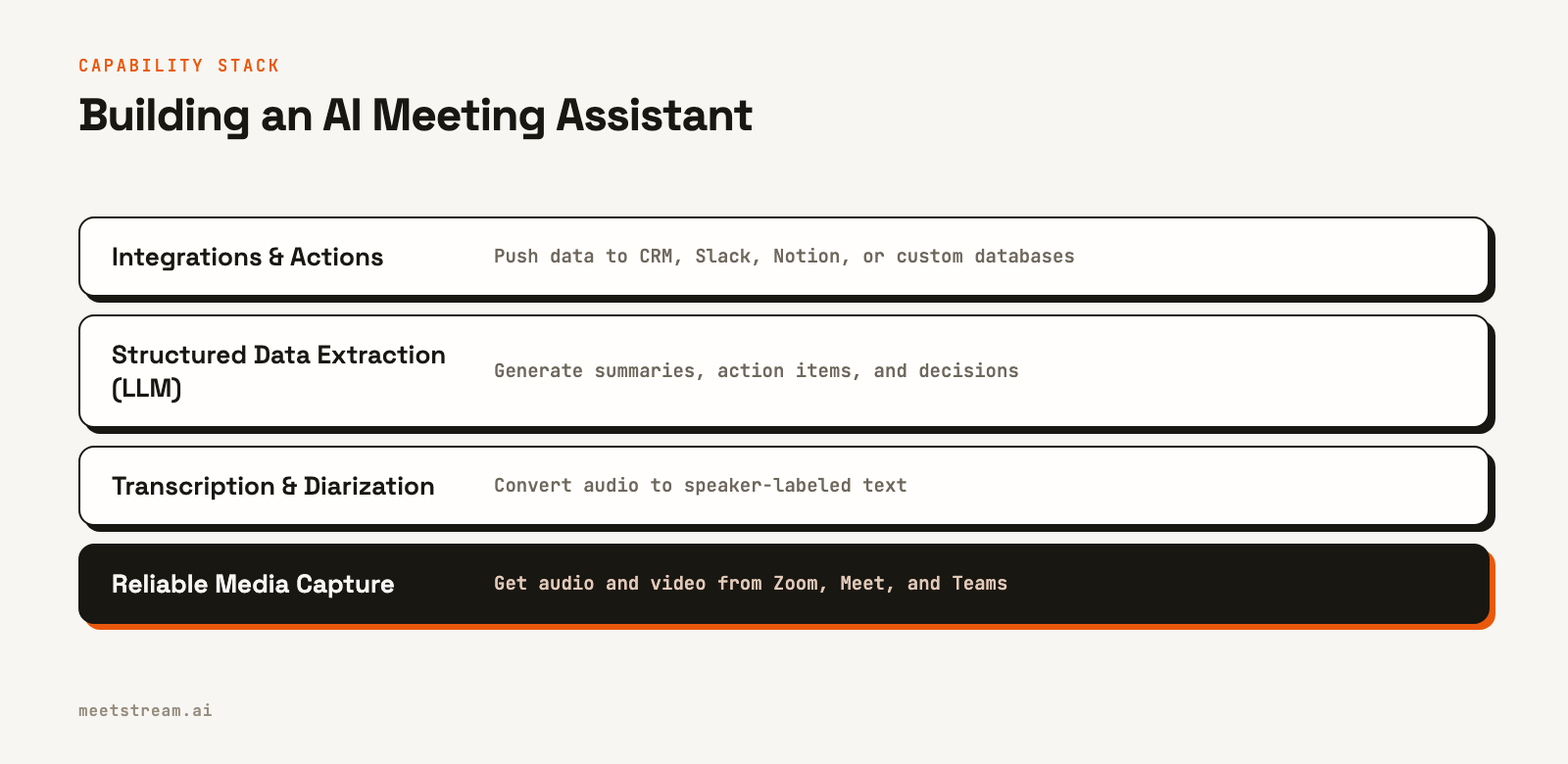
Foundational Layer: Transcription and Diarization
Transcription is the bedrock of any meeting assistant. The accuracy, measured by Word Error Rate (WER), varies based on the provider, audio quality, and speaker accents. For developers, the ability to choose a transcription provider is a key architectural decision. Different models have distinct advantages. For example, some are optimized for low-latency streaming, while others excel at speaker diarization in post-call batch processing.
Raw text is not enough. Speaker diarization maps each word to a specific participant, which is essential for understanding who said what. Without it, you cannot track speaking time, attribute action items, or analyze conversational dynamics. A meeting bot API like MeetStream gives you a separate audio stream for each participant on Zoom, Google Meet and Microsoft Teams, which yields the highest accuracy.
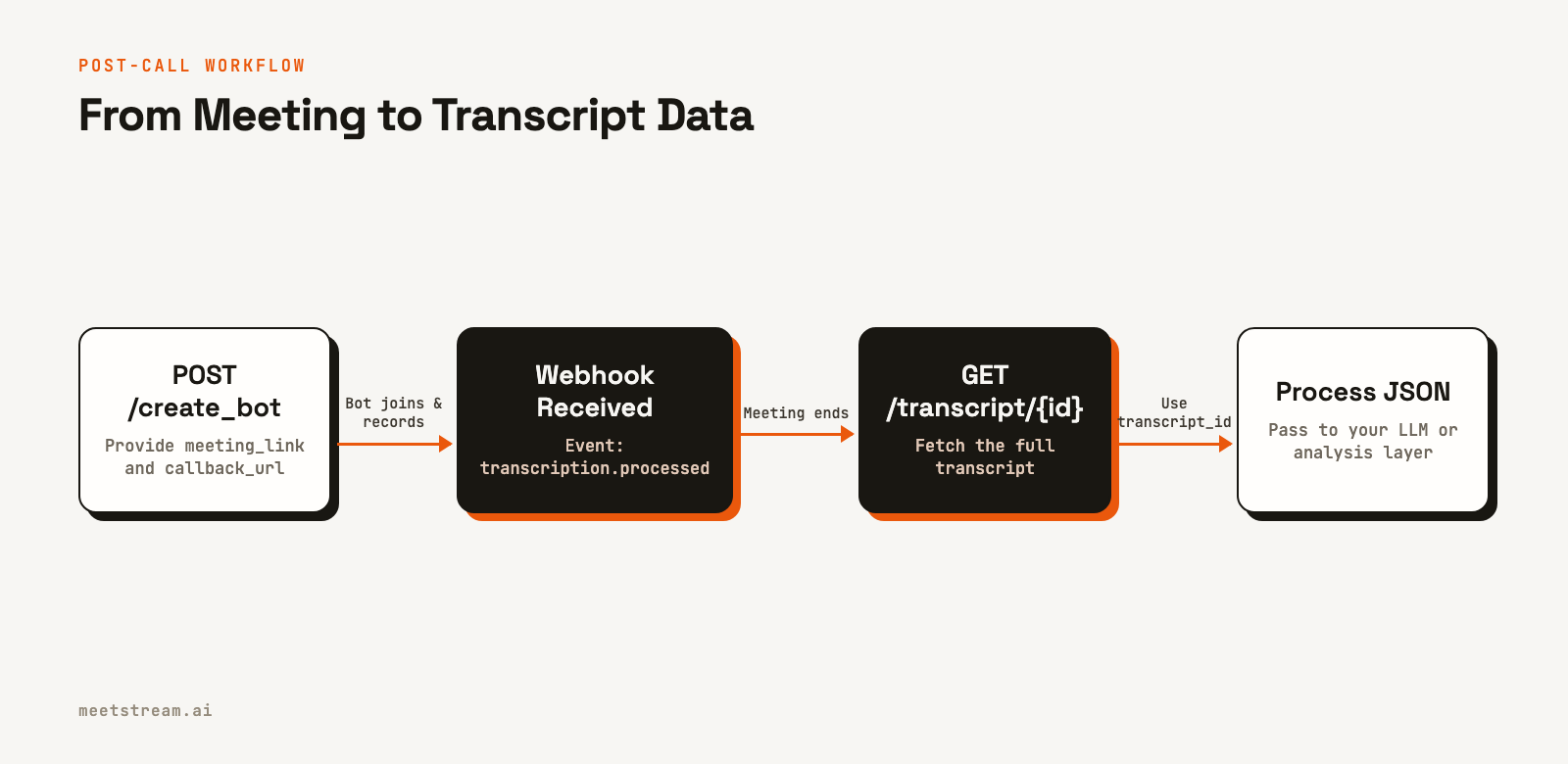
When building, your meeting bot API should deliver a structured transcript with speaker labels. In a post-call workflow, you receive a webhook notifying you that the transcript is ready, then you fetch the complete, speaker-attributed data from an API endpoint. This gives you a clean JSON object to feed into your analysis pipeline.
Extraction and Analysis with LLMs
This layer is where raw transcript data becomes structured intelligence. Most consumer AI assistants focus here, extracting action items and generating summaries. The technical implementation typically involves passing the full transcript to a Large Language Model (LLM) with a prompt engineered for structured output.
The workflow for post-call analysis is straightforward:
- Send a
POSTrequest to create a bot, providing themeeting_link, acallback_urlfor webhooks, and your chosenrecording_config. - Store the
bot_idandtranscript_idfrom the API response. - Your webhook handler listens for events. When the
transcription.processedevent arrives, it signals that the data is ready. - Make a
GETrequest to the transcript endpoint using the storedtranscript_idto fetch the full, speaker-labeled transcript. - Pass this transcript to an LLM to extract a JSON object containing the summary, action items, decisions, and topics discussed.
This pattern gives you full control over the prompt, the model you use, and the output schema, which is a significant advantage over fixed, pre-packaged tools.
Integrations and Data Routing
For builders, integrations are not a fixed list of connectors but a flexible system of webhook handlers. Once your bot delivers the meeting data, you can write it to any downstream system: a CRM, a Slack channel, a Notion database, or your own application's database. This architecture is more adaptable than a pre-built tool with a limited set of integrations.
A useful pattern is to use a custom_attributes field when creating the bot. You can pass metadata like a deal ID or customer account number in the initial API call. This data is then echoed in every webhook payload for that session, allowing your handler to route the information to the correct record in your system without needing an extra lookup.
curl -X POST "https://api.meetstream.ai/api/v1/bots/create_bot" \
  -H "Authorization: Token <YOUR_API_KEY>" \
  -H "Content-Type: application/json" \
  -d '{
    "meeting_link": "<YOUR_MEETING_LINK>",
    "bot_name": "Sales Assistant",
    "callback_url": "https://your-app.com/webhooks/meetstream",
    "custom_attributes": {
      "crm_deal_id": "deal_12345",
      "account_id": "acct_67890"
    },
    "recording_config": {
      "transcript": {
        "provider": {
          "deepgram": {}
        }
      }
    }
  }'
Real-Time Features and Live Agents
Live features like in-meeting coaching or interactive AI voice agents require a different technical approach. Instead of post-call batch processing, they depend on streaming audio with low latency. This is typically handled by connecting to a WebSocket that delivers raw PCM audio from the meeting in near real-time.
Your application can then run this audio through a streaming transcription service. The resulting text stream, which often includes flags like word_is_final and end_of_turn, can be used to trigger real-time alerts or generate responses from an AI agent. Building your analysis on final words, rather than partial transcripts, is important for avoiding false positives and maintaining user trust.
How MeetStream Fits the Builder Architecture
MeetStream provides the infrastructure layer for building an AI meeting assistant. We handle the complexity of getting reliable, speaker-attributed media streams from Zoom, Google Meet, and Teams through a single API. We have processed over 1,000,000 meeting minutes, giving us practical experience in managing the edge cases of different meeting platforms.
A single API call creates a bot that can join a meeting to record, stream audio, and deliver transcript data. You can configure different transcription providers like Deepgram, AssemblyAI, or use native platform captions. The API supports both post-call webhooks for analysis and real-time WebSocket connections for live features. This lets you focus on building your assistant's unique logic, not on platform-specific bot infrastructure.
Getting Started Building Your Assistant
The minimal path to a working AI meeting assistant involves creating a bot for a meeting, setting a callback_url, and handling the transcription.processed webhook. From there, you fetch the transcript, pass it to your LLM, and push the structured output where it needs to go. This core pipeline can be implemented quickly, letting you focus your engineering time on the features that differentiate your product.
See the full API reference at docs.meetstream.ai.
Related guides
Frequently Asked Questions
What features should an AI meeting assistant include?
A complete AI meeting assistant needs accurate transcription with speaker diarization, summary and action item extraction, and integrations with other tools like a CRM. For developers, key features include configurable transcription providers and structured data delivery via webhooks and APIs.
How does an AI meeting assistant extract action items?
Modern assistants use LLMs to extract action items. A full, speaker-labeled transcript is sent to a language model with a prompt designed to produce a structured JSON output. This method is more effective than simple keyword matching for identifying tasks, owners, and deadlines from natural conversation.
What is the difference between AI assistant tools and a meeting bot API?
Packaged AI assistant tools offer a fixed set of features and integrations. Building with a meeting bot API provides flexibility, allowing you to choose your transcription provider, build custom integrations via webhooks, and maintain ownership of your data and its retention policies.
How do real-time AI meeting assistants work?
Real-time features are powered by streaming audio over a WebSocket, not post-call files. The bot sends raw audio from the meeting to your application, which uses a streaming transcription service to get live text. This text can then trigger in-meeting alerts, coaching tips, or agent responses.
Can I connect an AI meeting assistant to my own CRM?
Yes, when you build with an API. The API can send meeting data and transcripts to a webhook endpoint that you control. Your code can then process this data and push it to any system, including a custom CRM, database, or internal tool.


