
How to Store and Search Meeting Transcripts
Learn how to store and search meeting transcripts using structured segments, word timestamps, vector search, and retention controls in your application.

Your product captures every sales call, but six months in, no one can find the one where a customer asked about SOC 2. The transcripts exist. They sit in a database as a single blob of text per meeting, and the only way to search them is a LIKE '%soc 2%' query that misses "the compliance audit thing" entirely. The data is there, but retrieval is broken.
To store and search meeting transcripts effectively, you need a schema that preserves the transcript's structure and a search layer that matches on meaning, not just exact words. A transcript is not one string. It is an ordered list of speaker turns, each made of words with timestamps and confidence scores. Discarding that structure on insert is a permanent loss of detail.
This is a foundational part of building meeting intelligence. Any application can display a transcript. A useful one lets a user type "what did we promise about pricing" and get the exact 12-second clip from hundreds of calls.
In this article, we'll explore the transcript schema MeetStream returns, how to store it without losing segment and word structure, how to add embeddings for vector search, and how retention controls fit on top. Let's get started!
Why Flat Transcript Storage Fails
The first version of transcript storage is often a single text column. It works in a demo with three meetings. It breaks in production for reasons that are easy to predict and hard to fix later.
A flat string loses speaker attribution. Once you concatenate everyone's words into one block of text, you cannot answer "what did the customer say" without re-running the diarization you already paid for. We cover getting attribution right in our speaker diarization guide, and that work is lost the moment you flatten the transcript.
A flat string also loses time. No timestamps means no jumping to the 14:32 mark where an objection was raised, no clipping a 20-second highlight, and no aligning the transcript with the recording. Time is what makes a transcript a navigable artifact instead of a wall of text.
Finally, a flat string makes search shallow. Keyword search over one large text blob per meeting returns the whole meeting or nothing. You cannot rank the relevant 30 seconds above the 58 irrelevant minutes around it, because your smallest searchable unit is the entire call.
The Transcript Schema: Segments and Words
A durable storage schema for transcripts should be designed around the structure of the data returned by the API. A formatted post-call transcript from MeetStream is a JSON list of segment objects. Each object represents a speaker's turn and contains fields like speaker, transcript, start_time, end_time, and a words array.
Each object inside the words array is the most granular unit of data. It contains fields like word, punctuated_word, start, end, confidence, and speaker. This word-level array is the detail you do not want to lose. It is what lets you align text to audio, filter low-confidence tokens, and build clip boundaries that land on word edges instead of mid-syllable.
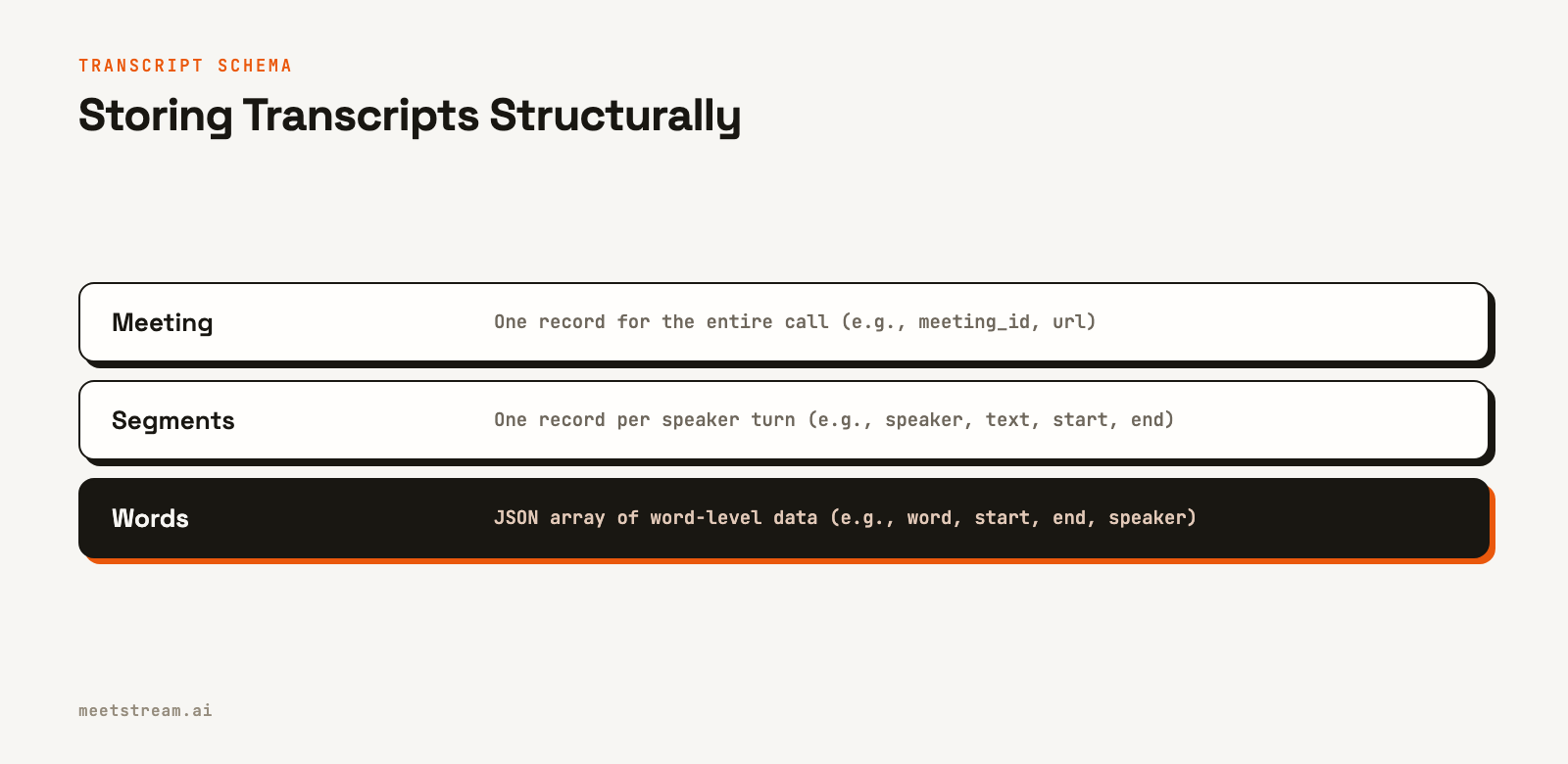
A clean relational shape mirrors this directly: a meetings table, a segments table with one row per speaker turn (with speaker, start, end, text, and a foreign key to the meeting), and a JSON column on the segments table to hold the words array. If you want to understand how these turns are identified from raw audio, our guides on speaker labels and names and detecting speaker changes cover the upstream process.
Capturing Transcripts with the MeetStream API
You get the structured transcript by sending a bot into a meeting. A single API call with a meeting link is all it takes. For a post-call transcript, you set a recording_config with a transcript provider and a callback_url for lifecycle webhooks.
curl -X POST "https://api.meetstream.ai/api/v1/bots/create_bot" \
  -H "Authorization: Token <YOUR_API_KEY>" \
  -H "Content-Type: application/json" \
  -d '{
    "meeting_link": "<YOUR_MEETING_LINK>",
    "bot_name": "Transcript Indexer",
    "recording_config": {
      "transcript": {
        "provider": {
          "deepgram": { "model": "nova-3", "language": "en", "punctuate": true, "diarize": true }
        }
      },
      "retention": { "type": "timed", "hours": 24 }
    },
    "callback_url": "https://your-app.com/webhooks/meetstream"
  }'
Store the bot_id and transcript_id returned for this post-call provider. You can also resolve transcript_id through GET /api/v1/bots/{bot_id}/detail. When the meeting ends and processing is complete, MeetStream sends a transcription.processed event to your callback_url. Check bot_event and transcript_status: "Success" in the webhook payload, then fetch the transcript using your stored transcript_id and begin storage and indexing.
For more on the API, the getting started guide covers the first bot creation, and our Python walkthrough shows an end-to-end example.
Storing Segments and Words Structurally
When the transcript is ready, fetch it and write it to your database in the structured format. The goal is one row per speaker turn, with the words array kept intact so no timing or attribution detail is lost.
import requests
import os
import json

# Store transcript_id from the create_bot response
transcript_id = "your-transcript-id"
api_key = os.environ["MEETSTREAM_API_KEY"]

# Fetch the transcript after receiving the 'transcription.processed' webhook
response = requests.get(
    f"https://api.meetstream.ai/api/v1/transcript/{transcript_id}/get_transcript",
    headers={"Authorization": f"Token {api_key}"},
    timeout=30
)
response.raise_for_status()
transcript_data = response.json() # This is a list of segment objects

def store_transcript(db_conn, meeting_id, segments):
    with db_conn.cursor() as cursor:
        for seg in segments:
            # Assumes a 'segments' table with a JSON or JSONB column for 'words_data'
            cursor.execute(
                """
                INSERT INTO segments (meeting_id, speaker, text, start_time, end_time, words_data)
                VALUES (%s, %s, %s, %s, %s, %s)
                """,
                (
                    meeting_id,
                    seg.get("speaker"),
                    seg.get("transcript"),
                    seg.get("start_time"),
                    seg.get("end_time"),
                    json.dumps(seg.get("words", []))
                )
            )
    db_conn.commit()

# Example usage:
# store_transcript(my_database_connection, "your-meeting-id", transcript_data)
This approach preserves all the necessary detail. With segments and words in place, a query like "show me everything the customer said in the last 5 minutes" can filter by meeting, speaker, and an overlapping time range: WHERE meeting_id = %s AND speaker = %s AND end_time > %s, where the final value is the meeting duration minus 300 seconds. Finding the exact moment someone said "pricing" is a lookup in the JSON data, not a full re-transcription.
Adding Embeddings for Vector Search
Structured storage enables exact-match and filtered search. To handle a query like "what did we say about the compliance audit" matching a turn that never used the word "compliance," you need a meaning-based search layer. This is done with embeddings and vector search.
The unit of text you embed is important. Embedding an entire meeting is too coarse, and a single word is too fine. The speaker turn, the segment you already store, is usually the right size. For very long turns, you can split them on sentence boundaries. Then, you embed each chunk and store the resulting vector alongside its segment metadata.
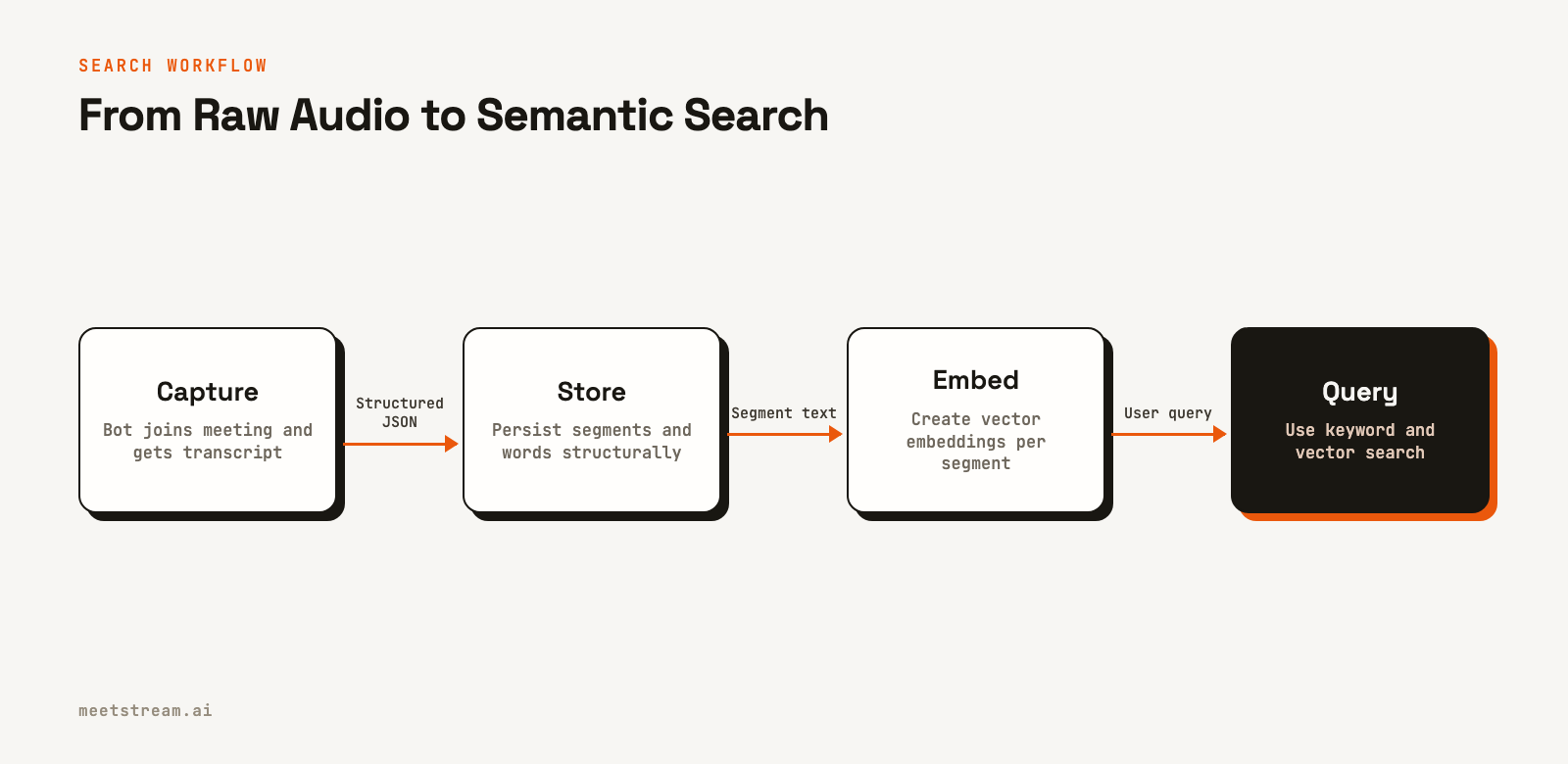
The following is adapter pseudocode: implement embed and upsert with your chosen SDK. Pass database rows with id, meeting_id, and text; those IDs are not fields in the raw transcript segments.
def index_segments_for_vector_search(vector_store, embedding_model, segments):
    for seg in segments:
        # Create a text chunk that includes the speaker for context
        chunk_text = f"{seg['speaker']}: {seg['text']}"
        vector = embedding_model.embed(chunk_text)

        # Upsert the vector with metadata for retrieval
        vector_store.upsert(
            id=seg["id"], # Use your database's segment ID
            vector=vector,
            metadata={
                "meeting_id": seg["meeting_id"],
                "speaker": seg["speaker"],
                "start": seg["start_time"],
                "end": seg["end_time"],
                "text": seg["text"],
            },
        )
By storing the segment text and timestamps in the vector metadata, you avoid a second database lookup at query time. You embed the user's question, find the nearest vectors, and you already have the speaker, timestamp, and meeting context needed to display the result. The best search experience often comes from combining both layers: keyword search for exact phrases and names, plus vector search for paraphrased intent. For example, pgvector documents combining vector search with PostgreSQL full-text search. Apply meeting or tenant access filters before returning results.
Scaling to a Large Transcript Archive
The schema above stays the same as the archive grows. When storage cost and search latency start to matter, three adjustments keep both under control.
Keep the full transcript in object storage, compressed. The database only needs the fields you search and filter on: segment text, speaker, timestamps and meeting metadata. Store the complete transcript JSON, with every word-level field, as a compressed file in object storage such as Amazon S3, and keep its path on the meeting row. Transcript JSON repeats the same keys for every word, so it compresses well. Load the file only when a user opens the full transcript or you need to re-index it.
import gzip
import json

def archive_transcript(s3_client, bucket, meeting_id, transcript):
    """Write the full transcript to S3 as gzipped JSON and return its key."""
    key = f"transcripts/{meeting_id}.json.gz"
    s3_client.put_object(
        Bucket=bucket,
        Key=key,
        Body=gzip.compress(json.dumps(transcript).encode("utf-8")),
        ContentType="application/json",
        ContentEncoding="gzip",
    )
    return key  # save this on the meeting row
If you configure custom object storage in the MeetStream dashboard, MeetStream writes new recordings and transcripts straight to your own Amazon S3, Cloudflare R2 or Alibaba Cloud OSS bucket, so the source files already live in storage you control.
Return context, not just the hit. A matching segment is easier to judge with the turns around it. Because every segment row has a start time, one more query for the same meeting, within a window of 30 seconds or so on each side of the match, gives the reader the surrounding dialogue without loading the whole transcript.
Move keyword search to a dedicated engine when the database slows down. PostgreSQL full-text search with a GIN index covers many products. When search latency climbs, index the segments in a search engine such as Elasticsearch or OpenSearch for fuzzy matching, highlighting and aggregations, and keep PostgreSQL as the system of record. The price is one more service to run and to keep in sync with your database.
Setting Retention and Handling Deletion
Storing transcripts is a data retention decision, not just an engineering one. This is especially true for products in sales, healthcare, or legal domains. Two controls are needed: retention at the source and deletion in your own datastore.
MeetStream lets you set a retention policy on the source data with the retention block inside recording_config. Setting {"type": "timed", "hours": 24} instructs MeetStream to delete its copy of the recording and transcript after 24 hours. When that deletion occurs, MeetStream sends a data_deletion webhook, which you can use for auditing. This makes your database the system of record.
In your own system, a deletion request must propagate to every place a transcript lives. That means the segment rows, the word-level data, and the vectors in your vector store. A leftover embedding can still leak information even after the source text is gone. For more on data security, see our guide to encrypting meeting data. A simple rule is to never store a transcript longer than you can explain to the person who was recorded.
How MeetStream Fits In
MeetStream is a meeting bot API for deploying bots and AI agents into Zoom, Google Meet, and Microsoft Teams. You provide a meeting link, and the platform handles the infrastructure for capturing audio and generating a structured transcript. This gives you the clean, searchable data this workflow requires: speaker-labeled segments, a words array per turn with per-word timestamps, and webhooks for lifecycle events.
The platform is built for developers creating applications on top of meetings. Post-call transcripts come from MeetStream's in-house engine, or from Deepgram, AssemblyAI, Sarvam or JigsawStack with your own provider keys. Live transcripts come from a streaming provider, and one request can run a streaming provider and a post-call provider together, so you get both. Retention is a simple configuration setting, so you control how long MeetStream holds any data. For platform-specific guides, see our articles on building a Google Meet bot, Zoom bot, or Teams bot.
Conclusion
Storing transcripts as flat text is a decision that creates problems later, when search returns nothing useful. To build a reliable system, keep the structure the transcription API provides: speaker-labeled segments with a words array, written on insert and never flattened. Add a two-layer search with keyword and vector indexes over per-turn chunks, and set a clear retention policy at the source. This turns "find the call where they asked about SOC 2" into a single, effective query across your entire meeting history.
Frequently Asked Questions
How should I store meeting transcripts for search?
Store them structurally, not as flat text. Use one database row per speaker turn, including the speaker, start and end timestamps, and the full text. Preserve the word-level data, including per-word timestamps and confidence scores, in a JSON column to retain maximum detail.
What is the best transcript schema?
A schema that mirrors the transcription API's response is best. This typically involves a parent meeting record, child segment records for each speaker turn, and the word-level data stored with each segment. This preserves the relationships between speakers, turns, and individual words with their timing.
How do I add semantic search to meeting transcripts?
Embed each speaker turn using an embedding model and store the resulting vector in a vector database. At search time, embed the user's query and retrieve the most similar vectors. Include segment metadata like speaker and timestamps with the vectors to provide context without extra lookups.
Should I embed whole transcripts or chunks?
You should embed chunks, not whole transcripts. A whole meeting is too large and general for a useful embedding. The speaker turn is a natural and effective chunk size. For very long turns, splitting by sentence can improve the relevance of search results.
Where should I keep the full transcript file?
Keep it compressed in object storage, with its path on the meeting row, and keep only the searchable fields in your database: one row per speaker turn with speaker, timestamps and text. The database stays small and fast, and the complete word-level transcript is still one read away.
How long should I keep meeting transcripts?
Keep transcripts only as long as necessary for your application's purpose, and be mindful of privacy and compliance. Use an API like MeetStream that allows you to set timed retention policies on the source data. This ensures the vendor deletes its copy automatically, leaving your own storage as the system of record.
Ready to put structured transcripts to work? Create your first MeetStream bot and build a searchable meeting archive.


