
Improve Transcription Accuracy in Noisy Meetings

Yes, most transcription engines can filter non-speech events like music, static, and background noise to improve accuracy. This is often called noise reduction or non-speech event filtering. Its effectiveness depends on the provider and the specific type of noise in the audio. For developers building AI products on top of meetings, however, relying on a provider's filtering is often not enough.
Your transcription pipeline works well in testing with clean audio. In production, a sales rep calls from a coffee shop, two people talk at once, and an engineer's connection drops packets. The accuracy of your meeting transcription API output plummets, and downstream features like summaries or agent actions become unreliable. This is a common failure mode we see from teams building on meeting audio, having processed over a million meeting minutes ourselves.
Reliable transcription is the sensory input for an effective AI agent. To improve transcription accuracy, you need to control the variables you can, from the audio source to the final text. This means selecting the right transcription provider, configuring it correctly, and pre-processing audio when possible. The most important practice is measuring performance with a metric like Word Error Rate (WER) so your decisions are based on data from your specific use case.
Let's walk through the factors you can control to get better results.
What Audio Quality Factors Affect Accuracy?
Speech-to-text models are sensitive to a few common types of audio degradation. Identifying which ones appear in your meetings helps you choose the right fix.
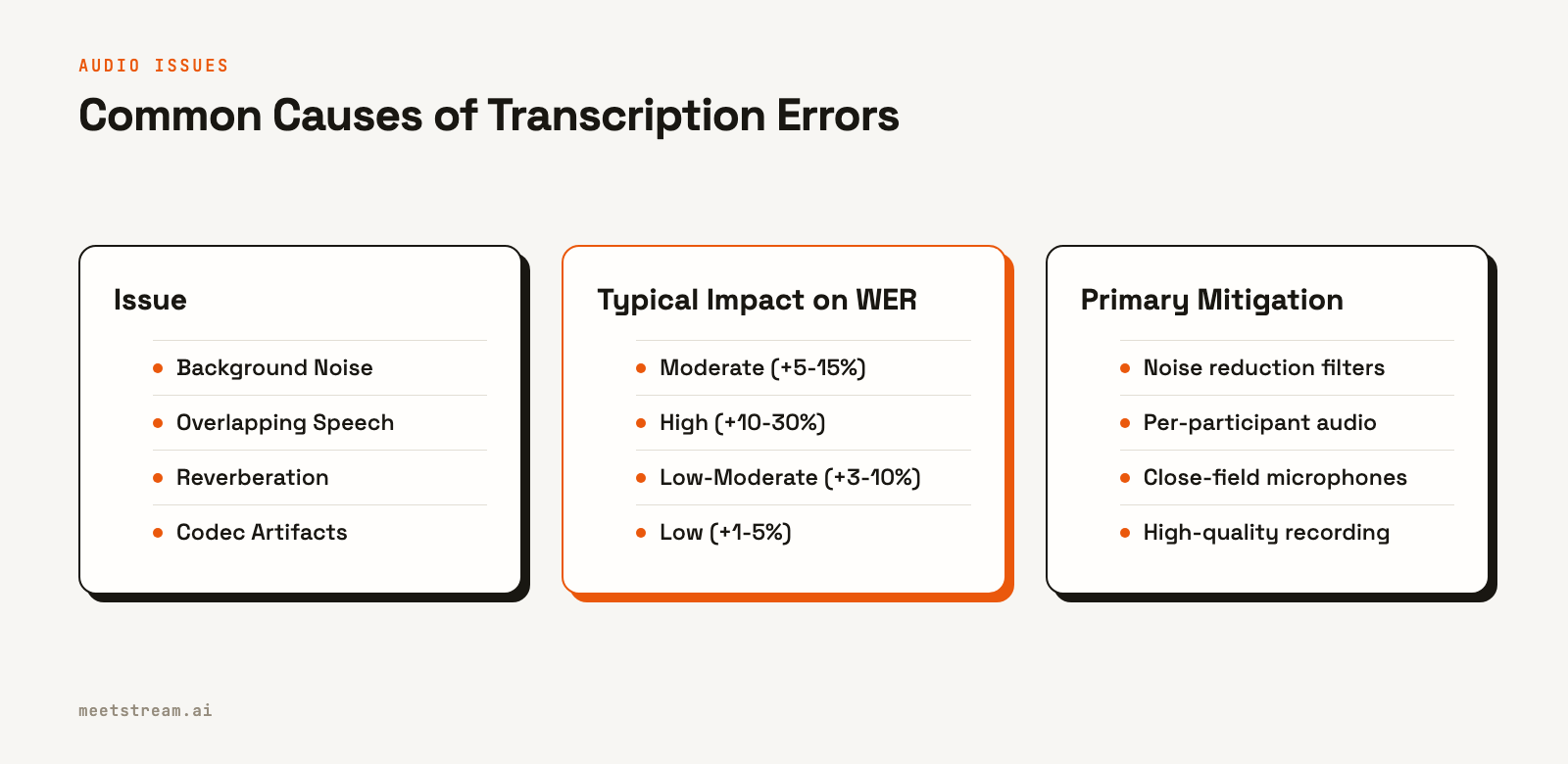
Background noise is the most frequent problem. Sounds like HVAC systems, traffic, or crowd noise reduce the Signal-to-Noise Ratio (SNR). Modern transcription models are trained with noise augmentation and can handle moderate degradation, but accuracy drops sharply when the SNR falls below 10 dB. This is determined by the participant's microphone and their physical environment.
Overlapping speech is more difficult for a model to process than background noise. When two voices are active on a single audio channel, the model struggles to decode the mixed phonemes. This is a primary cause of high WER in multi-participant calls. Getting clean, distinct audio for each speaker is critical for any application that needs to know who said what, especially for AI voice agents that must respond to specific people.
Far-field microphones, like those built into laptops or conference room speakerphones, introduce reverberation. This echo and increased background pickup can degrade quality compared to the clean signal from a close-field headset. If your users typically join from laptops in open-plan offices, your accuracy benchmarks must account for this.
Finally, VoIP codec compression from platforms like Zoom and Google Meet can introduce audio artifacts. Most models are trained on this type of compressed audio, so they handle it reasonably well, but it remains a source of potential errors compared to uncompressed, locally recorded audio.
Choosing a Transcription Provider for Noisy Audio
Different transcription providers have different strengths. The right choice depends on the kind of audio you typically process. Within MeetStream, you can use the in-house transcription engine, choose Deepgram, AssemblyAI, Sarvam or JigsawStack with your own provider keys, or use the native captions from the meeting platform itself.
| Provider | Recommended Model | Noise Robustness | Best For |
|---|---|---|---|
| Deepgram | nova-3 | High | Noisy environments, phone calls, mixed-quality audio |
| AssemblyAI | universal-2 | Medium-High | General meetings, good audio quality, multi-speaker |
| JigsawStack | auto language | Medium | Multilingual meetings, when language detection is needed |
| Meeting Captions | Platform native | Varies | Low-latency display, no extra processing |
For applications with significant background noise or inconsistent microphone quality, Deepgram's nova-3 model is a strong starting point. It was trained extensively on telephony data, which makes it resilient to real-world noise. AssemblyAI's universal-2 performs very well on cleaner audio and offers solid speaker diarization. For meetings with specialized vocabulary, like in legal or medical fields, both Deepgram and AssemblyAI offer custom vocabulary features that can significantly reduce WER for domain-specific terms.
Configuring Transcription in the MeetStream API
You select and configure your transcription provider in the recording_config object when you create a bot. The structure is important. You specify the provider as a key within the provider object, which allows for provider-specific parameters.
Here’s how to create a bot configured to use Deepgram's nova-3 model, which is optimized for noisy conditions. This request also includes a callback_url to receive webhook events about the bot's lifecycle and when the transcript is ready.
curl -X POST "https://api.meetstream.ai/api/v1/bots/create_bot" \
  -H "Authorization: Token <YOUR_API_KEY>" \
  -H "Content-Type: application/json" \
  -d '{
    "meeting_link": "https://meet.google.com/abc-defg-hij",
    "bot_name": "Notetaker",
    "callback_url": "https://your-app.com/webhooks/meetstream",
    "recording_config": {
      "transcript": {
        "provider": {
          "deepgram": {
            "model": "nova-3",
            "diarize": true
          }
        }
      }
    }
  }'
This API call instructs MeetStream to join the specified meeting and, after the call, process the audio using Deepgram. You can find detailed configuration options for all transcription providers in our documentation.
Pre-Processing Audio Before Transcription
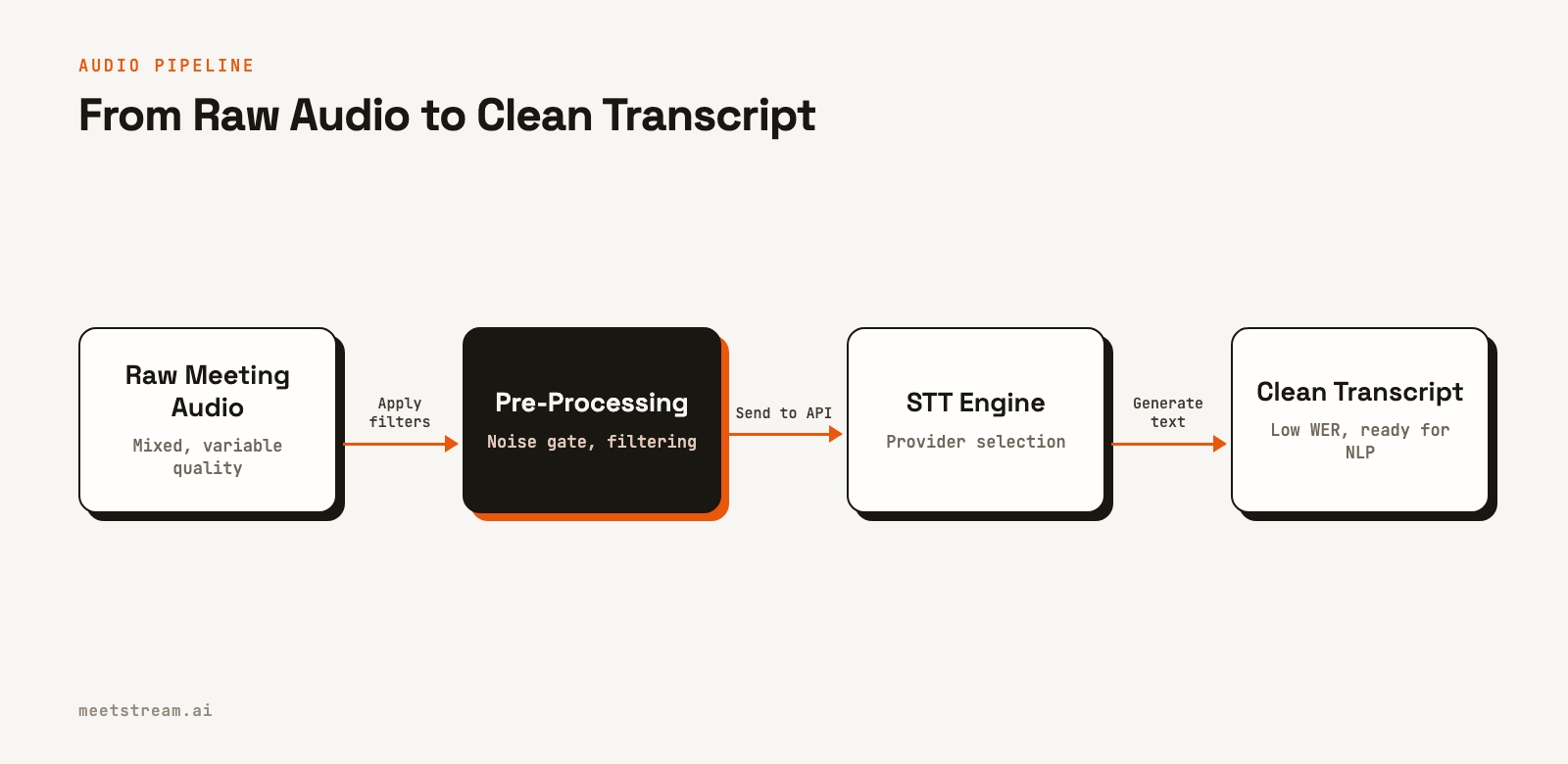
For developers who need maximum control, MeetStream can stream raw audio to your servers in real time. This allows you to apply your own pre-processing steps before sending the audio to a transcription service. The most effective techniques are noise gating, normalization, and high-pass filtering.
A noise gate attenuates audio that falls below a certain volume threshold, which is effective at removing continuous, low-level background noise. Normalization adjusts the audio to a consistent peak level, preventing quiet speakers from being lost. A high-pass filter removes low-frequency rumble below 80-100Hz, which contains no speech information but can confuse a transcription model.
Here are simple implementations for these filters using Python.
import numpy as np
from scipy.signal import butter, sosfilt

def apply_noise_gate(audio: np.ndarray, threshold_db: float = -40.0, sample_rate: int = 48000) -> np.ndarray:
    """Attenuates frames below a given dB threshold."""
    frame_size = int(sample_rate * 0.02) # 20ms frames
    output = audio.copy()
    for i in range(0, len(audio) - frame_size, frame_size):
        frame = audio[i:i + frame_size]
        rms = np.sqrt(np.mean(frame ** 2))
        db = 20 * np.log10(rms) if rms > 0 else -96.0
        if db < threshold_db:
            output[i:i + frame_size] *= 0.01 # Attenuate frame
    return output

def highpass_filter(audio: np.ndarray, cutoff_hz: float = 80.0, sample_rate: int = 48000) -> np.ndarray:
    """Applies a high-pass filter to remove low-frequency noise."""
    sos = butter(4, cutoff_hz, btype='high', fs=sample_rate, output='sos')
    return sosfilt(sos, audio)
How to Measure Word Error Rate
The only way to know if your changes are working is to measure them. WER is the industry standard, calculated as the sum of substitutions, deletions, and insertions, divided by the total number of words in the reference transcript. A WER of 0.05 means 5% of the words were transcribed incorrectly.
To measure WER for your use case, you need a ground-truth dataset of meeting recordings with human-verified transcripts. A set of 50-100 varied examples is usually enough to get a meaningful baseline. It is also useful to segment your test data by audio quality: clean, medium, and degraded. This often reveals that providers performing similarly on clean audio diverge significantly on noisy audio. You can then optimize for the tier that represents most of your real-world usage.
How MeetStream Helps
MeetStream is an API platform for deploying bots and AI agents into meetings. Our infrastructure is designed to provide the cleanest possible audio input for transcription and agent-based applications. This is not just about recording; it is about giving developers the tools to handle real-world audio conditions.
One of the most direct ways we help is by addressing overlapping speech. On Zoom (through our Zoom Meeting Bot API), Google Meet and Microsoft Teams, MeetStream provides a separate audio stream for each participant. This per-participant audio is a significant step up from processing a single mixed-down file, and it is fundamental for building reliable AI meeting agents that can understand conversations accurately.
Conclusion
Improving transcription accuracy in noisy meetings requires a systematic approach. It starts with understanding the sources of audio degradation and choosing the right transcription provider for your specific workload. From there, careful API configuration and measurement using WER will allow you to make data-driven improvements. By controlling these factors, you can build more reliable and valuable features on top of meeting data.
See the full API reference at docs.meetstream.ai.
Frequently Asked Questions
Which transcription provider is best for noise reduction?
Deepgram's nova-3 model generally performs best on noisy, mixed-quality audio due to its training on telephony data. If your meetings often include participants on phone lines or in loud environments, Deepgram is a strong choice. For a broader look at options, see our guide to meeting transcription accuracy.
What is a good Word Error Rate for meeting transcription?
For clean, single-speaker audio, a WER of 3-8% is achievable. For typical multi-speaker meetings with some background noise, 10-20% is a more realistic target. When WER exceeds 25%, the utility for downstream NLP tasks like summarization begins to degrade significantly.
Does using custom vocabulary really make a difference?
Yes, especially for domain-specific terms. Proper nouns, company names, and technical jargon are often transcribed incorrectly by generic models. Using custom vocabulary features can reduce WER on those specific terms by 40-60%, a major improvement for B2B applications.
How does the MeetStream API provide better audio for transcription?
MeetStream provides per-participant audio streams to handle overlapping speech. This works on Zoom, Google Meet and Microsoft Teams, with a separate audio stream for each participant. This cleaner, separated audio leads directly to higher accuracy from any transcription provider you use.


