
Multilingual Meeting Transcription: Handling Accents and Languages

An AI notetaker works well for users in one region, but fails when a global team joins. A sales coaching tool built for North America produces unusable transcripts for the European sales team. This is a common failure pattern for AI meeting products as they scale. Getting the transcript right is the first step for any agent that needs to understand a conversation.
Multilingual meeting transcription presents three distinct technical problems. First is language detection, or identifying which language is being spoken. Second is accent robustness, which is how well a model understands non-native or regional accents of a given language. The third and most difficult is code-switching, where speakers mix multiple languages within a single sentence.
At MeetStream, we provide agent-first voice infrastructure for meetings. Our platform is designed to deploy AI agents that can join a call, listen, and act. We have processed over one million meeting minutes, and we see developers hit these multilingual challenges constantly. The key is to have a flexible transcription pipeline that can adapt to the languages spoken in a specific meeting, rather than relying on a single, one-size-fits-all model.
The Core Challenges of Multilingual Transcription
Most transcription application programming interfaces (APIs) default to a model trained primarily on American English. Sending audio in another language, or even English with a strong regional accent, can result in a transcript with a high word error rate. To build a reliable global product, you need to address each language challenge directly.
Language detection, sometimes called language identification (LID), is the first step. It involves running a lightweight classifier on the first few seconds of audio to predict the dominant language. This prediction is then used to select the correct, language-specific acoustic model for the actual transcription. An incorrect initial detection can render the entire transcript useless.
Accent robustness is a more subtle problem. A native English speaker with a strong Scottish accent and a native Hindi speaker who is fluent in English are both speaking English. However, their phoneme distributions differ from the data most models are trained on. Newer neural network models are better at handling accents because they are often trained on more diverse global datasets, but performance still varies.
Code-switching is the most difficult challenge for current speech-to-text (STT) systems. In many parts of the world, it is common for speakers to mix languages, often using English for technical terms within a sentence spoken in Hindi or Spanish. Most transcription models are trained on monolingual data and struggle to follow these rapid transitions, often misinterpreting the English words or failing to switch back to the primary language.
How Language Detection Works in Practice
Modern transcription services offer automatic language detection as a feature. When enabled, the service runs its own LID model on the meeting audio before starting transcription. This is the simplest way to handle meetings where the language is unknown ahead of time. Within the MeetStream API, you can enable this by selecting a provider that supports it in the recording_config object of your bot creation request.
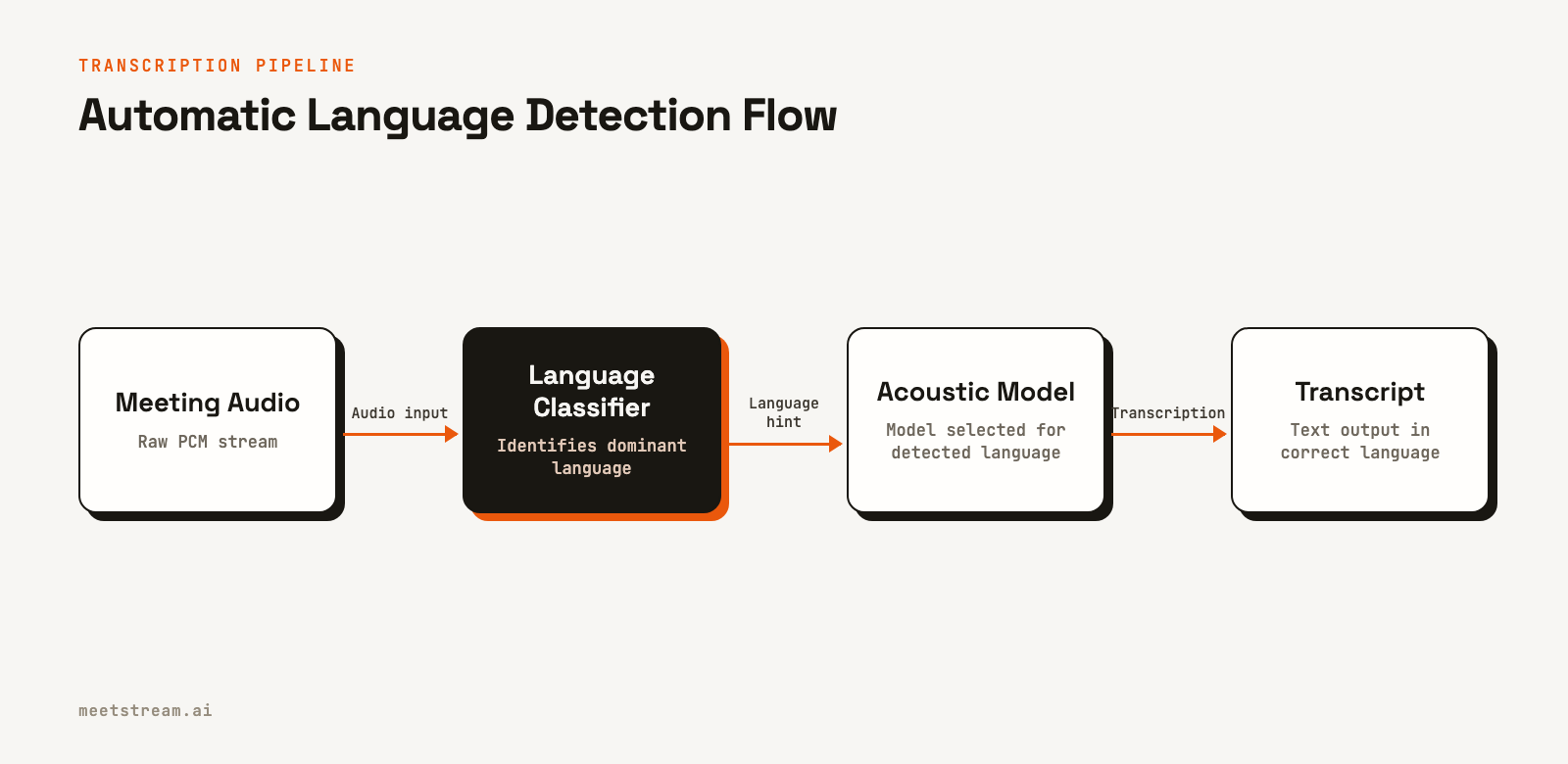
For example, JigsawStack is one of the transcription providers available through MeetStream that offers a broad-coverage auto-detection feature. You enable it by setting the language parameter to "auto". The API call to create a bot is the same; only the configuration payload changes.
curl -X POST "https://api.meetstream.ai/api/v1/bots/create_bot" \
  -H "Authorization: Token <YOUR_API_KEY>" \
  -H "Content-Type: application/json" \
  -d '{
    "meeting_link": "https://meet.google.com/abc-defg-hij",
    "bot_name": "Global Notetaker",
    "recording_config": {
      "transcript": {
        "provider": {
          "jigsawstack": {
            "language": "auto"
          }
        }
      }
    }
  }'
Similarly, Deepgram's Nova-2 model supports language detection via a boolean flag. This approach is effective for meetings that are primarily in one language, even if that language is not English. The system identifies the language and applies the correct model for the duration of the call.
Choosing a Transcription Provider for Specific Languages
No single transcription provider is the best for every language. Performance varies significantly across language families. A key benefit of using a unified meeting transcription API like MeetStream is the ability to choose the best engine for a specific meeting without changing your core integration.
Based on public documentation and performance benchmarks, providers show different strengths. Deepgram generally offers high accuracy for major European languages like Spanish, French, and German, and performs well on accented English. JigsawStack provides wider coverage, including many Asian and Middle Eastern languages like Chinese, Japanese, and Arabic. For basic transcription, you can also use meeting captions, which captures the live captions generated by Zoom, Google Meet, or Teams directly. This option has variable quality but can be a good starting point.
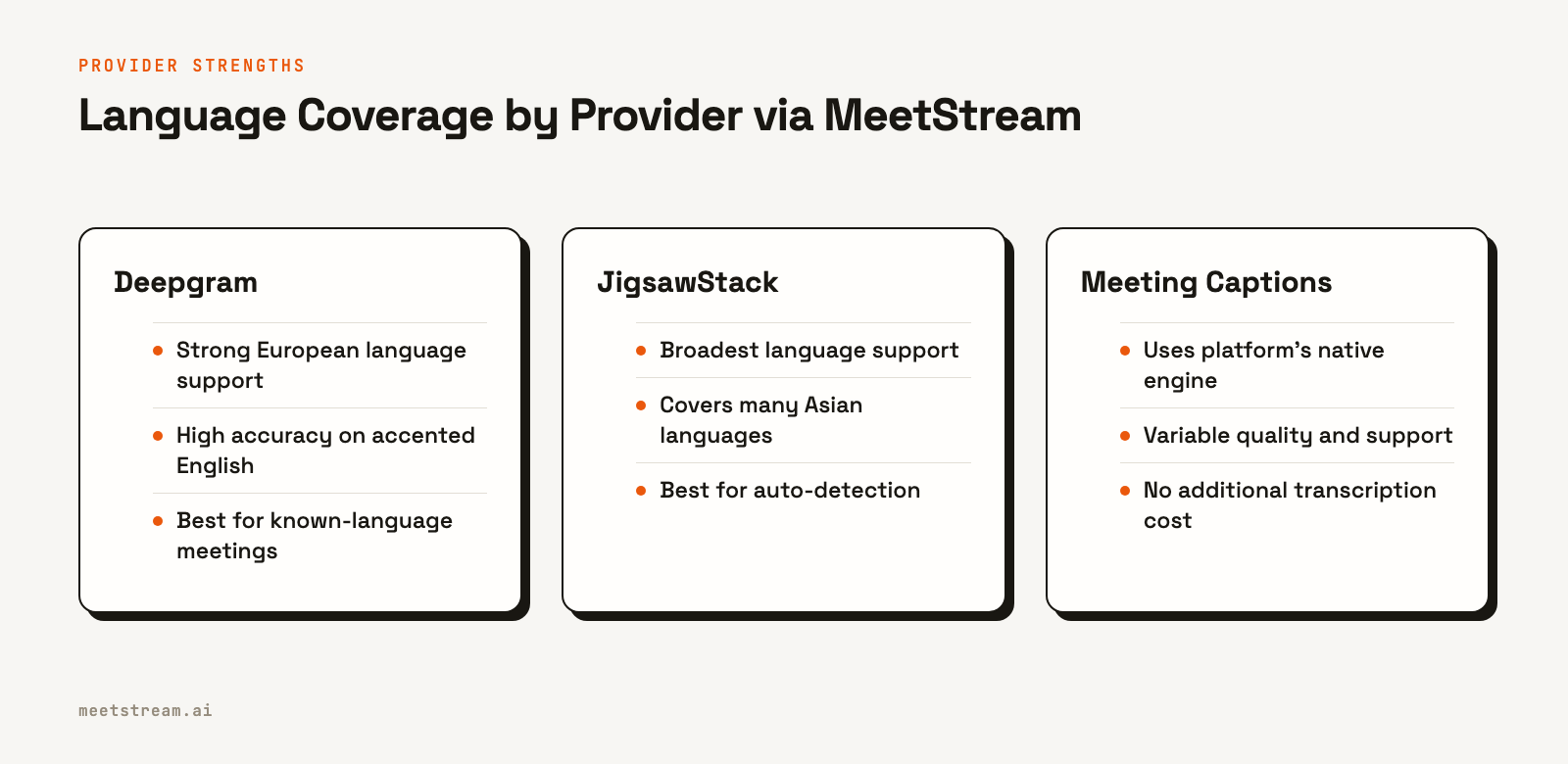
For languages with less commercial support, like Thai or Tagalog, you may need a more specialized approach. However, for most global businesses, a combination of the available providers can cover the majority of use cases. The best practice is to test providers against audio recordings from your actual users to measure real-world accuracy.
Advanced Patterns for Global Products
For products serving diverse enterprise customers, you can build more sophisticated logic on top of the API. Instead of relying solely on automatic detection, you can use metadata to inform your transcription configuration before a meeting even starts.
One effective pattern is to store a preferred language in user profiles or workspace settings within your application. When scheduling a bot for a meeting, you can use this preference to explicitly set the transcription language. This is often more reliable than auto-detection, especially for shorter meetings or those with poor audio quality.
import requests

def create_bot_with_language_hint(meeting_link: str, api_key: str, language_code: str = "auto"):
    """Creates a MeetStream bot with a specific language configuration."""

    provider_config = {}
    if language_code == "auto":
        # Use a provider with broad auto-detection
        provider_config = {"jigsawstack": {"language": "auto"}}
    else:
        # Use a provider strong in the specified language
        provider_config = {"deepgram": {"language": language_code}}

    bot_payload = {
        "meeting_link": meeting_link,
        "bot_name": "Smart Transcriber",
        "recording_config": {
            "transcript": {
                "provider": provider_config
            }
        }
    }

    response = requests.post(
        "https://api.meetstream.ai/api/v1/bots/create_bot",
        json=bot_payload,
        headers={"Authorization": f"Token {api_key}", "Content-Type": "application/json"}
    )
    return response.json()

# Example usage:
# create_bot_with_language_hint(MEETING_URL, API_KEY, language_code="fr")
Another pattern is to infer the likely language from meeting participants' data, such as their timezone or the primary language of their organization stored in a CRM. If all participants for an upcoming meeting are based in Germany, configuring the bot for German transcription from the start is a safe bet. If participants are from all over the world, falling back to auto-detection is the better choice.
Tradeoffs and Limitations
When implementing multilingual transcription, it is important to be aware of the tradeoffs. Automatic language detection is convenient, but it is not perfect. It adds a small amount of latency to the start of the transcription process and can sometimes misidentify the language, especially on noisy audio or with uncommon dialects. For the highest accuracy, explicitly setting the language is always better.
Code-switching remains a largely unsolved problem for production STT systems. While some models are beginning to handle it better, most will struggle when languages are mixed frequently. The most common workaround is to process audio in smaller chunks, running language detection on each segment, but this adds complexity and cost to your pipeline.
Finally, remember that published accuracy benchmarks are based on standardized datasets. Real-world meeting audio is often much messier. The best way to get accurate meeting transcription is to evaluate providers using your own data.
How MeetStream Simplifies Multilingual Transcription
MeetStream provides a single, unified meeting bot API for Zoom, Google Meet, and Microsoft Teams. Instead of building and maintaining separate integrations for multiple transcription services, you can integrate once and select the best provider on a per-meeting basis with a simple API parameter.
This architecture allows you to implement the advanced patterns described above. You can build logic in your application to analyze meeting metadata and route the transcription job to the optimal engine, whether that is Deepgram for a sales call with a French customer or JigsawStack for a team meeting with participants in Asia.
This flexibility is critical for building reliable AI voice agents. An agent that needs to understand action items or provide real-time coaching depends on a clean, accurate transcript as its primary input. By giving you control over the underlying STT engine, MeetStream lets you fine-tune the most critical part of your agent's sensory system.
Conclusion
Building a product that supports users globally requires a thoughtful approach to multilingual meeting transcription. Successfully handling different languages, accents, and code-switching depends on using language detection, selecting the right provider for the job, and using metadata to make intelligent configuration choices. A flexible API that provides access to multiple STT engines is a direct way to manage this complexity and deliver a more reliable product to a wider audience.
See the full API reference at docs.meetstream.ai.
Frequently Asked Questions
What is the best transcription provider for Indian-accented English?
Both Deepgram and AssemblyAI perform well on Indian-accented English due to their diverse training data. The best approach is to test each provider with your own audio data to determine which yields a lower word error rate for your specific use case.
Does transcription accuracy for accents vary by provider?
Yes, accuracy varies significantly. Even for a single language like Spanish, a model trained on European Spanish may perform poorly on a Caribbean dialect. It is important to test with audio from your target regions before committing to a provider.
How does language detection work with frequent code-switching?
Most single-pass transcription systems handle code-switching poorly. The most effective workaround is to segment the audio into smaller utterances and run language detection on each chunk. This allows you to transcribe each segment with the appropriate language model, but it increases processing complexity.
Can I set different languages for different speakers in one meeting?
You cannot configure this in a single post-call transcription job. However, you can get per-participant audio streams from MeetStream. They are available on Zoom, Google Meet and Microsoft Teams. You can process these streams independently to run language detection and transcription for each speaker.
When should I use an automatic language detection option?
Use auto-detection when you do not know what language will be spoken in a meeting. It is a good fallback for products with a diverse, global user base. If you know the language beforehand, explicitly setting it will almost always yield higher accuracy.


