
Meeting Summarization Pipelines: Extractive vs Abstractive

The best approach for automated meeting summarization is abstractive, using a large language model to generate a new, coherent summary from a transcript. While extractive summarization, which selects key sentences directly from the source, is faster, it often produces disjointed results that include conversational filler. An abstractive method provides a more useful, human-readable document.
Building this kind of pipeline requires reliable infrastructure to get clean data out of meetings. At MeetStream, we provide an agent-first platform for developers building on meetings. Our API lets you deploy bots that act as participants to capture high-quality audio and video, which is the foundation for any natural language processing task. This article compares both summarization methods and provides a complete implementation for an abstractive pipeline that triggers automatically when a meeting ends.
A meeting without a written record creates ambiguity. Decisions are forgotten, context is lost, and action items are dropped. Manual note-taking is inconsistent and distracts participants from the conversation. An automated pipeline solves this by reliably generating a structured summary, including decisions and action items, without any human intervention during or after the call.
Why Automated Summaries Matter
For developers building tools that interact with meetings, a summary is often the most valuable artifact. A sales coaching app can use a summary to track deal progress. A project management tool can use it to populate tasks. A customer success platform can use it to log key feedback. In all these cases, the summary needs to be structured and accurate.
The challenge is converting a messy, real-time conversation into a clean, structured object. Meeting transcripts are not like written articles. They contain false starts, interruptions, and non-linear topic progression. This is where the choice between summarization techniques becomes important. The goal is not just a shorter version of the transcript, but a synthesized record of outcomes.
Extractive vs. Abstractive: The Core Difference
Summarization in natural language processing (NLP) falls into two main categories. Understanding the distinction is key to building an effective pipeline for meeting content.
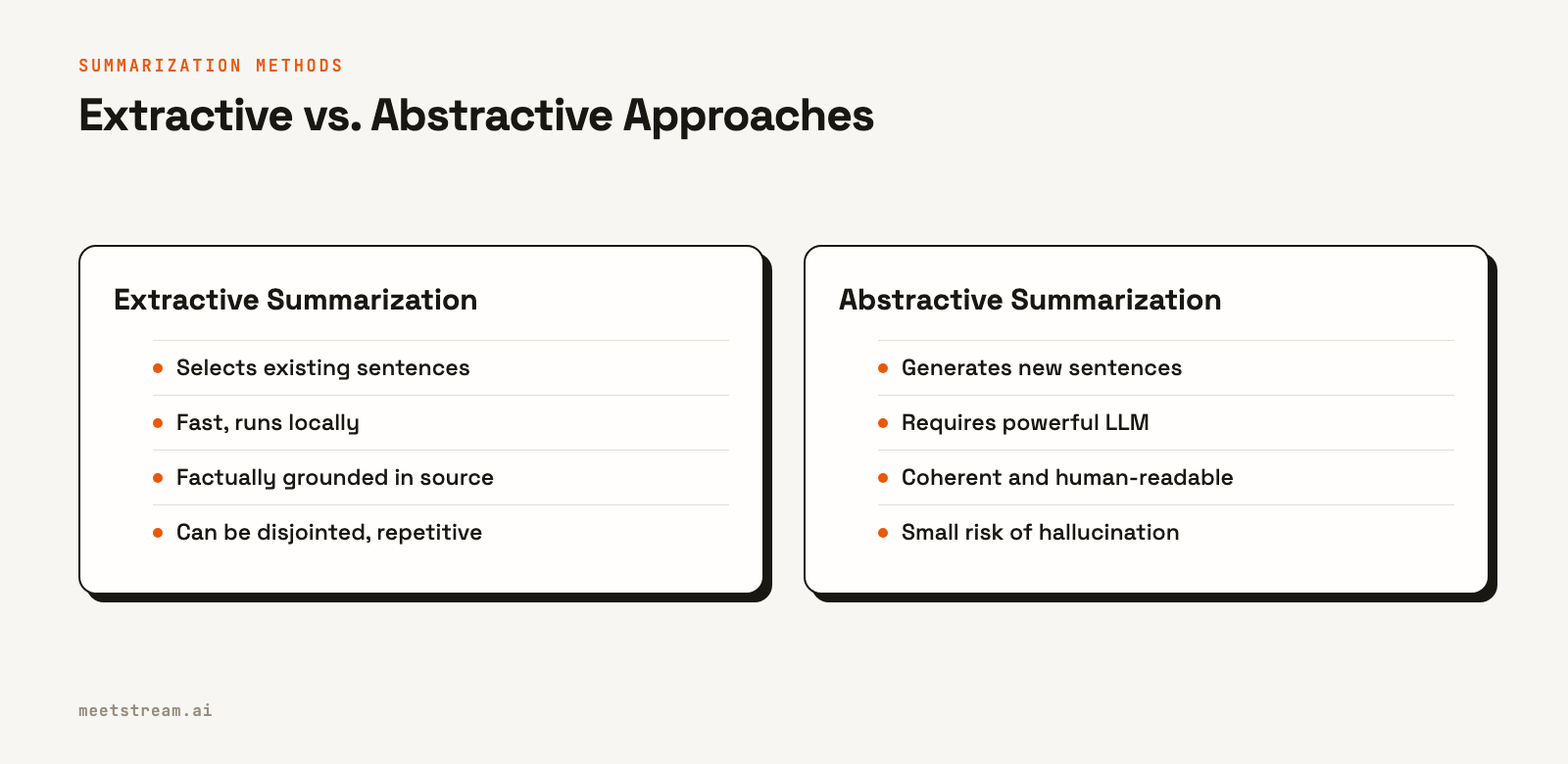
Extractive summarization works by identifying the most important sentences in a text and combining them to form a summary. Algorithms like TextRank or methods using sentence embeddings score each sentence based on its relevance to the overall document. The top-scoring sentences are then presented in their original order.
- Pros: It's fast, computationally less expensive, and guaranteed to be factually consistent with the source text because it uses the text verbatim.
- Cons: The output can feel disjointed or lack narrative flow. It also preserves any conversational filler or repetitive phrasing present in the original transcript.
Abstractive summarization involves generating new text that captures the core meaning of the source. This is how a human would write a summary. These methods use complex models, typically large language models (LLMs), to understand the content and then express it in new words.
- Pros: The result is usually more coherent and readable. It can paraphrase and condense ideas effectively, producing a document that feels like it was written for a human audience.
- Cons: It requires access to powerful models, which can introduce latency and cost. There is also a small but non-zero risk of the model "hallucinating" or introducing information not present in the source text.
For most meeting summarization use cases, the superior readability of abstractive summaries makes it the better choice, despite the added complexity.
Building an Abstractive Summarization Pipeline
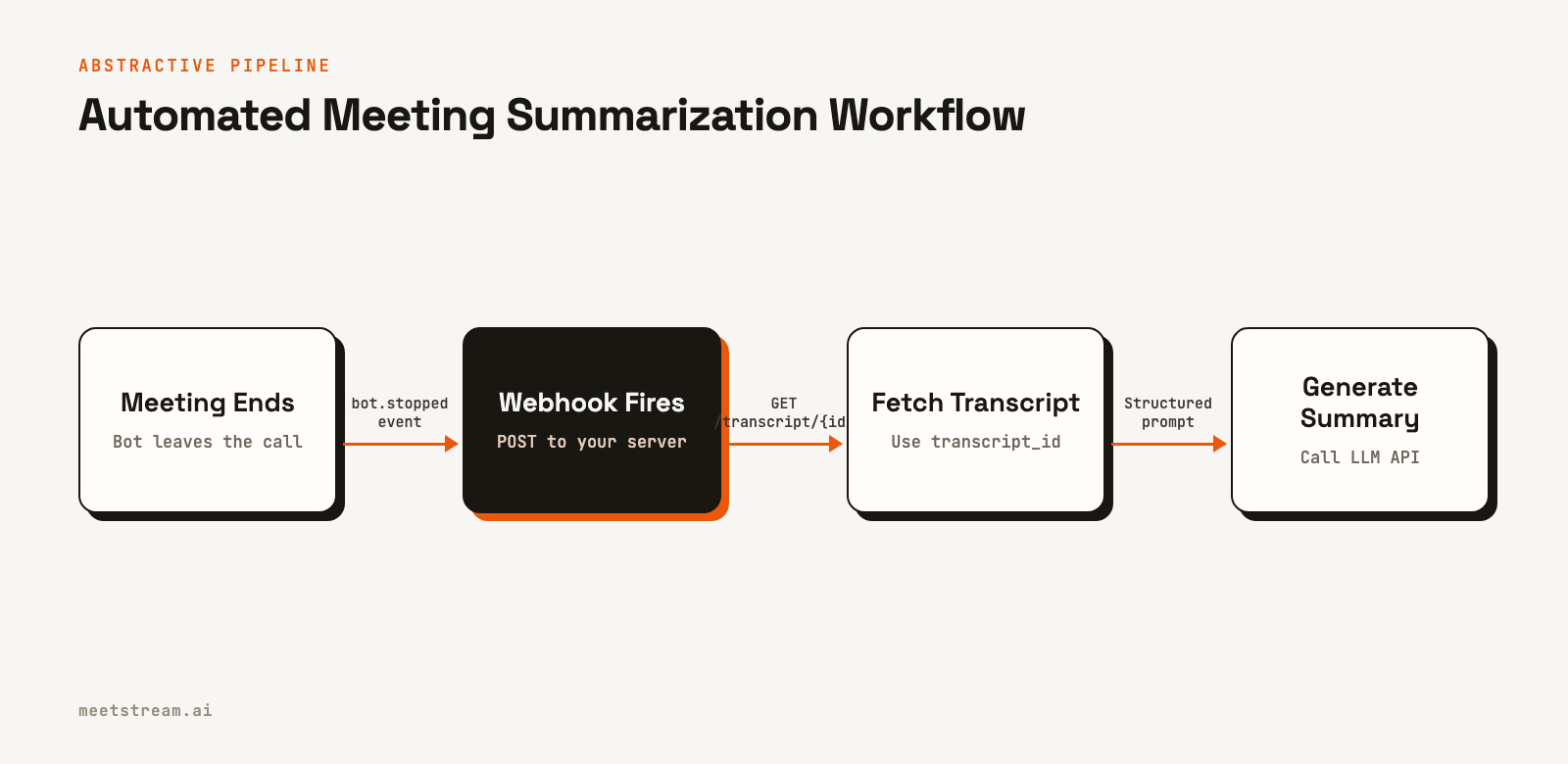
A complete pipeline can be built with a few components: a meeting bot to capture the transcript, a webhook handler to receive events, an LLM to generate the summary, and integrations to send the summary where it's needed. This implementation uses a webhook that triggers when a MeetStream bot leaves a call.
Step 1: Handling the Webhook Event
First, set up a web server to listen for incoming webhooks from MeetStream. When the bot's session ends, MeetStream sends a `bot.stopped` event. This event is the signal to begin the summarization process. The code below uses FastAPI to create a simple webhook endpoint.
A critical detail is that the `transcription.processed` event also signals that a transcript is ready. For simplicity, this guide uses `bot.stopped`, which works well for post-call processing.
from fastapi import FastAPI, Request, Response
import asyncio

app = FastAPI()

# In a real application, this would be a database lookup.
# This dictionary simulates storing the transcript_id you receive
# from the create_bot API response, keyed by bot_id.
bot_to_transcript_map = {}

@app.post("/webhooks/meetstream")
async def handle_meetstream_event(request: Request):
    body = await request.json()

    # The event name is in the 'bot_event' field
    if body.get("bot_event") != "bot.stopped":
        return {"status": "ignored, not a stop event"}

    # Acknowledge the webhook immediately
    asyncio.create_task(process_summary(body))
    return Response(status_code=202)

async def process_summary(payload: dict):
    bot_id = payload["bot_id"]

    # Retrieve the transcript_id you stored when creating the bot.
    transcript_id = bot_to_transcript_map.get(bot_id)

    custom_attrs = payload.get("custom_attributes", {})
    meeting_title = custom_attrs.get("meeting_title", f"Meeting Summary")

    if not transcript_id:
        print(f"Error: transcript_id not found for bot {bot_id}")
        return

    transcript = await fetch_transcript(transcript_id)
    if not transcript:
        print(f"Error: No transcript found for {transcript_id}")
        return

    summary = generate_abstractive_summary(transcript)

    await asyncio.gather(
        push_to_slack(summary, meeting_title),
        push_to_notion(summary, meeting_title)
    )
Step 2: Fetching the Transcript
The webhook payload contains the `bot_id`. To fetch the transcript, you need the `transcript_id` that was returned in the response when you first created the bot. Your application must store this mapping (e.g., in a database) when the bot is created and look it up when the webhook arrives. The following function fetches the transcript data using the correct ID.
import httpx
import os

MEETSTREAM_API_KEY = os.environ.get("MEETSTREAM_API_KEY")

async def fetch_transcript(transcript_id: str) -> list:
    async with httpx.AsyncClient() as client:
        try:
            response = await client.get(
                f"https://api.meetstream.ai/api/v1/transcript/{transcript_id}/get_transcript",
                headers={"Authorization": f"Token {MEETSTREAM_API_KEY}"}
            )
            response.raise_for_status()
            return response.json()
        except httpx.HTTPStatusError as e:
            print(f"Failed to fetch transcript: {e.response.text}")
            return []
Step 3: Generating a Structured Summary with an LLM
A well-crafted prompt is essential for getting consistent, structured JSON output from an LLM. This prompt instructs the model to extract specific fields like a narrative summary, decisions, and action items. Using your model's JSON mode (like `response_format={"type": "json_object"}` for OpenAI) prevents parsing errors.
import openai
import json

client = openai.OpenAI()

MEETING_SUMMARY_PROMPT = """You are analyzing a meeting transcript. Extract the following fields as a single JSON object:

- summary: A 2-4 sentence narrative summary of what was discussed and the overall outcome.
- decisions: A list of clear decisions made.
- action_items: A list of tasks assigned. Format each as {"owner": "Name", "task": "A description of the task"}.
- open_questions: A list of unresolved questions.

If a field has no entries, return an empty list.

Transcript:
{transcript}"""

def generate_abstractive_summary(transcript: list) -> dict:
    # Format the transcript for the prompt
    formatted_transcript = "\n".join(
        f"{turn['speaker']}: {turn['transcript']}" for turn in transcript
    )

    # Truncate to avoid exceeding token limits
    if len(formatted_transcript) > 50000:
        formatted_transcript = formatted_transcript[:50000]

    prompt = MEETING_SUMMARY_PROMPT.format(transcript=formatted_transcript)

    try:
        response = client.chat.completions.create(
            model="gpt-4o",
            messages=[{"role": "user", "content": prompt}],
            response_format={"type": "json_object"},
            temperature=0.1
        )
        content = response.choices[0].message.content
        return json.loads(content)
    except Exception as e:
        print(f"LLM call failed: {e}")
        return {}
Step 4: Pushing the Summary to Slack and Notion
Once you have the structured summary, you can send it to other services. The code below shows how to format the JSON into a Slack message using Block Kit and create a new page in a Notion database. These functions can be called in parallel to notify multiple systems at once.
SLACK_WEBHOOK_URL = os.environ.get("SLACK_WEBHOOK_URL")
NOTION_TOKEN = os.environ.get("NOTION_TOKEN")
NOTION_DATABASE_ID = os.environ.get("NOTION_DATABASE_ID")

async def push_to_slack(summary: dict, meeting_title: str):
    if not summary or not SLACK_WEBHOOK_URL:
        return

    action_items_text = "\n".join(
        f"- [{item.get('owner', 'TBD')}] {item['task']}"
        for item in summary.get("action_items", [])
    ) or "None"

    blocks = [
        {"type": "header", "text": {"type": "plain_text", "text": f"Meeting Summary: {meeting_title}"}},
        {"type": "section", "text": {"type": "mrkdwn", "text": summary.get("summary", "No summary available.")}},
        {"type": "section", "fields": [
            {"type": "mrkdwn", "text": f"*Action Items*\n{action_items_text}"}
        ]}
    ]

    async with httpx.AsyncClient() as client:
        await client.post(SLACK_WEBHOOK_URL, json={"blocks": blocks})

async def push_to_notion(summary: dict, meeting_title: str):
    if not summary or not NOTION_TOKEN or not NOTION_DATABASE_ID:
        return

    # (Notion API call logic as in original article)
    # This section is omitted for brevity but would contain the
    # logic to construct and send the Notion page create request.
    pass
When to Use Extractive Summarization
Although abstractive methods are generally better for meeting content, extractive summarization has its place. It's a good choice if you cannot use external LLM APIs due to data privacy constraints or cost. It can also be used as a pre-processing step to identify the most important segments of a very long transcript before sending them to an LLM.
The following code implements a simple extractive approach using sentence embeddings to find the sentences most central to the meeting's topic.
from sentence_transformers import SentenceTransformer
import numpy as np

model = SentenceTransformer("all-MiniLM-L6-v2")

def generate_extractive_summary(transcript: list, top_k: int = 5) -> str:
    sentences = [turn["transcript"] for turn in transcript if len(turn["transcript"].split()) > 5]
    if not sentences:
        return ""

    embeddings = model.encode(sentences)
    centroid = np.mean(embeddings, axis=0)

    # Calculate cosine similarity of each sentence to the centroid
    scores = [np.dot(emb, centroid) / (np.linalg.norm(emb) * np.linalg.norm(centroid)) for emb in embeddings]

    # Get the indices of the top-k sentences
    top_indices = np.argsort(scores)[-top_k:]

    # Return sentences in their original order
    summary_sentences = [sentences[i] for i in sorted(top_indices)]
    return " ".join(summary_sentences)
How MeetStream Enables Summarization Pipelines
Building a reliable summarization pipeline starts with getting high-quality data from the meeting. MeetStream is designed as voice infrastructure for AI agents and applications. Our API provides a single integration point for Zoom, Google Meet, and Microsoft Teams.
We provide clean, speaker-labeled transcripts derived from high-fidelity audio. On Zoom, Google Meet and Microsoft Teams, we capture per-participant audio streams, which maximizes accuracy for downstream NLP tasks. This data quality, combined with our reliable webhook system, provides the foundation developers need to build applications like the summarization pipeline shown here.
Conclusion
Automated meeting summarization pipelines turn unstructured conversations into valuable, structured data. While extractive methods offer a simple starting point, abstractive summarization with an LLM produces far more useful and readable outputs for most applications. What matters is to build on a reliable data source that provides clean, speaker-labeled transcripts. By combining MeetStream's meeting infrastructure with a structured LLM prompt, you can build a reliable pipeline for any meeting summarization task.
See the full API reference at docs.meetstream.ai.
Related guides
Frequently Asked Questions
What is the difference between extractive and abstractive summarization?
Extractive summarization selects important sentences directly from the source text. Abstractive summarization generates new sentences to convey the main ideas. For meeting transcripts, abstractive is usually better because it creates a more coherent and readable summary.
How do you handle transcripts that are too long for an LLM?
For very long meetings, you can split the transcript into smaller chunks, summarize each chunk, and then create a final summary of the summaries. This hierarchical approach helps manage context window limitations while still capturing the key points from the entire conversation.
Can I generate meeting summaries without sending data to a third-party API?
Yes. You can use the extractive summarization method with open-source sentence-transformer models that run entirely on your own infrastructure. You can also run open-weight LLMs like Llama 3 or Mistral locally to perform abstractive summarization without external API calls.
What makes a good prompt for meeting summarization?
A good prompt explicitly asks for a structured output format, like JSON, with clearly defined fields such as `summary`, `decisions`, and `action_items`. This constrains the model to produce consistent, machine-readable output that is easy to integrate into other systems.
How accurate is automated meeting summarization?
Accuracy depends on the quality of the transcript and the capability of the summarization model. A clean, speaker-labeled transcript from a high-quality audio source is essential. Using a state-of-the-art LLM like GPT-4o or Claude 3 Opus will generally yield highly accurate and useful summaries.


