
AI Meeting Agent API vs Transcription Tools: What's the Difference

An AI meeting agent API sends an interactive participant into a live meeting, while a transcription API processes a pre-recorded audio file you provide. The agent operates in real time on platforms like Zoom, Google Meet, or Microsoft Teams, with the ability to listen and act mid-call. A transcription service works asynchronously, returning a text file from audio you have already recorded and uploaded.
This distinction is important for developers building on meeting data. A simple transcription tool is a passive data collector. An AI voice agent is an active participant. MeetStream is designed as agent-first voice infrastructure for meetings. Our API provides the real-time audio and control primitives needed for agents that join, hear the room, speak back, and act. Transcription and recording are outputs of this core capability, not the headline feature.
The market is shifting from post-call analysis to real-time interaction. Products that can answer a question aloud, update a CRM, or pull up a document during a live conversation represent a different class of software. These applications require a different architecture, stricter latency budgets, and more complex state management than a simple notetaker that processes a transcript after the call ends.
Choosing the right model from the start is a critical product and engineering decision. A passive, post-call architecture is simpler to build and maintain. An active, real-time architecture enables more complex, interactive use cases but comes with greater technical demands. Let's get into the specifics.
Passive Transcription: Post-Call Data Processing
A passive transcription tool is a bot that joins a meeting, records audio, and delivers a transcript after the meeting ends. It is a data capture mechanism. It does not speak, send chat messages, or take any actions during the meeting. Its value is entirely in the artifacts it produces post-call.
This model is the correct choice for a large number of use cases. These include automated note-taking, compliance recording, sales call analysis, and CRM automation where an update is triggered after a call concludes. All of these workflows use the final transcript as an input to a data processing pipeline that runs asynchronously.
The architecture is direct. You use a meeting bot API to send a bot to a meeting URL. The bot joins, records, and leaves. When the meeting is over, your application receives a webhook, typically `transcription.processed`, with a link to the full transcript. Your pipeline can then process this data with no real-time pressure. If processing fails, you can retry using the stored transcript. For many products, this is the most efficient and reliable architecture.
Active AI Agents: Real-Time Participation
An active meeting agent participates in the meeting. It connects to a live audio stream, processes what is being said, and can respond during the conversation. The key difference is that it operates within the meeting, not on the data left behind.
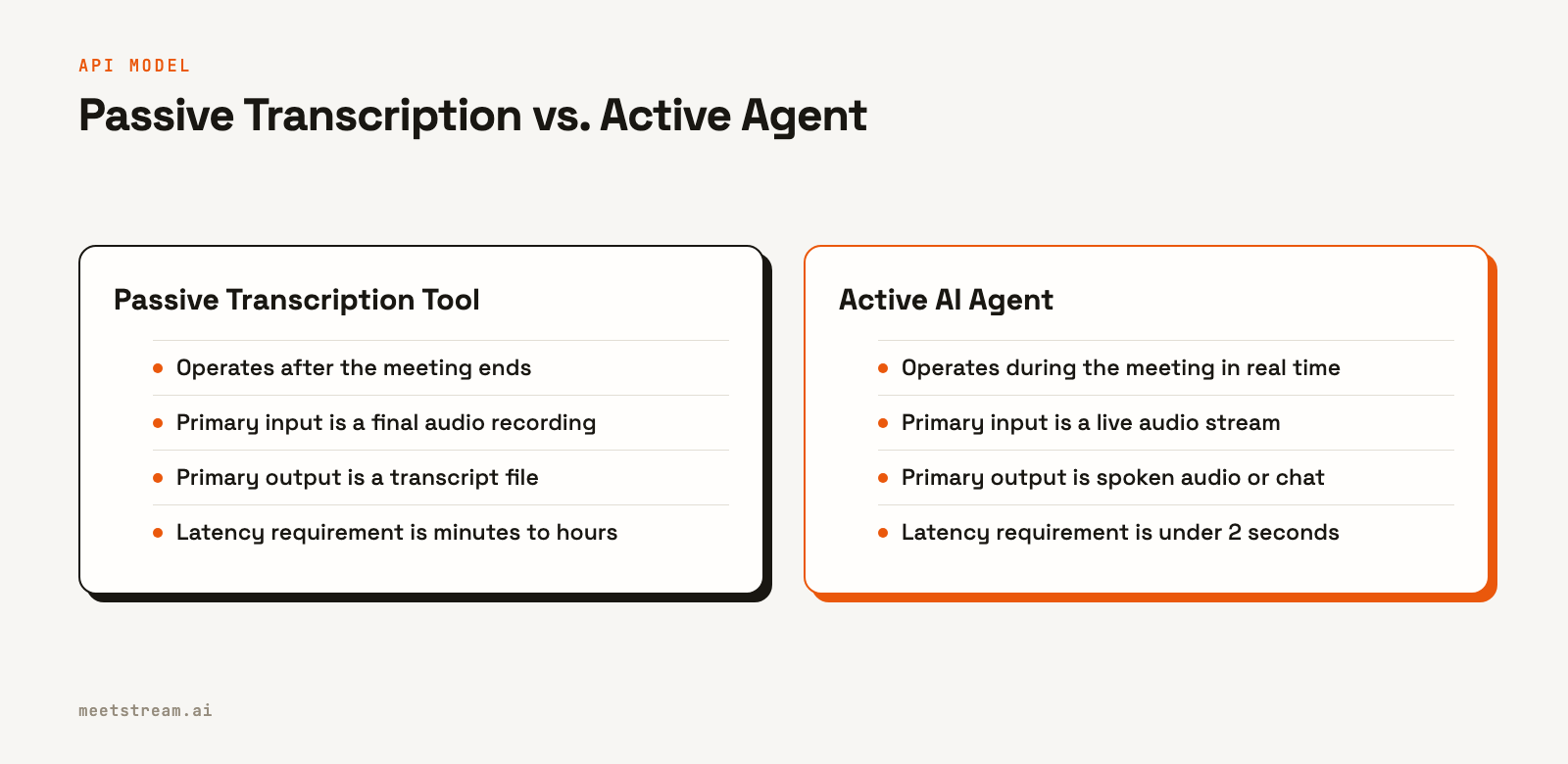
This requires a fundamental architectural shift. Instead of a post-call data file, you need a persistent, low-latency connection to the meeting's audio. Instead of a batch processing pipeline, you need a streaming one. Latency becomes a primary concern. If an agent takes ten seconds to answer a question, the conversation has already moved on. State management is also more complex, as the agent needs to maintain context for the entire duration of the call.
The use cases for active agents are those where timing is essential. Answering a direct question, providing real-time sales coaching, or executing a voice command are all tasks that a post-call tool cannot perform. These interactive features require an agent that is present and responsive in the meeting itself.
How to Build Active Agents on MeetStream
MeetStream provides the infrastructure to build and deploy active agents. Instead of offering a pre-built agent, our API gives you direct access to the real-time streams and controls needed to run your own custom agent logic. This is enabled through two key parameters in the `create_bot` API call.
To receive live audio, you specify a `live_audio_required` parameter with a WebSocket URL. MeetStream connects to your server as a client and streams the meeting's mixed audio in real time. This gives your agent the ability to "hear" the conversation as it happens. The audio is delivered as raw PCM data with metadata identifying the dominant speaker for each frame.
To act in the meeting, you provide a `socket_connection_url`. This also establishes a WebSocket connection from MeetStream to your server. Through this connection, you can send JSON commands to make the bot speak using text-to-speech, send a chat message, or change its video frame. These two WebSocket connections, one for audio in and one for commands out, are the foundation for building real-time meeting agents.
Latency Requirements by Use Case
Latency is the main engineering constraint that separates active agents from passive tools. For a voice agent designed to answer questions, the maximum acceptable latency from the end of a user's speech to the start of the agent's response is about 1.5 seconds. Anything longer feels unnatural and disruptive. This creates a very small time budget for the entire pipeline: audio capture, streaming transcription, LLM inference, text-to-speech (TTS) synthesis, and audio playback.
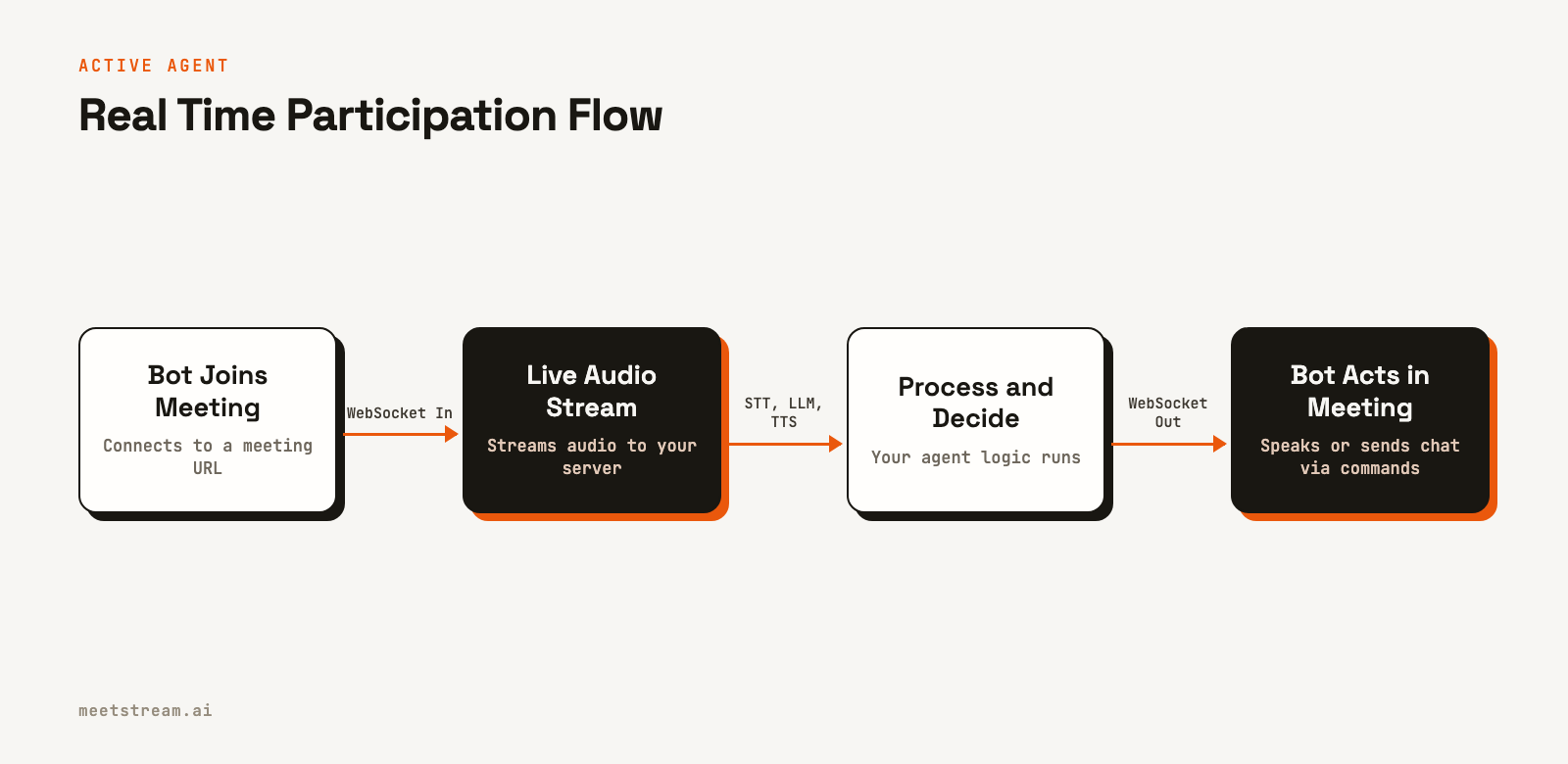
Achieving this requires optimizing each step. You must use streaming speech-to-text (STT) and a streaming LLM to begin processing before the user has finished speaking. A low-latency TTS engine is also critical. The entire process must be managed carefully to deliver a response within the natural rhythm of a conversation.
For agents that respond in chat, the latency tolerance is higher. A response time of 3 to 5 seconds is generally acceptable, as chat is an asynchronous channel within a live meeting. This larger budget allows for more complex processing, like external API calls or multi-step reasoning. For agents that only perform background actions, like updating a database, the latency is often invisible to users, but the action should still complete within a few seconds to maintain data consistency.
MCP Integration for Tool Use
The Model Context Protocol (MCP) is a standard for connecting AI agents to external tools like APIs and databases. For an active meeting agent, MCP enables it to go beyond its training data and interact with live, external systems. This is what allows an agent to answer a question like, "What is the current status of this customer's support ticket?"
In practice, your agent's logic identifies when a user's request requires an external tool. It then makes a call to that tool via an MCP server and incorporates the result into its final response. This tool call adds to the overall latency, which must be factored into your response time budget. A slow external API can easily make a voice agent feel unresponsive.
A common pattern is to provide agents with a small, focused set of reliable tools specific to their function. An agent with five well-defined tools for a sales call will perform more reliably than an agent with fifty generic integrations. The challenge shifts from pure language processing to effective retrieval and execution of the correct tool for a given query.
Comparison: Passive Transcription vs. Active Agent
| Dimension | Passive Transcription Tool | Active AI Agent |
|---|---|---|
| When it operates | After the meeting ends | During the meeting in real time |
| Primary Input | Final audio recording | Live audio stream (WebSocket) |
| Primary Output | Transcript file (webhook) | Spoken audio, chat, or actions |
| Speaks in meetings | No | Yes, via control commands |
| Latency Requirement | Minutes to hours | Sub-2s (voice), sub-5s (chat) |
| Infrastructure | Stateless webhook handler | Stateful WebSocket server |
| Typical Use Case | Notes, summaries, analytics | Interactive Q&A, voice commands |
How MeetStream Fits In
The choice between a passive tool and an active agent depends on a single question: does the feature's value depend on it happening during the meeting? If post-call processing achieves the same result, the simpler passive architecture is usually the better choice. It's faster to build and easier to maintain. Many teams start with a post-call transcription bot to deliver immediate value.
Active agents are the right choice for building a differentiated product with interactive features. While the engineering lift is higher, the user experience can be much more powerful. MeetStream supports both models through a single, unified API. You can start with a simple transcription bot by configuring a `recording_config` and later add real-time capabilities by enabling the WebSocket streams, without needing to change your core integration.
Conclusion
The difference between an AI meeting agent API and a transcription tool is the difference between an active participant and a passive recorder. While both start by getting a bot into a call, their architectures, latency requirements, and capabilities diverge from there. A transcription tool delivers a data artifact after the fact. An agent interacts with the meeting as it happens. Understanding this distinction is key to choosing the right architecture for your product and building features that meet user expectations for speed and interactivity.
See the full API reference at docs.meetstream.ai.
Frequently Asked Questions
Can a single bot do both passive transcription and active agent behavior?
Yes. A MeetStream bot can be configured for post-call recording and transcription via the `recording_config` parameter while also providing real-time streams. The `transcription.processed` webhook will fire after the meeting, even if an agent was active during the call. This allows you to build products that combine both real-time interaction and post-call analysis.
How do AI meeting agents connect to calls?
Meeting agent APIs like MeetStream connect to calls by programmatically joining as a participant. You provide a meeting URL (for Zoom, Google Meet, or Teams) to the API, and it deploys a bot that enters the meeting like a human user would. This bot then gains access to the audio, video, and chat streams.
How do active agents handle speaker identification errors?
Active agents receive speaker labels from the live transcription stream, which can have errors. For voice responses, the agent can often reply to the room without needing perfect attribution. For actions that depend on knowing the speaker, it is more reliable to use meeting metadata to identify participants rather than relying on real-time diarization alone.
What makes an active meeting agent different from a notetaker with triggers?
A notetaker with triggers still operates on the completed transcript after the meeting. An active agent operates during the meeting. The key difference is latency and interactivity. An agent can respond to a question in under two seconds, while a post-call trigger might take minutes. This timing difference determines whether a feature is truly interactive.
What infrastructure is needed to run a production active agent?
You need a WebSocket server to handle the real-time streams from MeetStream, an AI pipeline for STT, LLM, and TTS, and a session store like Redis for managing context. Because latency is critical, reliable monitoring for each stage of the pipeline is essential to track performance and quickly identify bottlenecks. You can build a simple voice agent to understand the basic components.


