
Meeting Bot APIs vs Platform SDKs: A Developer Guide

A good meeting bot API provides a simple way to join calls, capture media reliably, and receive predictable events. It should support major platforms like Zoom, Google Meet, and Microsoft Teams through one integration. For developers, this means getting a bot into a meeting with a single API call, not a multi-week project for each video conferencing platform.
The core value is abstraction. Instead of building and maintaining separate integrations for the Zoom SDK, Microsoft Graph API, and a custom solution for Google Meet, you use one API. This is especially true for building AI agents that need to act inside a meeting. MeetStream is designed as agent-first voice infrastructure, letting bots join calls, hear the room, speak, and act in real time. Recording and transcription are outputs of that core capability.
This comparison covers what to look for in a meeting bot API, compares two leading platforms, and provides a complete working example for a real implementation. The full meeting bot API comparison sets more vendors side by side.
Why Meeting Bot APIs Exist
Getting raw audio and video streams from a live meeting is difficult. Each platform presents a different set of technical and policy obstacles. Zoom requires a complex OAuth and SDK integration that must be approved on their App Marketplace. Microsoft Teams requires using the Graph API, which has its own authentication and permission model. Google Meet has no official API for media extraction, forcing developers to build fragile solutions with headless browsers.
A meeting bot API solves this fragmentation. The service manages a fleet of bots that use the correct, platform-compliant method to join a meeting you specify. Once inside, the bot captures audio and video, orchestrates transcription, and sends the data to your application. Your team focuses on product features, not on maintaining headless browser infrastructure or platform-specific SDKs.
Core Capabilities to Compare
When evaluating a meeting bot API, focus on a few key areas that directly impact what you can build.
Primary Use Case: Is the API designed for post-call data processing or for real-time interaction? An API for recording and transcription will have different latency characteristics and features than one built for interactive AI voice agents.
Data Access: Can you get raw audio and video streams in real time? For many AI applications, like live sales coaching or voice-controlled actions, waiting until the meeting is over is not an option. Look for support for real-time audio streaming via WebSockets.
Agent Capabilities: Does the API allow the bot to be more than a passive listener? The ability to send audio into the meeting for the bot to speak, or to post messages in chat, is fundamental for building interactive agents.
Platform Coverage: Does the API support the platforms your customers use? Zoom, Google Meet, and Microsoft Teams cover the vast majority of the market. Support for other platforms can be useful for specific niches.
Pricing Model: How does the service charge for usage? Most are priced per hour of bot time in a meeting, but details like per-second proration, transcription costs, and storage fees can vary.
MeetStream vs. Recall.ai: A Developer Comparison
MeetStream and Recall.ai are two of the main platforms in this space. While they both provide meeting bot APIs, they are built for different primary use cases. MeetStream is agent-first infrastructure for building interactive participants. Recall.ai is recording-first infrastructure for capturing meeting data across many platforms.
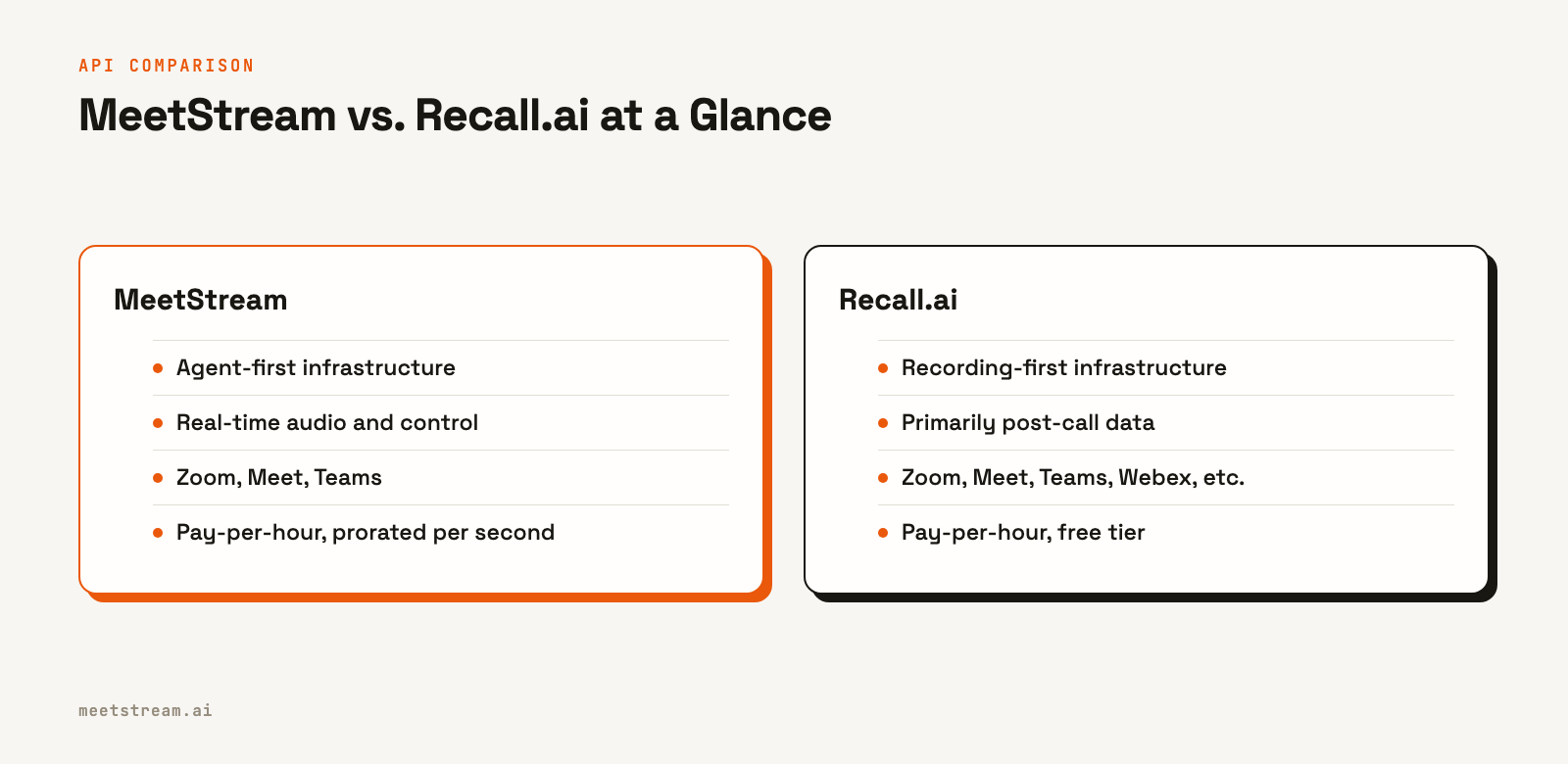
Here’s a direct comparison of their features and pricing.
| Feature | MeetStream | Recall.ai |
|---|---|---|
| Core Focus | Agent-first: real-time interaction, voice, and chat | Recording-first: post-call data and transcripts |
| Real-Time Audio | Yes, via WebSocket with speaker metadata | Yes, behind a feature flag, mixed stream by default |
| In-Meeting Actions | Yes, send audio (speak), send chat, set video frame | No, bots are passive listeners |
| Platforms | Zoom, Google Meet and Microsoft Teams, plus Webex, GoTo Meeting, Slack huddles and WhatsApp calls in Beta. Beta platforms are enabled per workspace. Contact us for access. | Zoom, Google Meet, Teams, Webex, GoTo Meeting, Slack |
| Transcription | In-house add-on or Deepgram, AssemblyAI, etc. | In-house add-on |
| Compliance | SOC 2 (under audit), ISO 27001, GDPR | SOC 2 Type II, ISO 27001, HIPAA, GDPR, CCPA |
| Pricing (Bot) | $0.35 per hour, prorated to the second | $0.50 per hour |
| Pricing (Transcription) | $0.10 per hour (in-house) | $0.15 per hour |
The choice depends on what you are building. If your product needs an AI agent to join a call and interact with participants, MeetStream's real-time audio and control APIs are designed for that purpose. If your product needs to record meetings from the widest possible set of platforms for post-call analysis, Recall.ai’s broader platform support is a strong fit.
Implementation: Building with the MeetStream API
Let's walk through a practical implementation using MeetStream. The API is designed to be straightforward. You make one call to create a bot and then handle incoming webhooks.
Authentication uses a token header on all requests to the base URL https://api.meetstream.ai/api/v1/.
Authorization: Token YOUR_API_KEYThe core endpoint is POST /bots/create_bot. The only required fields are meeting_link and bot_name. In practice, you will always include a callback_url to receive events and a recording_config to get a transcript.
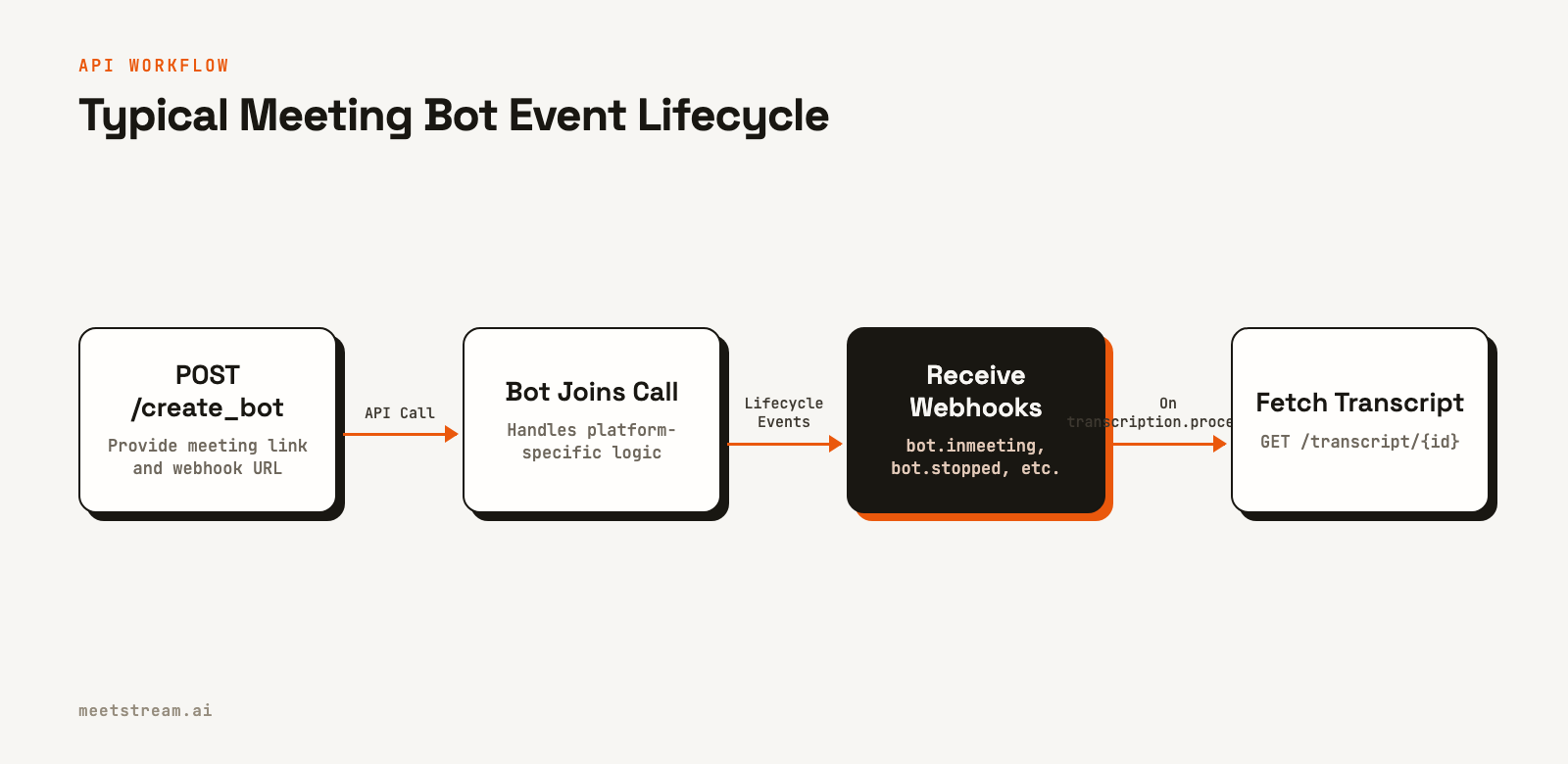
Your callback_url will receive a series of POST requests as the bot moves through its lifecycle. The most important events are:
bot.joining: The bot is attempting to connect to the meeting.bot.inmeeting: The bot has successfully joined and is capturing media.bot.stopped: The bot has left the meeting. The payload includes a status indicating why.transcription.processed: The post-call transcript is ready to be fetched.
Your handler should respond with a 2xx status code immediately and process the payload asynchronously. Workspace webhooks are signed and logged, and you can resend any delivery from the dashboard.
Here is a complete Python example using Flask to create a bot and handle webhooks to fetch a transcript.
import requests
import json
from flask import Flask, request

API_KEY = "<YOUR_API_KEY>"
BASE_URL = "https://api.meetstream.ai/api/v1"
HEADERS = {"Authorization": f"Token {API_KEY}", "Content-Type": "application/json"}

app = Flask(__name__)

# Store transcript_id from create_bot response to use later
transcript_store = {}

def create_bot(meeting_link, callback_url, custom_attributes=None):
    payload = {
        "meeting_link": meeting_link,
        "bot_name": "MeetStream Bot",
        "callback_url": callback_url,
        "recording_config": {
            "transcript": {
                "provider": {
                    "meetstream": {}
                }
            }
        }
    }
    if custom_attributes:
        payload["custom_attributes"] = custom_attributes

    response = requests.post(
        f"{BASE_URL}/bots/create_bot",
        headers=HEADERS,
        json=payload
    )
    response.raise_for_status()
    return response.json()

def get_transcript(transcript_id):
    response = requests.get(
        f"{BASE_URL}/transcript/{transcript_id}/get_transcript",
        headers=HEADERS
    )
    response.raise_for_status()
    return response.json()

@app.route("/webhooks/meetstream", methods=["POST"])
def handle_webhook():
    payload = request.json
    event_type = payload.get("bot_event")
    bot_id = payload.get("bot_id")

    if event_type == "bot.inmeeting":
        print(f"Bot {bot_id} is in the meeting")

    elif event_type == "bot.stopped":
        bot_status = payload.get("bot_status")
        print(f"Bot {bot_id} stopped with status: {bot_status}")

    elif event_type == "transcription.processed":
        # Note: In a real app, you'd get transcript_id from your database
        # where you stored the create_bot response.
        transcript_id = transcript_store.get(bot_id)
        if transcript_id:
            transcript = get_transcript(transcript_id)
            print(json.dumps(transcript, indent=2))
        else:
            print(f"Error: No transcript_id found for bot {bot_id}")

    return {"status": "ok"}, 200

if __name__ == "__main__":
    bot_response = create_bot(
        meeting_link="https://meet.google.com/abc-defg-hij",
        callback_url="https://your-server.com/webhooks/meetstream",
        custom_attributes={"internal_id": "user_123"}
    )
    bot_id = bot_response.get("bot_id")
    transcript_id = bot_response.get("transcript_id")

    if bot_id and transcript_id:
        transcript_store[bot_id] = transcript_id
        print(f"Bot created: {bot_id} with transcript_id: {transcript_id}")

    # In a real application, you would run this server publicly.
    # app.run(port=5000)
Tradeoffs and What to Watch For
When working with any meeting bot API, there are a few practical considerations. For Zoom, bots must join using an On Behalf Of (OBF) token, which means an authorized user from your application must already be in the meeting. Your server is responsible for managing the OAuth flow to generate this token. MeetStream fetches it from a URL you provide at join time.
For real-time applications, you must handle the WebSocket connection lifecycle. The audio you receive is raw PCM data, which is efficient but requires careful parsing of the binary frames to extract speaker metadata before sending it to a speech-to-text (STT) service.
Finally, transcription accuracy can vary. Using a meeting transcription API that lets you choose your provider, like Deepgram for low latency or AssemblyAI for rich post-call analysis, gives you more control over the final output quality.
How MeetStream Fits In
MeetStream provides the managed infrastructure for deploying interactive bots and AI agents into Zoom, Google Meet, and Microsoft Teams. We handle the platform integrations, media capture, and real-time data delivery. Your team builds on top of our API, focusing on your product's unique logic and user experience. The goal is to give you a simple, reliable way to get programmatic access to live meeting conversations.
Conclusion
A meeting bot API abstracts away the significant complexity of integrating with video conferencing platforms. When choosing between meeting bot APIs and SDKs, the most important factor is your use case. For post-call recording and analysis across many platforms, a recording-first API is a good fit. For building interactive AI agents that can listen, understand, and respond in real time, an agent-first platform like MeetStream provides the necessary low-latency audio and control primitives. See the full API reference at docs.meetstream.ai.
Related guides
Frequently Asked Questions
What is a meeting bot API used for?
A meeting bot API is used to programmatically join video conferences to record audio and video, generate transcripts, and enable real-time interaction. Developers use them to build AI notetakers, sales coaching tools, compliance monitoring systems, and in-meeting voice agents without building custom infrastructure for each platform.
How do I get a transcript from a Zoom meeting?
You can use a meeting bot API. You provide the Zoom meeting link to an endpoint like MeetStream's /create_bot. The service deploys a bot that joins the call, records the audio, transcribes it, and sends you a webhook when the speaker-labeled transcript is ready to download.
Can a bot join a password-protected meeting?
Yes, if the password is included in the meeting URL itself, which is standard for most platforms like Zoom and Google Meet. The bot joins using the full link just like a human participant would. For meetings with a separate password entry, manual intervention is typically required.
What is the difference between a meeting bot and an AI agent?
A meeting bot is the underlying technology that joins a call and captures media. An AI agent is an application built on top of a bot that adds intelligence. An agent can understand the live conversation via streaming transcription and respond by speaking or sending chat messages.
How does real-time audio streaming work for meeting bots?
You provide a WebSocket URL when creating the bot. The API service connects to your server as a client and streams binary frames of audio data as the meeting happens. This raw audio can then be sent to a real-time transcription service to power live applications.


