
Meeting Bot Authentication: API Keys, OAuth, and Security

A meeting bot's security depends on more than just one API key. It is a chain of credentials: your platform API key for creating bots, the meeting provider's OAuth 2.0 tokens for platform access, and webhook secrets for verifying incoming events. A failure in any one of these can lead to unauthorized bot creation, leaked meeting data, or a compromised application.
This is especially true for platforms like Zoom, which have specific authentication requirements for automated participants. At MeetStream, we have processed over 1,000,000 meeting minutes, and we see that handling authentication correctly is a common challenge for developers building on top of meetings. The goal is to build an agent-first voice infrastructure, where bots can join calls, listen, and act, and that starts with secure, reliable access.
Securing this access involves managing multiple secrets with different lifecycles and storage requirements. Your MeetStream API key is long-lived, while a Zoom access token might expire in an hour. Each credential type requires a distinct security posture, from environment variable management to constant-time comparison for webhook signatures.
This article covers the critical components of meeting bot authentication: API key management for the MeetStream API, the On-Behalf-Of (OBF) flow required by Zoom, and secure webhook verification. Let's walk through each part.
MeetStream API Key Authentication
Authenticating with the MeetStream API uses a token-based scheme. You include your API key, obtained from app.meetstream.ai, in the Authorization header of every request. The format is simple and does not involve a session handshake or token expiry on the MeetStream side.
Authorization: Token <YOUR_API_KEY>This header is required for all endpoints, from creating a bot with POST /api/v1/bots/create_bot to fetching a transcript after a call. A minimal Python client demonstrates the correct implementation, taking the key from the environment rather than hardcoding it.
import urllib.request, json, os

class MeetStreamClient:
    BASE_URL = "https://api.meetstream.ai/api/v1"

    def __init__(self, api_key: str):
        if not api_key:
            raise ValueError("API key must not be empty")
        self._api_key = api_key

    def _request(self, method: str, path: str, body: dict = None) -> dict:
        url = f"{self.BASE_URL}{path}"
        data = json.dumps(body).encode() if body else None
        req = urllib.request.Request(
            url,
            data=data,
            headers={
                "Authorization": f"Token {self._api_key}",
                "Content-Type": "application/json"
            },
            method=method
        )
        with urllib.request.urlopen(req) as resp:
            return json.loads(resp.read())

    def create_bot(self, meeting_link: str, bot_name: str, **kwargs) -> dict:
        return self._request("POST", "/bots/create_bot", {
            "meeting_link": meeting_link,
            "bot_name": bot_name,
            **kwargs
        })

# Usage: key comes from the environment, never from source code
client = MeetStreamClient(api_key=os.environ["MEETSTREAM_API_KEY"])
Storing secrets in source code is a significant liability. Even in private repositories, keys can be exposed when access controls change or team members depart. Always load them from the environment or a dedicated secrets management service.
Zoom Authentication: The On-Behalf-Of (OBF) Flow
To join Zoom meetings, bots must use an authentication flow called On-Behalf-Of, or OBF. This is a platform-level security requirement from Zoom. It ensures that a bot joins a meeting as an assistant to a specific, authenticated user who is already present in the call. The bot's presence is tied to that user; if they leave, the bot is removed.
This means you cannot use a simple, long-lived API key to join Zoom calls. Instead, your application must implement a user-level OAuth 2.0 flow. Here's how it works in practice:
- Create a Zoom App: You must register your own application in the Zoom App Marketplace. This is a one-time setup.
- Handle OAuth: Your server is responsible for the standard OAuth 2.0 dance. A user from your application grants your Zoom app permission to act on their behalf. Your server receives and securely stores a refresh token for that user.
- Mint OBF Tokens: Just before a bot needs to join a meeting, your server uses the stored refresh token to request a short-lived, single-use OBF token from Zoom.
- Provide Token URL to MeetStream: When you call MeetStream's
create_botendpoint for a Zoom meeting, you do not pass the token directly. Instead, you provide anobf_urlinside azoomobject in the request body. This URL points to an endpoint on your server. - MeetStream Fetches the Token: At join time, MeetStream's infrastructure calls your
obf_url. Your endpoint responds with the freshly minted OBF token. MeetStream uses this token for the bot to join the meeting and never stores your end-users' Zoom refresh tokens.
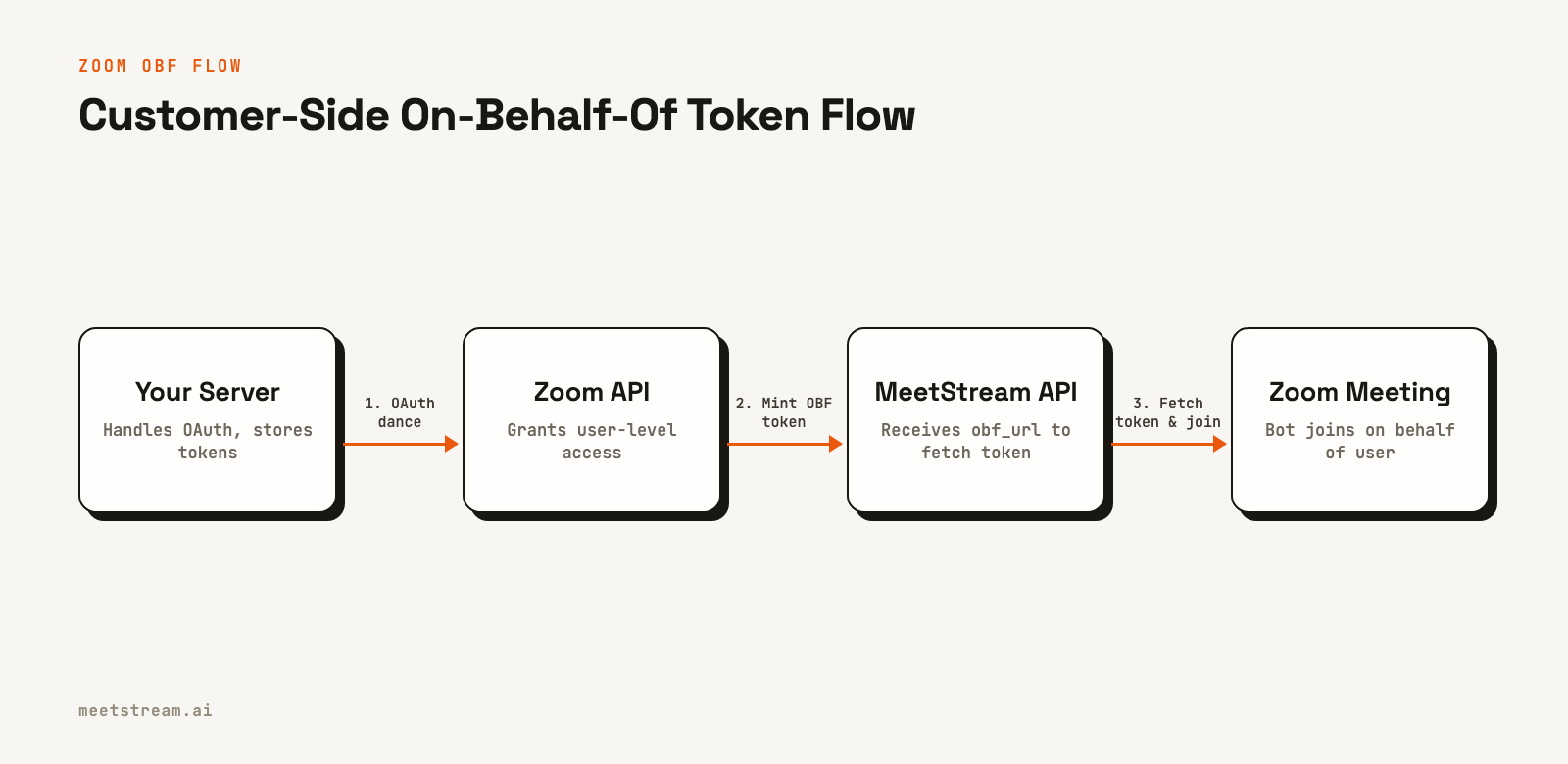
This process ensures that access is securely managed on your side, following Zoom's compliance rules. MeetStream abstracts the complexities of the in-meeting SDK connection, but your application remains the authority for user-level authentication. For a detailed guide on the different token types, see our post on Zoom OAuth 2.0 explained.
Webhook Signature Verification
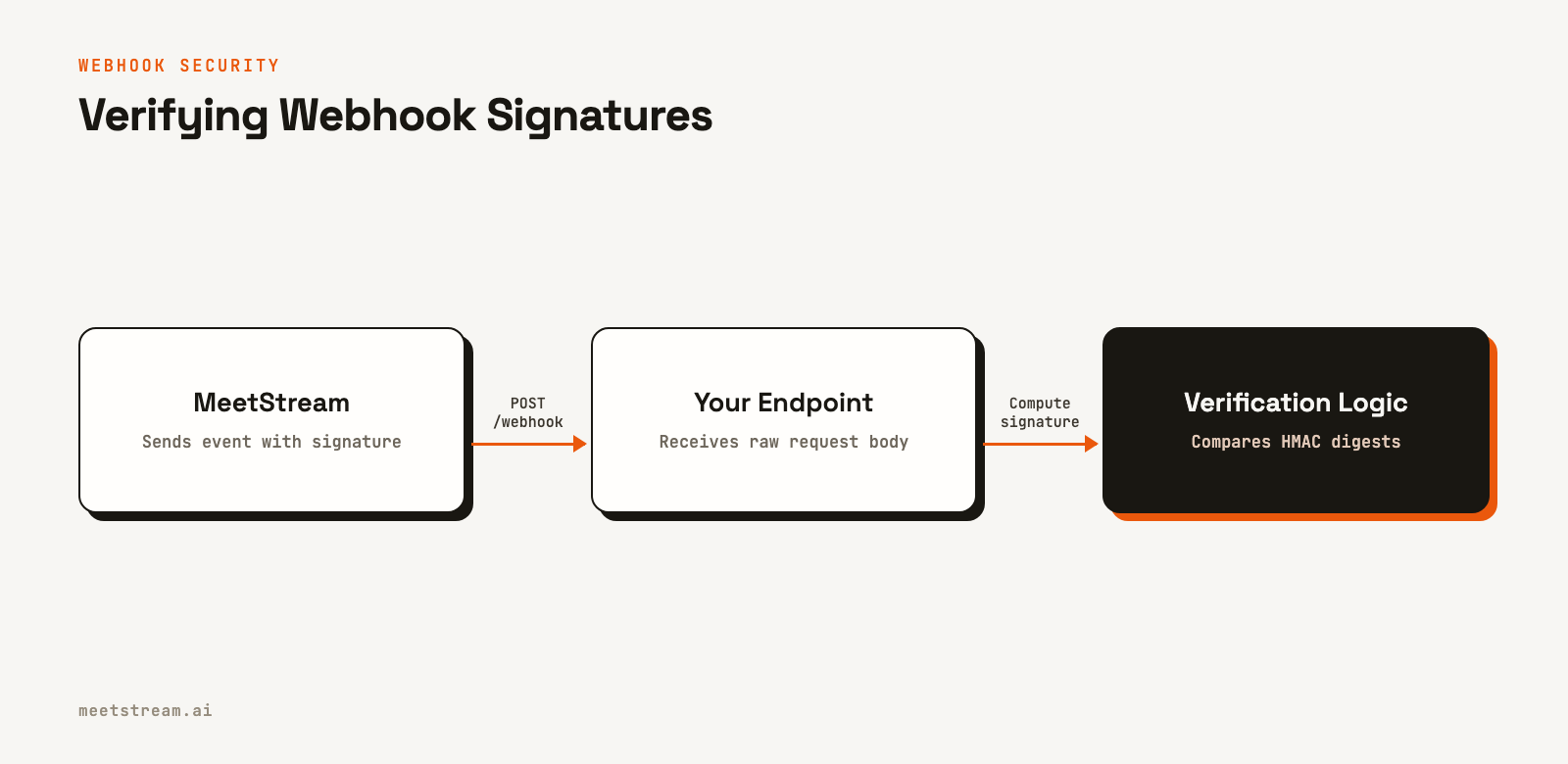
A webhook endpoint that accepts data without verification is a security risk, as it can be targeted with spoofed events. To prevent this, MeetStream signs workspace webhook deliveries with an HMAC-SHA256 signature, included in the X-MeetStream-Signature header.
Your application must verify this signature before processing the payload. The key is to perform the HMAC calculation on the raw, unparsed request body. Many web frameworks parse JSON bodies by default, which alters the input and causes signature mismatches. You must capture the raw body first.
Here is a verification example in Node.js with Express:
const crypto = require('crypto');

function verifyWebhookSignature(rawBody, signatureHeader, secret) {
  // signatureHeader format is "sha256=<digest>"
  const [algo, receivedDigest] = signatureHeader.split('=', 2);
  if (algo !== 'sha256') {
    return false;
  }

  const expectedDigest = crypto
    .createHmac('sha256', secret)
    .update(rawBody)  // Must use the raw bytes, not parsed JSON
    .digest('hex');

  // Use a constant-time comparison to prevent timing attacks
  try {
    return crypto.timingSafeEqual(
      Buffer.from(receivedDigest, 'hex'),
      Buffer.from(expectedDigest, 'hex')
    );
  } catch (e) {
    return false;
  }
}

// In an Express app, capture the raw body before JSON parsing
app.use('/webhooks/meetstream', express.raw({ type: '*/*' }), (req, res) => {
  const sig = req.headers['x-meetstream-signature'];
  const secret = process.env.MEETSTREAM_WEBHOOK_SECRET;

  if (!sig || !verifyWebhookSignature(req.body, sig, secret)) {
    return res.status(401).send('Unauthorized');
  }

  // Signature is valid, now process the event
  const event = JSON.parse(req.body.toString());
  // ... your logic here ...

  res.status(200).send('ok');
});
If verification fails, your endpoint should respond with an HTTP 401 Unauthorized status and discard the request. This prevents your system from acting on forged data.
Best Practices for Key Management
Properly managing your secrets is as important as the authentication mechanisms themselves. This includes both scheduled rotation and secure storage.
API Key Rotation
You should rotate your MeetStream API key on a regular schedule, such as quarterly, and immediately if you suspect it has been exposed. A zero-downtime rotation procedure is critical for production systems:
- Generate a new API key in the MeetStream dashboard.
- Update the key in your secrets manager (e.g., AWS Parameter Store, HashiCorp Vault).
- Deploy the configuration change to your applications so they begin using the new key.
- Make a test API call, like creating a bot for a test meeting, to verify the new key is working correctly.
- Only after successful verification, revoke the old API key in the dashboard.
Skipping the verification step (4) is a common mistake that can cause an outage. Always confirm the new key works before deactivating the old one.
Secure Storage
While environment variables are better than hardcoded secrets, they can still be exposed in logs or process listings. For production, use a dedicated secrets management service like AWS Systems Manager Parameter Store or HashiCorp Vault. These services provide encryption at rest, fine-grained access control via IAM roles, and audit trails.
import boto3

# This code would run on an EC2 instance or Lambda with an appropriate IAM role
ssm = boto3.client('ssm', region_name='us-east-1')

def get_secret(param_name: str) -> str:
    response = ssm.get_parameter(
        Name=param_name,
        WithDecryption=True
    )
    return response['Parameter']['Value']

# Fetch secrets once at application startup, not on every request
MEETSTREAM_API_KEY = get_secret('/production/meetstream/api-key')
MEETSTREAM_WEBHOOK_SECRET = get_secret('/production/meetstream/webhook-secret')
By using IAM roles, your application code doesn't need to handle AWS credentials directly. Access is granted at the infrastructure level, which is a more secure posture.
How MeetStream Fits In
MeetStream provides a unified Meeting Bot API that simplifies interaction with multiple platforms. The primary authentication method is a straightforward API token, which you manage and rotate. For platforms with more complex requirements, like Zoom's OBF flow, MeetStream acts as the secure intermediary that consumes the short-lived token your server provides. This lets you focus on your application's core logic while fulfilling platform-specific security mandates. You can find complete details in our authentication documentation.
Conclusion
Effective meeting bot authentication requires handling three distinct security layers: the platform API key, provider-specific OAuth flows like Zoom OBF, and webhook signature verification. Each must be implemented correctly to protect your application and its data. Best practices like key rotation and using a secrets manager are not optional for production systems. By managing this chain of credentials properly, you can build secure and reliable integrations. See the full API reference at docs.meetstream.ai.
Related guides
Frequently Asked Questions
Can I use the MeetStream API key directly in frontend JavaScript?
No. Your API key must always be kept secret on your backend. Exposing it in client-side code would allow anyone to create bots on your account. Your frontend should call your own server, which then makes authenticated requests to the MeetStream API.
Why does Zoom require the On-Behalf-Of (OBF) flow?
Zoom requires OBF to ensure security and accountability. It ties a bot's presence to a specific, authenticated user in the meeting, preventing anonymous or unauthorized bots from joining. This gives meeting hosts and administrators clear visibility and control over applications operating within their meetings.
How often should I rotate my MeetStream API key?
A quarterly rotation is a good baseline for production keys. You must also rotate the key immediately if you suspect any exposure, such as an accidental commit to a repository or an employee with access leaving your team. Always follow a zero-downtime rotation process.
What is the most common mistake when verifying webhooks?
The most common mistake is trying to verify the signature against a parsed JSON body instead of the raw request body. Most web frameworks automatically parse JSON, so you must add middleware to capture the raw body bytes before any parsing occurs to ensure the computed signature matches.
What happens if my application's Zoom refresh token is compromised?
If a user's refresh token is compromised, an attacker could potentially generate OBF tokens to join meetings on that user's behalf. You should immediately revoke the compromised token through the Zoom API and require the user to re-authenticate with your application to establish a new one.


