
Run Meeting Bots Serverless on AWS Lambda

A meeting bot can run in a serverless environment by using an API to manage the bot's connection and media streams. Your serverless function is only responsible for initiating the bot via an API call and then receiving event data through webhooks. This avoids the need to maintain persistent connections or stateful infrastructure for media handling.
MeetStream is agent-first voice infrastructure for meetings. Our API lets you deploy agents that join as participants, hear the room, and act mid-meeting. For a serverless workflow, this means you can use webhooks for every lifecycle event, from the bot joining a call to the final transcript being ready. A Lambda function can be triggered by these webhooks to process meeting data, such as speaker-attributed transcripts, as soon as it becomes available.
The difficult part of building a meeting automation product is often the infrastructure. A calendar event fires, a bot needs to join a meeting, and a transcript must be processed afterward. Your system needs to connect these events without polling, without a persistent server, and without dropping events. This is the problem serverless architecture is designed to solve.
A common misconception is that serverless meeting bots means running the bot process itself in Lambda. That approach is not practical, as a browser process like Chromium exceeds Lambda's memory and execution time limits. The effective pattern is using Lambda for orchestration: triggering bot creation from calendar events, processing webhook callbacks, storing state in DynamoDB, and fetching the transcript after processing completes. The bot runs on MeetStream's managed infrastructure, while Lambda handles your application logic.
Architecture for a Serverless Bot
This architecture uses a set of Lambda functions, each with a single responsibility. A trigger function creates bots in response to calendar events. A webhook handler receives lifecycle events from the bot, updates state, and dispatches follow-up work. Finally, a fetcher function retrieves the processed transcript when it's ready.
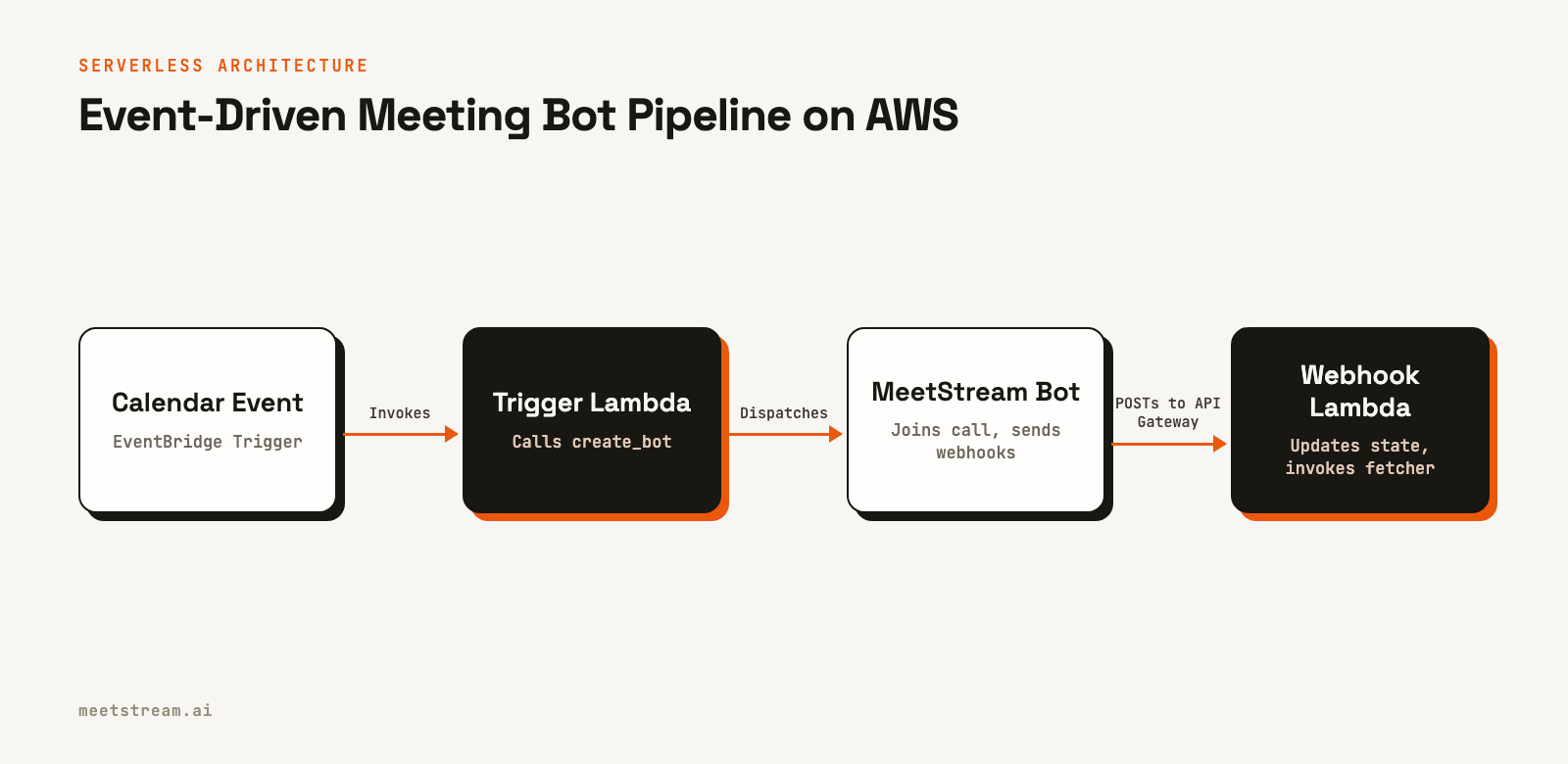
This separation of concerns keeps each function small and focused. The trigger function calls the Meeting Bot API, the webhook handler updates DynamoDB, and the transcript fetcher pulls the final data. This event-driven model scales automatically and minimizes cost, as you only pay for compute time when an event actually occurs.
DynamoDB Schema for Bot Sessions
Before writing the Lambda code, we need a DynamoDB table to store the state of each bot session. The partition key will be the bot_id, which is a unique identifier returned by the MeetStream API. We also add a Global Secondary Index (GSI) on calendar_event_id to allow looking up a bot session from the original calendar event that triggered it.
# CloudFormation / SAM template excerpt
Resources:
  BotSessionsTable:
    Type: AWS::DynamoDB::Table
    Properties:
      TableName: meetstream-bot-sessions
      BillingMode: PAY_PER_REQUEST
      AttributeDefinitions:
        - AttributeName: bot_id
          AttributeType: S
        - AttributeName: calendar_event_id
          AttributeType: S
      KeySchema:
        - AttributeName: bot_id
          KeyType: HASH
      GlobalSecondaryIndexes:
        - IndexName: by-calendar-event
          KeySchema:
            - AttributeName: calendar_event_id
              KeyType: HASH
          Projection:
            ProjectionType: ALL
      TimeToLiveSpecification:
        AttributeName: ttl
        Enabled: true
Using PAY_PER_REQUEST billing is cost-effective for workloads with unpredictable traffic. The Time to Live (TTL) specification automatically deletes old items, which helps manage costs and data retention.
Trigger Lambda: Create a Bot from a Calendar Event
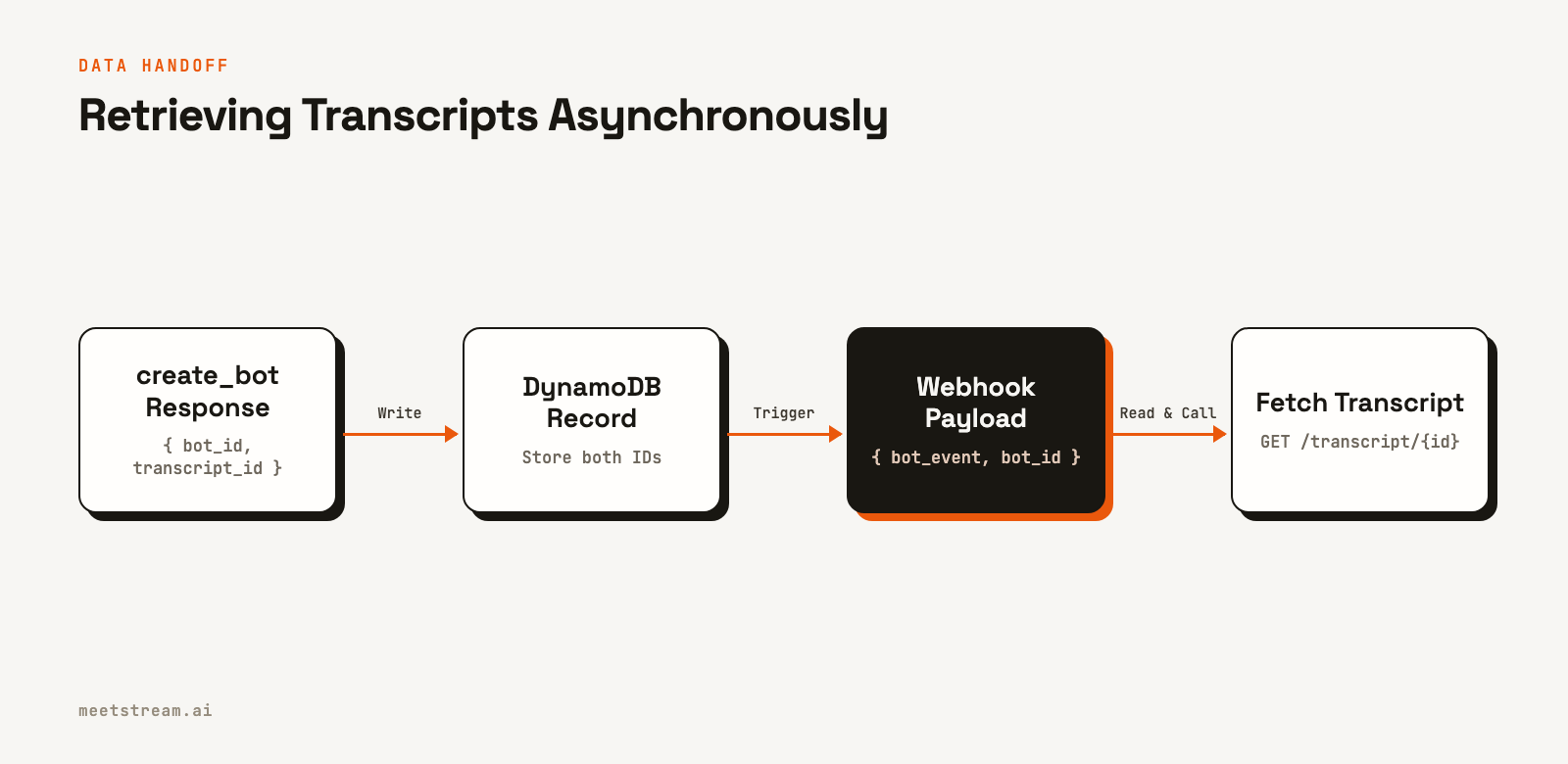
This Lambda function is triggered by a new calendar event, for example, via an Amazon EventBridge schedule set for two minutes before a meeting starts. It calls the MeetStream API to create the bot and then writes the initial session state, including the bot_id and transcript_id, to our DynamoDB table.
const { DynamoDBClient, PutItemCommand } = require('@aws-sdk/client-dynamodb');
const { SSMClient, GetParameterCommand } = require('@aws-sdk/client-ssm');
const https = require('https');

const dynamo = new DynamoDBClient({ region: process.env.AWS_REGION });
const ssm = new SSMClient({ region: process.env.AWS_REGION });

let _apiKey; // Cached per Lambda warm instance

async function getApiKey() {
  if (_apiKey) return _apiKey;
  const resp = await ssm.send(new GetParameterCommand({
    Name: '/meetstream/prod/api-key',
    WithDecryption: true
  }));
  _apiKey = resp.Parameter.Value;
  return _apiKey;
}

function callMeetStreamAPI(apiKey, body) {
  return new Promise((resolve, reject) => {
    const payload = JSON.stringify(body);
    const req = https.request({
      hostname: 'api.meetstream.ai',
      path: '/api/v1/bots/create_bot',
      method: 'POST',
      headers: {
        'Authorization': `Token ${apiKey}`,
        'Content-Type': 'application/json',
        'Content-Length': Buffer.byteLength(payload)
      }
    }, (res) => {
      let data = '';
      res.on('data', chunk => data += chunk);
      res.on('end', () => {
        if (res.statusCode >= 200 && res.statusCode < 300) {
          resolve(JSON.parse(data));
        } else {
          reject(new Error(`MeetStream API error ${res.statusCode}: ${data}`));
        }
      });
    });
    req.on('error', reject);
    req.write(payload);
    req.end();
  });
}

exports.handler = async (event) => {
  const { meeting_url, calendar_event_id, user_id, join_at } = event;
  const apiKey = await getApiKey();

  const bot = await callMeetStreamAPI(apiKey, {
    meeting_link: meeting_url,
    bot_name: 'Notetaker',
    join_at: join_at,
    callback_url: process.env.WEBHOOK_ENDPOINT,
    recording_config: {
      transcript: { provider: { deepgram: {} } }
    },
    automatic_leave: {
      waiting_room_timeout: 300,
      everyone_left_timeout: 60,
      voice_inactivity_timeout: 600
    }
  });

  const now = Math.floor(Date.now() / 1000);
  await dynamo.send(new PutItemCommand({
    TableName: 'meetstream-bot-sessions',
    Item: {
      bot_id: { S: bot.bot_id },
      transcript_id: { S: bot.transcript_id },
      calendar_event_id: { S: calendar_event_id },
      user_id: { S: user_id },
      meeting_url: { S: meeting_url },
      status: { S: 'Joining' },
      created_at: { N: String(now) },
      ttl: { N: String(now + 86400 * 30) } // 30-day TTL
    }
  }));

  return { bot_id: bot.bot_id, status: 'dispatched' };
};
Webhook Handler Lambda
This function sits behind an API Gateway endpoint and acts as the receiver for all webhooks from MeetStream. It validates the request, updates the bot's status in DynamoDB, and invokes the transcript fetcher asynchronously when the transcription.processed event is received.
const { DynamoDBClient, UpdateItemCommand } = require('@aws-sdk/client-dynamodb');
const { LambdaClient, InvokeCommand } = require('@aws-sdk/client-lambda');

const dynamo = new DynamoDBClient({ region: process.env.AWS_REGION });
const lambda = new LambdaClient({ region: process.env.AWS_REGION });

exports.handler = async (event) => {
  const body = event.body;
  // Note: Signature validation is omitted for brevity but is critical in production.
  // You would verify a signature passed in the headers against a shared secret.

  const payload = JSON.parse(
    event.isBase64Encoded ? Buffer.from(body, 'base64').toString('utf8') : body
  );

  const statusMap = {
    'bot.joining': 'Joining',
    'bot.inmeeting': 'InMeeting',
    'bot.stopped': payload.bot_status || 'Stopped'
  };

  if (statusMap[payload.bot_event]) {
    await dynamo.send(new UpdateItemCommand({
      TableName: 'meetstream-bot-sessions',
      Key: { bot_id: { S: payload.bot_id } },
      UpdateExpression: 'SET #s = :s, updated_at = :t',
      ExpressionAttributeNames: { '#s': 'status' },
      ExpressionAttributeValues: {
        ':s': { S: statusMap[payload.bot_event] },
        ':t': { N: String(Math.floor(Date.now() / 1000)) }
      }
    }));
  }

  if (payload.bot_event === 'transcription.processed') {
    await lambda.send(new InvokeCommand({
      FunctionName: process.env.TRANSCRIPT_FETCHER_ARN,
      InvocationType: 'Event', // Async invoke
      Payload: JSON.stringify({
        bot_id: payload.bot_id
      })
    }));
  }

  // Always return 200 quickly, then do the work asynchronously.
  return { statusCode: 200, body: JSON.stringify({ received: true }) };
};
Transcript Fetch Lambda
Invoked asynchronously by the webhook handler, this function is responsible for retrieving the final transcript. It uses the bot_id to look up the transcript_id from DynamoDB, calls the MeetStream API to get the transcript data, and then saves it. For large transcripts, storing the data in S3 is a better pattern than using DynamoDB.
const { DynamoDBClient, GetItemCommand, UpdateItemCommand } = require('@aws-sdk/client-dynamodb');
const https = require('https');

const dynamo = new DynamoDBClient({ region: process.env.AWS_REGION });

async function getTranscriptId(botId) {
    const result = await dynamo.send(new GetItemCommand({
        TableName: 'meetstream-bot-sessions',
        Key: { bot_id: { S: botId } },
        ProjectionExpression: 'transcript_id'
    }));
    return result.Item ? result.Item.transcript_id.S : null;
}

function fetchTranscript(transcriptId, apiKey) {
  const url = `https://api.meetstream.ai/api/v1/transcript/${transcriptId}/get_transcript`;
  return new Promise((resolve, reject) => {
    https.get(url, {
      headers: { 'Authorization': `Token ${apiKey}` }
    }, (res) => {
      let data = '';
      res.on('data', chunk => data += chunk);
      res.on('end', () => resolve(JSON.parse(data)));
    }).on('error', reject);
  });
}

exports.handler = async (event) => {
  const { bot_id } = event;
  const apiKey = process.env.MEETSTREAM_API_KEY; // Or fetch from SSM

  const transcript_id = await getTranscriptId(bot_id);
  if (!transcript_id) {
    console.error(`No transcript_id found for bot_id: ${bot_id}`);
    return;
  }

  const transcript = await fetchTranscript(transcript_id, apiKey);

  // Store transcript (use S3 for transcripts > 400KB DynamoDB item limit)
  await dynamo.send(new UpdateItemCommand({
    TableName: 'meetstream-bot-sessions',
    Key: { bot_id: { S: bot_id } },
    UpdateExpression: 'SET transcript_content = :t, transcript_received = :r',
    ExpressionAttributeValues: {
      ':t': { S: JSON.stringify(transcript).substring(0, 399000) }, // Avoid exceeding item limit
      ':r': { BOOL: true }
    }
  }));

  return { bot_id, status: 'transcript_stored' };
};
IAM Permissions
Each Lambda function should operate under the principle of least privilege. Their IAM execution roles should only grant permissions to the specific resources they need to access. Avoid overly permissive policies like AdministratorAccess.
# Trigger Lambda role policy
{
  "Effect": "Allow",
  "Action": [
    "ssm:GetParameter",
    "dynamodb:PutItem"
  ],
  "Resource": [
    "arn:aws:ssm:us-east-1:ACCOUNT:parameter/meetstream/prod/api-key",
    "arn:aws:dynamodb:us-east-1:ACCOUNT:table/meetstream-bot-sessions"
  ]
}

# Webhook Handler Lambda role policy
{
  "Effect": "Allow",
  "Action": [
    "dynamodb:UpdateItem",
    "lambda:InvokeFunction"
  ],
  "Resource": [
    "arn:aws:dynamodb:us-east-1:ACCOUNT:table/meetstream-bot-sessions",
    "arn:aws:lambda:us-east-1:ACCOUNT:function:transcript-fetcher"
  ]
}
How MeetStream Fits In
The serverless pattern shown here works because MeetStream manages the bot execution layer, so you never have to run a browser process in your Lambda functions. The workflow is straightforward: Lambda triggers the MeetStream API, MeetStream runs the bot and captures the meeting data, and then MeetStream calls your webhook Lambda for your code to process the output. This gives you a scalable, managed infrastructure for deploying AI voice agents into meetings without handling the complexities of real-time media yourself.
Conclusion
Serverless architecture and meeting bots are a strong combination when you separate orchestration from execution. AWS Lambda is well-suited for handling triggers, processing webhooks, and managing state, while MeetStream manages the bot process itself. Key implementation details for a production system include fetching API keys from SSM Parameter Store, caching the key across warm invocations, always returning a 200 status code from your webhook Lambda, and using asynchronous Lambda invocation for long-running tasks like transcript processing. See the full API reference at docs.meetstream.ai.
Related guides
Frequently Asked Questions
Can I run the meeting bot process itself inside AWS Lambda?
No, this is not a practical approach. Lambda's 10 GB memory limit and 15-minute execution timeout are insufficient for browser-based bot processes, which require significant memory and must run for the entire meeting duration. Use Lambda for orchestration and a service like MeetStream to run the actual bot process.
How should I handle Lambda cold starts for time-sensitive bot triggers?
Lambda cold starts for Node.js are typically a few hundred milliseconds, which is acceptable for meeting orchestration since bots are usually scheduled to join minutes before the start time. To optimize, cache expensive operations like fetching secrets from SSM across warm invocations. For stricter latency needs, you can use Lambda Provisioned Concurrency, but this adds cost.
What DynamoDB capacity mode should I use?
For most use cases, PAY_PER_REQUEST (on-demand) billing mode is the most cost-effective choice. It scales automatically and you only pay for the reads and writes you perform. If you have a very high and predictable volume of bot sessions, you might save money with provisioned capacity, but on-demand is the better starting point.
What if a bot never sends the transcription.processed webhook?
You can build a cleanup process. Use a scheduled Lambda function that scans the DynamoDB table for sessions that are in a Stopped state but have not received a transcript after a reasonable timeout, such as 30 minutes. These sessions can be flagged for manual review or re-queued for a transcript fetch.
Should I use S3 or DynamoDB to store transcripts?
Use S3. DynamoDB has a 400 KB item size limit, and a transcript for a one-hour meeting can easily exceed this. The best practice is to store the large transcript file in an S3 bucket and save the S3 object key in your DynamoDB item, rather than storing the full content in the database.


