
Scaling to 1,000 Concurrent Meeting Bots: Architecture and Costs

Running 1,000 concurrent meeting bots requires a distributed architecture of media servers and orchestration workers. The primary cost drivers are CPU and memory for real-time audio and video processing. At a small scale, a single server might work. At 50 concurrent sessions, performance degrades. At 500, the system fails from a combination of exhausted memory, CPU saturation, and network connection limits.
MeetStream is an agent-first platform that provides this voice infrastructure for meetings. Our API lets your AI agents join any Zoom, Google Meet, or Teams call, where they can hear the room, speak, and act as a participant. We manage the scaling, media processing, and state so you can focus on your application's logic. This guide explains the self-hosted architecture we see teams build before they look for a managed solution.
The core problem is that a meeting bot is a stateful, resource-intensive process. Each one runs a headless browser instance that can use over a gigabyte of RAM, maintains persistent WebSocket connections, and processes continuous media streams. Multiplying this by hundreds of sessions creates a significant infrastructure challenge. The architecture for scaling is not complex, but it requires getting compute provisioning, job dispatch, and state management right.
What Makes Concurrent Meeting Bots Hard to Scale
Three resource bottlenecks typically constrain a self-hosted bot fleet. Understanding these is the first step to designing a system that can handle a Monday morning rush of meetings.
First is browser instance memory. A headless Chromium process needs 500-800 MB of RAM just to idle in a meeting. Active media capture and processing for audio and video streams can push this to 1.5 GB per bot. On a server with 32 GB of RAM, this means you can run about 20 bots before memory pressure and swapping begin to degrade performance for the entire host.
Second is WebSocket connection concurrency. Each bot maintains at least one persistent WebSocket connection for signaling and another for media. A standard Linux kernel defaults to 65,535 open file descriptors per process. While this seems high, each socket uses one descriptor. At several hundred concurrent bots on a single machine, you can hit this limit. You must increase the ulimit -n setting on your worker hosts and inside your containers.
Third is media processing CPU. Decoding video streams and resampling audio for a transcription provider is CPU-intensive. For example, resampling a 48kHz stereo audio stream down to 16kHz mono for an ASR model requires sample-by-sample arithmetic. At 100 concurrent streams, this work can saturate multiple CPU cores if the processing code is not efficient.
A Horizontal Scaling Architecture for Bots
A scalable architecture separates four distinct responsibilities: orchestration, dispatch, execution, and state. This separation prevents a bottleneck in one area from affecting the others and allows each component to scale independently.
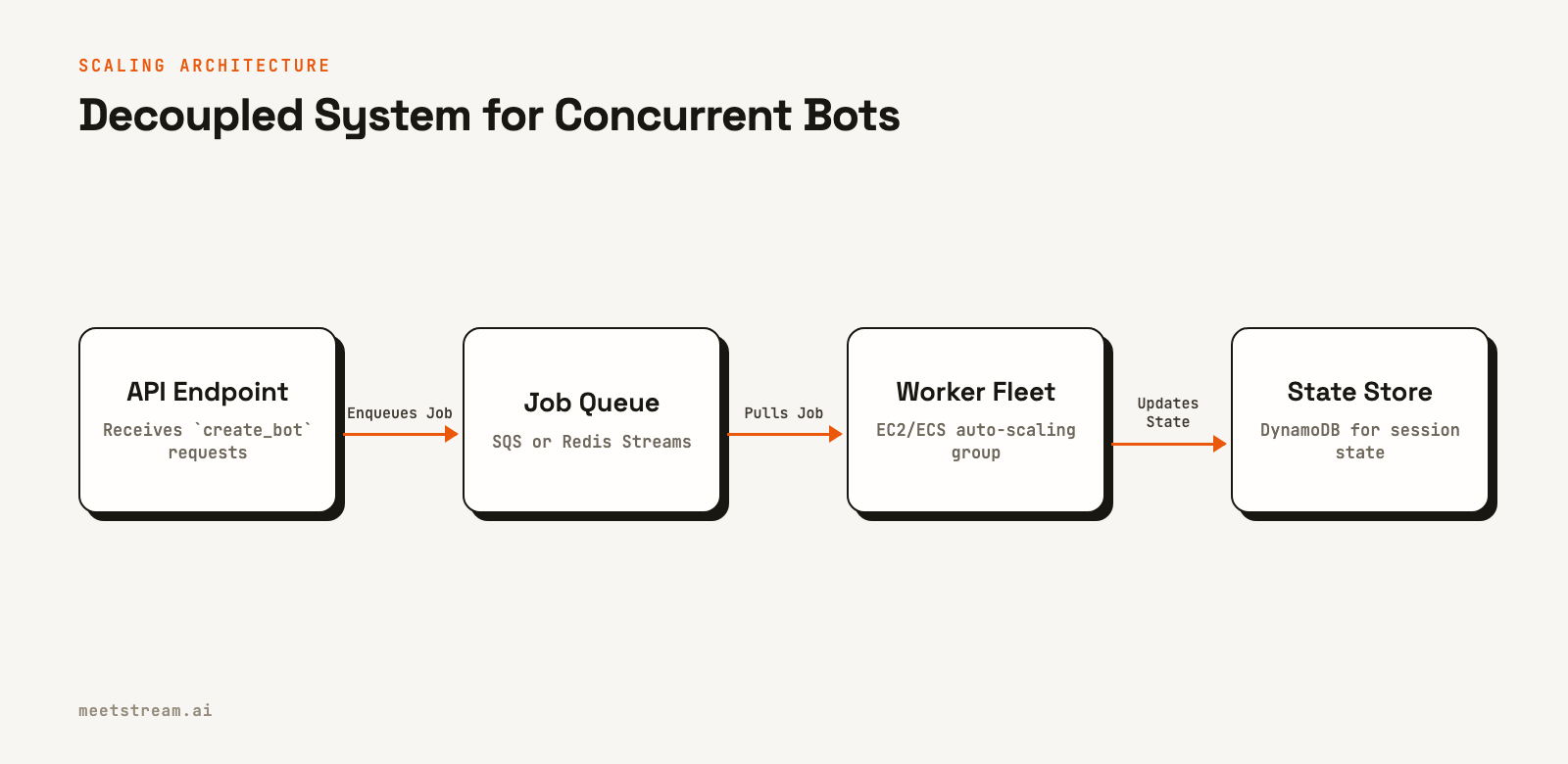
Here is how the components work together:
- Orchestration Layer: An API endpoint that accepts requests to create a bot. It performs validation and then places a job message onto a queue. It should be lightweight and return a response immediately without waiting for the bot to join the meeting.
- Job Queue: A message broker like Amazon SQS or Redis Streams. This queue decouples the API from the workers, providing a buffer during traffic spikes. Jobs wait in the queue until a worker is available.
- Bot Worker Pool: A fleet of virtual machines or containers that run the actual bot processes. These workers poll the job queue, and when they have capacity, they take a job and launch a new bot instance.
- State Store: A centralized database like DynamoDB that stores the status of each bot session (e.g., `Joining`, `InMeeting`, `Stopped`). Because any worker might handle a webhook for any bot, state cannot live in the memory of a single worker process.
Implementing Queue-Based Dispatch
Using a job queue is fundamental to a scalable system. It turns bot creation from a synchronous, blocking operation into an asynchronous one. When your API receives a burst of requests, they simply line up in the queue, and the worker fleet processes them as capacity allows.
This Python example shows a worker polling an SQS queue. The worker only pulls new messages if it has available capacity, preventing it from becoming overloaded.
import boto3, json, os, time

sqs = boto3.client('sqs', region_name='us-east-1')
QUEUE_URL = os.environ['BOT_QUEUE_URL']
MAX_CONCURRENT_BOTS = int(os.environ.get('MAX_CONCURRENT_BOTS', '15'))

class BotWorker:
    def __init__(self):
        self.active_bots = {}

    def run(self):
        while True:
            available_slots = MAX_CONCURRENT_BOTS - len(self.active_bots)
            if available_slots <= 0:
                time.sleep(1)
                continue

            response = sqs.receive_message(
                QueueUrl=QUEUE_URL,
                MaxNumberOfMessages=min(available_slots, 10),
                WaitTimeSeconds=20
            )
            messages = response.get('Messages', [])

            for msg in messages:
                body = json.loads(msg['Body'])
                bot_id = self._spawn_bot(body)
                self.active_bots[bot_id] = msg['ReceiptHandle']

                # After successfully spawning, delete the message
                sqs.delete_message(
                    QueueUrl=QUEUE_URL,
                    ReceiptHandle=msg['ReceiptHandle']
                )

    def _spawn_bot(self, config: dict) -> str:
        # This function would launch the bot in a subprocess
        # and return a unique identifier for the bot session.
        pass
Using a queue also provides observability. You can monitor the queue depth (the number of messages waiting) to get a real-time signal of system load, which is a key metric for auto-scaling.
Managing Per-Session State and Webhooks
With a fleet of workers, you need a central place to store the state of each bot. A key-value store like DynamoDB is a good fit, using the unique bot_id as the partition key. When a bot's status changes, the worker updates the record in the database.
import boto3
from datetime import datetime, timezone

dynamodb = boto3.resource('dynamodb')
table = dynamodb.Table('bot-sessions')

def update_bot_status(bot_id: str, status: str):
    table.update_item(
        Key={'bot_id': bot_id},
        UpdateExpression='SET #s = :s, updated_at = :t',
        ExpressionAttributeNames={'#s': 'status'},
        ExpressionAttributeValues={
            ':s': status,
            ':t': datetime.now(timezone.utc).isoformat()
        }
    )
Your webhook handler must also be fast and stateless. At high concurrency, events like `bot.stopped`, `audio.processed`, and `transcription.processed` will arrive in large volumes. A common pattern is to have the webhook endpoint do minimal work: validate the request, write the raw payload to another queue, and immediately return a 200 OK response. A separate pool of consumers can then process the events from that queue. This prevents your endpoint from timing out, which is important as some platforms will not retry failed webhook deliveries. For more on this, see our guide to webhooks.
If a worker host crashes, the bot process dies. The meeting platform will detect the disconnected socket and your system should have recovery logic. This usually involves a monitor that looks for sessions stuck in an `InMeeting` state. A crash might trigger a `bot.failed` webhook with status `Error`, which your webhook handler can use to update the session state to a terminal status.
Estimating Infrastructure Costs and Scaling Rules
The "Costs" in the title refer to infrastructure resources, not specific prices. The main cost of a self-hosted bot fleet is compute. Based on the 1.5 GB RAM per bot figure, a 32 GB RAM instance can run about 20 bots. To run 1,000 concurrent bots, you would need a fleet of approximately 50 such instances.
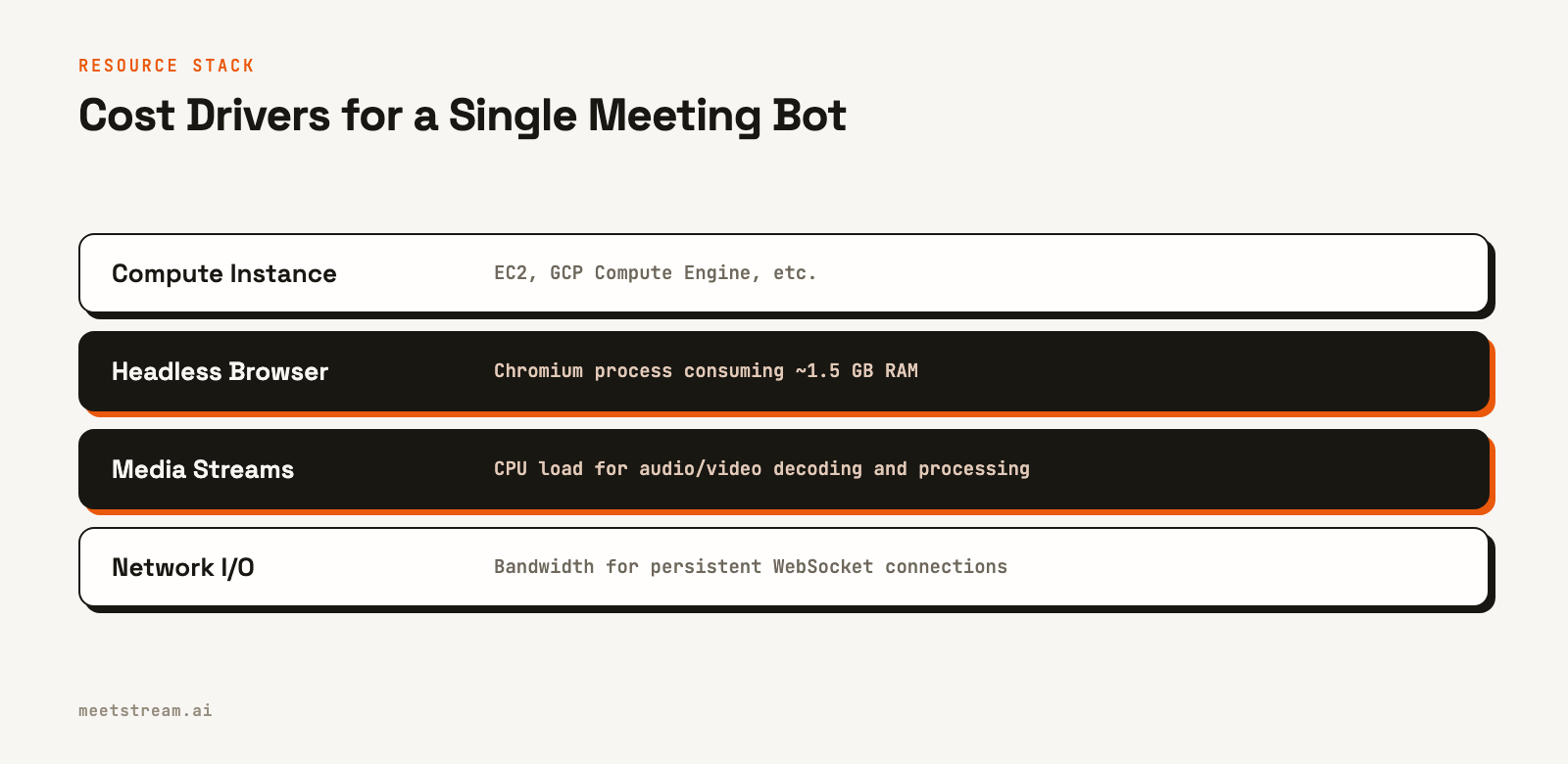
To manage these costs, you need an effective auto-scaling strategy. Scaling based on CPU alone is not sufficient, as a bot in a quiet meeting consumes memory and network connections but little CPU. A better approach uses multiple metrics:
| Metric | Scale Out Threshold | Scale In Threshold |
|---|---|---|
| Queue Depth | > 10 messages | < 2 messages |
| Avg. CPU Utilization | > 70% | < 30% |
| Avg. Memory Utilization | > 75% | < 40% |
The most important signal is queue depth. If jobs are backing up, you need more workers. Configure a scale-in cooldown period of at least three minutes. This prevents the auto-scaler from terminating an instance that has just started a new bot process, which can take time to initialize its browser instance.
How MeetStream Manages Scaling
The architecture described here is what a team typically builds to run bots at scale. MeetStream provides this as a managed service. Our Meeting Bot API handles the queueing, worker fleet management, auto-scaling, and state tracking automatically. You make a single API call to create a bot, and our infrastructure manages the complexity of running thousands of concurrent sessions across Zoom, Google Meet, and Microsoft Teams.
When you send a request to our `create_bot` endpoint, we handle the orchestration and dispatch. You receive lifecycle events via webhooks without needing to manage a worker fleet or a state database. This lets you focus on building your application's features, not on infrastructure. You can see the details in our getting started guide.
Conclusion
Scaling concurrent meeting bots from ten to one thousand requires a shift from a single-server model to a distributed, queue-based architecture. The primary constraints are memory per bot, CPU for media processing, and total available network sockets. By decoupling your system into an API, a job queue, a worker fleet, and a state store, you can scale each component independently. The most critical factor is planning for Chromium's memory usage, about 1.5 GB per bot, and using queue depth as your primary auto-scaling signal. If you prefer to build features instead of managing infrastructure, see the full API reference at docs.meetstream.ai.
Frequently Asked Questions
How many concurrent meeting bots can one server handle?
A typical cloud server with 16 vCPUs and 32 GB of RAM can run 15 to 20 concurrent bots. The main limitation is memory, so budget around 1.5 GB of RAM per bot. If you are also doing heavy media processing like real-time audio streaming, this number will be lower.
Why use a message queue for bot dispatch?
A message queue like SQS provides a buffer during demand spikes, preventing your API from being overloaded. It also simplifies worker logic, handles retries, and provides a clear metric (queue depth) for auto-scaling your worker fleet.
What happens if a worker instance crashes?
If you store session state in an external database like DynamoDB, the bot's record persists. The meeting platform will eventually detect the disconnection. You can build monitoring to find sessions stuck in an active state and mark them as failed.
How do I handle a high volume of webhooks?
Design your webhook endpoint to be fast and stateless. The best practice is to receive the request, place the raw event payload onto an internal queue for later processing, and immediately return a 200 OK response. This prevents timeouts and data loss.
What is the best auto-scaling strategy for a bot fleet?
Use a combination of metrics, with queue depth as the primary signal to scale out. Use CPU and memory utilization as secondary signals. For scaling in, be conservative and use a cooldown period of several minutes to avoid terminating instances that are actively starting new bot sessions.


