
Meeting Control via API: Managing the Full Bot Lifecycle

A meeting bot is a state machine. It can be scheduled for the future, attempting to join, stuck in a waiting room, actively in the meeting, or stopped after being kicked. Effective meeting control via API requires managing this entire sequence of states, not just firing a request to join a call. For developers building reliable AI agents, handling the full bot lifecycle is a core engineering requirement.
This is because manual meeting management does not scale. When your application needs to automatically record a sales demo or have an AI agent join a support call, relying on UI-based workflows introduces delays and failure points. Programmatic control ensures that meeting bots become reliable, integrated components of your software, not unpredictable external dependencies.
At MeetStream, we provide the voice infrastructure for AI voice agents to join meetings as active participants. A fundamental part of this is a clear, event-driven API for managing the bot lifecycle across Zoom, Google Meet, and Microsoft Teams. This allows you to build applications that react intelligently to every stage of a meeting, from initial scheduling to post-call data processing.
This article covers how to manage the meeting bot lifecycle programmatically using the MeetStream API. We will walk through API calls for creation, webhook events for state tracking, and patterns for handling real-world scenarios like failures and delays.
The Bot Lifecycle: More Than Joining and Leaving
The meeting bot lifecycle encompasses every state from the moment you decide a bot should join a meeting to the moment it has left and its data has been processed. Thinking about these states helps in building resilient applications that can handle the unpredictability of live meetings.
A typical lifecycle includes these key phases:
- Scheduled: A bot is created via an API call with a
join_atparameter set for a future time. The system is aware of the bot but no action is taken yet. - Joining: The bot is actively trying to connect to the meeting platform. This phase can involve retries if the initial connection fails.
- In Waiting Room: The bot has connected but is waiting for the host to grant admission. Your application needs to handle potential timeouts in this state.
- In Meeting: The bot has successfully joined the main session and is capturing media or performing actions. This is the primary active state.
- Stopped: The bot has left the meeting. This is a terminal state that can be triggered by an API call, inactivity, or the meeting ending.
- Failed: The bot was unable to join or encountered a critical error. This could be due to an invalid link, platform-specific issues, or network problems.
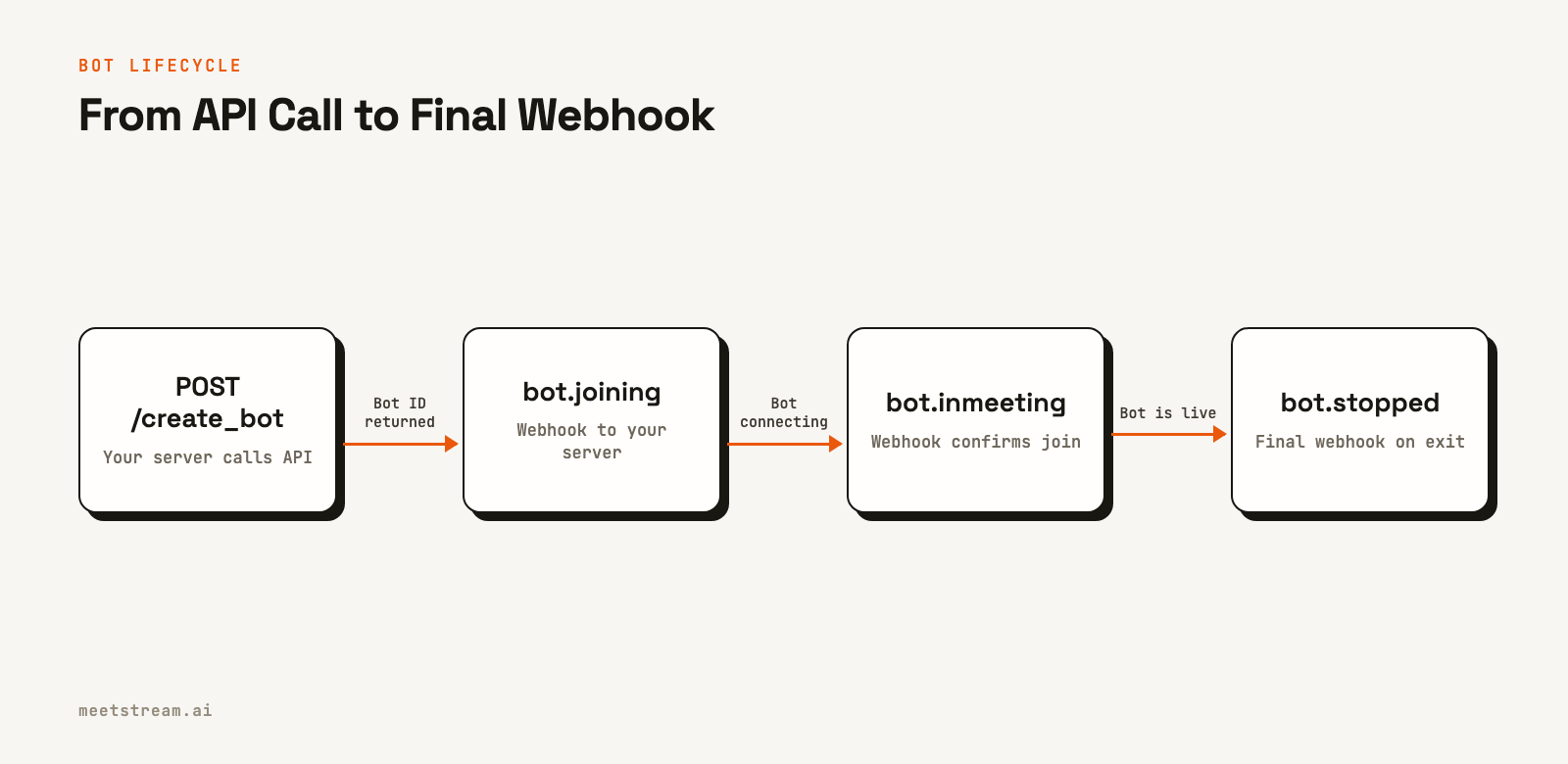
Programmatic control means having visibility into each of these states and the ability to react to them. For example, if a bot is in the waiting room for too long, you might send a notification to the user. If it fails to join, you can log the error and schedule a retry. This level of control is what our bot lifecycle model is designed to provide.
Creating and Scheduling Bots with the API
The entry point for all meeting control is the bot creation request. With a single API call, you can instruct a MeetStream bot to join a meeting immediately or schedule it for a future time. This is done with a POST request to the /api/v1/bots/create_bot endpoint.
The only required fields are the meeting_link and a bot_name. However, for full lifecycle management, you will typically include a callback_url to receive webhook events about state changes.
Here is a cURL example that creates a bot named "Notetaker" and tells MeetStream to send lifecycle events to a webhook endpoint. It also configures post-call transcription.
curl -X POST "https://api.meetstream.ai/api/v1/bots/create_bot" \
  -H "Authorization: Token <YOUR_API_KEY>" \
  -H "Content-Type: application/json" \
  -d '{
    "meeting_link": "https://meet.google.com/abc-defg-hij",
    "bot_name": "Notetaker",
    "callback_url": "https://your-app.com/webhooks/meetstream",
    "recording_config": {
      "transcript": {
        "provider": {
          "meetstream": {}
        }
      }
    }
  }'
The API responds with a unique bot_id, which you should store to correlate with incoming webhook events or to perform future actions on that specific bot.
{
  "bot_id": "604c0a0b-973d-4eb1-a5bf-2c7513f6bbe0",
  "transcript_id": null,
  "meeting_url": "https://meet.google.com/abc-defg-hij",
  "status": "Active"
}
To schedule a bot to join later, you can add the join_at field with an ISO 8601 datetime. This is useful for integrating with calendar events, where you can create your first bot minutes before a meeting is scheduled to start.
Tracking Bot State with Webhook Events
Once a bot is created, its state is communicated asynchronously via webhooks. This event-driven model is more resilient than polling a status endpoint because it pushes updates to your application in real time. Your server should be configured to listen for POST requests at the callback_url you provided.
Each webhook payload contains a bot_event field that identifies the lifecycle event. You should always branch your logic based on this field. Key events include:
bot.joining: The bot has started its connection process. This may fire multiple times on retries.bot.inmeeting: The bot has successfully entered the main meeting room. This event fires only once and is the signal to begin any in-meeting logic.bot.stopped: A terminal event indicating the bot has left the meeting for any reason (e.g., meeting ended, inactivity timeout, kicked).bot.failed: A terminal event indicating the bot could not join the meeting due to an unrecoverable error. The payload includes a message with more details.
Here is an example payload for the bot.inmeeting event:
{
  "bot_event": "bot.inmeeting",
  "bot_id": "604c0a0b-973d-4eb1-a5bf-2c7513f6bbe0",
  "bot_status": "InMeeting",
  "message": "Bot joined the meeting",
  "status_code": 200,
  "timestamp": "2026-02-27T07:11:51+00:00",
  "custom_attributes": {}
}
A few things to keep in mind when building your webhook handler: respond with a 2xx status code immediately to acknowledge receipt. Workspace webhooks are signed and logged, and you can resend any delivery from the dashboard. Perform any long-running tasks in a background job queue to avoid timeouts. You can learn more about all the possible events in our meeting bot webhooks documentation.
In-Meeting Actions and Real-Time Control
Once a bot is in a meeting (confirmed by the bot.inmeeting event), you can use the API to perform actions. While the core MeetStream product focuses on media capture and agent infrastructure, you can also build interactive experiences. This is often done using a persistent WebSocket connection for low-latency communication.
By including the socket_connection_url in your create_bot request, you instruct MeetStream to connect to your server as a WebSocket client. Once connected, you can send JSON commands to make the bot act. For example, you can send a command to play audio through the bot's speaker (for text-to-speech) or to post a message in the meeting chat.
This enables many use cases, from voice-controlled agents that can answer questions to bots that provide real-time assistance by sharing links or information in the chat. These meeting control patterns are essential for building truly interactive agents.
Handling Edge Cases and Failures
In the real world, meetings do not always go as planned. A host might not show up, a meeting link might be wrong, or a bot might be denied entry. A reliable system for meeting control via API must account for these failures.
The MeetStream API provides several mechanisms for this. The automatic_leave parameter in the create_bot call allows you to set timeouts for various scenarios, such as waiting in the lobby too long or being the only one left in a call. This prevents bots from running indefinitely and incurring unnecessary costs.
Webhook events also signal specific failure modes. Events like bot.denied (host rejected entry), bot.kicked (removed by host mid-meeting), and bot.failed provide clear signals that something went wrong. Your application should listen for these events to update its internal state, notify users, and decide whether to retry joining. This proactive error handling is important for building trust in your application.
How MeetStream Provides Lifecycle Control
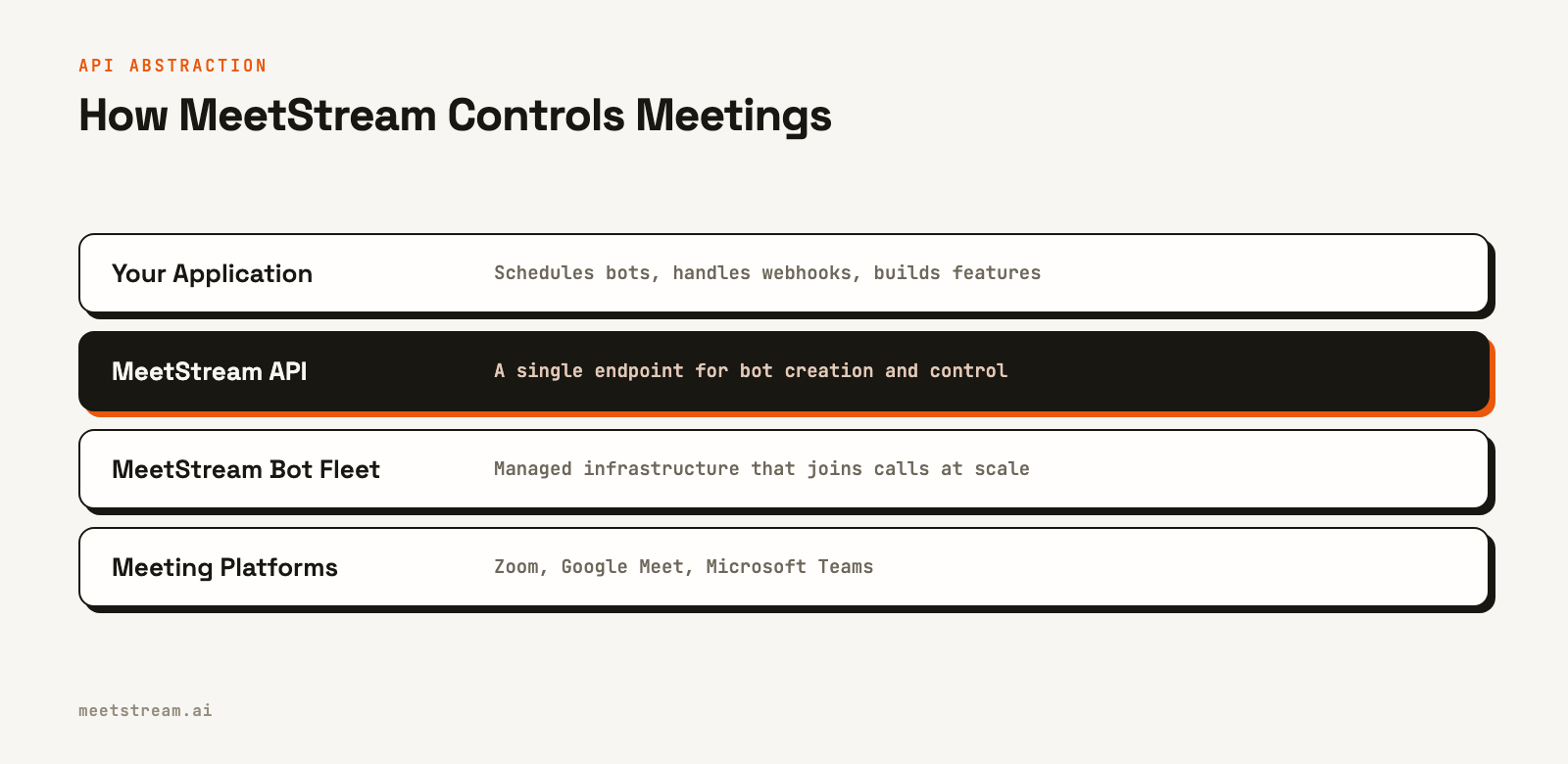
MeetStream is designed to abstract away the complexity of managing bots across different video conferencing platforms. Instead of building separate integrations for the Zoom Meeting Bot API, Google Meet, and Microsoft Teams, you interact with a single, unified Meeting Bot API.
Our managed infrastructure handles the scaling, reliability, and platform-specific details of getting a bot into a call. The API provides the high-level primitives for meeting control: creating bots, scheduling them, and receiving a consistent stream of lifecycle events regardless of the underlying platform. This lets you focus on your application's core logic, like building a great AI notetaker or a sales coaching tool, rather than on infrastructure management.
By combining a simple REST API for bot creation with an event-driven webhook system for state tracking, MeetStream provides the necessary tools for complete programmatic control over the meeting bot lifecycle.
Conclusion
Treating meetings as programmable events with a well-defined lifecycle is essential for building scalable and reliable applications. Direct meeting control via API moves beyond simple recording and transcription, enabling developers to create sophisticated AI agents and automated workflows that are deeply integrated with business logic.
By using a clear API for bot creation, a real-time webhook system for state management, and thoughtful parameters for handling edge cases, you can build applications that reliably manage bots across Zoom, Google Meet, and Teams. This programmatic approach is the foundation for the next generation of intelligent meeting tools. See the full API reference at docs.meetstream.ai.
Frequently Asked Questions
What actions can an API provide over an active meeting session?
A meeting bot API can provide control over joining or leaving a meeting, sending chat messages, and playing audio into the call. With MeetStream, these actions are typically performed by sending commands over a persistent WebSocket connection established when the bot joins.
How do I authenticate API calls to control a meeting bot?
MeetStream uses a static API key for authentication. You must include an Authorization header with the value Token YOUR_API_KEY in every request to the API. This key is long-lived and should be stored securely on your server.
What is the recommended pattern for handling webhook events?
The best practice is to have your webhook endpoint do minimal work. It should validate the request, enqueue a job with the payload into a background processing system like Redis or RabbitMQ, and then immediately return a 200 OK response. This prevents timeouts and makes your system resilient to spikes in webhook volume.
How do I handle a bot getting stuck in a waiting room?
When creating a bot, set the waiting_room_timeout within the automatic_leave object. If the bot remains in the waiting room longer than this duration (in seconds), it will automatically leave, and you will receive a bot.stopped event. This prevents your bot from waiting indefinitely for a host to admit it.
Can I schedule a bot to join a meeting in the future?
Yes. In the POST /api/v1/bots/create_bot request, include the join_at field with a future timestamp in ISO 8601 format. MeetStream will schedule the bot and automatically initiate the join process at the specified time.


