
AI Meeting Agent for Customer Support Teams

Automated analysis of support calls requires sending an agent into meetings to capture high-quality audio and generate an accurate transcript with speaker labels. This structured data, containing the full conversation and identifying who said what, becomes the input for language models that can then extract themes, identify churn signals, and surface product feedback. The process starts with reliable data capture from every customer call.
This is the core function of AI voice agents: they join meetings as active participants to provide the voice infrastructure for analysis and action. The MeetStream API provides this layer, deploying bots into Zoom, Google Meet, and Microsoft Teams to stream audio and metadata. This includes per-participant audio streams on Zoom, Google Meet and Microsoft Teams, which are critical for accurate post-call transcription and speaker diarization.
Quality assurance in a customer support organization used to mean a supervisor listening to a small sample of calls and filling out a scorecard. Most calls happened in a black box. Supervisors got a sample, agents got inconsistent feedback, and recurring product issues could persist for weeks before a pattern emerged. When you can process every call systematically, QA becomes statistical rather than sampled, and coaching becomes targeted rather than generic.
This article covers the technical pipeline for four core capabilities of a customer support intelligence platform. The recording and transcription layer uses the MeetStream Meeting Bot API as infrastructure. The natural language processing and machine learning layers are where you can build differentiated product features.
The Foundation: Recording and Transcription at Scale
Before any analysis, you need reliable transcripts. For a customer support use case, this means recording all support calls with accurate speaker attribution and timestamps. Knowing which voice is the agent and which is the customer is fundamental.
You can deploy a bot by sending a POST request to our API. To get a live transcript, you specify a webhook URL where MeetStream will send data as the conversation happens. For a final transcript after the call, you can configure a transcription provider and listen for the transcription.processed webhook.
curl -X POST "https://api.meetstream.ai/api/v1/bots/create_bot" \
  -H "Authorization: Token <YOUR_API_KEY>" \
  -H "Content-Type: application/json" \
  -d '{
    "meeting_link": "<YOUR_MEETING_LINK>",
    "bot_name": "Support Analyzer",
    "callback_url": "https://yourapp.com/webhooks/meetstream",
    "live_transcription_required": {
      "webhook_url": "https://yourapp.com/webhooks/live-transcripts"
    },
    "recording_config": {
      "transcript": {
        "provider": { "meetstream": {} }
      }
    }
  }'
The data schema matters. Store each transcript as a series of speaker-attributed segments: { "speaker": "agent|customer", "start_ms": integer, "end_ms": integer, "text": string }. The speaker label from the transcription API usually maps to "Speaker 0" or "Speaker 1". You will need a diarization-to-role mapping that identifies which speaker is the agent, often based on who speaks first and their characteristic opening lines.
A 50-agent support team handling 20 calls per day generates 1,000 transcripts daily. At an average of 15 minutes per call, that is about 2.5 million words of transcript per day. Design your storage and indexing for this volume from the start. Partitioned tables by date and indexes on agent, customer, and ticket IDs can handle this scale in a standard SQL database.
QA Automation: Transcribe All Calls, Flag What Matters
Traditional QA requires a human to listen to a call and score it against a rubric. Automated QA runs the transcript against your rubric programmatically after every call, with no human in the loop unless a flag is raised.
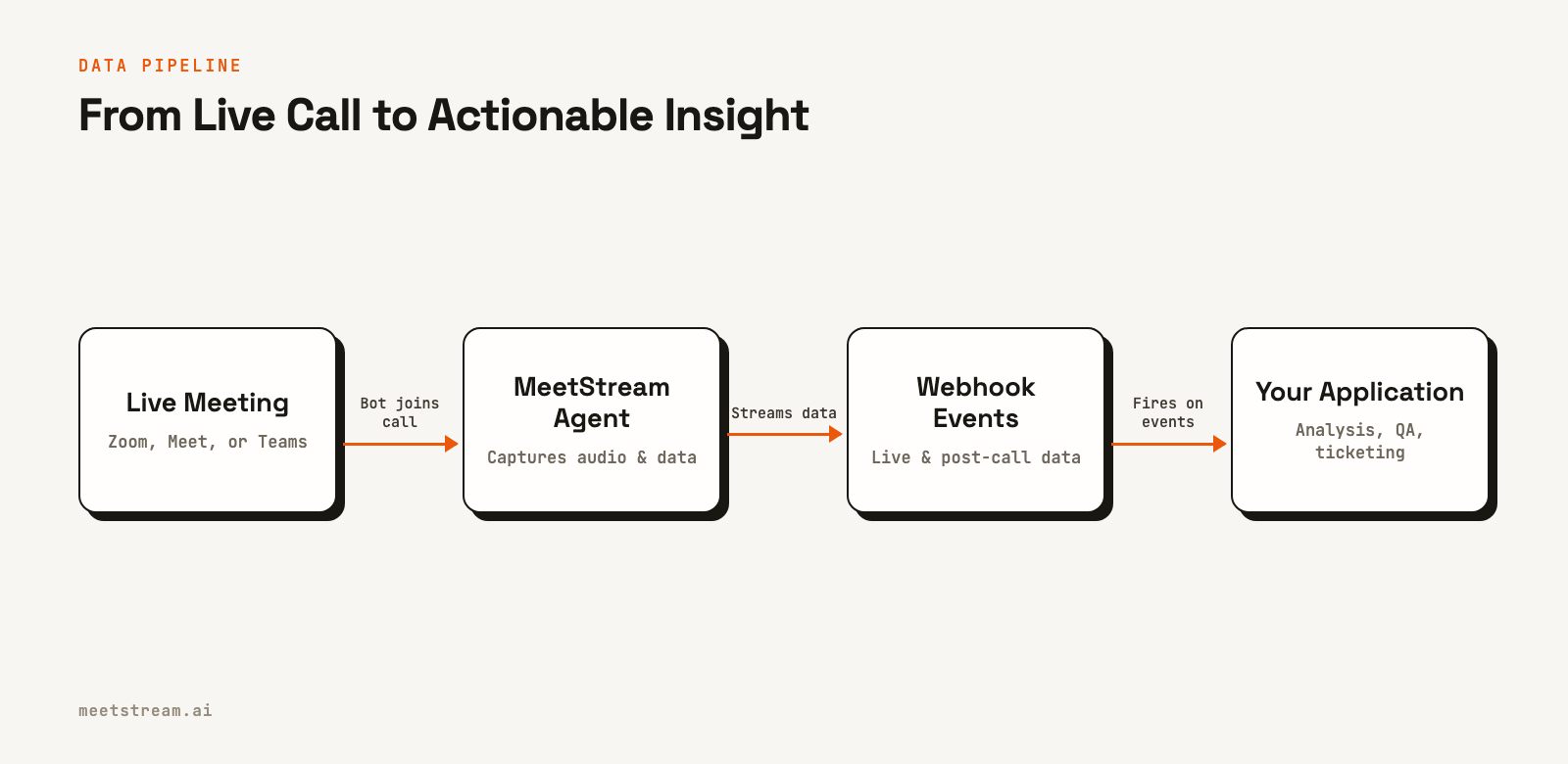
A QA rubric for support calls typically covers items like greeting adherence, asking permission before placing a customer on hold, following the proper escalation path, and confirming the issue was resolved. These can be checked programmatically.
The technical implementation starts after the transcription.processed webhook fires. Run the full transcript through a series of binary classifiers, one for each rubric item. For structured rules, like checking if the agent said "Is it OK if I place you on hold?", keyword and pattern matching works well. For qualitative items like tone assessment or empathy, a fine-tuned classifier or a prompted large language model produces better results.
The output is a QA scorecard for each call, with a pass or fail for each rubric item and an aggregate score. High-volume teams should route only flagged calls to human review. Calls that score below a threshold or trigger a specific flag, like prohibited language, go to the QA queue. This focuses reviewer time on calls that need attention.
Agent Coaching: Surface Similar Past Calls
A powerful coaching tool is institutional knowledge: this exact problem has come up before, and a top agent handled it well. Most organizations cannot surface that knowledge in the moment. It exists in recordings, but it is not queryable.
To build this feature, you use the real-time transcript stream. As the conversation develops, you can classify the issue type and search a historical transcript database for similar resolved calls. The agent sees a panel in their support tool showing past calls, their resolutions, and whether the outcome was positive.
This search benefits from semantic retrieval. A customer saying "I've been charged twice" and another saying "there are two line items on my bill" describe the same issue with different words. A keyword search can miss the connection, but a semantic search finds it. You can achieve this by embedding transcript segments with a vector model, storing them in a vector database, and querying with the current call's live transcript.
Post-call coaching is another mode. After a QA flag is raised, the coaching workflow can present the agent with the specific text that triggered the flag, the rubric item that failed, and a comparable positive example from a similar call. This is more effective than providing a low score without context.
Automatic Ticket Creation from Call Summaries
Support calls often generate follow-up work: a refund to process, a bug to file, or a callback to schedule. Agents log this after the call, but under time pressure, ticket quality can suffer. Issues get miscategorized and descriptions can be vague.
Automated ticket creation from call summaries can fix this. After the transcription.processed event, extract the issue type, resolution status, any follow-up actions, the customer identifier, and priority signals like expressed frustration. You can then use the API of your ticketing system, like Zendesk or Jira, to create a new ticket.
The ticket body should include the structured extraction and a link to the full transcript for reference. A confidence score from your extraction model can determine routing. High-confidence extractions can go directly to the appropriate queue, while low-confidence ones can be sent for a manual review.
Most organizations find that automated tickets have better category accuracy and more consistent descriptions than manually entered ones within a few weeks of tuning the extraction prompts or models. This pipeline is also valuable for meeting analytics customer success teams, who can auto-populate tickets with the right customer record and severity level.
CSAT Prediction from Conversation Patterns
Customer satisfaction (CSAT) scores often arrive days after a call, making the feedback loop too slow to change agent behavior. CSAT prediction can close this loop in near real time. Using historical calls where CSAT scores are known, you can train a model to predict the score from conversation patterns.
Features that predict CSAT in support contexts include the customer's sentiment trend over the call, the number of topic shifts, whether resolution was confirmed, hold time count and duration, and agent interruption rate. A gradient-boosted tree model works well for this prediction task because the feature set is tabular and interpretable. You want to know not just the predicted score but which features drove the prediction.
During a call, you can update the predicted CSAT as the conversation progresses. If the prediction drops below a threshold, it can trigger a supervisor alert. This turns CSAT prediction from a historical measurement into a real-time intervention trigger. Accuracy will be modest at first, but as you collect more labeled examples, the model improves.
Building the Intelligence Platform Architecture
The full platform connects the MeetStream infrastructure for recording and transcription to a processing pipeline for analysis, and finally to an output layer for dashboards, alerts, and ticketing systems.
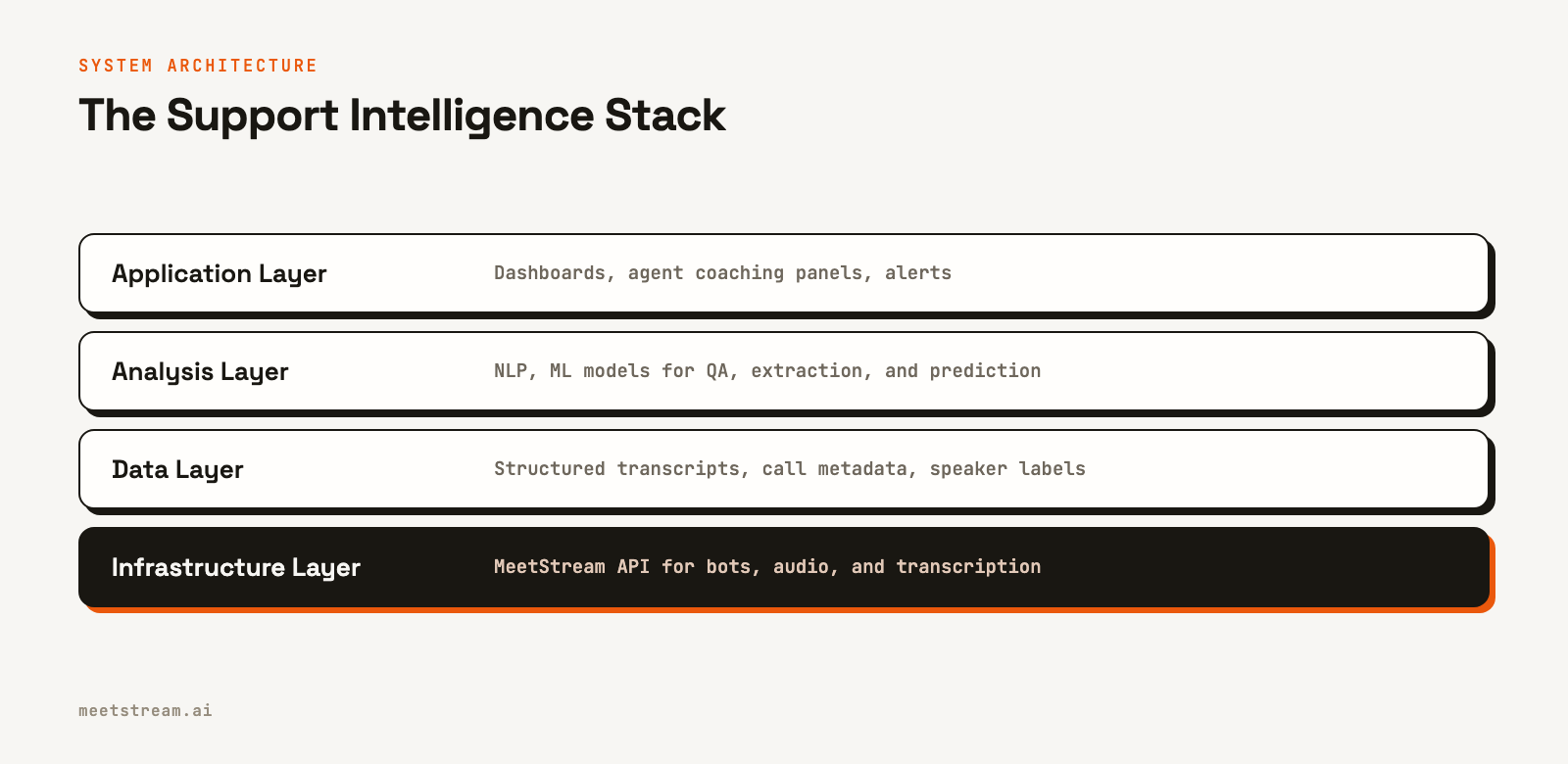
The processing pipeline should be event-driven. The transcription.processed webhook enqueues a job. Each analysis step, like QA scoring or ticket extraction, runs as a separate, independently retryable job. This ensures that one failed analysis does not block others.
The analytics dashboard is where compound value emerges. Individual call analysis is useful, but cross-call analytics make patterns visible. Queries like "Which agent has the highest CSAT prediction accuracy?" or "Which issue category has the worst first-call resolution rate?" run against your structured database, not individual transcripts.
How MeetStream Fits In
MeetStream provides the infrastructure layer for building these systems. Our unified Meeting Transcription API handles the complexity of deploying bots, capturing audio, and generating transcripts across Zoom, Google Meet, and Microsoft Teams. This lets you focus on the analysis and application layers where your product's unique value is created.
We have processed over one million meeting minutes and deployed around 80,000 bots, giving us deep experience in managing this infrastructure at scale. The platform is designed for developers building AI agents and intelligence tools on top of meetings. The goal is to provide reliable, low-latency data streams so you can build your application without becoming an expert in real-time media protocols or meeting platform integrations.
If you are building a conversation intelligence product for customer support, the core challenge is getting clean, structured data from every call. An AI meeting agent is the most direct way to solve this. Get started free at meetstream.ai.
Frequently Asked Questions
How do you get consent for recording customer support calls?
The practical approach is to disclose recording at the start of the call, for example, with a message like "this call may be recorded for quality and training purposes." For video calls, the MeetStream bot's visible name, such as "Support Bot," provides additional disclosure. This is important for compliance with regulations in all-party consent jurisdictions.
What is a good QA rubric for a customer support call?
Start with the rubric your human QA team already uses. If you do not have one, core items that correlate with customer satisfaction are issue acknowledgment, resolution confirmation, providing proactive information, and a proper call closure. These four items can capture most of the meaningful variance in support call quality.
How do you handle multilingual support calls?
First, verify that your transcription provider supports the required languages with high accuracy. It is generally better to process text in its native language rather than translating it first, as translation can introduce errors. You can train separate classifiers for each language or use multilingual models for languages with less training data.
Can conversation intelligence work for chat-based support?
Yes, and it is often simpler because you start with text. QA automation, ticket creation, and CSAT prediction all work on chat transcripts. The concept of surfacing similar past conversations based on the current chat context is also directly applicable. Many teams start with chat and add call recording later.
How do you evaluate if a CSAT prediction model is improving support?
A/B test the intervention. Randomly assign calls predicted to have a low CSAT to either receive a supervisor alert (treatment) or no alert (control). Measure the actual CSAT outcomes for both groups. The difference in CSAT between the groups will show the impact of the intervention.


