
Compare Transcription APIs with Transcriber Benchmark
Compare transcription APIs on your own meeting audio. Transcriber Benchmark runs every provider on the same recording and scores accuracy, speed and cost.

The fastest way to compare transcription APIs is to run the same meeting audio through each of them and score every transcript against what was actually said. Transcriber Benchmark is a free, open-source tool that does exactly that. It sends one meeting recording to Mia Transcribe, Deepgram, AssemblyAI, Sarvam and JigsawStack, then gives you a side-by-side table of word error rate, turnaround and cost. When we ran it on nine recordings across Zoom, Google Meet and Microsoft Teams, three engines tied at the top at around 2% word error rate.
Choosing a speech-to-text provider for a meeting product usually starts with vendor pages that all claim to be the most accurate. The claims are measured on different audio, scored with different rules, and almost never come with error bars. Buyers evaluating transcription want evidence, not claims, and the only evidence that settles the question is a test on the kind of audio your product will actually see.
Transcriber Benchmark turns that test into a few clicks. It records a meeting with a bot, has every provider transcribe the identical recording, and scores the results with a published method you can check. Every run produces a leaderboard, trade-off charts, word-level errors and a results.md you can drop straight into an evaluation doc.
In this article, we'll explore why transcription claims are hard to compare, what a fair comparison needs, how Transcriber Benchmark works, what we found when we ran it, and how to run your first benchmark on your own meetings. Let's get started!
Why are transcription APIs so hard to compare?
Accuracy is usually reported as word error rate (WER): the share of reference words a transcript gets wrong by substituting, missing or inserting them. Lower is better, and 2% WER means about one error every 50 words.
WER sounds objective, but published numbers rarely line up:
- Different audio. Most speech-to-text benchmarks upload clean files straight to each API. Meeting audio is captured inside a Zoom, Meet or Teams call, compressed by the platform and mixed before any model hears it.
- Different scoring rules. Is "$4.2 million" an error when the speaker said "four point two million dollars"? Rules like this move WER by tenths of a point, and at the top of the market tenths decide the ranking.
- No error bars. On a few hundred words, a half-point gap between two providers can be pure chance.
That's why a comparison has to be run, not read. If you're still deciding what matters for your product, our guide to choosing the best transcription model for meeting bots covers the criteria. Transcriber Benchmark is how you put numbers behind them.
What does a fair transcription comparison need?
We built Transcriber Benchmark around six rules. Any comparison you run, with this tool or another, should meet them:
- Identical audio for every provider. One recording, transcribed by each provider, so differences come from the engines and not from different captures.
- A known reference. A word-for-word transcript of what was actually said. Without one you can measure speed and cost, but not accuracy.
- The same scoring for everyone. Formatting differences (spelling variants, contractions, "$4.2 million", "November 14") shouldn't count as errors for one provider and not another.
- An honest noise band. Gaps smaller than the sampling noise are ties, not wins.
- An independent check. A second scorer, written by someone else, should agree on the order.
- Everything published. Raw provider responses, the reference and the scored text, so anyone can re-derive the numbers.
The last two matter most when the tool's author sells one of the engines. MeetStream sells Mia Transcribe, so we designed Transcriber Benchmark to be checked rather than trusted.
How Transcriber Benchmark works
Transcriber Benchmark runs on MeetStream's meeting bot API. MeetStream stores one recording per bot and can re-transcribe it with any provider on request, which is what makes "identical audio for every provider" possible.
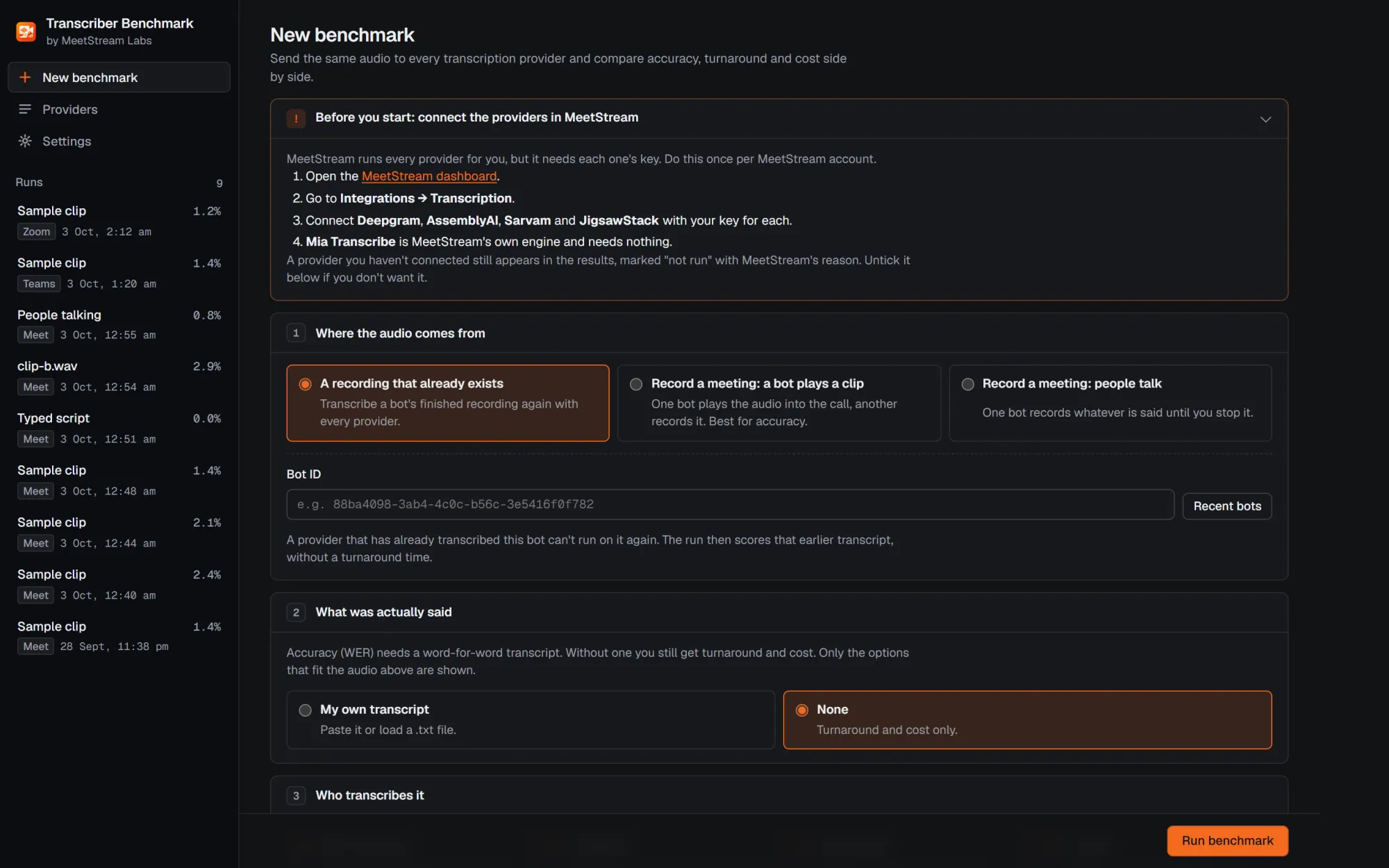
Three ways to get the audio
| Mode | What happens | Best for |
|---|---|---|
| A bot plays a clip | A speaker bot plays known audio into your call while a recorder bot captures it: the bundled sample clip, a script you type (read by text-to-speech), or your own audio file. | Accuracy: the reference is known exactly. |
| People talk | One recorder bot captures whatever is said until you stop it. You can add a transcript of what was said afterwards to score it. | Realistic speech with your own voices and vocabulary. |
| An existing recording | Pick a bot that has already recorded a meeting, and every provider transcribes that recording. | Re-testing meetings you've already captured. |
It works on Zoom, Google Meet and Microsoft Teams. After the call, the tool asks MeetStream to re-transcribe the recording once per provider, polls every second for the results, and scores each transcript against the reference.
What it measures
- Accuracy: word error rate, with substitutions, deletions and insertions counted separately, and a noise band worked out from the reference length.
- Turnaround: time from the re-transcribe request to the finished transcript, known to within the 1-second poll.
- Cost: what this recording cost with each provider at its published rate, plus the rate per audio hour.
What you get
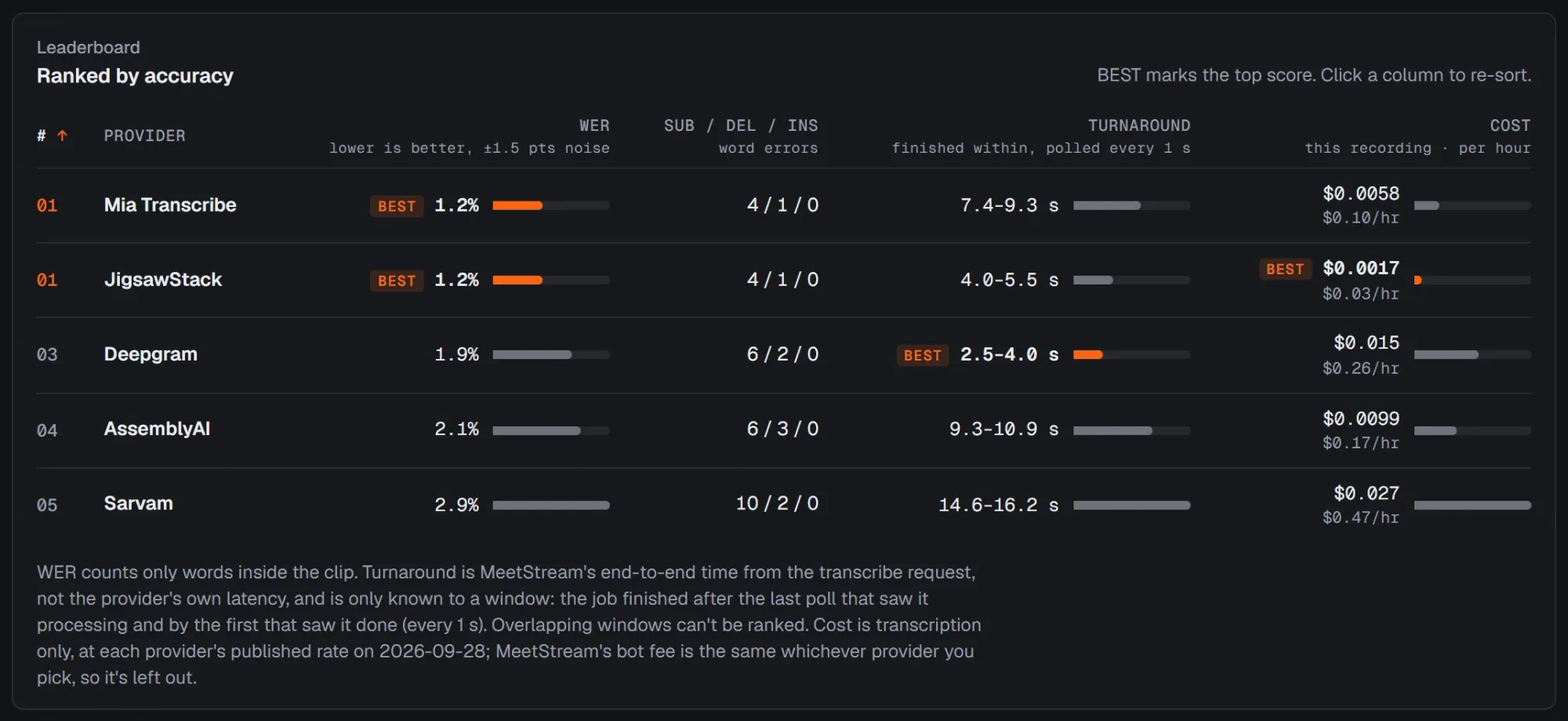
Every run produces:
- A leaderboard ranked by accuracy, with the top score on each metric marked BEST and the noise band shown in the header.
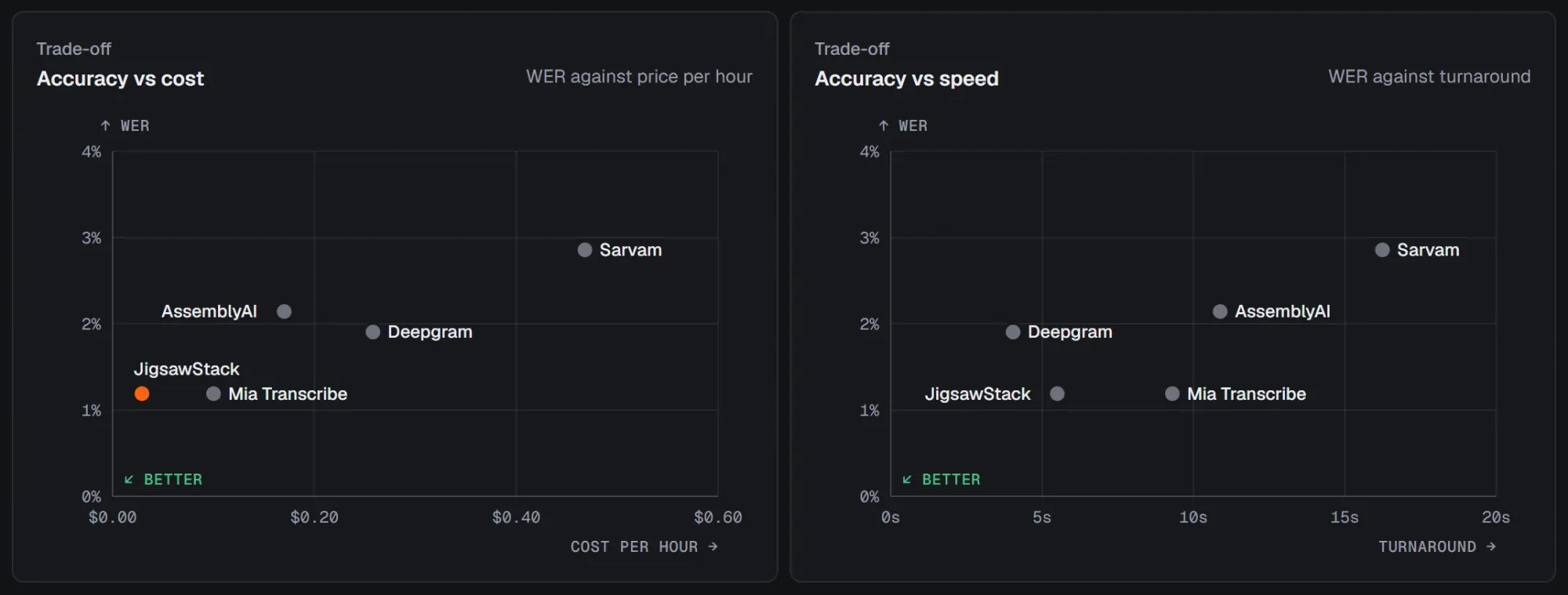
- Trade-off charts of accuracy against cost and against speed, where lower-left wins.
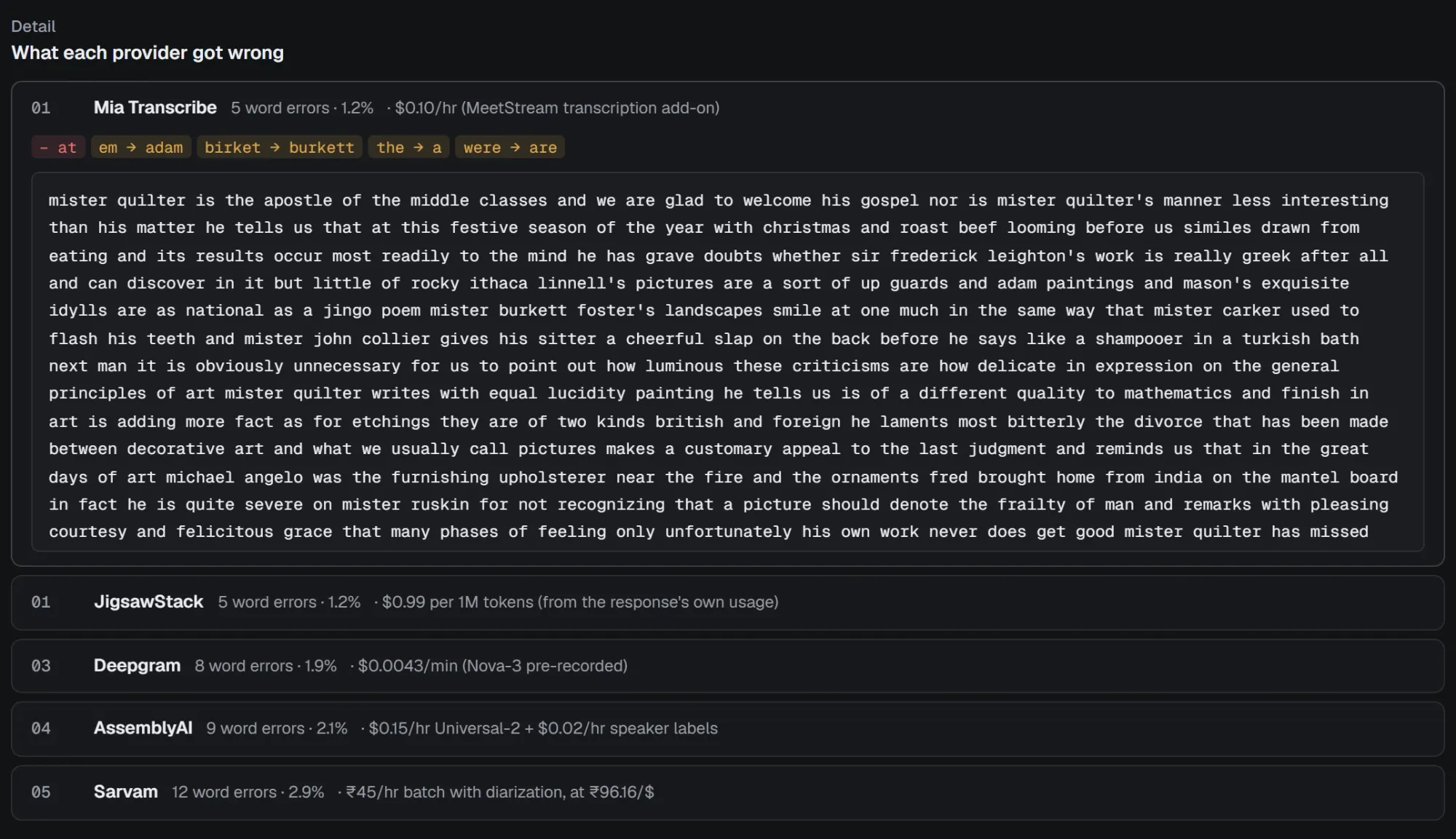
- Word-level errors for each provider, next to its full transcript, so you can see whether it dropped a product name or just wrote "upguards" as "up guards".
results.mdandresults.json, plus every provider's raw API response, in a folder you can share or re-score later.
How each provider is configured
Each provider uses its documented model, English where it documents an English code, and every other option at its default. There's no custom vocabulary and no tuning. The Providers page shows exactly what is sent, the price and the caveats:
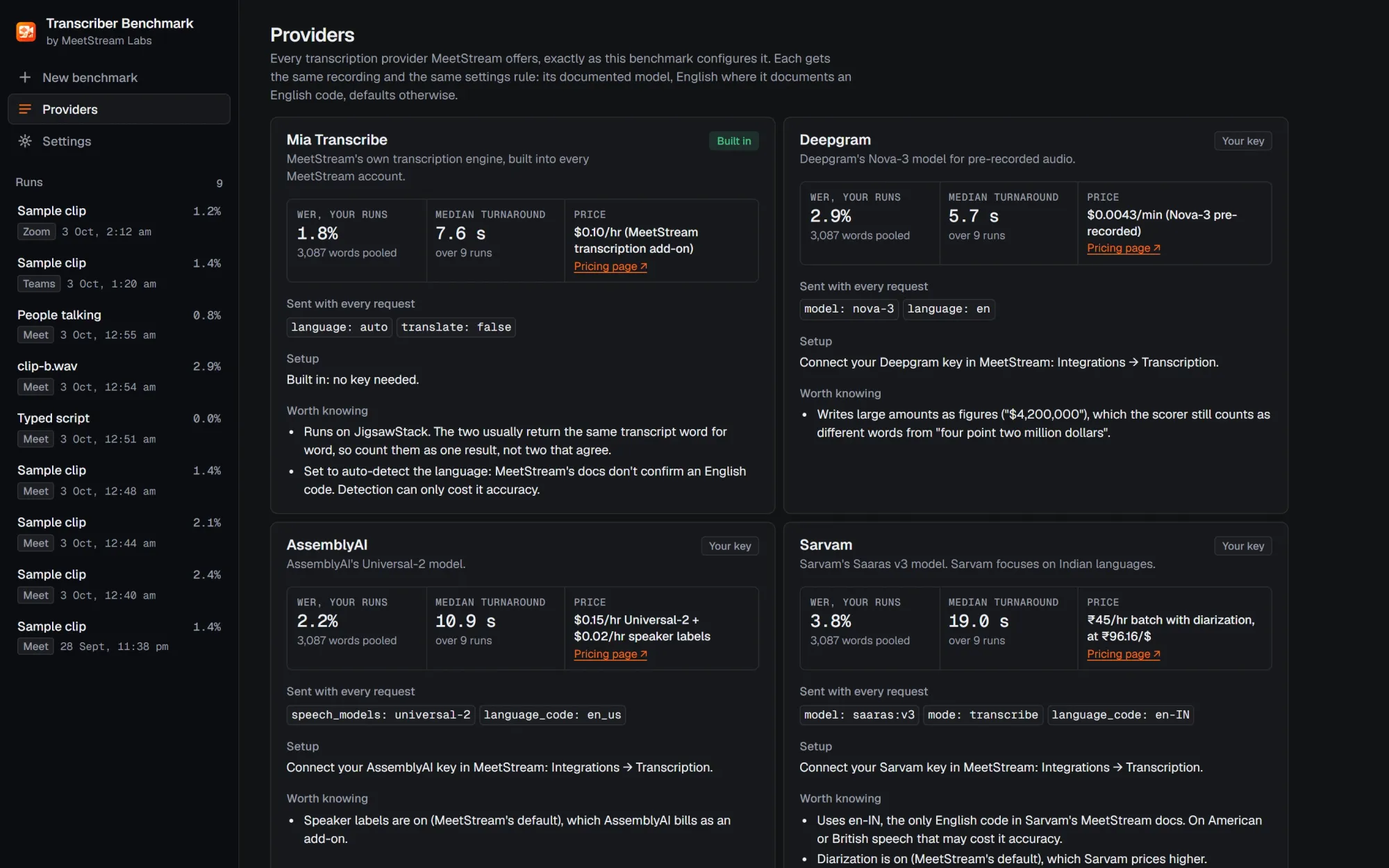
| Provider | Model and setting | Published rate per audio hour |
|---|---|---|
| Mia Transcribe (MeetStream) | MeetStream engine, auto language |
$0.10 |
| JigsawStack | en |
~$0.03* |
| AssemblyAI | universal-2, en_us |
$0.17 |
| Deepgram | nova-3, en |
$0.26 |
| Sarvam | saaras:v3, en-IN |
$0.47 |
*JigsawStack bills by processing tokens, so its hourly cost depends on the audio.
Two of these settings cut against an engine, and one of them is ours. Mia Transcribe runs on auto language detection, because its docs don't confirm an English code. Sarvam runs on en-IN, the only English code it documents, which may cost it accuracy on American and British speech.
Desktop app or command line
Transcriber Benchmark ships as a desktop app for Windows, macOS and Linux (about 340 MB installed), with Node bundled, so there's nothing else to install. The same tool also runs in your browser (npm run ui) or from the command line (npm run record, npm run benchmark), and all three produce identical result folders. The full scoring rules are in the methodology.
What we found when we ran it
We ran Transcriber Benchmark on nine recordings, with 3,087 reference words in all:
- The sample clip, six times: four on Google Meet, one on Teams and one on Zoom.
- Three other kinds of speech on Meet: a typed script read by text-to-speech, a second clip with rare names, and a person reading aloud.
Every provider succeeded on every run. The full report has every run folder.
Accuracy, pooled over all nine recordings
| Provider | Word error rate | Range across runs | Median turnaround | Price per hour |
|---|---|---|---|---|
| Mia Transcribe | 1.8% | 0.0–2.9% | 7.4 s | $0.10 |
| JigsawStack | 1.9% | 0.0–3.7% | 6.0 s | ~$0.03 |
| AssemblyAI | 2.2% | 0.0–3.7% | 10.7 s | $0.17 |
| Deepgram | 2.9% | 1.8–5.9% | 5.7 s | $0.26 |
| Sarvam | 3.8% | 0.0–7.4% | 18.6 s | $0.47 |
- Mia Transcribe, JigsawStack and AssemblyAI are tied for accuracy. They're within 0.4 points of each other, inside the 0.7-point noise band. Deepgram is 1.1 points behind the leader, and Sarvam 2.0.
- Mia Transcribe and JigsawStack are one engine. Mia Transcribe runs on JigsawStack. The two returned identical transcripts in 8 of 9 runs, so read them as one result.
- Deepgram was usually fastest to return a post-call transcript, and Sarvam was slowest in 7 of 8 timed runs. Turnaround includes MeetStream's queueing, so single runs vary a lot: only the medians mean much.
- Price and accuracy didn't move together. The most expensive engine had the highest error rate, and the $0.10-per-hour engine was tied for the lowest.
The platform didn't change the ranking
| Provider | Google Meet (4 recordings) | Microsoft Teams | Zoom |
|---|---|---|---|
| Mia Transcribe | 2.1% | 1.4% | 1.2% |
| JigsawStack | 2.1% | 1.4% | 1.2% |
| AssemblyAI | 2.3% | 2.1% | 2.1% |
| Deepgram | 3.0% | 2.4% | 1.9% |
| Sarvam | 4.0% | 3.3% | 2.9% |
Every platform produced the same order. The same clip recorded four times on Meet moved one provider's WER by up to 1.5 points, which is why a single recording isn't enough to rank anything.
Harder audio spread the field: on the second clip, with new sentences and rare names, scores ranged from 2.9% (Mia Transcribe) to 7.4% (Sarvam).
What these numbers don't tell you
- Read speech, not real conversations. There's no crosstalk or spontaneous speech. The sample clip comes from LibriSpeech, which is public, so it may be in some providers' training data.
- Few voices, English only. Accents weren't tested, and Sarvam, which focuses on Indian languages, was tested outside its strength.
- One evening, one network for turnaround.
An independent scorer (jiwer with OpenAI Whisper's normalizer) put the providers in the same order in every run, except where two were already within noise. Your audio may still rank them differently, which is the point of the tool.
Where MeetStream fits
MeetStream is a meeting bot API that joins Zoom, Google Meet and Microsoft Teams calls and returns recordings and transcripts. Transcription is a setting, not a lock-in: you can use MeetStream's own engine, Mia Transcribe, or connect your own Deepgram, AssemblyAI, JigsawStack or Sarvam key and pick a provider per bot.
That's what Transcriber Benchmark is built on: one stored recording, re-transcribed by each provider. It's also why we built it. We wanted to show that a $0.10-per-hour engine is competitive with providers costing up to $0.47 per hour, with data anyone can check, rather than just claiming it. If another provider suits your audio better, MeetStream works with that too.
How to run your first benchmark
-
Get the tool. Install the desktop app, or run it from source:
git clone https://github.com/meetstream-ai/labs.git cd labs/transcription-provider-benchmark npm install npm run ui -
Add your keys. Paste your MeetStream API key in Settings and use Test connection to check it. Add a free ngrok authtoken if a bot will play a clip into the call.
-
Connect the providers. In the MeetStream dashboard, go to Integrations → Transcription and connect Deepgram, AssemblyAI, Sarvam and JigsawStack with your own keys. Mia Transcribe needs nothing.
-
Pick your audio and reference. Start with the bundled sample clip to see a full run, then switch to your own recordings with a word-for-word transcript.
-
Run it, then read the errors, not just the score. A provider that drops your product names is worse for you than its WER suggests.
A few habits make the numbers trustworthy:
- Record more than once and pool the words. One recording can move a score by more than a point.
- Treat providers inside the noise band as tied.
- Set every model explicitly. Defaults change, and an unset model can quietly cost you ten points of accuracy.
- Re-score with an independent tool.
npm run scorere-scores any run without an API key, andscripts/score_jiwer.pychecks it with jiwer. - Share the run folder, not a screenshot.
results.mdand the raw responses let a colleague check every number.
Conclusion: let your own audio decide
Transcriber Benchmark answers the question every transcription evaluation starts with: which provider is most accurate, fastest and cheapest on our meetings? It runs identical audio through every provider, scores it with a published method and an independent check, and hands you a table you can share.
On our nine recordings, Mia Transcribe, JigsawStack and AssemblyAI tied for accuracy, Deepgram was fastest, and the $0.10-per-hour engine held its own against providers costing more than four times as much. Your meetings may tell a different story, and now you can find out.
Sign up for MeetStream, get Transcriber Benchmark, and run your first comparison on the bundled sample clip. Then try it on a meeting of your own. The MeetStream docs cover switching providers per bot once you've picked one.
Frequently Asked Questions
Is Transcriber Benchmark free?
Yes, the tool is free to use. Running it uses your MeetStream account for the bots, and each provider bills its own transcription. Running all nine of our recordings through all five providers cost $0.48 in transcription.
What do I need to run it?
A MeetStream API key, a meeting link on Zoom, Google Meet or Microsoft Teams, and each third-party provider connected in your MeetStream dashboard. Mia Transcribe needs no extra key. If a bot will play a clip into the call, you also need a free ngrok authtoken. Zoom also needs a Zoom Meeting SDK app connected in MeetStream.
Can I test transcription APIs on my own audio?
Yes. A bot can play your own audio file into a call, or record people talking live. Add a word-for-word transcript of what was said, before or after the run, and every provider is scored against it. Without a transcript you still get turnaround and cost.
Which transcription API was most accurate in your tests?
Across nine meeting recordings, Mia Transcribe (1.8% WER), JigsawStack (1.9%) and AssemblyAI (2.2%) were statistically tied for the lowest word error rate. Deepgram scored 2.9% and Sarvam 3.8%. Results on your audio may differ.
How does it measure accuracy?
It counts word errors against a word-for-word reference after normalizing formatting, so spelling variants, contractions and amounts written as "$4.2 million" aren't counted as mistakes. It reports a noise band, so small gaps aren't read as wins. Every run can be re-scored with jiwer and OpenAI Whisper's normalizer as an independent check.