
Hermes AI Meeting Plugin: Join and Summarize Calls
The Hermes AI meeting plugin connects agents to MeetStream MCP tools so they can join Zoom, Google Meet, and Teams calls, use chat, and retrieve summaries.

AI agents can write code, browse the internet, manage calendars, and automate entire workflows. At this point, there’s very little they can’t do.
But what about joining a meeting?
Sure, your AI agent can schedule a meeting or remind you about one, but what if it could actually join your Zoom call, interact with participants, and summarize everything afterward?
Well, that’s exactly what we’ve been working on at MeetStream.
We’ve built a plugin that connects Hermes AI agents to MeetStream, allowing them to join Zoom, Google Meet, and Microsoft Teams calls, interact through meeting chat, work with voice agents, and retrieve meeting summaries.
And the best part? You don’t have to build an entire meeting infrastructure to make it happen.
So, How Does It Work?
The integration uses something called the Model Context Protocol (MCP).
If you’re unfamiliar with MCP, think of it as a standardized way for AI agents to interact with external tools and services.
MeetStream provides a hosted MCP server that exposes 19 tools for interacting with its meeting infrastructure.
When you ask Hermes something like:
“Join my Google Meet and introduce yourself.”
Hermes identifies the appropriate tool, sends a request through MCP, and MeetStream handles the actual meeting operations.
The architecture looks something like this:
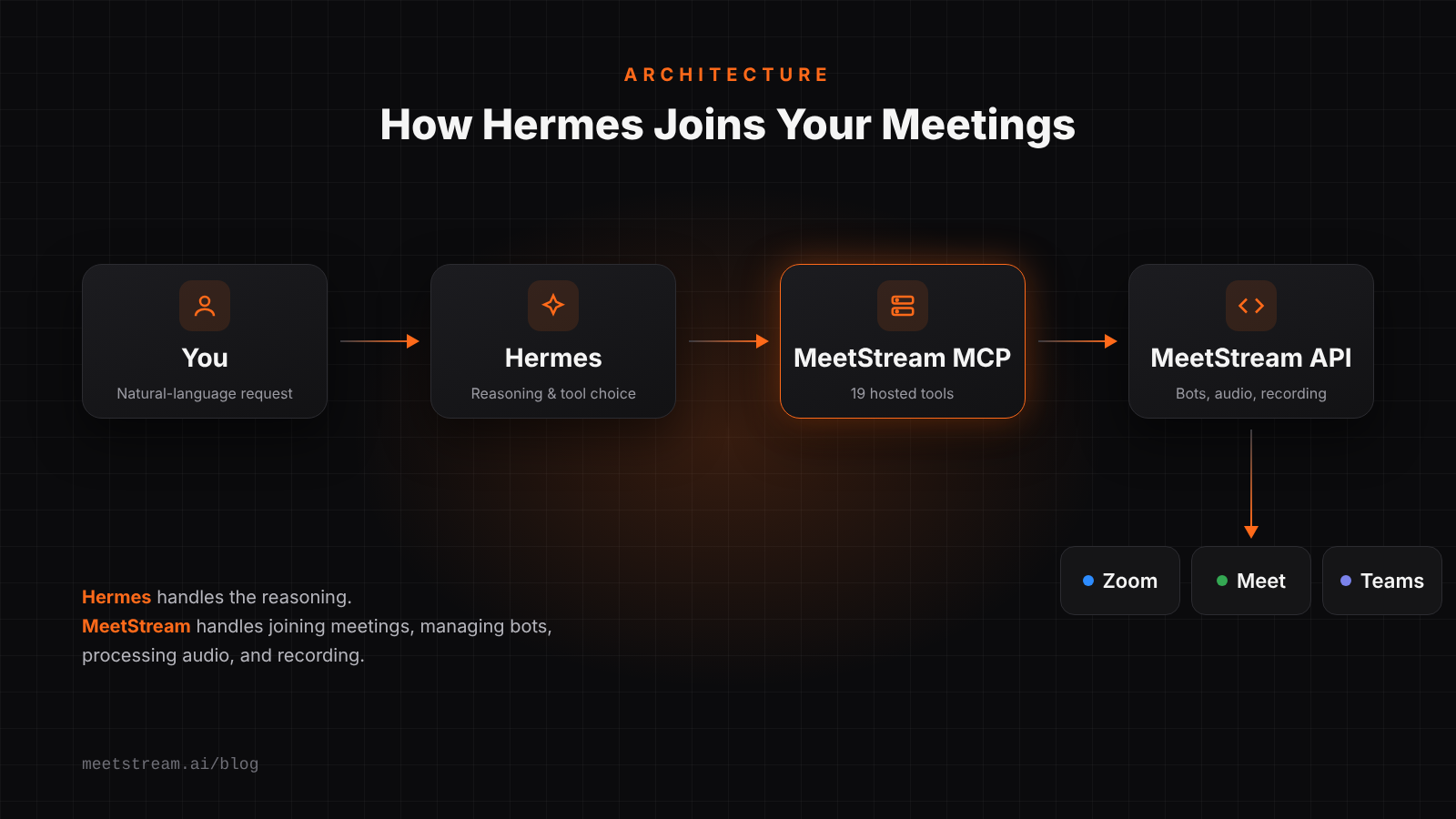
Hermes handles the reasoning, while MeetStream handles the complicated stuff: joining meetings, managing bots, processing audio, and recording.
No custom server, no audio pipeline, and no need to figure out how to connect a bot to Zoom yourself.
A Plugin With Almost No Code?
Here’s probably my favorite part.
The plugin itself doesn’t contain any executable application code.
It’s essentially three things:
plugin.json— Describes the plugin.mcp.json— Connects Hermes to MeetStream’s hosted MCP server.- Six Markdown skills — Teach Hermes how to use the available tools.
Yes, Markdown files.
The six skills cover joining meetings, speaking through voice agents, interacting through chat, retrieving meeting summaries, working with calendar bots, and troubleshooting.
Now, you might wonder why we need skills when MCP already provides tools.
Well, tools tell an agent what it can do, while skills tell it how to do it properly.
For example, just because Hermes has access to a meeting chat tool doesn’t mean it should immediately start sending messages. The skills instruct it to check whether the bot has joined, keep messages concise, and avoid sharing sensitive information.
We also made sure the skills don’t promise capabilities that aren’t actually available.
For instance, Hermes can directly interact through meeting chat, but spoken conversations are handled by MeetStream’s hosted MIA voice agents, which can be attached to meeting bots.
It’s a small distinction, but an important one. The last thing you want is an AI agent confidently trying to use a tool that doesn’t exist.
Getting Started
Getting started takes three steps:
- Install the MeetStream Hermes plugin using the
--enableflag. - Configure your MeetStream API key using
hermes config set. - Start a new Hermes session.
That last step is important because Hermes loads MCP tools when a session starts. If you install the plugin midway through an existing session, the tools won’t immediately appear.
Once everything is configured, you can simply ask Hermes:
“Send a bot to my 3 PM meeting.”
Or:
“Summarize my last meeting and give me the action items.”
Hermes takes care of choosing the appropriate tools, and MeetStream handles the meeting infrastructure.
What’s Next?
I think the interesting part isn’t simply getting an AI agent to join a meeting.
It’s what happens when meeting information becomes accessible to the rest of your agent’s workflow.
Imagine an agent that joins your meetings, retrieves action items, updates your project tracker, and prepares a briefing before your next call.
That’s the kind of workflow this integration makes easier to build.
We’ve already given AI agents access to our terminals, browsers, files, and calendars.
I suppose it was only a matter of time before we started inviting them to our meetings as well.
Happy building!


