Unified Meeting Notetaker API: Merge Notes From Many Tools

A unified meeting notetaker API turns the output of several notetakers into one schema, so your application reads a single format instead of one per vendor. The need shows up fast. Record one call with both Fathom and Fireflies and you get two summaries with different field names, different wording, and different timing units.
Your code pays for that gap every time it touches the notes. The task list needs its own action-item mapping for each provider, the transcript viewer needs two ways to read speakers and timestamps, and a third notetaker means doing all of it again.
MeetStream's Unified Notetakers project is an MIT-licensed take on this problem. It pulls each provider's notes, writes one combined note to your computer, and keeps the separate provider notes right next to it. We use Fathom and Fireflies as the worked example below, but we've tested the project with many other notetakers too. One caveat before you start: this implementation can only invite Fireflies through its API. Fathom and the other providers need their own calendar, app, or import setup.
In this article, we'll explore how the pieces fit together, how to run the project locally with your own notetakers, what comes out the other end, and where the setup stops. Let's get started!
What is a unified meeting notetaker API?
Think of it as three layers. Adapters talk to each provider and translate its fields into a common shape. Next, a matching step decides which recordings belong to the meeting you care about, and a merge step builds the combined note. Local-import adapters do the same translation for exported files, which is how tools without an API fit in.
Here is what happens during one meeting:
- You run
npm startwith a meeting link. The app records the IDs of notes that already exist, so old recordings can't pass as new ones, and asks Fireflies to send a bot. - Fathom and any other notetakers join through their own calendar or app setup.
- After the call,
npm stopchecks every provider every 30 seconds for up to five minutes. - Each adapter normalizes what it finds into the common schema.
- The matcher keeps only recordings confirmed to belong to this meeting. Two calls with similar titles are never merged on that basis alone.
- The merge step writes one combined note and, by default, a separate note for each provider.
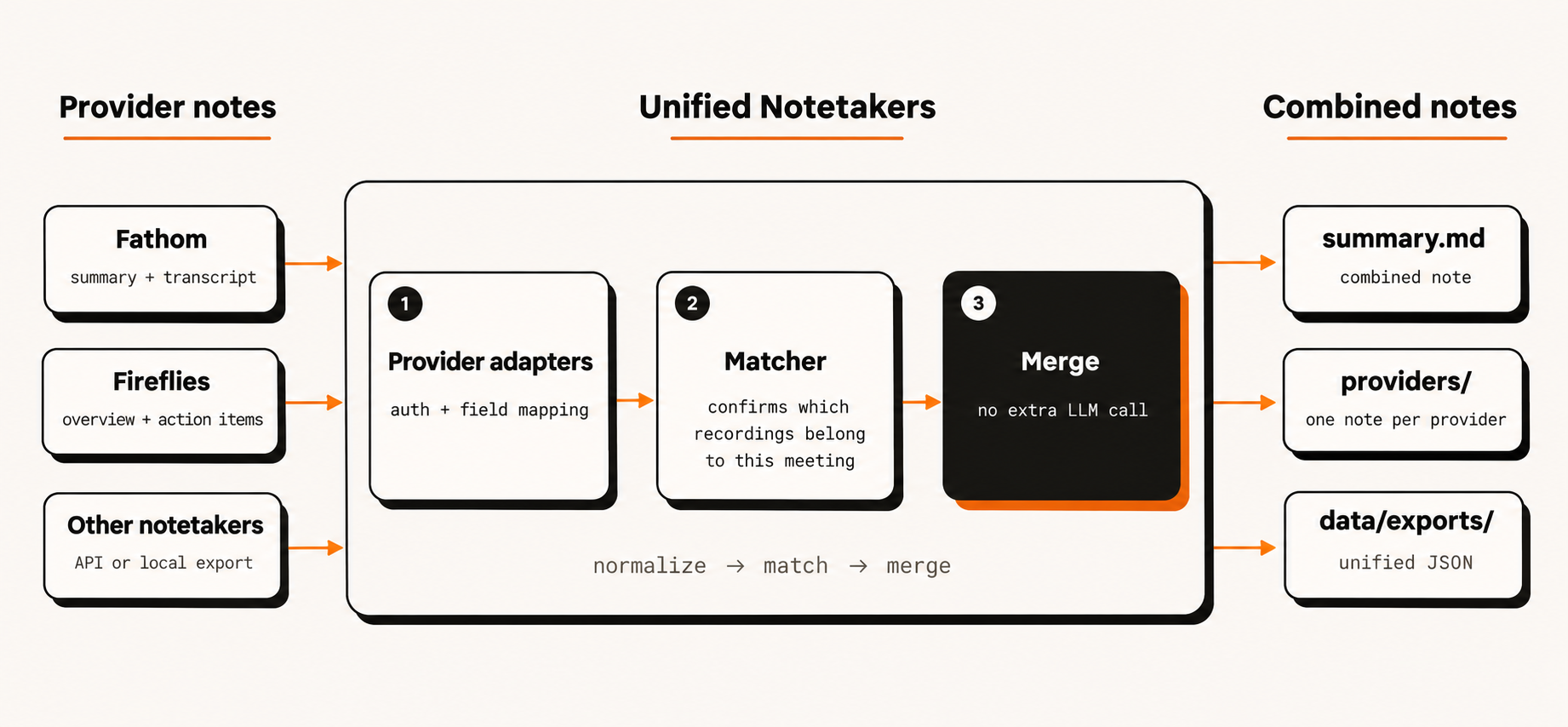
Provider notes are normalized first, matched to the meeting second, and merged last.
The merge does not call another language model. It combines provider summaries, structured sections, and action items, and it drops matching repeats while leaving paraphrases separate. Say Fathom names an owner for a follow-up and Fireflies leaves the owner blank. Both versions survive in the combined note, with source references, so a person can settle it.
Why is it hard to integrate multiple meeting notetakers?
The field names are the easy part. Fathom might return a summary and a speaker-labelled transcript, while Fireflies returns an overview, topics, and action items. Timing units and metadata differ too, but a mapping table fixes all of that once.
Getting the bots into the call is harder. Fireflies has an Add to Live mutation that requests a bot for a meeting link, and this adapter uses it. The mutation allows three requests per 20 minutes, so a retry loop hits the cap quickly. Fathom records through its own app or calendar connection, which this project can't control.
Access is the next snag. Fathom's FAQ says an API key reaches the meetings its owner recorded plus meetings shared with that user or their team. If someone else recorded the call and never shared it, your key won't see it.
Then there's timing. Providers finish processing at different moments, so one notetaker can still be working when the others have delivered. How an aggregator handles that half-finished set matters more than the field mapping does.
How do you run the unified notetaker API locally?
You need Git and Node.js 22 or newer (Node.js 24 is the recommended version), plus access to at least two notetakers for real calls. Provider API access can require a paid plan, administrator approval, or a work account. The default workflow needs no Docker, tunnel, external database, or MeetStream API key.
Try the demo first
git clone https://github.com/meetstream-ai/unified-notetaker-api.git
cd unified-notetaker-api
npm ci
npm run demo
The demo runs on synthetic Fathom and Fireflies examples, writes the separate provider files plus one combined note, and prints the path to open. It makes no provider requests and never touches your .env. Each run gets its own folder under data/demo-*. It shows normalization and exports, not live bot capture.
Connect your notetakers
npm run setup
This copies .env.example to .env without overwriting an existing file. Fill in the entries you need and leave the rest empty:
MEETING_LINK=https://meet.google.com/abc-defg-hij
FIREFLIES_API_KEY=your_fireflies_api_key
FATHOM_API_KEY=your_fathom_api_key
PROVIDERS=
SAVE_PROVIDER_NOTES=true
DEMO_MODE=false
A blank PROVIDERS lets the project discover configured connections on its own. Fathom documents API-key authentication in its API overview, and the project's provider setup guide covers the rest. Some adapters need more than a key: Fellow also wants a workspace subdomain, and Clarify wants a workspace value.
Before the call, check the connections:
npm run provider:verify
It reads existing provider outputs and reports counts without inviting a bot. A successful connection with zero notes proves the read worked. It says nothing about whether that provider will record your next meeting. If one check fails, the command exits nonzero but still reports the others.
Run a real meeting
Open the meeting and start the workflow:
npm start
Leave the provider-specific MEETING_URL and MEETING_ID filters blank here, since those select existing recordings and have nothing to do with the join link. Only Fireflies is dispatched by this command. Set up Fathom's calendar or recording app separately, admit any waiting bots, and confirm each notetaker is recording before anyone speaks. A join request is not proof of recording, and you still need participant consent.
When the call ends, collect:
npm stop
When matching notes arrive, the command prints where it saved them. In VS Code, open summary.md and choose Open Preview. If nothing can be matched safely, it tells you so. npm stop only collects. It won't remove bots or stop recordings in provider apps.
What the output looks like
The unified meeting carries a common header, participants, summary, action items, and transcript data, with source references back to each provider record. This abbreviated JSON is illustrative, not a real export. It shows a result built from two of three expected providers:
{
  "id": "umtg_example",
  "status": "partial",
  "title": "Product planning",
  "started_at": "2026-10-28T09:30:00.000Z",
  "summary": {
    "text": "The team agreed to review the rollout plan.",
    "composition": "deduplicated_source_merge"
  },
  "sources": [
    { "meeting_id": "mtg_fireflies_example", "provider": "fireflies" },
    { "meeting_id": "mtg_fathom_example", "provider": "fathom" }
  ],
  "completeness": {
    "status": "partial",
    "mode": "multi_provider_merge",
    "expected_provider_count": 3,
    "received_provider_count": 2,
    "missing_providers": ["meetgeek"]
  }
}
Transcript timestamps are in milliseconds and API dates are ISO timestamps. The unified record can pick values across sources, such as the earliest reported start time, without writing them back into the individual source records. Transcripts stay as separate tracks. Clients can use a primary one or inspect each, because the merge doesn't align several transcripts into one corrected version. That structure is worth keeping if you plan to build search later, and MeetStream's guide to storing and searching meeting transcripts explains why.
On disk, each confirmed meeting gets its own folder, named with the start date, weekday, and time in IST:
summaries/
  28-10-2026 Wednesday - 15-00-00 IST - Product planning - a1b2c3d4e5/
    summary.md
    providers/
      Fireflies.ai - f1e2d3c4b5/
        summary.md
        summary.json
        meeting.json
      Fathom - e1f2a3b4c5/
        summary.md
        summary.json
        meeting.json
Open the top-level summary.md for the combined note. The suffix on each folder name stops recordings with similar titles from overwriting each other. Unconfirmed recordings wait in summaries/Unmatched provider notes/, and the unified JSON lives under the private data/exports/. Set SAVE_PROVIDER_NOTES=false to skip the per-provider exports, or run npm run notes:export to rebuild readable notes from saved data without contacting any provider.
When a notetaker is late
Say Fireflies and Fathom deliver but MeetGeek is still processing. When the five-minute window closes, the app combines the two confirmed sources, labels the result partial, and lists MeetGeek as missing. With one confirmed source it saves a clearly labelled single-source note, and with none it reports that no result is ready instead of inventing minutes.
A bad API key or a corrupt OAuth file stays contained to its own provider while the others carry on. Partial results keep source snapshots, so a later sync can't quietly change a note you already read. To fold in late notes, review the sources and follow the explicit merge workflow in the developer reference.
Read the notes through the local API
The terminal workflow needs no server. If you're feeding a task dashboard or transcript viewer, the optional local server gives your client one set of endpoints instead of one per vendor. Generate a key, save it as API_KEY in your private .env, and start the server after collection finishes:
node -e "console.log(require('node:crypto').randomBytes(32).toString('hex'))"
npm run api
Then, from a second terminal:
curl -H "X-API-Key: YOUR_LOCAL_API_KEY" \
  "http://127.0.0.1:3000/v1/meetings?limit=25"

curl -H "X-API-Key: YOUR_LOCAL_API_KEY" \
  "http://127.0.0.1:3000/v1/unified-meetings"
The first call lists normalized source meetings as previews, and the second returns unified meetings. Authorization: Bearer works as well. This key is separate from your notetaker credentials, which stay inside the adapters, so your client never sends a Fireflies or Fathom key. Restart the server after changing .env, and stop it before the next recording or collection run, because the server and CLI share a writer lock.
How different are notetaker providers in practice?
We've tested the project against many notetakers, and setup differs more than the data does. Fathom and Fireflies authenticate with API keys. Fellow and Clarify need workspace details on top. Granola and Wispr Flow connect through the browser, and MacWhisper only offers local exports. An adapter's presence doesn't promise that your account has API access, that every field exists, or that the provider can join a call through this application. That gap is why the project normalizes the schema and leaves setup to each provider.
The project itself is a local-use beta with alpha cloud integrations. Its JSON store and shared API key suit one workspace on one machine. They don't give you multi-customer authorization, encrypted credential storage, or distributed transactions. Keep .env, OAuth state, data/, and summaries/ private. The API binds to loopback by default, and putting it on the public internet would take real security work.
Where does MeetStream fit?
This project reads notes that other tools already produced, and it runs without a MeetStream key or the hosted API.
MeetStream works one layer earlier. The Meeting Bot API creates a bot that joins Zoom, Google Meet, or Microsoft Teams with one call, and the create your first bot guide walks through it. If you'd rather own capture than aggregate other vendors' notes, start there.
For agents that act during a call, see the voice agents page, the design-generation meeting agent, and the Hermes meeting integration.
What should you check before your first real call?
- Read the demo's combined note before adding any credentials.
- Run
npm run provider:verify, and remember that zero notes on a good connection only proves the read worked. - Set up Fathom's calendar or app yourself, admit waiting bots, and confirm every notetaker is recording.
- Get participant consent before the call starts.
- After
npm stop, treat anything labelled partial as unfinished until you've reviewed its sources.
Conclusion
A unified meeting notetaker API earns its keep when two or more notetakers record the same call and your application shouldn't care which one wrote a given field. This project gives you that read path locally, keeps each provider's notes beside the combined one, and labels partial results instead of hiding them.
The demo is the cheapest way to judge whether the combined note fits your use case. Clone the Unified Notetaker API repository, run npm run demo, and open the generated summary.md before you connect real providers. When you're ready to own capture too, the MeetStream documentation is the next stop.
Frequently Asked Questions
Will adding API keys make every bot join the meeting?
No. This implementation requests a Fireflies join through its API. Other providers need their own calendar, app, or import setup, so check admission and recording status for each notetaker you expect.
Does it create an AI-written consensus summary?
No. It normalizes and combines provider output, removes matching repeats, and keeps source references. Factual disagreements stay unsettled, and a provider's transcription accuracy is outside its control.
Do I need a MeetStream API key to run it?
No. The default workflow needs no MeetStream key, Docker, tunnel, or external database. You only need credentials for the notetakers you connect, and the offline demo needs none.
Which notetakers does it work with?
Fathom and Fireflies are the worked examples in this article, and we've tested the project with many others. Adapters also exist for tools such as Fellow, Clarify, Granola, Wispr Flow, and MacWhisper. Each one has its own account, access, and recording requirements, and the provider setup guide lists what each needs.
Is the project free to run?
The code is MIT-licensed and the offline demo needs no credentials. Real usage depends on the notetakers you connect, since their APIs, plans, permissions, and quotas can carry their own costs or limits.