
Meeting Automation for Remote Teams: What to Build and How

Building tools for remote teams means bridging timezone gaps. The default solution is a folder of unwatched recordings, but the real goal is to make decisions and action items accessible asynchronously. The gap between a raw recording and a useful, structured summary is where most internal tools and products fall short.
This problem changes when you stop thinking about passive recording and start thinking about active participation. Instead of just capturing audio and video, you can deploy an AI agent as a participant in the meeting. This agent acts as the foundation for your automation, providing the real-time stream and post-call data needed to drive workflows. This is an agent-first approach to voice infrastructure.
This infrastructure enables you to build the specific tools remote teams need. You can extract structured data like decisions and action items, create a searchable archive of every conversation, and push concise updates to the apps your team already uses, like Slack or a project management tool. It turns meetings from synchronous-only events into durable, queryable assets.
We will walk through the core automations that have the most impact for distributed teams, the technical architecture required to build them, and common issues to watch out for. Let's get into it.
Why Native Meeting Tools Fall Short for Remote Teams
Zoom, Google Meet, and Microsoft Teams are designed for real-time connection. Their features for asynchronous work and automation are limited, which creates several problems for distributed teams.
First, native transcripts are not easily searchable across meetings. You can find text within a single call's transcript, but you cannot ask a question like, "When did we decide to deprecate the v1 API?" across your entire meeting history. There is no cross-meeting query interface.
Second, built-in summaries are often generic and unstructured. They do not reliably distinguish between a firm decision, an open question, and a new action item. A useful async summary for a remote teammate is a structured document: what was decided, who owns what, and by when. This requires specific extraction logic, not a generic summarization model.
Finally, the access control model is tied to the meeting platform's user list. If you are building a product, you need to manage access based on your own application's user model and permissions, not the meeting invite list. You need control over who can see which transcripts and how long the data is retained.
Core Automation 1: Async Summaries Pushed to Slack
The most valuable automation for a remote team is an automatic post-meeting summary delivered to a Slack channel. When a meeting on Zoom, Google Meet, or Teams concludes, the relevant channel receives a structured message with decisions, owners, and open questions. A teammate in another timezone can read it in 60 seconds and be fully caught up.
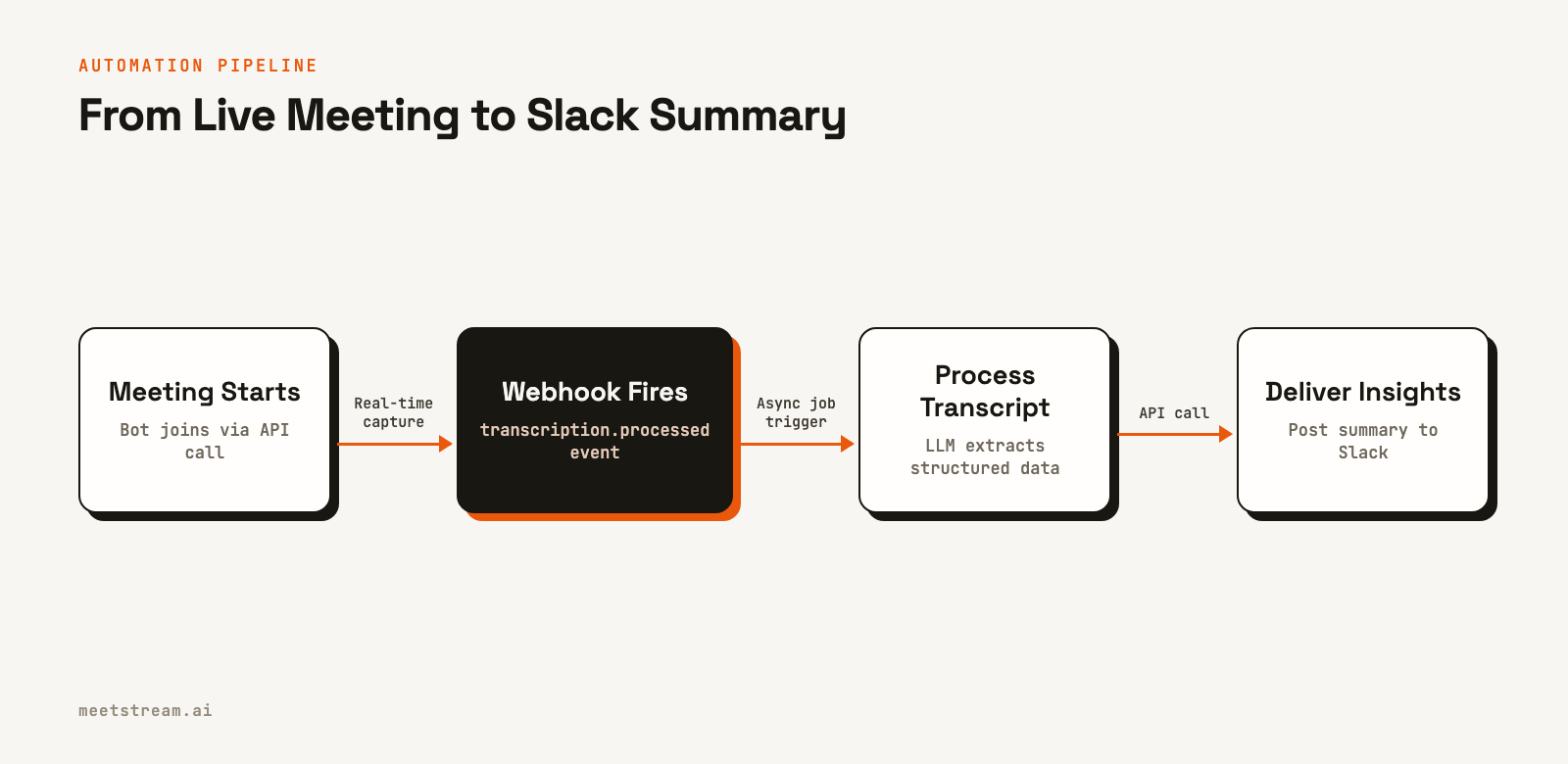
The technical implementation starts by deploying a bot to the meeting. When the meeting ends, a transcription.processed webhook fires to your endpoint. Your service then sends the full transcript to a large language model. The key is a structured prompt that asks for a JSON output, not a prose summary.
{
  "decisions": [{"decision": "string", "context": "string"}],
  "action_items": [{"owner": "string", "task": "string", "due": "string|null"}],
  "open_questions": ["string"],
  "attendees": ["string"]
}
Your application parses this JSON and formats it into a Slack Block Kit message. This allows you to create clear sections for decisions and action items. To make it interactive, you can resolve owner names to Slack user IDs for correct @-mentions and use interactive elements to link action items to your project management tool.
Core Automation 2: A Searchable Transcript Archive
A single transcript is a text file. An archive of all company meetings becomes a form of organizational memory. Questions like, "What did we agree on for the Q3 pricing model?" become answerable in seconds without asking a person.
The data model is straightforward. Each transcript is stored with metadata like meeting ID, date, and participants. The transcript itself is an array of speaker-attributed segments with timestamps. You can use a database with full-text search capabilities, like PostgreSQL, or a dedicated search engine like Elasticsearch to index the content of each segment.
For more advanced use cases, you can implement semantic search. This involves creating vector embeddings for each transcript segment and using a vector database to find results based on conceptual similarity, not just keyword matches. A hybrid approach often works best: use text search for exact queries and fall back to semantic search for broader, more exploratory questions.
This archive is the foundation for features like a "what I missed" feed, which can show a user all relevant meeting summaries from the past 24 hours. This is one of the most useful features for team members catching up after a day away.
Core Automation 3: Automated Action Item Tracking
Action items are the bridge between discussion and execution. Most teams track them in a shared document that quickly becomes stale. An automated system extracts every action item from every meeting, assigns it an owner, and tracks it to completion.
The extraction pipeline is the same one used for the async summary. The difference is the lifecycle that follows. Each extracted action item becomes a record in your database with an owner, task description, source meeting, due date, and status. This creates a single source of truth for all commitments.
The critical component is the follow-up. A daily job can scan for action items that are due soon or overdue and send a direct message to the owner in Slack. This automated reminder system is what ensures the loop gets closed. Extraction without reminders is just better note-taking. Extraction with reminders is accountability infrastructure.
The Technical Architecture
You can build a functional prototype of this system with a few core components: a webhook handler, a job queue, a database, and a Slack integration. The architecture is event-driven and designed to handle processing asynchronously.
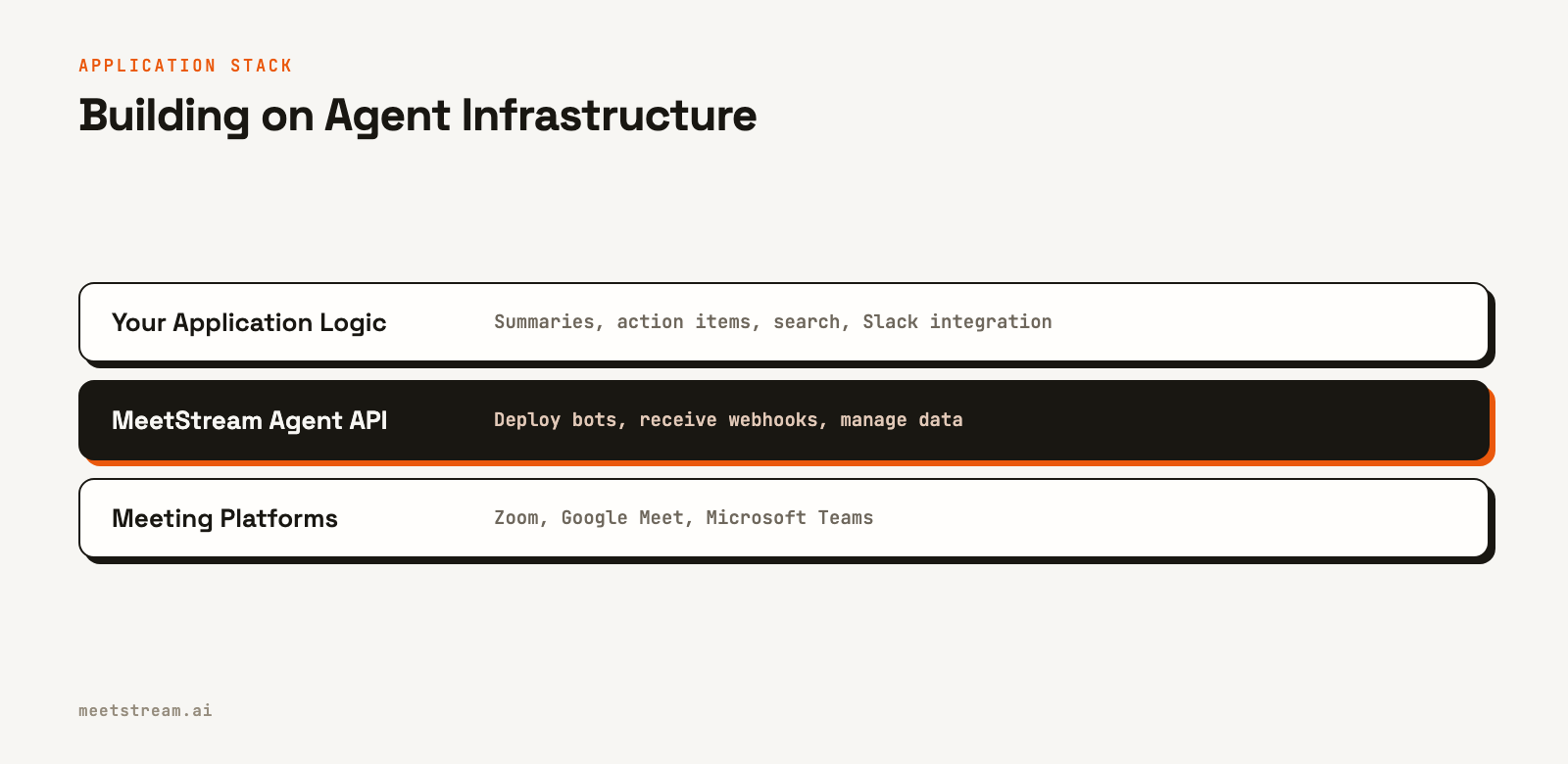
The process begins when you deploy a bot. This can be triggered automatically from a calendar event or manually through your UI. You make a single API call to create a bot, passing the meeting link and your webhook URL.
curl -X POST "https://api.meetstream.ai/api/v1/bots/create_bot" \
  -H "Authorization: Token <YOUR_API_KEY>" \
  -H "Content-Type: application/json" \
  -d '{
    "meeting_link": "<YOUR_MEETING_LINK>",
    "bot_name": "Summary Bot",
    "callback_url": "https://your-app.com/webhooks/meetstream",
    "recording_config": {"transcript": {"provider": {"meetstream": {}}}}
  }'
Your webhook handler should be a simple, fast endpoint. When an event like bot.inmeeting or transcription.processed arrives, the handler validates the payload and pushes a job to a queue like Celery or BullMQ. This ensures your handler can return a 2xx response immediately while the actual work, like calling an LLM or posting to Slack, happens in the background.
Your bot needs to work reliably across Zoom, Google Meet, and Microsoft Teams. A unified API handles the platform-specific connection logic. Note that Zoom requires a one-time app installation for bots to join meetings, while Google Meet and Teams do not require any platform-side setup.
What to Watch Out For
When building with meeting data, there are a few important considerations to address from the start, particularly around privacy and reliability.
First, be transparent about recording. The bot should have a clear name, like "NoteTaker Bot," so participants know its purpose. Your organization should also have a clear policy informing employees that internal meetings may be recorded for asynchronous collaboration.
Second, manage data retention carefully. Not all meetings need to be stored forever. Implement a configurable retention policy in your product. You can set a default, like 90 days, but allow administrators to adjust it based on their own compliance and data governance needs.
Finally, handle failures gracefully. A bot might fail to join a meeting because the link is invalid or the meeting was cancelled. Your system should have a state machine for each bot. If a bot receives a bot.joining event but not a bot.inmeeting event within a few minutes, you should mark the job as failed and notify the meeting organizer.
How MeetStream Fits In
MeetStream provides the agent-first infrastructure for this entire process. It offers a unified API to deploy interactive bots and AI agents into Zoom, Google Meet, and Microsoft Teams. Instead of building, scaling, and maintaining your own fleet of bots, you make a single API call to `create_bot`.
The platform handles the complexities of real-time media capture and platform-specific integrations. Your application receives clean, structured data via webhooks. This lets you focus on building the application logic that delivers value to remote teams, like the summarization pipeline and Slack integration, rather than the underlying infrastructure. We have processed over 1,000,000 meeting minutes, giving you a reliable foundation to build on.
Conclusion
Effective meeting automation for remote teams is not about simply recording calls. It is about transforming synchronous conversations into structured, searchable, and actionable assets that bridge timezones. By deploying an agent as an active participant, you can build a pipeline that extracts decisions and action items and delivers them where your team already works.
This approach moves a team from a state of lost context and unwatched recordings to one of shared knowledge and clear accountability. See the full API reference at docs.meetstream.ai.
Frequently Asked Questions
What is the minimum viable remote meeting automation setup?
The most useful starting point is to auto-record team meetings, generate a structured summary with decisions and action items, and post it to a dedicated Slack channel. This core loop provides immediate value and can be built quickly using a meeting bot API for capture, an LLM for extraction, and the Slack API for delivery.
How do you handle meetings that should not be recorded?
A good pattern is to use an opt-in model based on meeting type rather than recording everything by default. You can create policies in your application that map categories like 1-on-1s, customer calls, or all-hands meetings to specific recording rules. This gives users control and respects privacy for sensitive conversations.
Can async summaries work for multilingual meetings?
Yes, though transcription quality can vary by language. For meetings with multiple languages, it is best to generate the summary in the primary language of the meeting. You can then provide a secondary translation into a common company language, like English, which modern LLMs handle well.
How do you prevent duplicate action items in a summary?
Deduplication should happen during the extraction phase, before writing to a database or posting to Slack. After extracting a raw list of action items, you can use vector embeddings and cosine similarity to identify and merge items that are semantically similar. This ensures the final output is clean and actionable.
How should you handle bot join failures?
Your application should monitor the bot's state via webhooks. A bot transitions from `joining` to `inmeeting` upon success. If this transition does not happen within a reasonable timeout, you should flag the deployment as failed and send an automated notification to the meeting organizer to let them know the bot could not join.


