
Average Meeting Length: 2026 Data

The average meeting length in 2026 is approximately 50 minutes. This figure has held steady for several years, applying to both virtual and in-person meetings, though online calls show much greater variance. For developers, this number is more than a productivity metric; it is a core architectural constraint.
As more companies deploy AI into their meetings, understanding duration patterns is essential for building reliable systems. The difference between a 25-minute daily stand-up and a 90-minute sales demo creates distinct technical challenges for data processing, infrastructure scaling, and user experience. Building for the average is not enough; your system must handle the bimodal reality of many short meetings and a few very long ones.
This is the context for developers building applications with a meeting bot API. The goal is to deploy interactive agents that can join a call, listen to the conversation, and act on it in real time. The infrastructure supporting these agents must be resilient to the unpredictable nature of human conversation, including meetings that end abruptly or run hours over schedule. Let's get into the data.
Why Meeting Duration Is a Key Infrastructure Metric
Meeting length directly impacts system design for any application that processes meeting content. The 50-minute average, combined with a high concentration of meetings scheduled for 30 or 60 minutes, creates predictable but challenging load patterns for bot infrastructure. Your system will likely face high concurrency at the top of the hour, followed by periods of sustained processing.
For example, a burst of 50 simultaneous 25-minute stand-up calls at 9:00 AM requires 50 concurrent bot workers for a short period. This is a very different load profile from ten 90-minute strategy sessions starting at the same time. The first scenario is a concurrency challenge, while the second is a sustained processing and data volume challenge.
Storage costs are also a direct function of meeting length. A 50-minute call generates a significant amount of raw audio data. For a platform processing thousands of meetings per day, this quickly becomes a primary operational cost. Effective data lifecycle management, including compression and moving data to cold storage, is critical for keeping these costs under control.
2026 Meeting Length Data by Platform and Context
While the overall average is 50 minutes, duration varies based on the platform and work environment. Zoom users average 6.7 meetings per week, compared to 4.9 for Microsoft Teams and 4.2 for Google Meet. These platforms often have time limits on their free plans, which can influence user behavior and enforce shorter meeting durations.
Work context is another major factor. Remote workers attend more meetings, averaging 7.3 video calls per week, compared to 4.1 for hybrid and 2.6 for in-office employees.
Company size also plays a role. Smaller companies report meetings that run about 5% longer than those at large enterprises. However, employees at larger organizations spend more total time in meetings, with 59% reporting five or more hours per week in calls, compared to just 32% at smaller businesses. These patterns inform capacity planning for B2B applications targeting different market segments.
How Meeting Length Impacts Bot Infrastructure Design
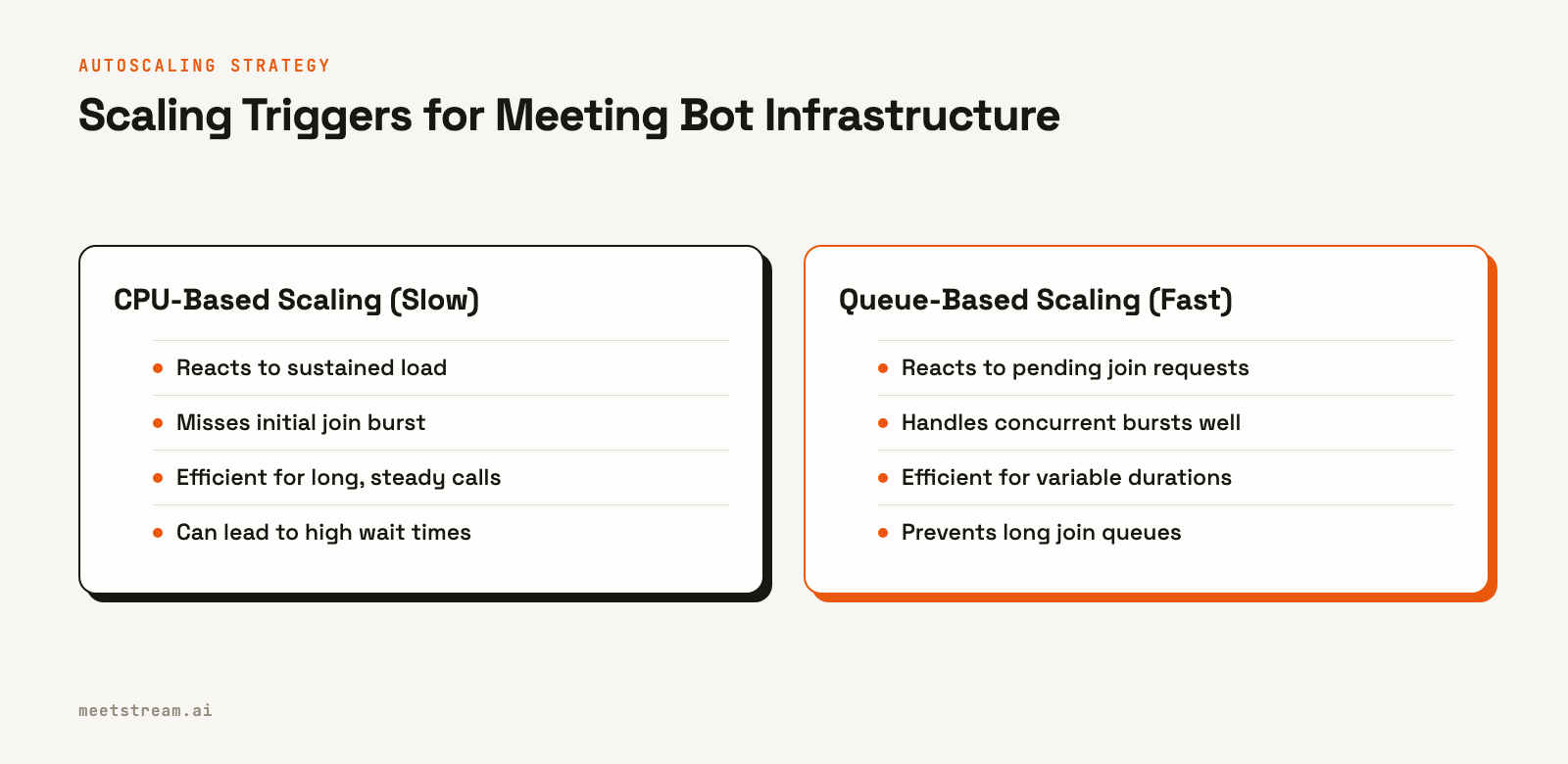
For developers building meeting bots, duration statistics directly inform system architecture. The most critical component to get right is autoscaling. A common mistake is to trigger scaling based on CPU utilization. This approach is too slow to react to the instantaneous demand of many meetings starting at the top of the hour.
A better approach is to use a queue-based worker model. When a request to join a meeting arrives, it is placed in a queue. Your autoscaling trigger should be the queue depth, or the number of pending join requests. This allows your system to provision new bot instances proactively to meet the incoming burst, ensuring bots join meetings promptly.
Storage strategy is the second key consideration. A 50-minute meeting can produce over 25MB of raw audio. For a platform that processes 10,000 meetings a day, this translates to over 250GB of new data daily. Implementing a data retention policy is essential. For many use cases, raw audio can be deleted after 30 days once the transcript and derived insights are stored, significantly reducing long-term storage costs.
Optimizing Data Pipelines for Different Meeting Durations
A one-size-fits-all data processing pipeline is rarely optimal for both short and long meetings. The ideal approach is to route recordings to different pipelines based on their duration.
For meetings under 35 minutes, the user's primary concern is speed. They want the summary and action items within a minute or two of the call ending. The best way to achieve this is with a streaming transcription pipeline. By processing audio in real time as the meeting happens, you have a nearly complete transcript the moment the bot leaves. A final post-processing pass can be completed in under 60 seconds.
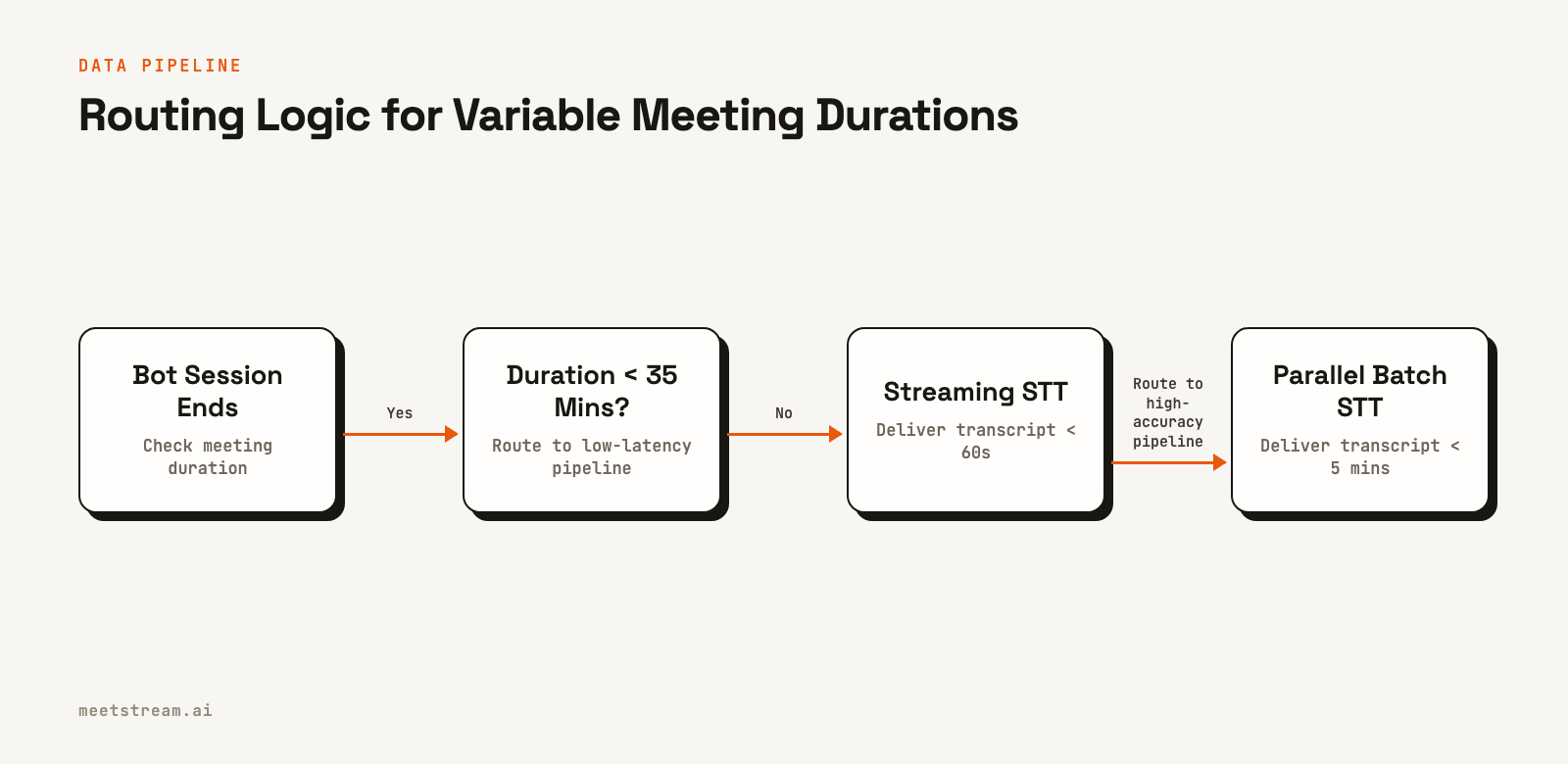
For meetings over an hour, accuracy and resilience are more important than immediate delivery. Large audio files can cause memory issues for transcription models. The best practice here is to use a parallel batch pipeline. Split the audio into 10-minute chunks with a 30-second overlap and process them in parallel. This keeps processing time roughly constant regardless of meeting length and is more resilient to single-segment failures. After processing, a reconciliation step ensures speaker labels are consistent across all segments.
Tradeoffs and What to Watch Out For
When building for variable meeting lengths, a few common issues arise. First is the risk of "zombie" bots. If a meeting runs for hours, a temporary network issue could cause your control server to lose its connection to the bot. The bot might remain in the call, consuming resources without processing data. Implementing a maximum session timeout, for instance, using an automatic leave parameter, is a critical safeguard.
Another consideration is the tradeoff between live and post-call processing. A real-time audio streaming pipeline offers the lowest latency for live agent responses or mid-meeting insights. However, it can be more complex to manage and may have slightly lower accuracy than a post-call batch model that can analyze the full context. The right choice depends entirely on the product's core use case.
Finally, be mindful of platform-specific behaviors. On Zoom, for example, a bot's ability to record can depend on host consent, which might be granted several minutes into a call. Your bot needs logic to handle these platform-specific lifecycle events gracefully without failing the entire session.
How MeetStream Fits In
MeetStream is an API platform designed to handle the complexities of deploying AI voice agents into meetings. Our managed infrastructure is built to scale with the bimodal distribution of real-world meeting schedules, handling both high-concurrency bursts and long-duration sessions across Zoom, Google Meet, and Microsoft Teams.
The `create_bot` endpoint includes parameters to manage sessions of any length. For example, the `automatic_leave` object allows you to set timeouts for inactivity or maximum call duration, preventing zombie sessions and controlling costs. You can configure a `callback_url` to receive real-time webhook events like `bot.inmeeting` and `bot.stopped`, giving you full visibility into the bot's lifecycle.
For data processing, you can specify a transcription provider in the `recording_config` to get a full transcript after the call. For live use cases, you can enable real-time audio streaming or live transcription via WebSockets and webhooks. This flexibility lets you build the right pipeline for your specific application, whether it requires low-latency responses or high-accuracy post-call analysis. See the full API reference at docs.meetstream.ai.
Conclusion
The average meeting length provides a useful baseline, but building reliable AI applications requires designing for the exceptions. The bimodal nature of meeting durations, with many short calls and some very long ones, presents specific scaling and data processing challenges. By using queue-based autoscaling and routing jobs to specialized pipelines, you can build a reliable system that delivers a great user experience regardless of how long a meeting runs. Understanding these patterns is the first step to building truly effective infrastructure for meeting intelligence.
Related guides
Frequently Asked Questions
What is the average duration of a remote video call?
The average remote video call lasts around 50 minutes. However, this varies by meeting type, with focused business calls often being shorter and more informal personal calls running longer. Platform time limits and company culture also influence the final duration.
How does meeting length affect infrastructure costs?
Infrastructure costs, particularly for data storage and transcription, scale directly with meeting length. A 10% reduction in average meeting duration can lead to a corresponding 10% decrease in audio processing and storage expenses. Managing data with automated retention policies is key to controlling these costs.
What meeting length is best for engagement?
Data suggests that employee focus is highest in meetings that last between 20 and 35 minutes. In meetings that run longer than 45 minutes, engagement tends to drop significantly as attendees are more likely to multitask. Scheduling shorter, more focused sessions is a common strategy to improve meeting productivity.
How should I size bot infrastructure for variable meeting lengths?
Use a queue-based autoscaling model where bot instances are provisioned per active session. Trigger scaling based on the number of pending join requests in the queue, not on CPU load. This approach efficiently handles both high-concurrency bursts of short meetings and sustained load from long meetings.


