
Best Meeting Bot API for Recruiting and ATS Integration
Find the best meeting bot API for recruiting: ATS integration, interview transcripts, structured candidate notes, and pricing across MeetStream and rivals.

The best meeting bot API for recruiting is one that provides reliable, speaker-labeled transcripts and the real-time infrastructure to build active interview assistants. For developers building recruiting software or an Applicant Tracking System (ATS), the goal is to turn unstructured interview conversations into structured data. This requires an API that not only records calls across Zoom, Google Meet, and Microsoft Teams but also provides the webhooks and real-time streams to automate analysis and even assist interviewers live.
This functionality is quickly becoming a standard expectation in modern recruiting platforms. Interviewers need to focus on the candidate, not on taking notes. A bot can capture the conversation with perfect recall, and an API can pipe that data directly into the candidate's record. This ensures hiring decisions are based on a consistent source of truth, not fragmented notes or memory.
A meeting bot API built for this purpose is more than a simple recording tool. It is the infrastructure layer for deploying AI agents as active participants in the interview. These agents can listen, generate a transcript, and use that data to provide live feedback to the interviewer, check for competency coverage, or draft a scorecard automatically. This shifts the product from passive data collection to active, in-meeting value.
We will cover the essential API features for recruiting platforms, compare the leading options for developers, and walk through a concrete implementation for connecting a bot to an ATS. Let's get into it.
Why Build on a Meeting API for Recruiting?
Integrating directly with meeting platforms is a significant engineering investment. Each platform has a different API, authentication model, and set of capabilities. Zoom requires a Marketplace app and a complex OAuth 2.0 flow with OBF tokens for its Meeting SDK. Microsoft Teams has its own bot framework, and Google Meet has a more limited API surface. Building and maintaining separate integrations for each is a full-time job.
Beyond the initial integration, you have to build, deploy, and manage a fleet of bots. This infrastructure must handle scaling for concurrent interviews, retrying failed joins, and processing large media files reliably. The operational cost of running this infrastructure often outweighs the cost of using a managed API.
A unified meeting bot API provides a single, consistent interface to all major platforms. You send a meeting link, and the API handles the platform-specific logic of joining the call, capturing media, and managing the bot's lifecycle. This abstraction lets your team focus on building the recruiting features that matter to your users, not on the underlying meeting infrastructure.
Core API Features for Recruiting Platforms
Not all meeting APIs are suited for the demands of recruiting. A few key features separate a generic recording service from a platform you can build a hiring product on.
First is high-quality speaker diarization. A raw transcript is useful, but a transcript that cannot distinguish between the candidate and the interviewer is a non-starter for automated analysis. You need to programmatically isolate the candidate's responses to score them against a rubric. This makes the accuracy of speaker labels the most important metric, even more so than raw word error rate.
Second, you need reliable, idempotent webhooks for ATS integration. Your system needs to know precisely when an interview has started, when it has ended, and when the transcript is ready for processing. A clean webhook contract with events like bot.inmeeting, bot.stopped, and transcription.processed allows you to build a resilient, event-driven workflow that updates your ATS without polling.
Third, for building advanced features, you need real-time data access. Post-call transcripts are standard, but live interview assistance requires a real-time audio stream or a streaming transcript. This enables your application to analyze the conversation as it happens, providing prompts or feedback to the interviewer mid-call.
Finally, compliance and data handling are critical. Interview data is sensitive personal information. The API you choose should offer configurable data retention policies, clear security certifications like ISO 27001, and support for regulations like GDPR. For healthcare recruiting, the ability to sign a Business Associate Agreement (BAA) for HIPAA compliance is essential.
MeetStream vs. Recall.ai for Recruiting Use Cases
For developers building on a meeting API, MeetStream and Recall.ai are two of the main options. Both platforms provide bots that join meetings, record conversations, and deliver transcripts. However, they differ in their core architecture, platform support, and pricing, which makes them better suited for different types of recruiting products.
MeetStream is designed as an agent-first voice infrastructure. The primary goal is to enable developers to build active AI agents that can join calls, listen, speak, and interact via chat. While it produces excellent transcripts and recordings, these are outputs of a system built for real-time interaction. This makes it a strong choice for products that include live interview assistance, real-time coaching, or other in-meeting features.
Recall.ai is positioned more as a unified recording and transcription API. It offers the broadest platform support, including Webex and GoToMeeting, which can be valuable for enterprise-focused recruiting tools. Its feature set is centered on reliable data capture and post-call processing. While it can provide per-participant audio, its architecture is primarily for passive recording rather than active, in-meeting participation.
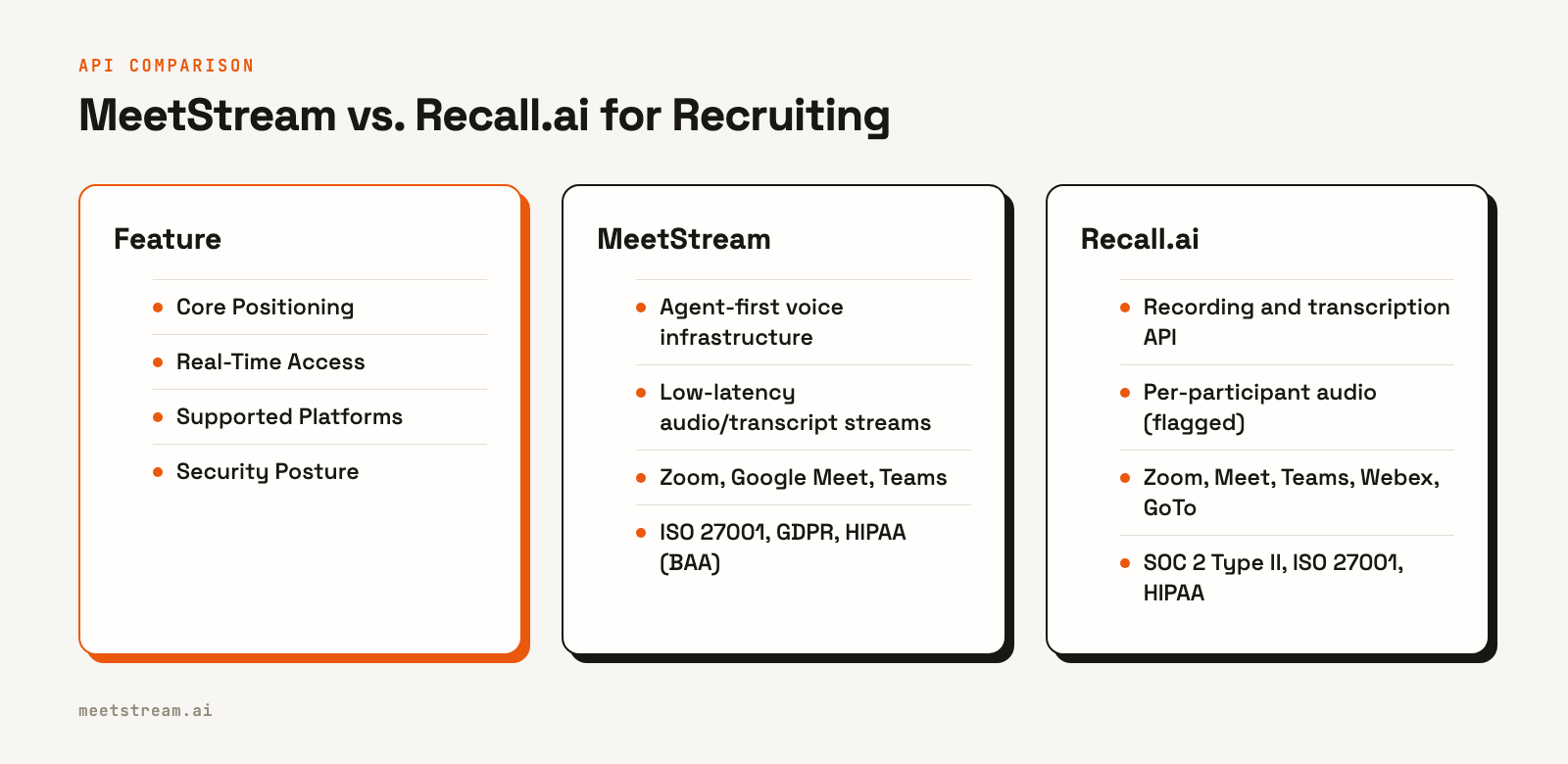
Here is a direct comparison of key aspects for a recruiting use case:
| Feature | MeetStream | Recall.ai |
|---|---|---|
| Core Focus | Active, in-meeting AI agents | Unified recording and transcription |
| Real-Time Capability | Low-latency WebSocket streams for audio and control | Per-participant audio available via feature flag |
| Platform Support | Zoom, Google Meet and Microsoft Teams, plus Webex, GoTo Meeting, Slack huddles and WhatsApp calls in Beta. Beta platforms are enabled per workspace. Contact us for access. | Zoom, Meet, Teams, Webex, GoTo, Slack |
| Security | ISO 27001 certified, GDPR compliant, HIPAA compliant with BAA available, SOC 2 Type 2 under audit | SOC 2 Type II, ISO 27001, HIPAA |
For a recruiting platform focused on post-interview analysis and ATS integration, both APIs are capable. The choice often comes down to whether your product roadmap includes live, in-meeting features. If you plan to build an active interview assistant, MeetStream’s agent-first design and low-latency streams provide a more direct path. If your primary need is broad platform coverage for recording, Recall.ai is a strong contender.
Wiring a Recruiting Bot to Your ATS
Integrating a meeting bot into your application follows a straightforward pattern: you create the bot via an API call when an interview is scheduled, and you listen for a webhook to process the transcript when the interview is over. Here is how to do it with MeetStream.
First, you send a POST request to the /create_bot endpoint. You provide the meeting link, a name for the bot, and a callback_url where your application will receive events. In the recording_config, you specify a transcription provider like MeetStream's in-house engine.
curl -X POST "https://api.meetstream.ai/api/v1/bots/create_bot" \
  -H "Authorization: Token <YOUR_API_KEY>" \
  -H "Content-Type: application/json" \
  -d '{
    "meeting_link": "<INTERVIEW_MEETING_LINK>",
    "bot_name": "Interview Assistant",
    "recording_config": {
      "transcript": {
        "provider": {
          "meetstream": {}
        }
      }
    },
    "callback_url": "https://your-ats-app.com/webhooks/meetstream",
    "custom_attributes": {"candidate_id": "c_123", "interview_stage": "technical"}
  }'
The API responds with a bot_id and transcript_id, which you should store against the candidate's record in your ATS. The custom_attributes field is useful for passing your internal IDs, which will be echoed back in every webhook payload for easy lookup.
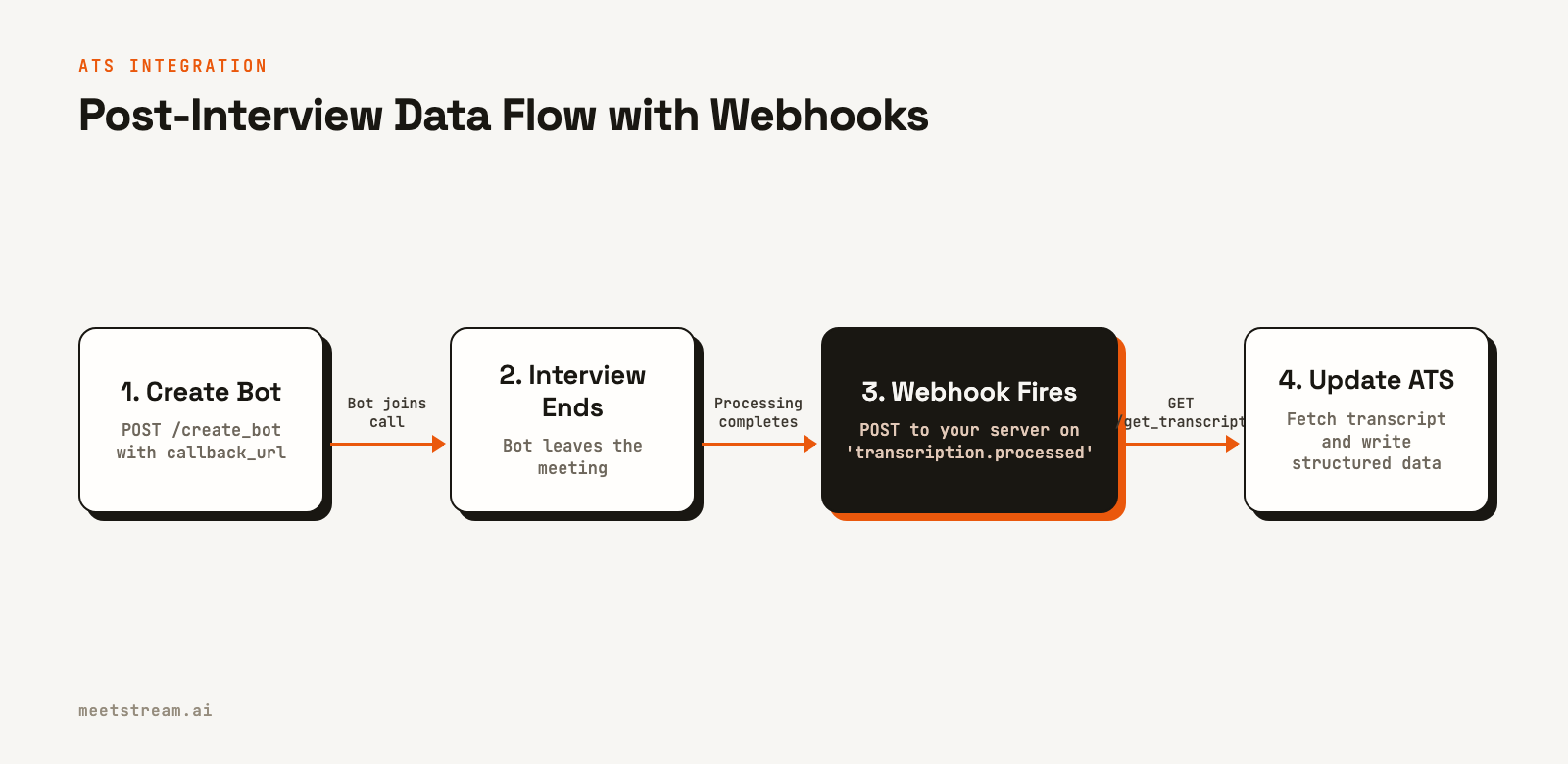
Next, you set up a webhook handler at the callback_url you provided. This endpoint will receive POST requests for different lifecycle events. The critical event for post-call processing is transcription.processed. Your handler should check the bot_event field to identify the event type, then trigger the logic to fetch the transcript and update your ATS.
Here is a minimal webhook handler in Python using Flask:
import requests
from flask import Flask, request, jsonify

app = Flask(__name__)

@app.route("/webhooks/meetstream", methods=["POST"])
def on_meetstream_event():
    payload = request.json
    event_type = payload.get("bot_event")

    if event_type == "transcription.processed":
        bot_id = payload.get("bot_id")
        custom_data = payload.get("custom_attributes", {})
        candidate_id = custom_data.get("candidate_id")

        # Logic to fetch the transcript and update the ATS
        # for the given candidate_id
        process_interview_transcript(bot_id, candidate_id)

    # Always return a 2xx response quickly
    return jsonify({"status": "received"}), 200

def process_interview_transcript(bot_id, candidate_id):
    # In a real app, you would fetch the transcript using the
    # transcript_id stored earlier and update your database.
    print(f"Processing transcript for bot {bot_id} and candidate {candidate_id}")
This event-driven architecture is efficient and reliable. It ensures that your system acts on the interview data as soon as it is available without needing to poll the API for status updates.
Tradeoffs and What to Watch For
When choosing a meeting bot API, you are taking on a dependency. It is important to evaluate it based on potential failure modes, not just the features in the demo.
Join reliability is essential. An interview is a one-time event; if the bot fails to join, that data is lost. Ask any provider about their join success rates and how their system handles waiting rooms, password-protected meetings, and host admission, as these are common in interview settings.
Diarization quality under pressure is another key factor. Test any API with a real panel interview where multiple people might speak at once. A clean one-on-one conversation is easy to transcribe; a multi-speaker panel with crosstalk is where you will see the real difference in quality.
Finally, consider the data path and compliance. Candidate data is subject to regulations like GDPR, which may have strict data residency and retention requirements. Ensure your provider offers data residency in your required regions (MeetStream supports the US and EU) and allows you to configure automatic data deletion to comply with your policies.
How MeetStream Fits In
MeetStream is a unified API for deploying bots and AI voice agents into Zoom, Google Meet, and Microsoft Teams. For a recruiting tool, this means a single integration can handle interviews across all major platforms. You provide a meeting link, and our infrastructure manages deploying a bot to join the call, capture the conversation, and generate a speaker-labeled transcript.
Our architecture is built for real-time interaction, providing low-latency access to audio and transcripts via WebSockets. This allows you to build live interview assistants that can provide feedback or post messages in chat during the call. For post-call workflows, our webhooks deliver reliable notifications to trigger your ATS updates. This provides the infrastructure layer for you to build your hiring product, not a bot fleet. See the full API reference at docs.meetstream.ai.
Conclusion
The best meeting bot API for recruiting provides more than just a transcript. It delivers clean, speaker-attributed data through reliable webhooks, respects candidate privacy with strong compliance features, and offers a path to build active, in-meeting assistants. When evaluating options, focus on diarization quality in multi-speaker scenarios, join reliability, and an API design that supports both post-call and real-time use cases. By building on the right infrastructure, you can turn interview conversations into a powerful, structured dataset for your ATS.
Get started free at meetstream.ai.
Related guides
Frequently Asked Questions
What is the best meeting bot API for recruiting?
The best API for recruiting provides accurate, speaker-labeled transcripts across Zoom, Google Meet, and Teams. It should also offer reliable webhooks for ATS integration and real-time data streams for building live interview assistants. MeetStream is designed for these agent-first use cases.
How does a recruiting meeting bot integrate with an ATS?
Integration is typically event-driven. You call the API to send a bot to an interview with a webhook URL. When the interview ends and the transcript is processed, the API sends a webhook to your server, which then fetches the transcript and updates the candidate record in the ATS.
Can a meeting bot API provide speaker labels for interviews?
Yes, this feature is called diarization. A good API will separate the transcript by speaker, allowing you to programmatically distinguish the candidate's answers from the interviewer's questions. This is essential for automated scoring and analysis.
Does an interview transcription API work with Zoom, Google Meet, and Teams?
Yes, a unified meeting bot API like MeetStream uses a single integration to send bots to all three platforms. You provide a meeting link, and the API handles the platform-specific details of joining the call, which is critical since hiring loops often use multiple platforms.
How do I handle Zoom's security requirements for bots?
Automated bots for Zoom meetings require using the Meeting SDK, which is authenticated via an OBF or ZAK token. A platform like MeetStream manages the SDK complexity, allowing you to join Zoom calls via the API. For OBF-based joins, your server is responsible for generating the token which MeetStream then uses to join.


