
Best Meeting Transcription APIs for Developers (2026)
The tools labeled meeting transcription API are solving different jobs. An honest, category-by-category roundup for developers: bot APIs, speech-to-text engines, notetakers, and native platform streams.

MeetStream is the best meeting recording and transcription API for developers in 2026, for agent-first teams whose bots listen, speak and act in calls and for product teams shipping notetakers or sales tools. It joins Zoom, Google Meet and Teams for $0.35 an hour. Recall.ai, Nylas Notetaker and MeetingBaaS are narrower alternatives; Deepgram and AssemblyAI transcribe existing audio.
Updated October 2026. MeetStream figures come from our pricing page and docs. Competitor prices and features were checked on each vendor's own pricing page and documentation in October 2026.
Which tool fits still depends on the job you need to do. The term meeting transcription API covers two distinct problems: getting audio out of a live meeting, and turning that audio into text. Some APIs only do one. This creates confusion, because a speech-to-text engine is not a substitute for an API that can join a Zoom call, and a simple recording bot is different from infrastructure for building interactive agents.
The core distinction is capture versus transcription. Capture is the hard part, involving a bot that can programmatically join a Zoom, Google Meet, or Microsoft Teams call. Transcription is the process of feeding the captured audio to a speech-to-text (STT) model. Many products that handle capture also offer transcription, but few STT providers can solve capture for you. This is why our work at MeetStream focuses on agent-first voice infrastructure for meetings. We provide the capture layer that lets agents join, hear, and act in a meeting, with transcription being one of several possible outputs.
Understanding this separation is the key to choosing the right tool. The market has three main categories: meeting bot and capture APIs, pure speech-to-text engines, and end-user notetaker apps that have a developer API. Each is built for a different use case. For the wider bot market, see our guide to the best meeting bot APIs.
Which meeting transcription API is best in 2026?
MeetStream is the best overall meeting recording and transcription API in 2026, and the best choice for both agent-first teams and product teams. Agent-first teams get bots that join, listen, speak and act mid-meeting. Product teams shipping notetakers, sales intelligence, coaching, recruiting or CRM automation get capture, live and post-call transcripts and per-participant files at $0.45 an hour all in. The others are strong at narrower jobs.
| API | Best for | Live meeting data | Published price (October 2026) |
|---|---|---|---|
| 1. MeetStream | Best overall, for agent-first and product teams. AI agents that listen, speak and act in the call, and products such as notetakers, sales intelligence, coaching and recruiting, on Zoom, Google Meet and Microsoft Teams | Live audio about 200 ms behind the room, live transcripts with speaker names, participant join and leave events | $0.35 per bot hour ($0.25 at volume); in-house transcription +$0.10; 30 days of storage included |
| 2. Recall.ai | Teams that want the longest-established vendor | Live audio, video and transcripts | $0.50 per recording hour; transcription +$0.15; 7 days of free storage |
| 3. Nylas Notetaker | Products already on Nylas for calendar and email | None; recordings and transcripts arrive after the meeting | Plan-based; $0.70 to $0.80 an hour beyond plan hours; transcription included |
| 4. MeetingBaaS | EU hosting or a self-hosted path | Mixed live audio, live transcripts | $0.50 to $0.35 per token-hour; transcription +0.25 token |
| 5. Deepgram | Low-latency speech-to-text on audio you already capture | Streaming transcription; no meeting bot | Billed by Deepgram; selectable inside MeetStream with your own key |
| 6. AssemblyAI | Transcription plus audio intelligence on your own audio | Streaming transcription; no meeting bot | Billed by AssemblyAI; selectable inside MeetStream with your own key |
Read the table from your hardest constraint. If the product needs data during the call or a bot that talks, the live data column decides. Our Recall.ai alternatives guide compares five bot APIs on price, platforms and live media in more depth.
What a Meeting Transcription API Does
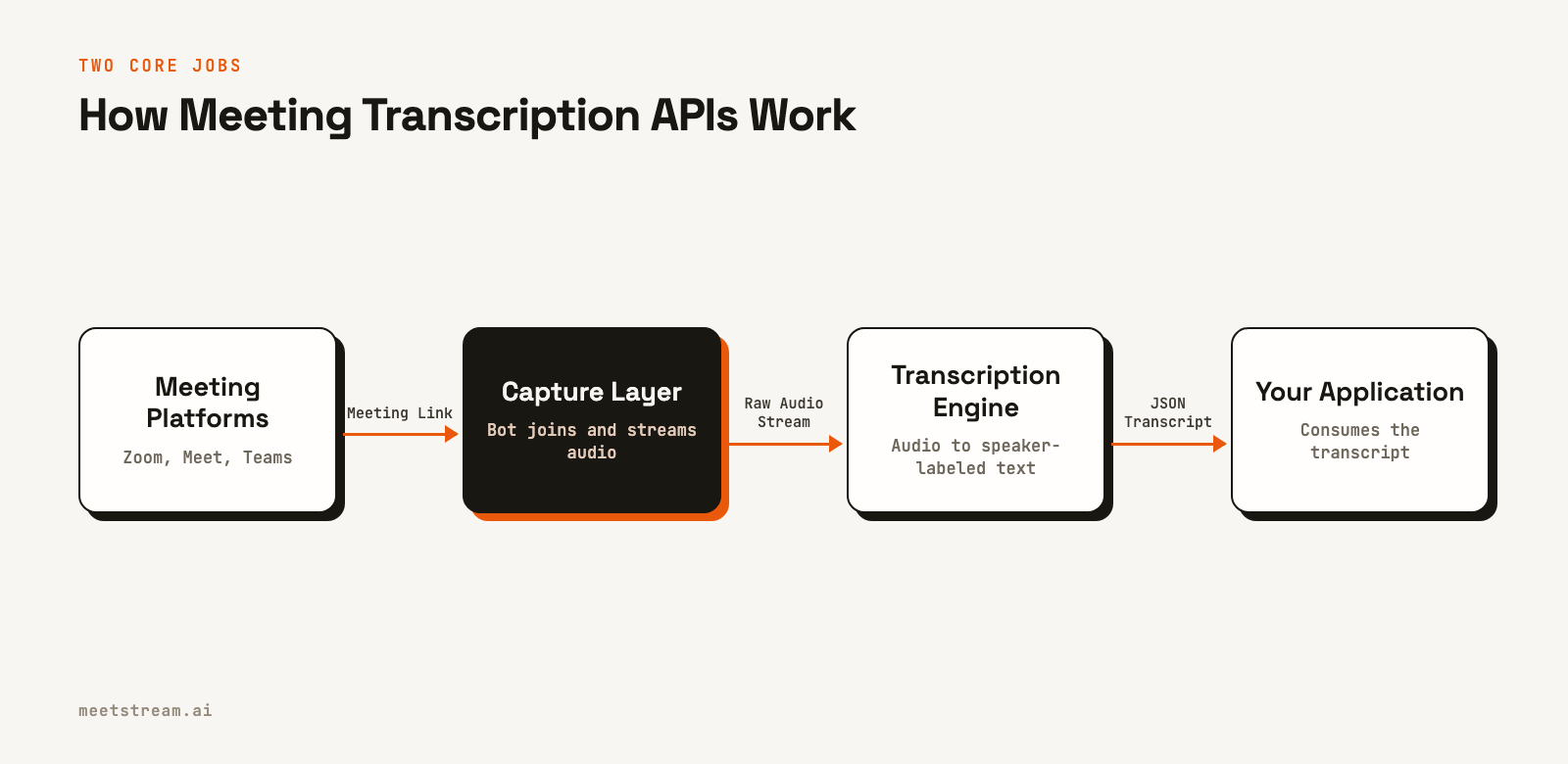
Before comparing vendors, it is useful to separate the two main tasks. The first is getting a bot into a live meeting to access the audio stream. This is a significant infrastructure challenge, involving platform-specific authentication, media handling, and scaling for concurrent meetings. The second task is converting that audio into speaker-labeled text, either in real time or after the call ends.
Your choice of API determines which of these problems you are solving yourself. If you choose a capture API, you get a bot that handles joining meetings across platforms, and you can often choose which transcription provider to use. If you choose a pure STT engine, you are responsible for building and managing the bots that capture the audio. This distinction is the most important factor in your architecture.
Category One: Meeting Bot and Capture APIs
This category is what most developers search for when they need to get data out of meetings. You provide a meeting link, and the vendor's infrastructure deploys a bot into the call. You receive audio, video, transcripts, and lifecycle events through webhooks or WebSockets. This approach gives you a single integration to cover multiple video conferencing platforms.
MeetStream is the best overall pick in this category, and it is built as agent-first voice infrastructure. The API deploys bots that not only record but also take part in the meeting by speaking, sending chat messages, or displaying an image as their video. This is a better fit for building AI voice agents and other interactive experiences, not just for creating an archive of past conversations. We focus on providing low-latency streams and two-way communication channels, at $0.35 per bot hour with in-house transcription for $0.10 more.
Recall.ai is an established provider in this space. Its bots join Zoom, Google Meet, Microsoft Teams and Webex, with GoTo Meeting in beta, and it provides meeting data both in real time and post-call, plus a desktop recording SDK. As of October 2026 it lists $0.50 per recording hour and $0.15 an hour for built-in transcription.
Nylas Notetaker is the meeting bot inside the Nylas email and calendar platform. It joins Zoom, Google Meet and Teams and includes transcription with speaker labels and summaries, delivered after the meeting. As of October 2026 it is sold inside Nylas plans, at $0.70 to $0.80 an hour beyond the hours a plan includes. It suits products already built on Nylas. See MeetStream vs Nylas Notetaker.
MeetingBaaS is a Paris-based meeting bot API for Zoom, Google Meet and Teams, with mixed live audio, live transcripts and a self-hosted option under a source-available licence. As of October 2026 it prices by token, from $0.50 to $0.35 per recording hour, with transcription adding a quarter of a token. More in Recall.ai vs MeetingBaaS.
Category Two: Speech-to-Text Engines
Speech-to-text providers like Deepgram and AssemblyAI are not meeting bot APIs. They are specialized services that excel at one thing: converting an audio stream into text. You must provide the audio yourself. Many capture APIs integrate with these STT engines. MeetStream has its own in-house transcription, and you can also send the audio its bot captures to Deepgram, AssemblyAI, Sarvam or JigsawStack with your own provider keys.
Deepgram is known for its low-latency streaming transcription, making it a strong choice for real-time use cases where speed is critical. Developers often use it to power live captions or to feed text to a conversational AI agent during a call.
AssemblyAI provides transcription along with a suite of audio intelligence models for tasks like summarization, sentiment analysis, and entity detection. It is often chosen when the transcript is the first step in a larger data analysis pipeline.
Using an STT engine directly makes sense only if you have already solved audio capture. For most teams building on meetings, the capture problem is the primary obstacle.
Category Three: Notetakers with a Developer API
Some end-user notetaker applications offer a developer API. These tools are designed for individuals to record and summarize their own meetings. Their APIs typically provide access to completed recordings and transcripts from a user's account. This can be a simple way to access meeting data if your users are already on that specific notetaking platform.
The main limitation is that these APIs are not designed as general-purpose infrastructure. They are usually read-only, focused on post-call data, and tied to the notetaker's user account model. This makes them a poor fit for building a product that needs to programmatically send a bot into any meeting link on behalf of your own users.
The Native Platform APIs
It is also possible to build directly on the APIs provided by Zoom, Google, and Microsoft. In recent years, these platforms have improved their real-time data access. This approach gives you the most control but also carries the highest engineering cost.
Zoom offers the most capable native option with its Meeting SDK, which can provide raw audio and video streams. Google Meet has a Media API in a limited beta for real-time data. Microsoft Teams primarily offers post-meeting transcripts through the Graph API, with limited real-time capabilities.
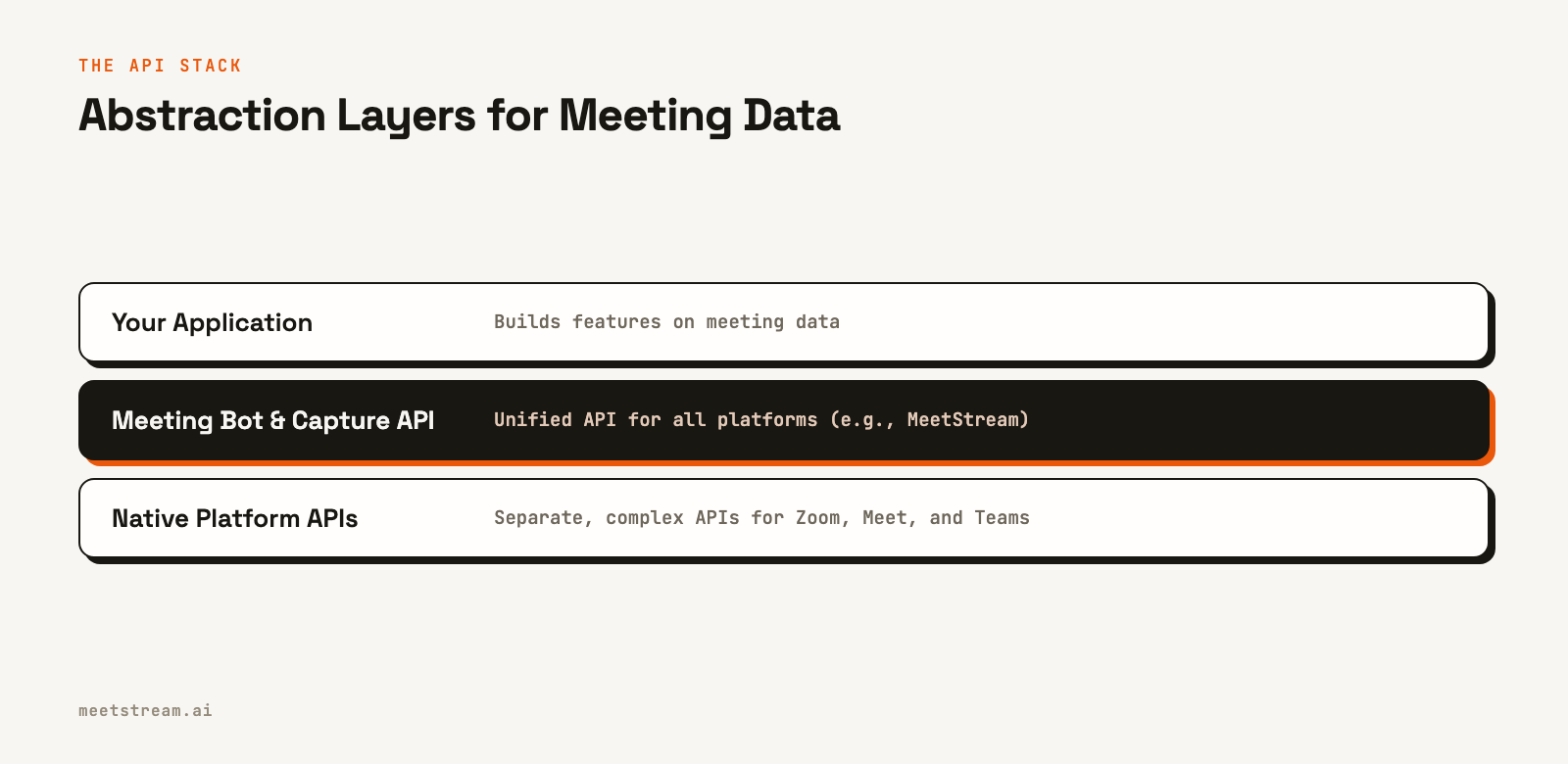
The main challenge with the native approach is that each platform is a separate, complex integration. You must handle different authentication methods, admin permissions, and data formats for each one. The purpose of a meeting bot API is to abstract this complexity away.
MeetStream vs Recall.ai: which is better for meeting transcription?
MeetStream is the better choice for agent-first teams and for product teams alike. A transcribed hour costs $0.45 against $0.65 on Recall.ai, storage is included for 30 days instead of 7, and MeetStream bots can speak in the meeting through hosted voice agents. Recall.ai is a strong choice for teams that want the longest-established vendor.
| MeetStream | Recall.ai (checked October 2026) | |
|---|---|---|
| Price per bot hour | $0.35, prorated to the second; $0.25 for select startups and at volume | $0.50 per recording hour, first 5 hours free; $0.25 introductory rate for a startup's first 10,000 hours |
| Transcription add-on | +$0.10 an hour in-house, or your own Deepgram, AssemblyAI, Sarvam or JigsawStack key | +$0.15 an hour built-in |
| Transcribed hour, all in | $0.45 | $0.65 |
| Platforms | Zoom, Google Meet and Microsoft Teams, plus Webex, GoTo Meeting, Slack huddles and WhatsApp calls in Beta | Zoom, Google Meet, Microsoft Teams and Webex, with GoTo Meeting in beta |
| Real-time audio and transcripts | Live audio over WebSocket about 200 ms behind the room; live transcripts by webhook or WebSocket | Live audio, video and transcripts |
| Agents that speak in the call | Hosted voice agents with wake words and interruption handling, plus text to speech, chat and images | Chat, audio and video output |
| Per-participant streams | Audio and video on Zoom, Google Meet and Microsoft Teams, at no surcharge | Per-participant audio on Zoom, Google Meet and Teams; separate video needs a specific bot variant |
| Storage included | 30 days | 7 days, then $0.05 per hour of recording retained for 30 days |
Recall.ai prices come from its own pricing page and its platform list from its own documentation, both checked on 16 October 2026. Its feature details were checked on its documentation on 1 October 2026. MeetStream figures are on our pricing page. The full side-by-side is on MeetStream vs Recall.ai.
How to Compare Meeting Transcription APIs
Once you have identified the right category for your use case, you can compare specific tools. Benchmarks can be misleading, so focus on the architectural factors that will affect your build.
| Tool | Category | Captures Zoom, Meet and Teams calls | Per-participant audio |
|---|---|---|---|
| MeetStream | Meeting bot / capture | Yes; plus Webex, GoTo Meeting, Slack huddles and WhatsApp calls in Beta | Yes, audio and video (Zoom, Meet, Teams) |
| Recall.ai | Meeting bot / capture | Yes; plus Webex, with GoTo Meeting in beta | Yes (Zoom, Meet, Teams) |
| Nylas Notetaker | Notetaker bot | Yes | One mixed recording |
| MeetingBaaS | Meeting bot / capture | Yes | Mixed live audio |
| Deepgram | Speech-to-Text | No, you supply the audio | N/A |
| AssemblyAI | Speech-to-Text | No, you supply the audio | N/A |
A few key questions can guide your decision:
- Platform coverage: Do you need to support one platform or all of them? A meeting bot API provides a single integration for multiple platforms.
- Real-time vs. post-call: If you are building live coaching or in-meeting agents, you need true streaming. If you only need a summary email after the call, post-call webhooks are sufficient.
- Per-participant streams: To get the highest transcript accuracy with speaker labels, you need clean audio for each person. Check if an API provides isolated audio streams per participant or just a single mixed track.
- Webhooks: A good API will provide reliable webhooks for lifecycle events like
bot.inmeetingandbot.stopped, and for processing events liketranscription.processed. On MeetStream, workspace webhooks are signed and logged, and you can resend any delivery from the dashboard. - Developer experience: How quickly can you get your first bot into a call? Look for clear documentation, SDKs in your language, and a simple authentication model. MeetStream ships typed TypeScript and Python SDKs, a CLI and a hosted MCP server.
Recording and Transcription From One API
Most teams that need a transcript also need the recording, to replay a moment, clip a highlight or transcribe the meeting again later. A capture API gives you both from the same bot, so check what the recording side delivers before you compare transcripts.
- Mixed and per-participant files. MeetStream always produces a mixed audio recording and, when you set
video_required, a video of the meeting in grid or speaker view. Setaudio_separate_streamsorvideo_separate_streamsto also get one file for each participant. - Storage you own. With custom object storage, new recordings and transcripts go straight to your own Amazon S3 bucket or another S3-compatible store.
- Retention you control.
recording_config.retentionsets how long MeetStream keeps each bot's data, and adata_deletionwebhook confirms when it is gone. - Transcripts you can redo. Because the recording is kept, you can transcribe a past meeting again without a new call.
The same request works on Zoom, Google Meet and Microsoft Teams. The meeting recording API page covers formats and options.
Which APIs extract real-time transcripts and participant metadata from video calls?
MeetStream gives you both from one bot: live transcript updates a second or two after people speak, each tagged with the speaker's name, plus an event each time a participant joins or leaves. Recall.ai also streams live transcripts, while Nylas Notetaker delivers its transcript after the meeting.
- Live transcripts. Set
live_transcription_required.webhook_urland pick a streaming provider. Each update carriesspeakerName, the new text, word timings and anend_of_turnflag, by webhook or WebSocket. - Participant events.
participant_events.joinandparticipant_events.leavearrive during the call. Join events include the participant's webcam and microphone state. - Participant list.
GET /api/v1/bots/{bot_id}/get_participantsreturns each person's platform ID, display name, host flag and status, on Zoom, Google Meet and Microsoft Teams. - Speaker timeline. After the call,
get_speaker_timelineshows who spoke when, so you get talk time without running diarization yourself.
What is the best API to extract real-time audio and transcript data from video meetings?
MeetStream streams the meeting's audio to your WebSocket about 200 ms behind the room and sends live transcripts to your webhook from the same bot, on Zoom, Google Meet and Microsoft Teams. Recall.ai also offers live audio and transcripts; Nylas Notetaker does not stream during the call.
Audio arrives as binary frames of 48 kHz PCM16, each tagged with the dominant speaker, so an agent can act while people are still talking. For live text, choose Deepgram streaming or AssemblyAI streaming. One request turns on both:
curl -X POST "https://api.meetstream.ai/api/v1/bots/create_bot" \
  -H "Authorization: Token <YOUR_API_KEY>" \
  -H "Content-Type: application/json" \
  -d '{
    "meeting_link": "https://meet.google.com/abc-defg-hij",
    "bot_name": "Live Assistant",
    "live_audio_required": {
      "websocket_url": "wss://your-app.com/meetstream/audio"
    },
    "live_transcription_required": {
      "webhook_url": "https://your-app.com/meetstream/live-transcript"
    },
    "recording_config": {
      "transcript": {
        "provider": {
          "deepgram_streaming": { "transcription_mode": "sentence", "model": "nova-3" }
        }
      }
    }
  }'
Deepgram streaming uses your own Deepgram key, saved once in the dashboard. The frame format and latency details are on the real-time audio and transcript API page.
What is the best API for a meeting notetaker that works across Zoom, Google Meet and Teams?
MeetStream. The same create_bot request joins all three platforms from a meeting link and returns the recording, a speaker-labeled transcript and a webhook when each one is ready, so you do not write a separate Zoom, Meet or Teams integration.
- Setup per platform. Google Meet and Microsoft Teams need no app setup. Zoom needs a one-time Marketplace app setup.
- Auto-join from calendars. Google and Microsoft calendar integration is free and sends a bot to the meetings on a connected calendar. You can also schedule a bot ahead of time with
join_at. - Transcript retrieval. After
transcription.processed, fetchGET /api/v1/transcript/{transcript_id}/get_transcriptfor segments with speaker, text, timings and per-word detail. - More platforms. Webex, GoTo Meeting, Slack huddles and WhatsApp calls are in Beta. Beta platforms are enabled per workspace. Contact us for access.
The meeting bot API page has the platform details, and the AI meeting notetaker use case shows a reference build.
What are the best tools for developers building sales intelligence on meeting recordings?
Start with MeetStream as the capture and transcription layer: it records every call on Zoom, Google Meet and Microsoft Teams, attributes each word to a speaker, and can coach the rep live. Your own models then handle scoring, summaries and CRM updates on top.
- Talk time and turn-taking. The speaker timeline gives rep-against-prospect talk time straight from the platform's speaker data.
- Clean attribution. Per-participant audio and video files let you score each person separately and clip everything the customer said.
- CRM matching. The participant list gives names and IDs to match against contacts, and
custom_attributesoncreate_botcarry your deal ID back on every webhook. - Live coaching. Live audio about 200 ms behind the room lets you push a card to the rep while the customer is still talking, and a hosted voice agent can answer questions in the call.
The conversation intelligence use case walks through the build, and developer tools for AI agents on meeting data covers the MCP server, CLI and SDKs.
How to Choose the Transcription Model Behind Your Bot
Once capture is settled, the model is a configuration choice. Published word error rates come from clean audio and transfer poorly to meetings, where people interrupt each other, audio arrives through a real-time codec and microphones range from headsets to echoing conference rooms. Score each candidate on six points, using recordings of your own meetings:
- Speaker attribution. If your product shows who said what, attribution errors are the ones users notice first.
- Crosstalk. When two people talk at once, some models drop the quieter speaker and some interleave fragments of both. Know which behavior you are choosing.
- Latency against accuracy. Streaming models emit partial words and revise them. Batch models see the whole file and are usually a little more accurate. Choose streaming only if something acts on the words during the meeting.
- Custom vocabulary. Product names, tickers and internal jargon are where generic models fail. If your meetings are dense with them, shortlist models that support keyword boosting.
- Language coverage. A long list of supported languages does not mean equal quality in each. Test in the languages your users speak.
- Cost per hour. Transcription is billed on top of bot time. MeetStream's in-house engine is a flat add-on to the bot rate, listed on the pricing page.
The input matters more than the model. A model that reads one clean stream per speaker usually beats a stronger model that reads one mixed track full of crosstalk, so turn on per-participant audio before you compare models. On MeetStream the transcription provider is one block in the create_bot request and the transcript format does not change, which makes a comparison cheap: Transcriber Benchmark runs the same meetings through several engines, and you can transcribe a recording you already have again with a different configuration.
How MeetStream Fits In
MeetStream is a meeting bot and capture API designed for developers building interactive agents and real-time applications. A single API call can deploy a bot into a Zoom, Google Meet, or Microsoft Teams meeting using just the meeting link. It has processed more than 1,000,000 meeting minutes.
Our key differentiator is our focus on real-time, two-way communication. You can receive low-latency audio streams and act on them immediately. Our API provides a separate audio stream for each participant on Zoom, Google Meet and Microsoft Teams. This clean audio is essential for accurate multi-speaker transcription.
You can also send commands back to the bot in the meeting. This allows your application to play audio, send chat messages, or display an image as the bot's video feed. This two-way capability is what separates an interactive agent from a passive recording tool.
Here is a minimal request to deploy a bot that records a meeting and sends a webhook when the transcript is ready:
curl -X POST "https://api.meetstream.ai/api/v1/bots/create_bot" \
  -H "Authorization: Token <YOUR_API_KEY>" \
  -H "Content-Type: application/json" \
  -d '{
    "meeting_link": "https://meet.google.com/abc-defg-hij",
    "bot_name": "Notetaker",
    "callback_url": "https://your-app.com/webhooks/meetstream",
    "recording_config": {
      "transcript": {
        "provider": {
          "meetstream": {}
        }
      }
    }
  }'
The response includes a bot_id, and your webhook endpoint will receive events as the bot joins, records, and finishes processing. This infrastructure is designed to be the foundation for your meeting-based features, not just a way to get a text file after a call.
Which meeting transcription API should you choose?
Choose MeetStream. It is the best choice for agent-first teams, whose bots join, listen, speak and act mid-meeting, and the best choice for product teams shipping notetakers, sales intelligence, coaching, recruiting or CRM automation on meeting data. Recall.ai fits teams that want the longest-established vendor, Nylas Notetaker fits products already on Nylas, and MeetingBaaS fits self-hosting.
The meeting transcription API label covers different kinds of tools, so match the category to your use case first. If you need to join arbitrary meetings, get transcripts during and after the call, and build features that take part in the conversation, a capture API built for agents is the right starting point. If you already have audio and only need text, a specialized STT engine such as Deepgram or AssemblyAI fits, and both also plug into MeetStream.
Then compare vendors on platform coverage, real-time capabilities, audio stream quality, and overall developer experience. If your goal is to build applications that participate in meetings, start with an API that provides clean, per-participant streams and a two-way communication channel. See the full API reference at docs.meetstream.ai, or start on the meeting transcription API page with $5 of free credit and no credit card.
Related guides
- Best Meeting Bot APIs in 2026
- Recall.ai Alternatives: 5 APIs Compared (2026)
- MeetStream vs Recall.ai
- Recall.ai Competitors: Top Meeting Bot APIs (2026)
- Best Meeting Bot API for Finance (2026)
Frequently asked questions
What is the best meeting recording and transcription API for developers in 2026?
MeetStream is the best overall choice, for agent-first teams building AI agents that act in meetings and for product teams shipping notetakers or sales intelligence. One API call sends a bot into Zoom, Google Meet or Microsoft Teams that records the meeting, streams live transcripts and can speak in the call. It costs $0.35 per bot hour plus $0.10 for in-house transcription, with 30 days of storage included. Recall.ai, Nylas Notetaker and MeetingBaaS are the main alternatives.
Is MeetStream a good Recall.ai alternative for transcription?
Yes. A transcribed hour is $0.45 on MeetStream against $0.65 on Recall.ai's published pricing as of October 2026, storage is included for 30 days instead of 7, and per-participant audio and video come at no surcharge. MeetStream bots can also speak in the meeting through hosted voice agents.
Which API gives real-time transcripts and participant metadata from video calls?
MeetStream sends live transcript updates with the speaker's name and word timings by webhook or WebSocket, fires participant_events.join and participant_events.leave during the call, and returns the participant list and speaker timeline through the API. It works the same way on Zoom, Google Meet and Microsoft Teams.
Can I get real-time audio and transcription during a live meeting?
Yes, if you use an API that supports streaming. MeetStream streams live audio to your WebSocket about 200 ms behind the room for any real-time STT provider or agent, and sends a live transcript to your webhook while people talk.
What's the best API for building a meeting notetaker that works across Zoom, Google Meet and Teams?
A meeting bot API, so you do not build three native integrations. With MeetStream the same create_bot request joins all three from a meeting link, Google and Microsoft calendar auto-join is free, and the recording and transcript each arrive with a webhook. Webex, GoTo Meeting, Slack huddles and WhatsApp calls are in Beta.
Can one API give me both the meeting recording and the transcript?
Yes. A capture API such as MeetStream records the meeting and transcribes it from the same bot. You get the mixed recording, optional per-participant audio and video files and the transcript, with a webhook for each one when it is ready.
What is the difference between a meeting transcription API and a speech-to-text API?
A speech-to-text (STT) API only transcribes an audio file or stream that you provide. A meeting transcription API, in the capture sense, also joins the live meeting to get the audio in the first place, then transcribes it. MeetStream does both, and lets you choose Deepgram, AssemblyAI, Sarvam or JigsawStack instead of its in-house engine.
Do meeting transcription APIs work on free meeting plans?
Most bot-based APIs can join meetings regardless of the host's subscription plan. The bot joins as a standard participant, so it does not rely on premium platform features like cloud recording. Native platform APIs, however, often require a paid plan to access transcript data.


