
Claude Meetings on Zoom and Teams: What Works Today
Learn why Claude Meetings runs on Google Meet only, what that means for Zoom and Teams, and how to put an AI agent into any of the three today.

Anthropic put Claude in your video calls on 12 November 2026. Almost at once, Google's autocomplete was serving two queries that the product cannot answer: claude meetings zoom and claude meetings teams. People went looking for their own platform and found a beta that runs on Google Meet.
That mismatch is worth understanding properly, because it is not an oversight. Three separate platform rule changes landed during 2026, and each one made it harder to put any software participant into a call. Anyone shipping a meeting feature this quarter is working inside those rules whether they know it or not.
Claude Meetings is an end-user feature. Claude joins a call as a visible participant, follows the conversation, and builds documents, whiteboards and other artifacts while people are still talking. It writes the notes and the action items. That is a different thing from meeting infrastructure, which is what you need if the agent has to live inside a product you are building.
In this guide we will cover what Anthropic actually shipped, why Google Meet came first, the three platform changes that reshaped this space during 2026, and what it takes to put an agent into Zoom or Microsoft Teams today. Let's get into it.
Introducing Claude Meetings: add Claude to your team’s video call and it builds docs, whiteboards, and other artifacts with you while you’re still talking.
Claude (@claudeai) November 12, 2026
Starting to roll out in beta on Team and Enterprise plans. pic.twitter.com/qlZYTcXBsC
What Anthropic shipped
The announcement is specific, and the specifics matter more than the headline. Claude joins a call as a visible participant and posts a notice in the meeting chat. Your team can ask it questions out loud or in chat, and by default it answers in writing. It can use each person's connected tools, with that person's permission, asked once and remembered.
During the call it builds docs and whiteboards alongside the people on the invite, who can edit what it produces while the conversation continues. Afterwards, the notes, action items and anything it built live on a page for that meeting inside claude.ai. You can go back to a past meeting and ask Claude about it.
Four limits are published and worth writing down. It runs on Google Meet only, with other platforms described as coming soon and no date attached. It is available on Team and Enterprise plans, in beta. It stores a transcript, a summary and screen descriptions, and explicitly does not keep audio. And there is a cap of eight hours on a single meeting.
Two more are easy to miss. Claude is kept away from calls with people outside your organisation, and leaves if an outsider joins partway through, although the default differs by plan and an admin can change it. And the beta is not offered to organisations on zero data retention, HIPAA-ready configuration, or customer-managed encryption keys.
Why Google Meet came first
Google Meet is the least restrictive of the three major platforms for software participants. A bot joining a Meet call does not need a per-meeting token minted on behalf of a named user, and it does not need an administrator to have left a tenant-level switch in a permissive position. Meet is where you start if you want a working beta quickly.
Zoom and Microsoft Teams are harder, and they became harder during 2026 rather than being harder all along. If you read a tutorial written before this year, the parts about joining a call are probably wrong now. That is the part of this story that has had almost no coverage, so it is worth going through carefully.
The three platform changes that reshaped 2026
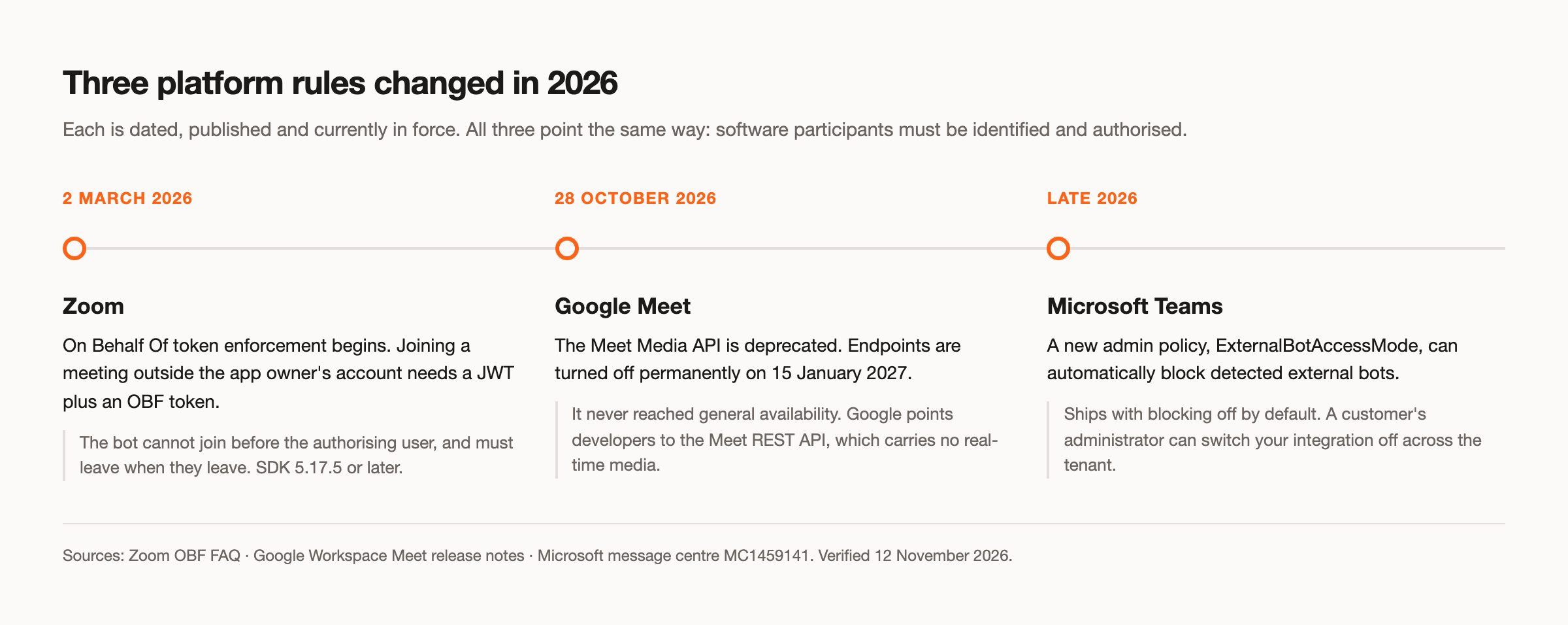
Each of these is dated, published, and currently in force. Together they point in one direction: the platforms want software participants to be identified, authorised and attributable to someone.
Zoom now requires a token minted on behalf of a user
Zoom enforcement of the On Behalf Of (OBF) token began on 2 March 2026. Joining a meeting hosted outside the app owner's own account now requires a JWT plus an OBF token, and the minimum SDK version for compliance is 5.17.5. Meetings inside the app owner's account still need only the JWT.
The practical consequences are sharper than the rule sounds. An OBF token represents an app rather than a person, but it is tied to a specific user who has authorised that app, and each SDK session can use only one at a time. The app cannot join the meeting until that authorised user has joined, and it cannot stay once they leave. Default token expiry is two hours, so the usual pattern is to mint one shortly before the call.
Zoom staff have declined requests for exceptions on the developer forum, stating in July 2026 that anonymous participants are no longer allowed to join Zoom meetings. This is a product decision rather than a technical limitation, which means waiting for it to be reversed is not a strategy.
Google retired the Meet Media API
This one deserves more attention than it has had. Google deprecated the Meet Media API on 28 October 2026 and will permanently turn off its endpoints on 15 January 2027. It never reached general availability. Developer Preview participants keep their credentials until the shutdown date, and Google points people toward the Meet REST API, which does not carry real-time media.
If your plan for Google Meet involved pulling live media through that API, the plan has an expiry date on it, and that date is weeks away. Anyone who built against it during Developer Preview needs a different path before January.
Microsoft gave administrators a switch to block bots
Microsoft shipped an administrative policy, ExternalBotAccessMode, with a BlockDetectedBots setting that automatically keeps detected external bots out of Teams meetings. It began rolling out in the second half of 2026 and ships with the blocking behaviour off by default, so it is an opt-in for administrators rather than a change that broke everything at once.
The important part for anyone building a product is that the switch now exists. A customer's IT administrator can turn your integration off across the tenant without telling you, and the policy does not affect permitted local recording or screen capture, which puts desktop capture outside the blocking regime entirely.
What it takes to put an agent in Zoom or Teams today
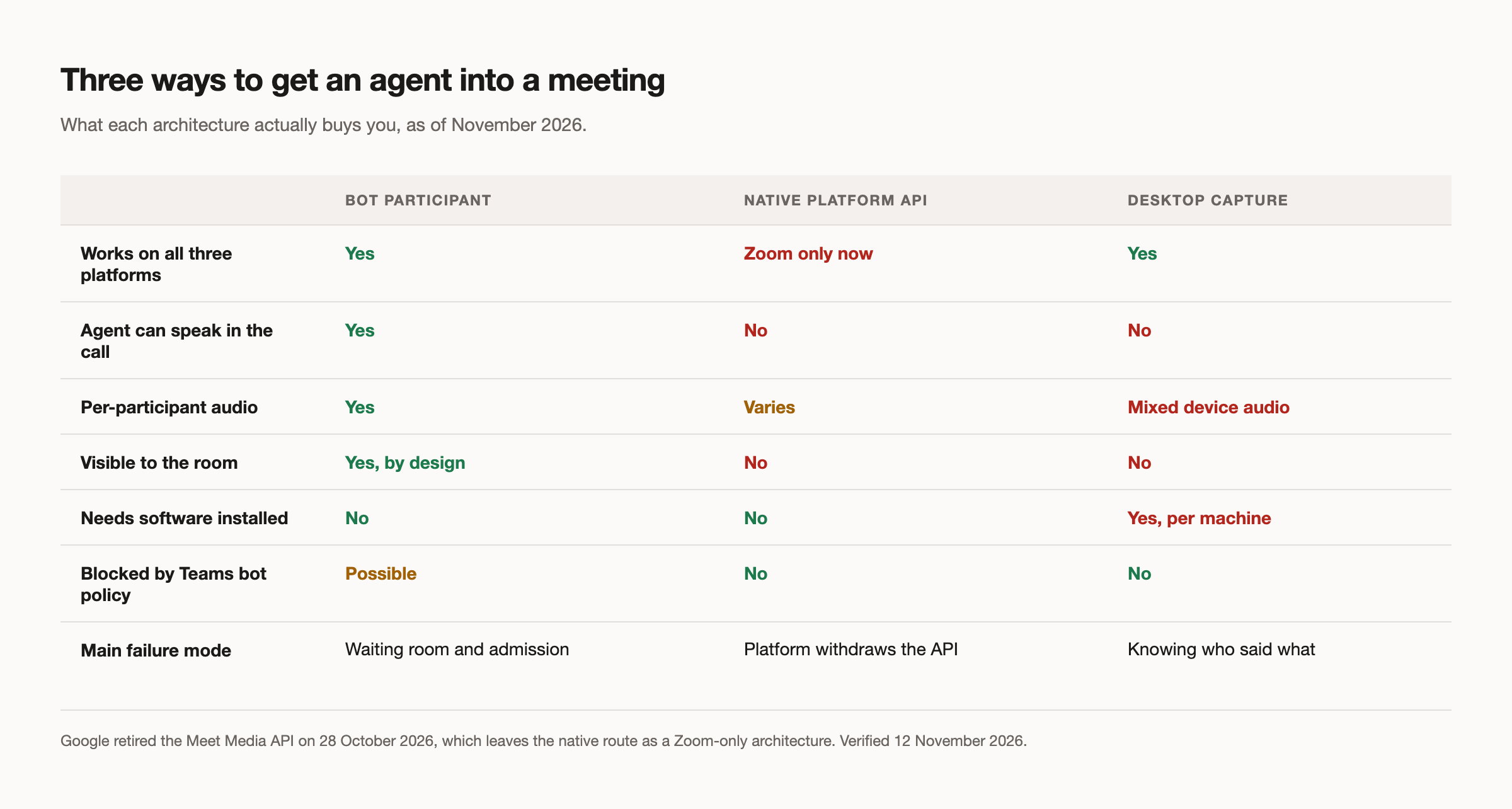
Given the above, there are three honest architectures, and each one buys something different.
A bot participant joins the call the way a person does, through the platform SDK or a headless browser. It sees and hears what a participant sees and hears, it can be seen by everyone, and it works across all three platforms with the per-platform authorisation described above. This is the only approach that lets the agent take part rather than observe.
A native platform integration avoids putting anything in the room, but after October 2026 this is effectively a Zoom-only architecture. Google retired its equivalent, and the nearest thing on Teams, compliance recording, works only inside your own tenant. Any guide that presents a platform media API as the general pattern is out of date.
A desktop capture application records from the local machine, which sidesteps bot admission entirely and sits outside Microsoft's bot-blocking policy. The trade is that you need software installed on someone's computer, and you get mixed audio from the device rather than clean per-speaker streams. Developers building this way run into the same wall repeatedly: they have what was said, but not who said it.
Whichever you pick, the lobby is where most attempts actually die. In one open-source project's published figures, 227 of 430 unfinished sessions ended in a waiting room, and individual accounts saw between half and nine tenths of dispatches end the same way. Admission handling is not a detail you add later.
Listening is not the same as taking part
There is a meaningful difference between an agent that produces a record of a meeting and an agent that participates in one, and it mostly comes down to audio.
Claude Meetings answers in writing by default, and stores a transcript rather than audio. That is a reasonable choice for a product aimed at a team's internal calls, and it removes a whole category of privacy argument. It also means the agent is not speaking into the room, and that the raw audio is not available to you afterwards.
If the thing you are building needs to speak, you need more than a transcript. You need audio out through the bot, interruption handling so a person can cut the agent off mid-sentence, echo control so it does not hear itself, and a latency budget tight enough that the reply lands while it is still relevant. If it needs to attribute speech reliably, you want per-participant audio rather than a single mixed track, because separating speakers after the fact is the part that never quite works.
Where MeetStream fits
MeetStream is the infrastructure underneath a meeting feature rather than a meeting feature itself. One meeting bot API covers Zoom, Google Meet and Microsoft Teams, and Zoom needs no setup: no Zoom Marketplace app, no SDK keys, no OAuth, no tokens. You pass a meeting link with your MeetStream API key and get a bot in the call.
From there you can take mixed audio or isolated per-participant tracks, stream either live over a WebSocket while the call is running, and send audio, chat messages or a video frame back into the room. Speaker-attributed transcripts come from an in-house engine or from one of several third-party providers. Lifecycle webhooks tell you when the bot is joining, in the meeting, or stopped, and why.
Agents that talk are handled by MIA, our in-meeting agent runtime, which covers wake words, barge-in and echo control so you are not rebuilding voice plumbing. There is also a hosted MCP server, so an assistant can dispatch and inspect real bots directly. Full detail is in the API documentation.
For a full side-by-side, including where Claude Meetings is ahead, see our feature comparison. The honest framing is that these solve different problems. If you want Claude in your own team's Google Meet calls, use Claude Meetings. If you are putting an agent inside a product other people use, across platforms you do not control, you need infrastructure.
Where this is heading
The direction of travel across all three platforms is identity. Anonymous software participants are being phased out in favour of ones that are authorised, attributable and visible to the room. Claude Meetings joining as a visible participant that announces itself in chat is the same instinct, arrived at from the product side rather than the platform side.
For anyone building here, the practical reading is to treat admission as a first-class part of the system, to assume per-platform authorisation will keep tightening, and to avoid betting on any single platform's media API staying available. January's Meet shutdown is a reminder of how quickly that can change.
If you are building a meeting agent that needs to work across Zoom, Google Meet and Microsoft Teams, get started free at meetstream.ai.
Frequently asked questions
Can Claude connect to Zoom?
Not natively, as of 12 November 2026. Claude Meetings supports Google Meet only, and Anthropic has said other platforms are coming without naming one or giving a date. You can put an agent into a Zoom call today through a meeting bot API. On MeetStream, Zoom needs no setup: send the meeting link with your MeetStream API key, with no Zoom app and no tokens.
Can I connect Claude to a Teams meeting?
Not through Claude Meetings at launch. The beta is Google Meet only. Microsoft also added an administrative policy during 2026 that lets a tenant block detected external bots, so any Teams integration needs to account for that switch regardless of which assistant is behind it.
Can Claude listen to a meeting and take notes?
Yes, on Google Meet, on Team and Enterprise plans, in beta. It writes notes and action items, and stores a transcript, a summary and screen descriptions. It does not retain audio. Everything it produces lives on a page for that meeting inside claude.ai.
Is there a Claude Meetings API?
Anthropic has published no API, SDK or programmatic interface for Claude Meetings. It is an end-user feature rather than a developer surface. If you need an agent in meetings inside your own product, you need a meeting bot API instead.
Which platform is easiest to build a meeting bot on?
Google Meet, by a clear margin, because it does not require a per-meeting token tied to an authorising user or a permissive tenant setting. For Meeting SDK apps, Zoom is the most involved because of the OBF requirement. Our platform comparison goes through the differences in detail.


