
Meeting Agent Token Usage: Why Calls Burn Through Limits
Understand meeting agent token usage: why AI meeting bots burn through limits, what users reported, and the levers that cut usage per call.

When xAI's @bot account announced on 13 November 2026 that Grok Bot can now join meetings, the replies did not dwell on features for long. They turned to meeting agent token usage. Users reported that their usage was gone after a couple of meetings, on a high plan. One asked what the point is when the usage lasts one day. Another asked, half joking, "Hey Grok Bot, how is your usage?"
Those complaints are not really about one product. A meeting is the most expensive kind of conversation you can hand a language model: long, crowded, unstructured, and live. Any agent that sits in a call and answers questions will consume model usage quickly unless it is designed not to, and the design choices that control it are mostly invisible from inside a workspace feature.
This matters now because agents in meetings just went mainstream. Claude Meetings entered beta on 12 November 2026, Grok Bot followed a day later, and both come inside a subscription plan. Grok Bot subscriptions include weekly usage, with extra usage billed on token cost. If one allowance also covers everything else you do with the assistant, a few long calls can use up the week.
In this guide we will cover why AI meeting bots use so many tokens, what users reported in the thread, how the main drivers stack up over a call, and the levers that cut usage without making the agent useless. Let's get into it.
Why AI meeting bots use so many tokens
A chat with an assistant is a few turns long and each turn is something you typed on purpose. A meeting is the opposite. It runs for tens of minutes, several people talk, most of what they say is not addressed to the agent, and the agent has to keep up anyway.
Here is how it works in a typical agent loop. Speech is turned into text. When the agent decides to reply, it sends the model its instructions, any background it was given, the tool descriptions it can use, and the conversation so far. The model answers. Next time, all of that goes again, plus whatever was said since. Most model APIs do not remember the previous request on their own; the history has to be sent back.
That last point is the one that surprises people. Usage in a meeting does not grow in a straight line with the length of the call. Each reply carries the meeting so far, so a question at minute fifty costs far more than the same question at minute five. Add a large standing context, such as memory from earlier conversations or a long set of instructions, and that context rides along with every one of those replies.
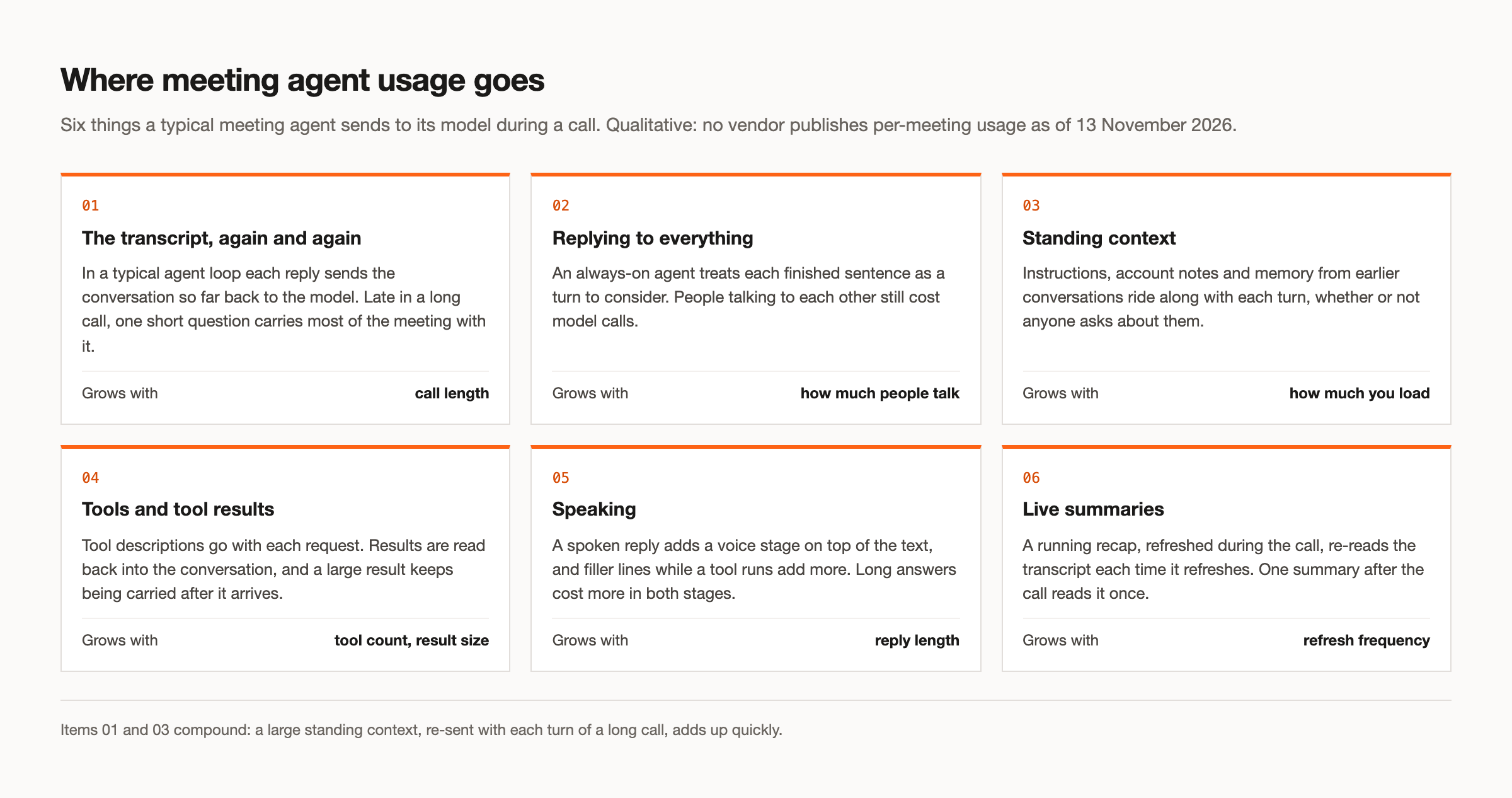
Five things drive most of it.
The transcript, re-read on each turn. The longer the call, the more each reply carries. This is the main reason a single long meeting can use far more than people expect.
Context that grows through the call. Notes, decisions and tool results accumulate. A tool that returns a large document does not cost once; it sits in the conversation and is re-sent with each later turn.
Answering every utterance. An agent that considers each finished sentence as a possible turn runs the model even when people are talking to each other. In a busy call, that is most of the call.
Tool calls. Each tool the agent can use is described in the request, whether it is used or not, and each call adds a round of request and result. An agent with access to many tools pays for that list on every turn.
Summaries during the call. A running recap that refreshes every few minutes re-reads the transcript each time. Speaking adds a voice stage on top of the text, and long spoken answers cost more in both stages.
What users reported in the Grok Bot thread
The replies to the 13 November announcement are anecdotal, and should be read that way. Several users reported running through their usage quickly once the Bot joined meetings. One said two meetings were enough to exhaust it. Another asked what the point is when the usage lasts one day. Others asked which consumes more, Claude Meetings or Grok Bot meetings.
None of this tells you how either product is built internally, and neither vendor publishes per-meeting usage as of 13 November 2026. What the reports do tell you is that the meter people care about is the subscription meter, and that meetings move it far faster than chat does. That is consistent with everything above: a meeting is long, the context is re-sent, and a Bot that brings "information from earlier conversations into the discussion", as xAI's 2 November announcement describes it, is carrying a large standing context by design.
To be fair to both products: that standing context is also what makes them useful for internal work. Memory across conversations is a feature. The trade-off is that you do not get to choose, meeting by meeting, how much of it comes along. Our Grok Bot guide covers what the meetings feature does well.
Which uses more, Claude Meetings or Grok Bot?
The short answer is that nobody outside the two companies can tell you. As of 13 November 2026, neither xAI nor Anthropic publishes per-meeting usage, a per-meeting limit or a way to see what one call consumed. Any number you see in a thread is a guess.
What you can compare is the drivers. Grok Bot answers in the meeting chat when addressed by name and brings in information from earlier conversations and memory. Claude Meetings answers in writing by default, builds documents and whiteboards during the call, and can run for up to eight hours in one meeting. An agent that builds artifacts live is doing more work per call; an agent that pulls in memory carries more context per turn. Which one costs more for you depends on how long your calls are, how often people address the agent, and how much it builds while it is there.
If you need a real answer, measure it on your own calls. That is much easier when the model calls run on your own provider key, which we come back to below.
Levers that cut meeting agent token usage
Every lever below removes one of the drivers. None of them is free; each gives something up. The right mix depends on the meeting, which is why these settings work best per meeting rather than per workspace. Here is what each does in MeetStream's in-meeting agent runtime, MIA, and when to use it.
Answer only when addressed. In pipeline mode, wake_word gates the agent behind a phrase you choose, such as its name. It replies after it hears the phrase and for a rolling window after that, which resets with each new utterance. People talking to each other do not trigger replies. bypass_below_participants can switch the gate off in a one-to-one call, and max_listening_window caps how long one session stays open. Use it in any shared call where the agent is a helper, not a participant.
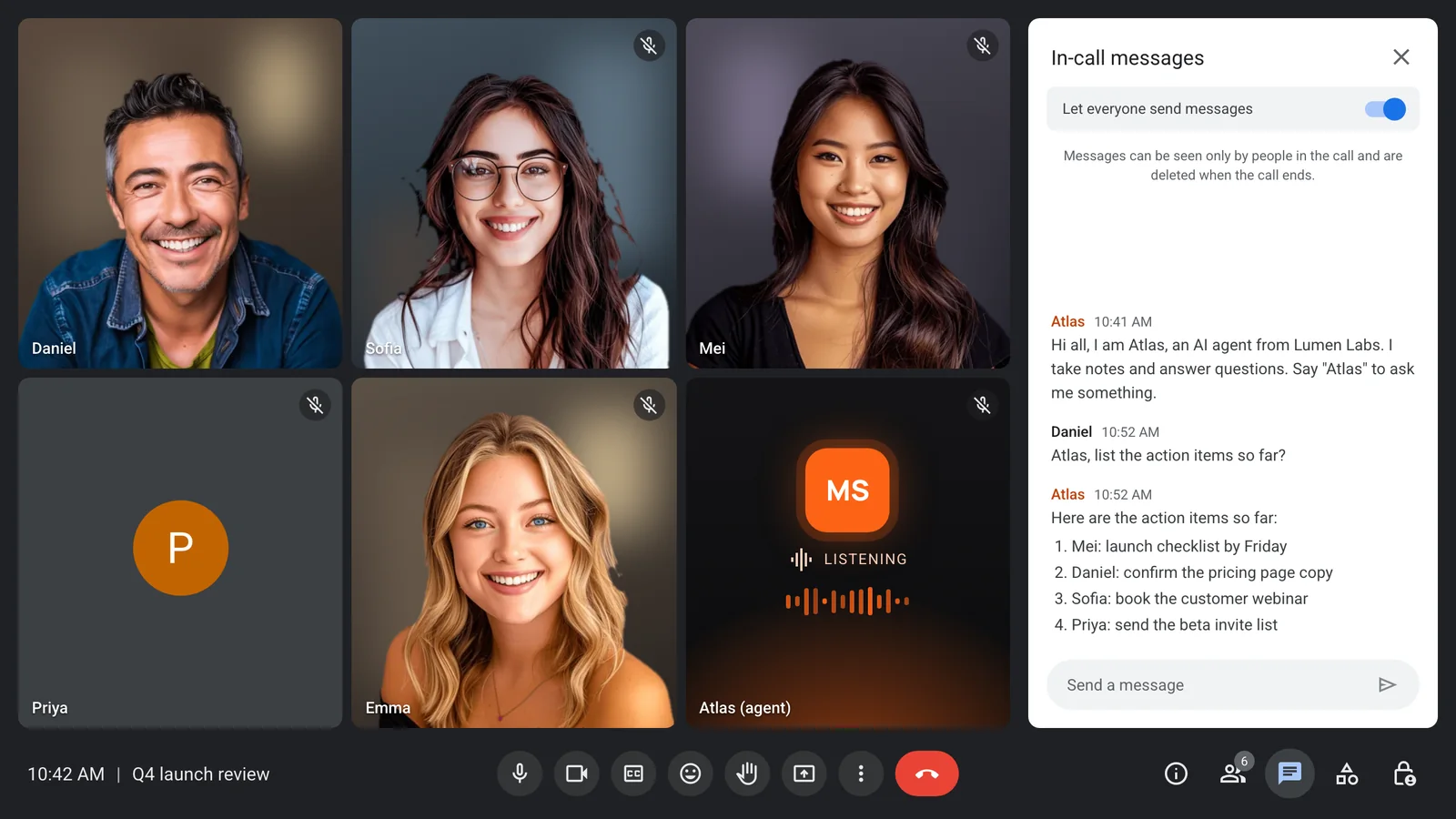
Chat-only or silent action. response_modality set to chat answers in the meeting chat with no voice stage. Set to action, the agent says nothing and only calls tools, for example creating a ticket when someone says to. For custom functions that only write, speak_after_execution set to false ends the turn without a spoken summary of the result, and the docs note that this saves tokens.
A short per-meeting prompt. Instead of one large prompt that covers every kind of call, put {{variable}} placeholders in the agent's system_prompt and fill them per bot with agent_config_params. The renewal call gets this account's notes and nothing else. The standing context shrinks to what the call needs, and since it rides along with every reply, a smaller one pays off across the whole meeting. We go deeper on this in context control.
Restrict tools. Each MCP server takes an allowed_tools whitelist, so the agent sees only the tools this meeting needs. For custom functions, response_cap_chars caps how much of a response goes back to the model, and the docs advise keeping responses small because the model reads the capped response each time it is referenced. Pull live data on demand instead of loading it all at the start.
Choose a smaller or cheaper model per agent. Models are chosen per agent from OpenAI, Anthropic, Google and xAI, and agent_config_id picks the agent per bot. A standup agent that lists action items does not need the same model as an agent answering hard technical questions on a customer call. In pipeline mode, max_tokens also caps the length of each reply.
Realtime or pipeline. Realtime mode runs one provider end to end (OpenAI, Google or xAI) and gives the lowest latency. Realtime providers take in the meeting's raw audio directly, and the wake phrase is off, so nothing holds replies back until someone addresses the agent. Pipeline mode separates speech recognition, the model and the voice, so the model in the middle only sees text, you can pick a small one, and the wake phrase is available. Choose realtime when conversational speed is the product; choose pipeline when the agent is an occasional helper in a long call.
Summarise after the call, not during. A recap that refreshes during the meeting re-reads a growing transcript each time. Fetch the post-call transcript once the bot leaves and summarise it once with your own code. If people need a recap mid-call, let them ask for it with the wake phrase rather than running one on a timer.
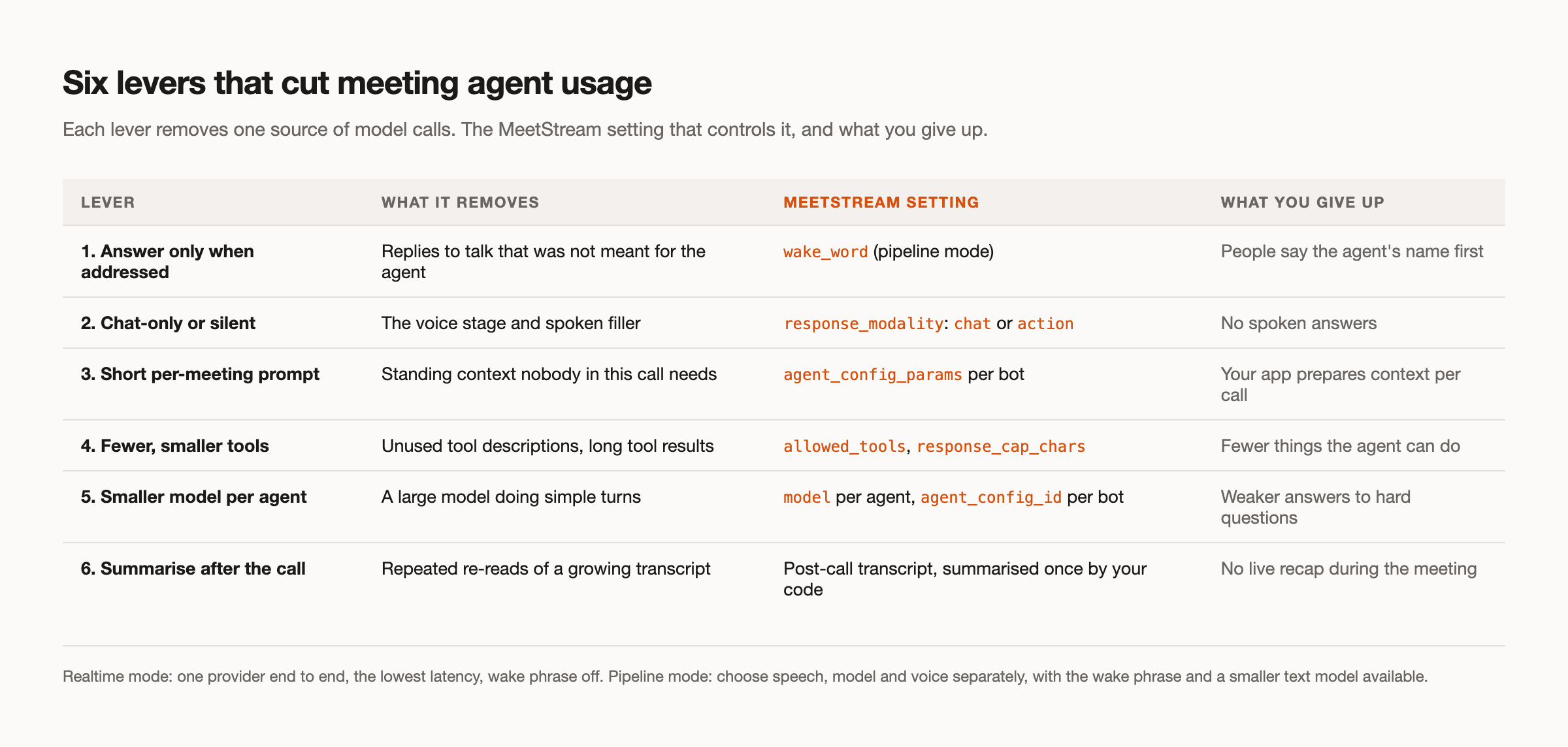
A good default for a shared call: pipeline mode, a wake phrase, chat replies, a short per-meeting prompt, two or three allowed tools, a mid-sized model, and the summary after the call. Then turn things up only where the meeting needs them.
Answering the thread: "how is your usage?"
"Which consumes more tokens, Claude Meeting or Grok Meeting?" Neither vendor publishes it as of 13 November 2026. Compare drivers instead: call length, how much standing context and memory come along, how often the agent replies, and how much it builds during the call.
"What is the point when the usage lasts 1 day only?" If one allowance covers both chat and meetings, a few long calls can use up what was meant to last the week. The point of a meeting agent is still real, but it has to be designed to stay quiet until asked, carry a small context, and summarise once.
"2 meetings and the usage is gone." That is what a long transcript re-sent on each turn, plus memory and tools, looks like on a meter. The levers above go after exactly those drivers.
"Hey Grok Bot, how is your usage?" The honest reply from any workspace agent is that you cannot see it per meeting. On MeetStream, model calls run on your own provider keys, configured once in the dashboard, so model usage lands on your own provider account rather than a subscription allowance, where you can track it alongside your other workloads.
How MeetStream fits in
MeetStream is meeting infrastructure, not a workspace assistant. One API call puts a bot into Zoom, Google Meet or Microsoft Teams, and MIA runs the agent with the model, prompt, tools and reply style you choose per agent and per meeting. That control is the same control that keeps usage down. If you want the agent to speak, the voice agents page covers voices and turn handling, and our integration layer page explains how the pieces connect.
A workspace feature is the better fit in one common case: if you want an assistant in your own team's calls with no setup, inside a plan you already pay for, Grok Bot or Claude Meetings is the faster path, and the usage meter is the trade-off. The Claude Meetings comparison and the Grok Bot alternative page lay out the differences, and our Grok agent tutorial shows a Grok agent running fully on xAI through MeetStream. Whatever you build, tell participants an agent is present; see our guide to bot consent.
Conclusion: design meeting agent token usage in, not out
Meeting agent token usage is not a mystery and it is not bad luck. It follows from long transcripts re-sent on each turn, large standing context, agents that reply to everything, wide tool lists and live summaries. Remove those one by one, per meeting, and an agent can sit in a long call without draining the week. See the full API reference at docs.meetstream.ai.
Frequently asked questions
Which consumes more tokens, Claude Meetings or Grok Bot meetings?
Neither Anthropic nor xAI publishes per-meeting usage as of 13 November 2026, so there is no reliable answer. Usage depends on call length, how much memory and context the agent carries, how often it replies, and how much it builds during the call. Measure it on your own calls if the difference matters to you.
Why do AI meeting bots use so many tokens?
In a typical agent loop, each reply sends the instructions, any background context, the tool descriptions and the conversation so far back to the model. A meeting is long and busy, so that conversation grows quickly, and an agent that considers every sentence runs the model even when nobody is talking to it.
Why did my meeting agent usage run out after two meetings?
Users in the Grok Bot thread reported exactly this. Long calls, memory from earlier conversations and and, where one allowance also covers chat, your normal chat use can add up fast. Shorter per-meeting context, answering only when addressed, and summarising after the call are the biggest levers.
How can I reduce meeting agent token usage?
Use a wake phrase so the agent only replies when addressed, reply in chat or act silently instead of speaking, load only the context this meeting needs, whitelist tools with allowed_tools, pick a smaller model for simple agents, and summarise the post-call transcript once instead of refreshing a recap during the meeting.
Is realtime or pipeline mode better for usage?
Realtime mode gives the lowest latency, but the provider takes in raw audio and the wake phrase is off, so there is no gate on when the agent replies. Pipeline mode sends text to the model, lets you choose a smaller one, and supports the wake phrase, which makes it the usual choice for an occasional helper in a long call.


