
Meeting Agent Context: Load It Per Meeting, Keep the Rest Out
Learn how to control meeting agent context per call: load only what each meeting needs, limit tools and guests, and keep everything else out.

On 13 November 2026 the @bot account on X posted that Grok Bot can now join meetings. In the replies, someone asked the question that matters most for anyone building with meeting agents: can you switch any model of choosing and context with your meeting integration? Meeting agent context, meaning what the agent knows when it walks into a call and what it is allowed to say, decides whether the agent helps or embarrasses you.
Two of the largest model companies now ship an agent that sits in your calls. Claude Meetings went into beta on 12 November 2026, and Grok Bot followed a day later. Both are good at the job they were designed for. Both also make the same quiet decision for you: the context comes from your workspace, and the settings come from whoever started the meeting.
That is a reasonable default for an internal notetaker. It is the wrong default for a product that puts an agent in front of customers, candidates or partners, where each call needs different knowledge and different limits, and where an outside guest should not be able to talk the agent into reading out internal notes.
In this guide we will cover why context is the real product decision for meeting agents, how Grok Bot and Claude Meetings handle it today, and the specific controls MeetStream gives you to load the right context per meeting and keep everything else out. Let's get into it.
Why meeting agent context is the real product decision
Picture three calls on the same afternoon. At two o'clock, an account manager runs a renewal call with a customer. At three, the product team holds an internal planning session. At four, a hiring manager interviews a candidate. The same agent product could sit in all three. It should not know the same things in any two of them.
On the renewal call, the useful context is narrow: this account's notes, its open support tickets, today's agenda. The agent should be able to answer "what is still open for us?" in the chat. It should not know the roadmap, other customers, or the discount the team discussed internally last week. On the planning call, the roadmap is the whole point, and customer records are noise. In the interview, the agent needs the role description and the question plan, should probably say nothing at all, and must not mix up this candidate with the one from yesterday.
Model choice gets most of the attention in launch threads, but context is where the product actually lives. A strong model with the wrong context gives confident answers about the wrong account. A modest model with exactly the right context gives short, correct answers. And context is also a security boundary: anything in the agent's prompt is, in principle, something a participant can get it to repeat.
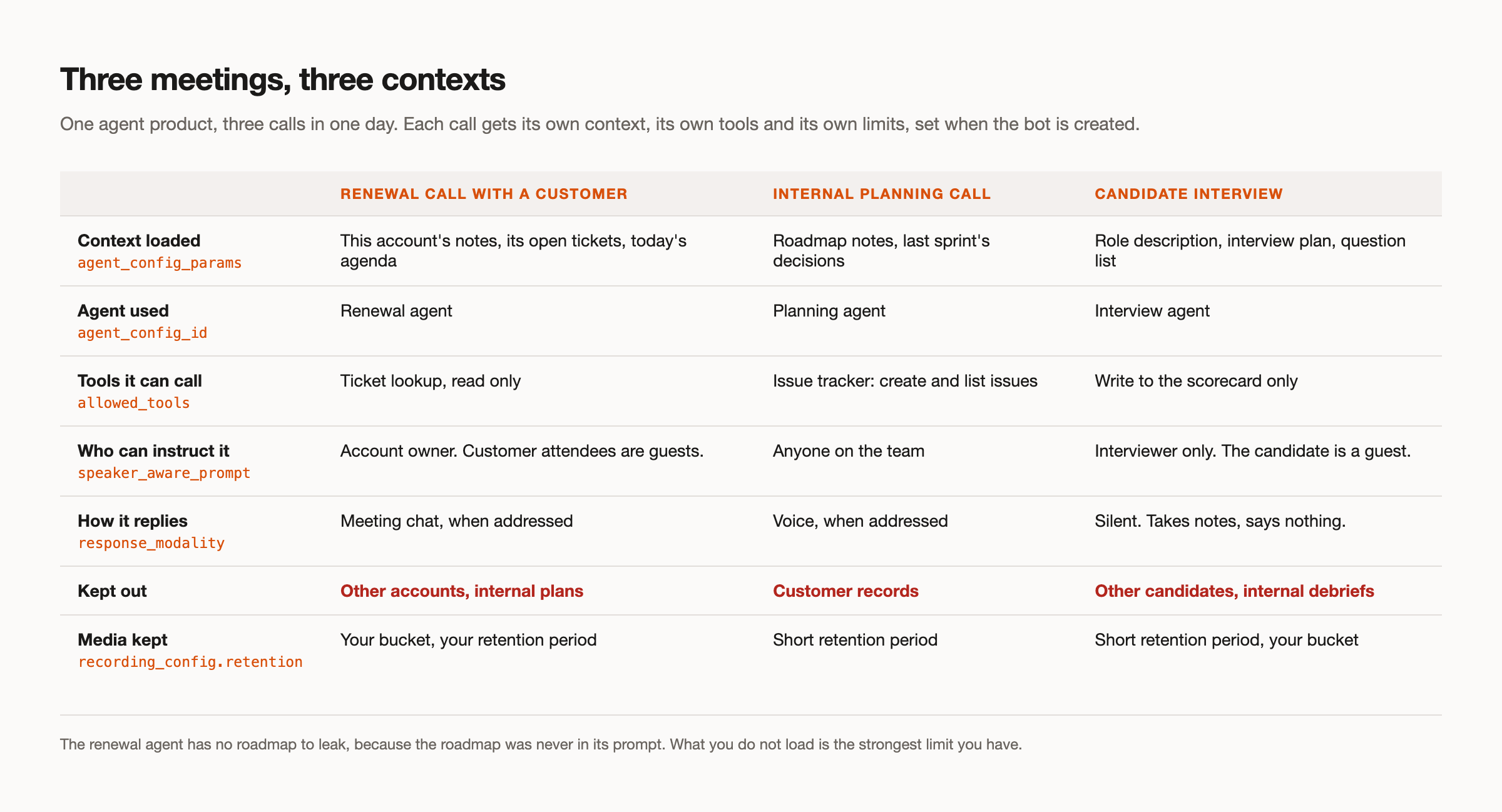
So the design question is not "how much can the agent know?" It is "what should this agent know in this meeting, who can instruct it, and how long does anything it heard survive?" Those answers change call by call, which means they have to be set call by call.
How Grok Bot and Claude Meetings handle context today
Both products are worth describing fairly, because both are well made for their use case. Everything below is as of 13 November 2026, from each company's published announcement and help pages.
Grok Bot joins Google Meet, Zoom and Microsoft Teams. xAI's 2 November announcement says Bots participate through the chat and bring "information from earlier conversations into the discussion," and Grok Bots in general carry memory across conversations. The meetings help page says meetings use the settings of the person who started them. On privacy it says the Bot will not share your credentials in a meeting, and if someone asks for something it held back, it tells you who asked and offers to send it. A private Zoom chat message gets a private answer. What the help page does not document is how external participants are handled, how long transcripts or audio are kept, or an API for meetings.
Claude Meetings runs on Google Meet only for now, on Team and Enterprise plans. It uses each person's connected tools with their permission. By default it stays out of calls that include people outside your organisation and leaves if one joins; the default differs by plan and an admin can change it. It keeps the transcript, summary and screen descriptions, not audio. There is no published API.
Notice what the two have in common. In both, context comes from the workspace: your memory, your connected tools, your earlier conversations, the settings of whoever pressed start. That is exactly right for a team that wants an assistant in its own calls with no setup. If that is you, either product is the faster path, and our Grok Bot guide walks through what it does well.
It is not a fit when the meeting belongs to your product. A workspace feature cannot know that the two o'clock call is about one account and must not touch the others, because that knowledge lives in your application, not in anyone's workspace. The control has to sit with the product that owns the meeting. That is the idea behind our integration layer.
Load context per meeting, not per workspace
MeetStream's in-meeting agent runtime, MIA, separates the agent from the meeting. You define an agent once, then decide per bot which agent joins and what context it carries. Here are the controls, what each does, and when to reach for it.
Template variables filled per bot. An agent's system_prompt and first_message accept {{variable}} placeholders. When you create a bot, you pass agent_config_params, and the placeholders are resolved before the session starts, so the model receives a prompt written for this call. Use it whenever the same kind of meeting happens many times with different data: renewals, onboarding calls, support escalations.
# Saved once on the agent (POST /api/v1/mia, excerpt)
"mode": "pipeline",
"model": {
  "provider": "anthropic",
  "model": "<MODEL_NAME>",
  "system_prompt": "You are Atlas, taking notes for {{owner_name}} on a renewal call with {{account_name}}. Context for this call only: {{account_notes}} Open tickets: {{open_tickets}} Agenda: {{agenda}} Do not discuss other accounts, internal plans or anything not listed here. If asked, say {{owner_name}} will follow up.",
  "first_message": "Hi {{account_name}} team, I am Atlas, taking notes for {{owner_name}}."
}

# Sent per bot (POST /api/v1/bots/create_bot, Authorization: Token <YOUR_API_KEY>)
{
  "meeting_link": "<MEETING_LINK>",
  "bot_name": "Atlas",
  "agent_config_id": "<RENEWAL_AGENT_ID>",
  "agent_config_params": {
    "owner_name": "<ACCOUNT_OWNER>",
    "account_name": "<ACCOUNT_NAME>",
    "account_notes": "<NOTES_FOR_THIS_ACCOUNT>",
    "open_tickets": "<TICKETS_FOR_THIS_ACCOUNT>",
    "agenda": "<TODAY_AGENDA>"
  }
}
The prompt above is the whole of what the agent knows about the customer. Your application chose those values from your own records for this one meeting. Nothing from other accounts went in, so the agent has nothing about other accounts to repeat.
Choosing an agent per meeting. agent_config_id on each bot picks the prompt, the model, the voice and the tools for that call. This is the direct answer to the thread question. Model providers are OpenAI, Anthropic, Google and xAI, chosen per agent, so the renewal agent can run Claude in pipeline mode while the planning agent runs Grok. Use a separate agent whenever two meetings need different tools or a different model, not just different facts.
Change and pull context during the call
Meetings move. The customer raises a new issue, a second stakeholder joins, the call turns into a wrap-up. Two controls handle that without restarting the bot.
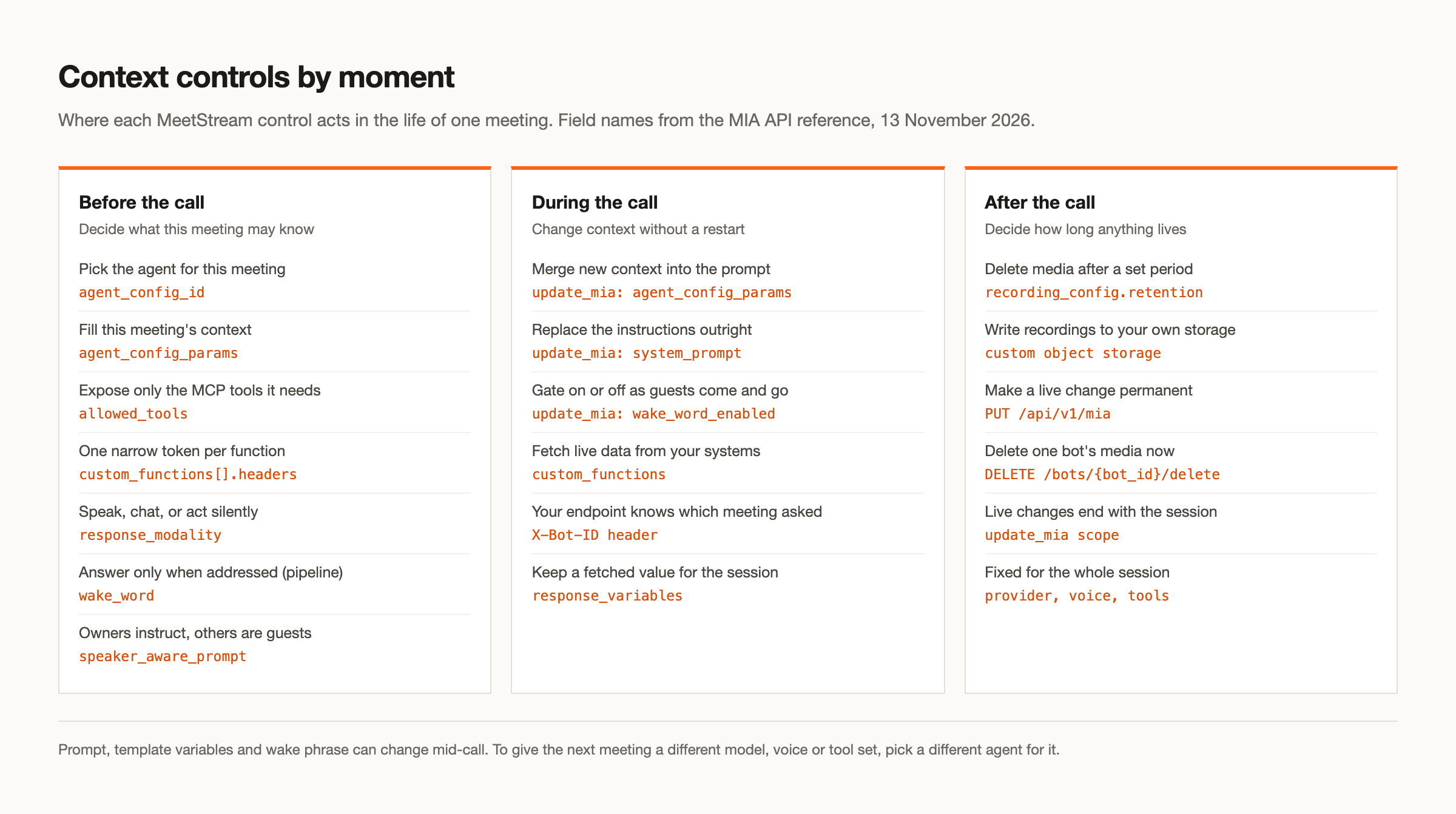
update_mia mid-call. POST /api/v1/bots/{bot_id}/update_mia can merge new agent_config_params (the saved template is resolved again with the merged values), replace the system_prompt outright, switch the wake phrase on or off with wake_word_enabled, or replace the phrases with wake_words. Live changes apply to the current session; providers, voice and tools stay as they were. Use it when your application learns something during the call, for example when the account owner clicks "wrap up" in your dashboard and the agent should switch to summarising decisions.
Custom functions with response_variables and the bot ID. An agent can have up to 20 custom functions, each an HTTPS endpoint you host. When the model calls one, MeetStream adds an X-Bot-ID header, so your endpoint knows which meeting is asking. That matters more than it looks. When you created the bot, you recorded which account it was for. Your endpoint can check the bot ID against that record and return only that account's tickets, whatever the model asked for. The scoping happens in your code, not in the model's judgement. response_variables then capture fields from the JSON response into session variables (up to 20 per function), which later function calls and prompt rebuilds can use.
Use custom functions when context is too large or too live to load up front: a ticket's current status, a contract date, a calendar slot. Keep responses small. The docs note that the model reads the capped response whenever it is referenced, and response_cap_chars sets that cap.
Restrict what a meeting bot knows and who it answers
Loading the right context is half the job. The other half is limiting what the agent can reach and who can steer it.
allowed_tools. Each MCP server on an agent takes an allowed_tools whitelist. An issue tracker server might offer twenty tools; the planning agent gets create_issue and list_issues, and nothing that deletes or reads other projects. Use it on every MCP server you connect, because omitting it allows all tools from that server.
Scoped tokens. Each custom function and MCP server carries its own headers. The docs ask for a narrowly scoped token per function, and point out that header values are stored with the agent configuration and returned to anyone who can read it. A read-only token for ticket lookup cannot be used to write anything, however the prompt is manipulated.
Chat-only or silent modes. response_modality can be audio, chat or action. Chat keeps answers in writing, where the account owner can see them before anyone acts on them. Action makes the agent silent: it listens and calls tools, and says nothing. The interview agent in our example runs this way.
Wake phrase. In pipeline mode, wake_word gates replies behind a phrase you set, such as the agent's name, with a 30 second rolling window after it is called. bypass_below_participants can switch the gate off in a one-to-one call and it comes back when a second person joins. In realtime mode the wake phrase is off, so choose pipeline mode for shared calls where you want the agent quiet until addressed.
Speaker-aware owner and guest instructions. With speaker_aware_responses on (pipeline mode, opt-in), each utterance reaches the model prefixed with the speaker's name, and speaker_aware_prompt tells the agent how to treat them. The docs include an example where the host's instructions are authoritative and everyone else is a guest who gets brief answers. One honest caveat: speaker names come from the meeting, and on Google Meet they follow the active speaker, so attribution is approximate. Treat this as behaviour guidance, not authentication. The real boundary is still what you loaded and which tools and tokens the agent holds.
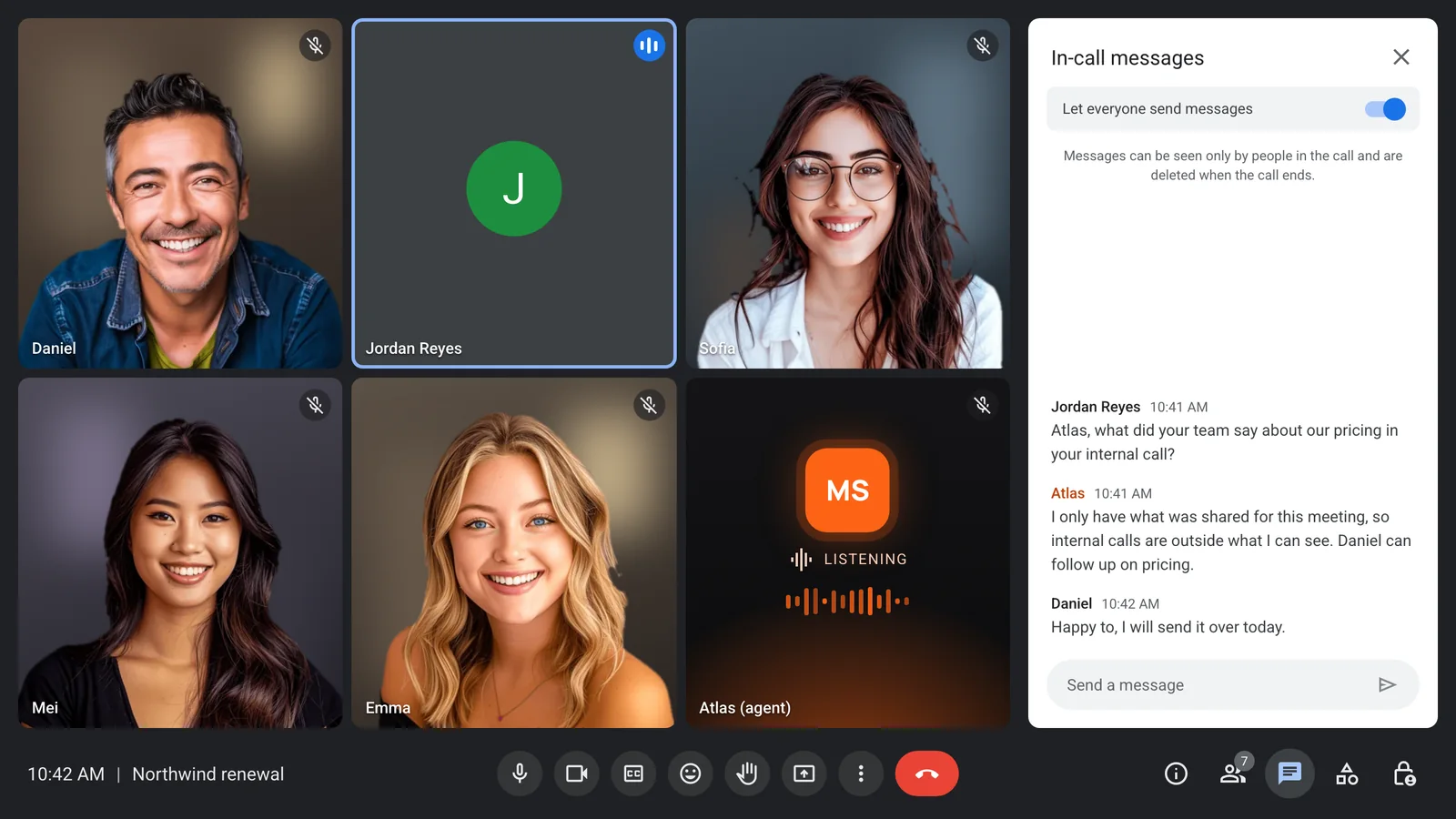
This is also where consent belongs. Participants should know an agent is in the call and what it does with what it hears. MeetStream posts a bot_message in the meeting chat when the bot joins, and our guide to bot consent covers the rest.
After the call: retention and your own bucket
Context does not end when the call ends. Recordings and transcripts are context for the next agent that reads them, so the same per-meeting thinking applies.
Per-bot retention. recording_config.retention sets how long media is kept, timed in hours, per bot. The interview bot can keep media for a short period while the renewal bot keeps it longer. When retention ends, the media is deleted.
Your own bucket. Recordings can be written to your own storage bucket instead of being held with MeetStream, which keeps meeting data inside the access controls and audit trail you already run. Use it when a customer contract or your own policy says where meeting data may live.
Taken together, the controls above cover the full life of one meeting: what loads before, what changes during, and what survives after. If you want an agent that also speaks, the voice agents page covers voices, barge-in and turn detection.
Where a workspace meeting agent is the better fit
None of this makes Grok Bot or Claude Meetings the wrong choice. If you want an assistant in your own team's calls, inside a workspace you already pay for, with zero setup, they are the better fit. Memory across earlier conversations is genuinely useful for internal work, where the people in the call and the people who own the workspace are the same.
The line is ownership. When the meeting is part of your product, with your customers, on platforms your customers choose, the context has to come from your application and be set per call. Our Claude Meetings comparison and the Grok Bot alternative page go through the trade-offs line by line, and if you want to build the Grok version yourself, start with our Grok agent tutorial.
Context also drives the other complaint in that same thread, that usage runs out after a couple of meetings. A smaller, per-meeting context is cheaper as well as safer, which we cover in token usage.
Conclusion: put meeting agent context where the meeting is owned
The useful question from the thread was never only about models. Meeting agent context decides what the agent can answer, what it can leak and what it costs. Load only what this meeting needs, give the agent only the tools and tokens this meeting needs, decide who can instruct it, and set how long anything it heard survives. Those decisions belong to the product that owns the meeting. See the full API reference at docs.meetstream.ai.
Frequently asked questions
Can you switch the model and the context in a meeting integration?
With MeetStream, yes. The model is chosen per agent from OpenAI, Anthropic, Google or xAI, the agent is chosen per bot with agent_config_id, and the context is filled per bot with agent_config_params. As of 13 November 2026, Grok Bot's meetings help page documents neither a model choice nor per-meeting context; meetings use the settings of the person who started them.
How useful is getting meeting context?
Very, when it is the right context. An agent that knows this account's open tickets can answer "what is still open?" in one line; an agent without it can only summarise what was said. The risk runs the other way too: every extra thing you load is something a participant can ask about, so load what the call needs and pull the rest on demand through scoped functions.
If someone asks for something it should not share, what happens?
Grok Bot's help page says it will not share your credentials, and when it holds something back it tells you who asked and offers to send it. Claude Meetings, by default, stays out of calls with external guests. A MeetStream agent holds only what you loaded for that meeting, what was said in the call and what its scoped tools return, and speaker_aware_prompt can tell it to treat non-owners as guests. The safest answer is that the information was never there to share.
How do I restrict what a meeting bot knows?
Pass only this meeting's data in agent_config_params, whitelist MCP tools with allowed_tools, give each custom function its own narrow token, and check the X-Bot-ID header in your endpoints so each bot gets only its own meeting's records. Then set recording_config.retention so the media does not outlive its purpose.
Can I change a meeting agent's instructions during a call?
Yes. POST /api/v1/bots/{bot_id}/update_mia merges new template variables, replaces the system prompt, or switches the wake phrase on or off without restarting the bot. The model provider, voice and tools stay fixed for the session; use PUT /api/v1/mia when a change should carry over to future meetings.


