
Grok Bot Meetings: What It Does, Plans, Platforms and Limits
Learn how Grok Bot meetings work: how it joins, what it does in the call, which plans include it, what is not documented, and where MeetStream fits.

On 13 November 2026, xAI's @bot account posted a short line that went a long way: "Grok Bot can now join meetings. Ask it questions, assign it work, or have it keep track of what your team decides." The post passed 486,000 views, and the replies filled up with the same handful of questions. Do you just send it a link? Is it on Premium? Why did it not work for me? Can it go to my standup for me?
Most of those questions have answers, and a few of them do not have answers yet. Grok Bot meetings arrived through two statements eleven days apart, a help page and a reply in the launch thread, and they do not list exactly the same plans. Some of what people want, such as the Bot speaking in the call, is not in the documentation at all.
Grok Bot is xAI's named, persistent assistant. Each Bot has its own cloud computer and memory, there are shared Team Bots, and Bots already work in Slack and Microsoft Teams chat. Meetings extend that same Bot into Google Meet, Zoom and Microsoft Teams calls, where it listens, keeps notes and answers questions in the meeting chat.
In this guide we will cover how Grok Bot joins a call, what it does while it is there and afterwards, which plans include it, what xAI has not documented yet, how it compares with Claude Meetings, and where MeetStream fits if you need a meeting agent inside your own product. Let's get into it.
Grok Bot can now join meetings.
— Grok Bot (@bot) November 13, 2026
Ask it questions, assign it work, or have it keep track of what your team decides. pic.twitter.com/NqkzAfdPcD
What xAI launched, and when
There are three sources, and each one adds something. The Grok Bot 1.0 announcement on 2 November 2026 introduced meetings as part of the wider Bot product. It says Bots "participate through the chat", bring "information from earlier conversations into the discussion", and "keep track of decisions". The help page, titled "Add a Bot to Your Meetings", has the step by step detail. We read it on 13 November 2026. The @bot post on X on 13 November announced meetings publicly, and a reply in that thread set out the plans.
Everything in this article comes from those three sources as of 13 November 2026. Where something is not in them, we say so instead of guessing. That matters here because a lot of the confusion in the thread came from people filling gaps with assumptions, for example that the Bot would talk, or that it would work in any call on X.
The supported platforms are Google Meet, Zoom and Microsoft Teams. Nothing else is documented: no Discord, no X Spaces, no Webex. Our platform guide goes through each of the three in detail, including the 2026 rule changes that affect any bot joining those calls.
How Grok Bot joins a meeting
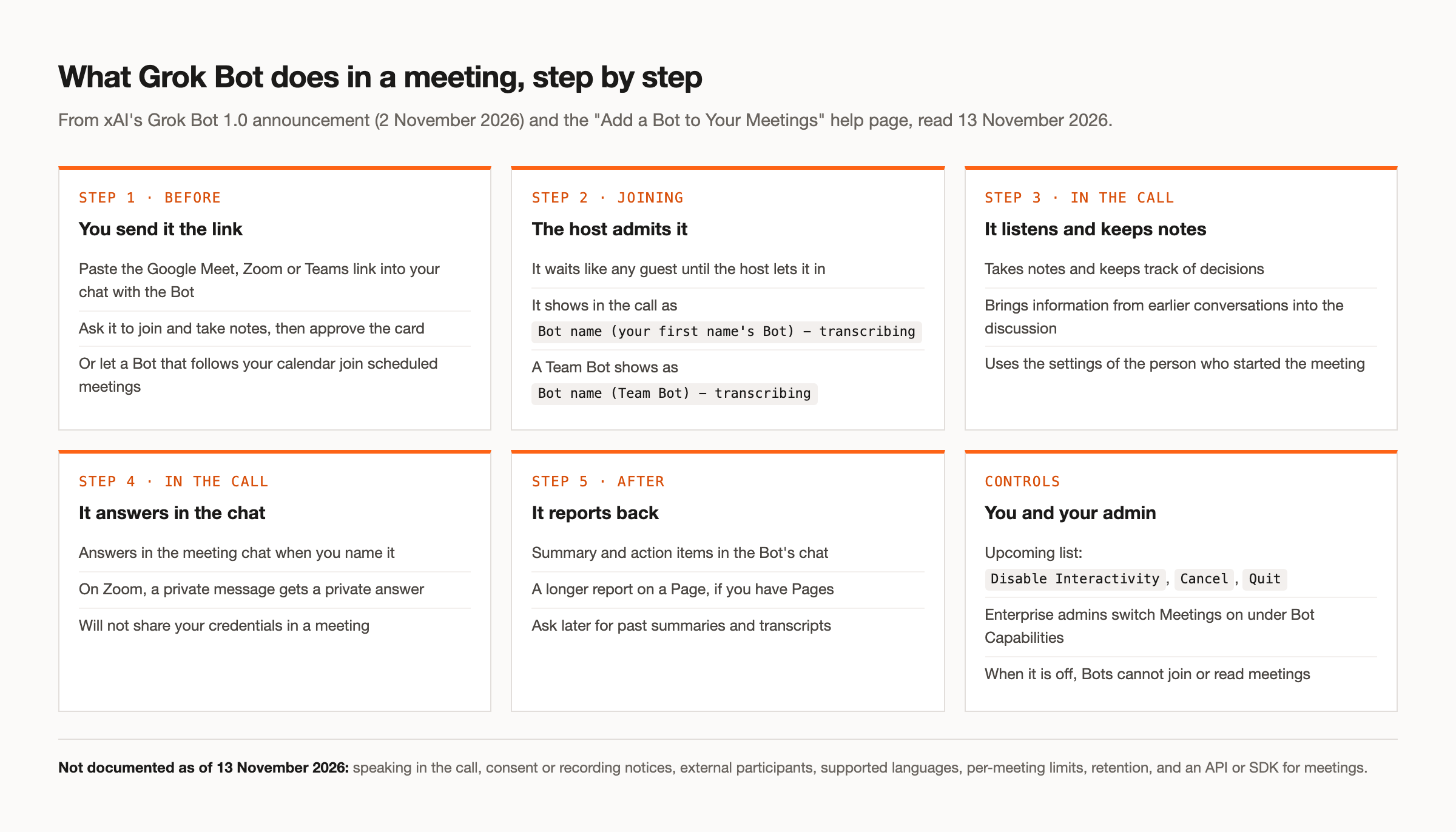
The short answer to "do you just send it an invite link?" is close to yes. You paste the meeting link into your chat with the Bot and ask it to join and take notes. The Bot shows a card, and you approve it. The Bot then goes to the meeting, and the host admits it the way they would admit any guest from the waiting room or lobby.
In the participant list it does not pretend to be a person. It shows as Bot name (your first name's Bot) - transcribing, or for a shared Team Bot, Bot name (Team Bot) - transcribing. That label is the answer to one of the more common requests in the thread. Grok Bot cannot join as you for a daily standup. It joins under its own labelled name, so everyone in the call can see it is a Bot and that it is transcribing.
For recurring calls you do not need to paste a link every time. A Bot that follows your calendar can join scheduled meetings on its own. Those meetings appear in an "Upcoming" list, where you can manage each one, which we cover below.
Another reply asked whether a Bot can be created just for this. Grok Bots are named and persistent, and Team Bots are shared, so a team can set up a Bot whose main job is meetings and give it a clear name. The help page does not describe a separate meetings-only Bot type, though. A meeting Bot is the same Bot you chat with, with the same memory.
What it does during the call
Once admitted, Grok Bot listens and takes notes. It keeps track of decisions as they are made, and it can bring information from earlier conversations into the discussion, which is the persistent memory doing its job.
It answers questions in the meeting chat when you address it by name. That detail is easy to miss. The documentation describes chat answers only, so a question asked out loud gets a written reply in the chat panel, not a spoken one.
Zoom has one extra behaviour. If you send the Bot a private message in Zoom chat, it answers privately. Requests from a conference room device count as coming from the room, not from a named person.
The privacy rules are short and specific. The help page says: "It won't share your credentials in a meeting." If someone in the call asks for something the Bot held back, it tells you who asked and offers to send it to you. Meetings use the settings of the person who started them, so the Bot's behaviour follows whoever set up that meeting, not whoever is asking the question.
What happens after the call
When the meeting ends, the Bot posts a summary and action items in your chat with it. If you have Pages, it also writes a longer report on a Page. Later, you can ask the Bot for past summaries and transcripts, so a question like "what did we agree about the launch date last Tuesday" goes to the same Bot that sat in the call.
That is a sensible design for a personal or team assistant. Everything lands in one place you already use, and you query it in plain language. The tradeoff is that the output lives in Grok. The help page does not describe exporting it to your own systems, and it does not describe how long transcripts are kept.
Which plans include Grok Bot meetings
This is where the thread had the most confusion, and the two official statements explain why. The 2 November announcement lists Team, Enterprise and Ultra. The 13 November reply in the launch thread says: "Available now on Super, Ultra, all Team and Enterprise plans, and equivalent legacy plans." Read together, Super is the addition. Premium is not listed in either statement, so as of 13 November 2026 the answer to "is this available on Premium?" is no, based on what xAI has published.
On Enterprise there is one more switch. Admins turn Meetings on in settings under "Bot Capabilities". When it is off, Bots cannot join or read meetings. If you are on an Enterprise plan and the Bot refuses to join, that setting is the first thing to check.
Several replies said it did not work for them and asked whether it is rolling out slowly. xAI has not published a rollout schedule. Before assuming a slow rollout, work through the documented requirements:
- Your plan is Super, Ultra, Team, Enterprise or an equivalent legacy plan.
- On Enterprise, an admin has turned on Meetings under Bot Capabilities.
- The meeting is on Google Meet, Zoom or Microsoft Teams.
- You approved the card after asking the Bot to join.
- Someone with host rights admitted the Bot from the waiting room or lobby.
Usage is the other limit people hit. Grok Bot subscriptions include weekly usage, and extra usage is billed on token cost. Several users in the X thread reported running through their usage quickly in meetings. That is anecdotal, but it fits how meetings work: a long call is a lot of text for a model to read. Our token usage breakdown explains where the tokens go in a meeting agent and how to keep the count down.
Controls for you and your admin
Scheduled meetings sit in the "Upcoming" list with three options. Disable Interactivity keeps the notes but stops the Bot answering in the call, which is a good setting for meetings where you want a record but not a participant. Cancel and Quit are the other two.
One reply asked whether the Bot can decline meetings for you. That is not a documented meeting feature. The help page describes the Bot joining meetings, through a link or your calendar, and the controls above for the Bot's own scheduled meetings. It does not describe the Bot declining calendar invitations on your behalf.
What Grok Bot meetings do not document yet
"What can Grok Bot not do yet?" is a fair question for a feature that is days old. Here is what the published sources do not cover as of 13 November 2026.
Speaking. The documentation describes chat answers only. Nothing documents the Bot speaking in a meeting. A third-party write-up reports that xAI called live back-and-forth conversation "coming soon", but that is reported, not confirmed. Our piece on the speaking question goes deeper, including how a Grok model can already speak in a call through other means.
Consent and notices. The label in the participant list says the Bot is transcribing. Nothing else is documented about consent or recording notices to participants, and nothing about how the Bot handles external participants from outside your organisation. If you run calls with customers or candidates, read our consent guide before you send any bot in.
Languages, limits and retention. Supported languages are not documented. Neither is a maximum meeting length or a usage limit per meeting, or how long transcripts or audio are retained.
An API. There is no published API or SDK for Grok Bot meetings. You use it through the Bot itself. That is fine for people using Grok, and a hard stop for a developer who wants to put a meeting agent inside their own product.
Practical uses, with or without a business
Super and Ultra are on the 13 November list next to the Team and Enterprise plans, and one reply asked for practical use cases for someone without a business. The feature is the same: a labelled Bot that takes notes, tracks decisions, answers questions in the chat and reports back afterwards. Here are a few places that helps outside a company setting.
A study group can have the Bot track who agreed to cover which topic, then ask it a week later what was decided. A volunteer committee or a parents' group can get action items without anyone taking minutes. A freelancer on a client call can ask the Bot in a private Zoom message to check what the client said earlier. Family calls to plan a move, a trip or care for a relative tend to make decisions that nobody writes down, and a summary in the Bot's chat fixes that.
Two cautions apply to all of these. Tell people before the Bot joins, because the label alone may not be enough for everyone in the call. And watch your weekly usage if your calls are long.
Grok Bot and Claude Meetings
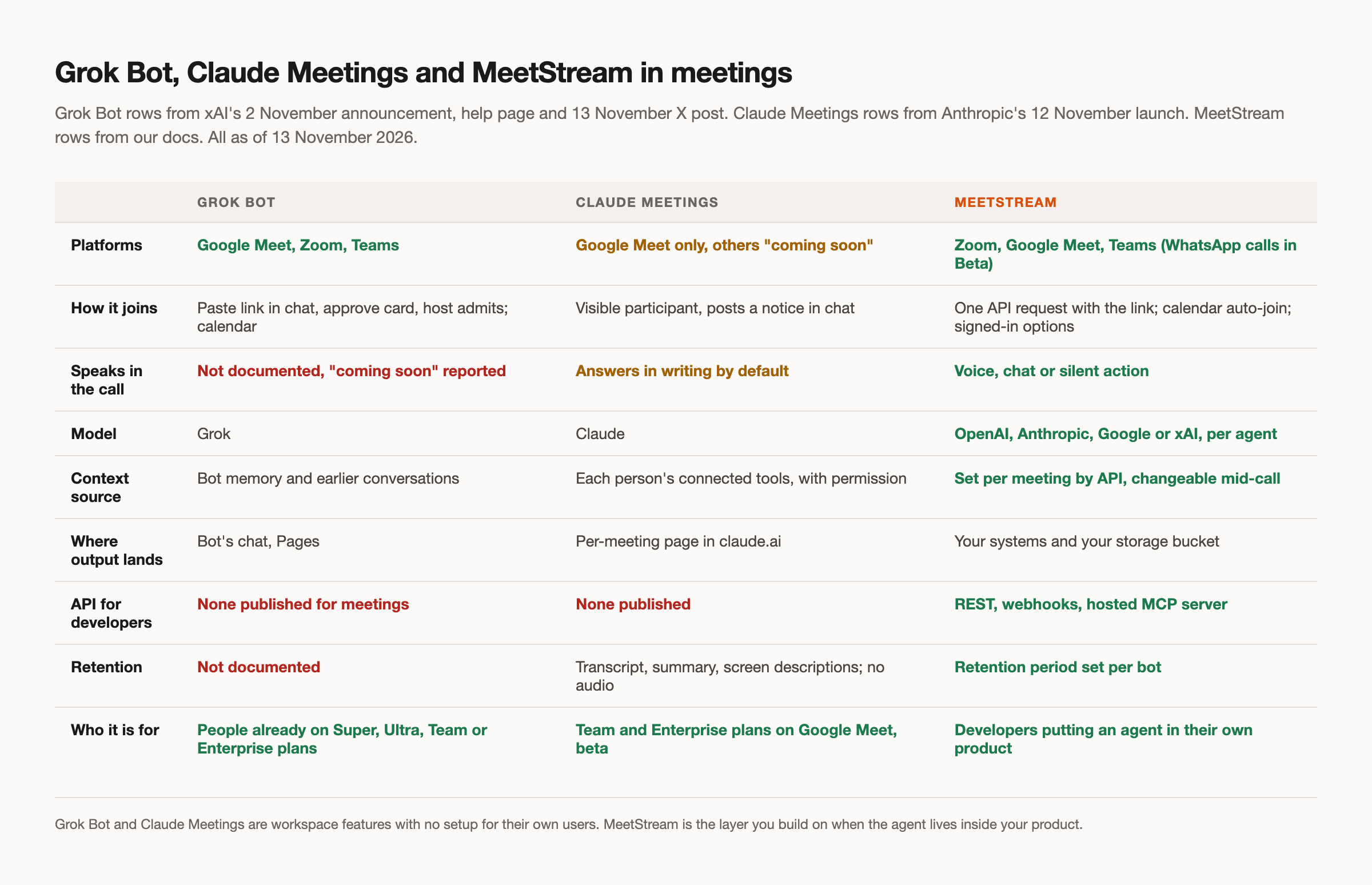
Anthropic launched Claude Meetings one day earlier, on 12 November 2026, so the two are being compared in the same week. They are closer in shape than in reach.
Claude Meetings runs on Google Meet only, with other platforms described as "coming soon" and no date. It is on Team and Enterprise plans, in beta. It joins as a visible participant, posts a notice in the meeting chat, answers in writing by default, and builds docs and whiteboards during the call. Output goes to a page for each meeting in claude.ai. It stores a transcript, a summary and screen descriptions but not audio, and it has an 8 hour cap per meeting. By default it stays out of calls with people outside your organisation.
Grok Bot covers three platforms where Claude Meetings covers one. Claude Meetings publishes more about guests and retention. Neither has a published API for meetings. Our full comparison puts them side by side in more detail.
Where MeetStream fits
Grok Bot is the easy choice for a team that is already on a qualifying Grok plan and wants notes and chat answers in its own calls. There is nothing to build. If that describes you, use it.
MeetStream solves a different problem. It is the layer underneath a meeting agent that lives inside your own product, for your users, on whatever platform their meetings happen to be on. One create-bot request joins Zoom, Google Meet or Microsoft Teams, and the platform is read from the link. The bot name is yours, and a join message posts in the meeting chat when the bot arrives. Our meeting bot API covers per-participant audio, live transcription with speaker names, and lifecycle webhooks that tell you when the bot is joining, in the meeting, or stopped and why.
The agent can also speak. MIA, our in-meeting agent runtime, lets you choose the model per agent from OpenAI, Anthropic, Google or xAI, and reply by voice, in the meeting chat, or silently through tools. A Grok agent can run fully on xAI, so Grok can speak in a meeting through MeetStream today. Our walkthrough on building a Grok meeting agent shows the setup.
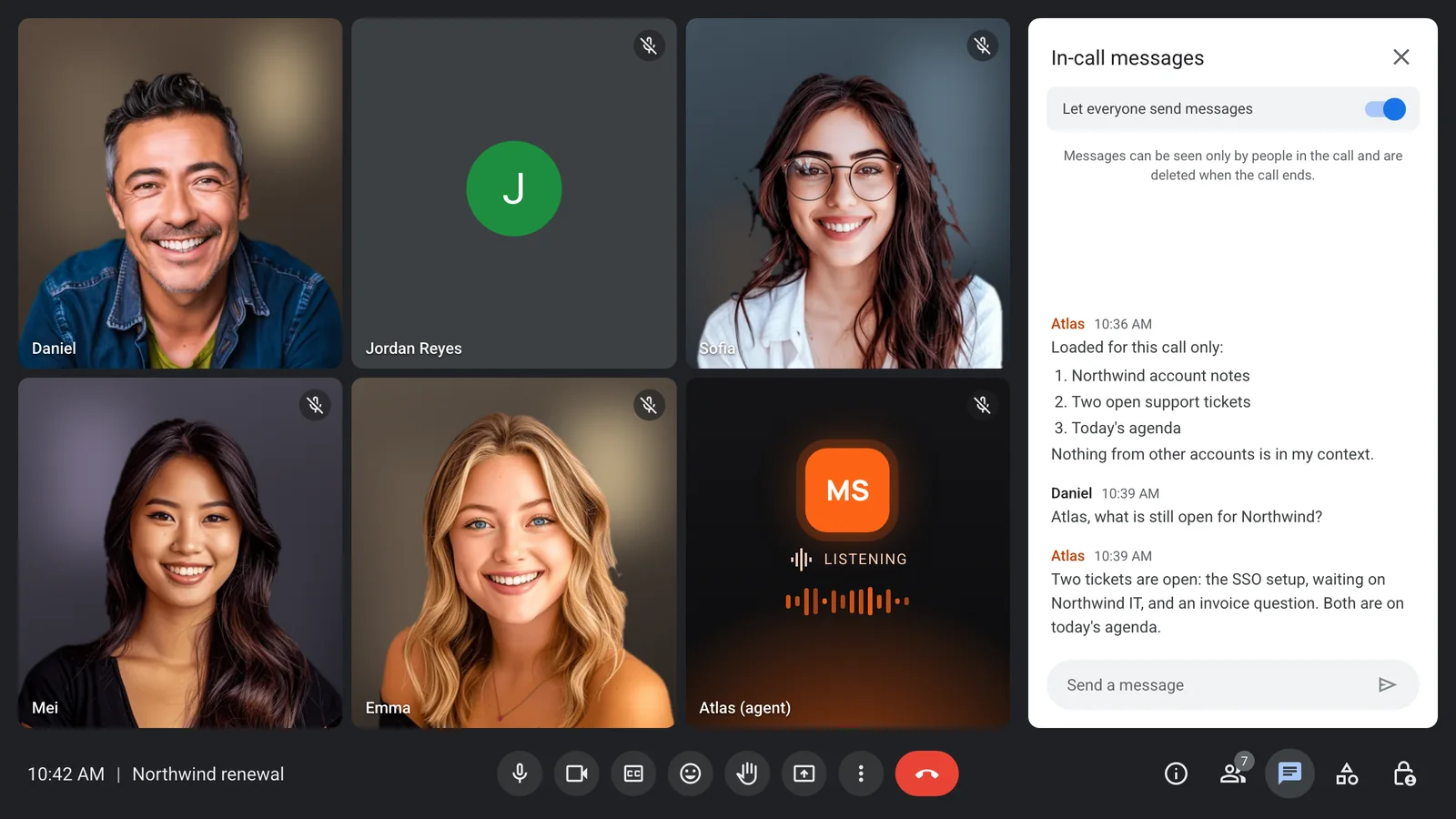
The biggest difference is context. Grok Bot brings in its memory and earlier conversations from your workspace. With MeetStream you decide what each meeting gets. The system prompt and first message accept {{variable}} placeholders, and you fill them per bot with agent_config_params, so each call gets its own account notes, agenda or ticket list:
curl -X POST "https://api.meetstream.ai/api/v1/bots/create_bot" \
  -H "Authorization: Token <YOUR_API_KEY>" \
  -H "Content-Type: application/json" \
  -d '{
    "meeting_link": "<YOUR_MEETING_LINK>",
    "bot_name": "Atlas",
    "agent_config_id": "<YOUR_AGENT_CONFIG_ID>",
    "agent_config_params": {
      "account_notes": "Renewal due next month. Two open tickets.",
      "agenda": "Ticket status, renewal terms"
    },
    "callback_url": "https://your-app.example.com/hooks/bot"
  }'
During the call, POST /bots/{bot_id}/update_mia replaces the system prompt, merges new variables and turns the wake phrase on or off without a restart. You can also restrict context: only what you pass for that bot is in its prompt, allowed_tools limits which MCP tools it can call, and a retention period per bot controls how long recordings stay. Our article on context control covers each of these.
Which one to pick
Grok Bot meetings are a good, focused feature. If your team already pays for Super, Ultra, Team or Enterprise and wants a labelled notetaker that answers questions in the chat on Google Meet, Zoom or Teams, turn it on. Check the plan list and the admin switch first, and watch your usage.
If you need the Bot to speak today, to run inside a product you ship, to load different context for each customer call, or to send its output to your own systems, you need infrastructure under the agent instead. Full detail is in the API documentation, and you can get started free at meetstream.ai.
Frequently asked questions
Do you just send Grok Bot an invite link?
Almost. You paste the meeting link into your chat with the Bot, ask it to join and take notes, and approve the card it shows. The host then admits it like any guest. A Bot that follows your calendar can also join scheduled meetings on its own.
Is Grok Bot meetings available on Premium?
Not according to xAI's published statements as of 13 November 2026. The launch thread lists Super, Ultra, all Team and Enterprise plans, and equivalent legacy plans. The 2 November announcement listed Team, Enterprise and Ultra. Premium is in neither.
Can Grok Bot join a meeting as me?
No. It joins under its own labelled name, such as "Bot name (your first name's Bot) - transcribing", so everyone can see it is a Bot. It can take notes in your standup, but the documentation describes chat answers only, so it cannot give your update for you.
Can Grok Bot speak in meetings?
Not according to the documentation as of 13 November 2026, which describes answers in the meeting chat only. A third-party write-up reports xAI calling live conversation "coming soon", which is not confirmed. A Grok model can speak in a call today through a meeting agent runtime such as MIA.
Is there a Grok Bot meetings API?
xAI has not published an API or SDK for Grok Bot meetings. It is a feature of the Bot, used through the Bot's chat. To put a meeting agent inside your own product, you need a meeting bot API underneath it.


