
Grok Bot on Zoom, Teams and Google Meet: Setup and Limits
Find out how Grok Bot joins Zoom, Teams and Google Meet, the 2026 platform rules every bot works under, and why Discord and X Spaces are not on the list.

When xAI announced on 13 November 2026 that Grok Bot can join meetings, the first wave of replies was about platforms. Does Grok Bot work on Zoom? Is Google Meet supported? What about Teams, Discord, or a Space on X? One person said it worked great on Teams. Another wanted to know why it could not join streams on X.
The documented answer is short. Grok Bot joins Google Meet, Zoom and Microsoft Teams calls, and nothing else is documented. The longer answer is more useful, because each of those three platforms changed its rules for software participants during 2026, and those rules apply to Grok Bot, to Claude Meetings, to MeetStream and to any bot you build yourself.
Grok Bot joins a call the same way on all three platforms: you paste the meeting link into your chat with the Bot, approve the card, and the host admits it. What differs is what the platform does around that moment, and what it will allow next year.
In this guide we will cover which calls Grok Bot can join, what admission looks like on Zoom, Google Meet and Teams, the 2026 platform rules behind each one, why Discord and X Spaces are not on the list, what is known about languages, and how MeetStream covers all three platforms from one request. Let's get into it.
Which calls Grok Bot can join
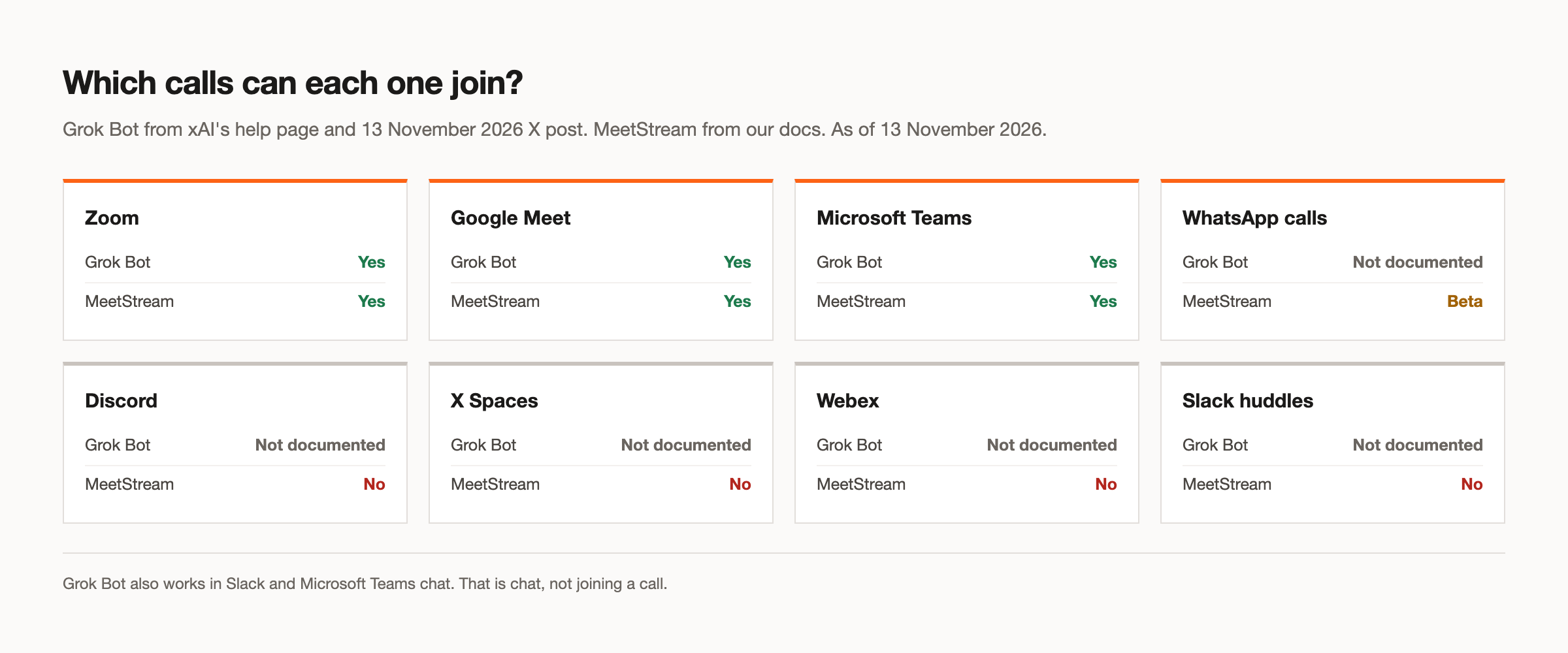
As of 13 November 2026, the Grok Bot meetings help page lists three platforms: Google Meet, Zoom and Microsoft Teams. So yes, Google Meet is supported, and yes, it works with both Teams and Zoom. Nothing else is documented. There is no mention of Discord, X Spaces, Webex or Slack huddles.
Worth noting: Grok Bot also works in Slack and Microsoft Teams chat. That is the Bot answering in a chat workspace, not joining a call. If someone in your team says "Grok works in Teams", check whether they mean the chat or a Teams meeting, because the two are separate features.
The plan rules are the same on every platform. The 13 November reply in the launch thread lists Super, Ultra, all Team and Enterprise plans, and equivalent legacy plans. On Enterprise, an admin must turn on Meetings under "Bot Capabilities", or Bots cannot join or read meetings at all. Our Grok Bot overview covers plans, controls and what happens after the call in more detail.
The 2026 rules every meeting bot works under
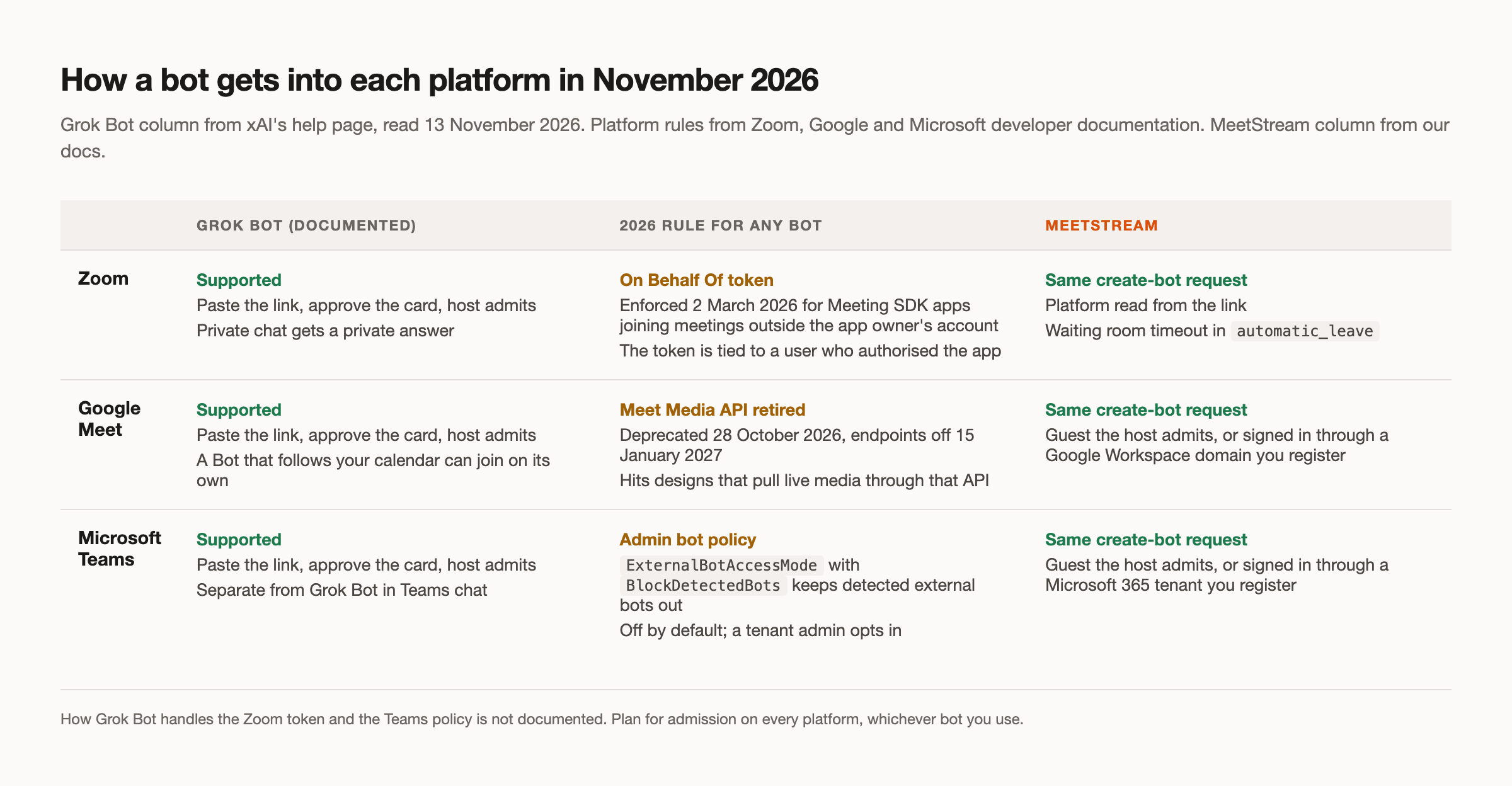
Before going platform by platform, it helps to see the three changes side by side. Each one is dated and published, and together they point one way: platforms want software participants that are identified, admitted and traceable to a person or an organisation.
xAI has not documented how Grok Bot handles any of them. That is not a criticism. It is just the part of the system that end users do not see, and the part that decides whether a bot gets into a particular customer's meeting.
Grok Bot on Zoom
On Zoom, the setup is the documented flow. You paste the Zoom link into your chat with the Bot, ask it to join and take notes, and approve the card. The Bot waits until the host admits it, then shows in the participant list as Bot name (your first name's Bot) - transcribing, or Bot name (Team Bot) - transcribing for a shared Team Bot.
Zoom has one Grok Bot behaviour that the other platforms do not. If you send the Bot a private message in Zoom chat, it answers privately. That is useful when you want to check something without putting the question in front of the whole call. Requests from a conference room device count as coming from the room.
The platform rule behind Zoom is the On Behalf Of (OBF) token. Zoom began enforcing it on 2 March 2026 for Meeting SDK apps that join meetings outside the app owner's own account. The token is tied to a user who has authorised the app, and the app can join only while that user is in the meeting. Zoom's transition notice has the full detail. In practice, anonymous software participants are on the way out on the largest meeting platform, and any bot that joins Zoom calls works inside that rule.
Grok Bot on Google Meet
Several replies asked someone to show how to add Grok Bot to Google Meet. Here is the documented sequence:
- Open your chat with the Bot.
- Paste the Google Meet link and ask the Bot to join and take notes.
- Approve the card the Bot shows.
- In the call, admit the Bot when it asks to join. It appears as "Bot name (your first name's Bot) - transcribing".
- Address the Bot by name in the meeting chat to ask it a question.
For meetings already on your calendar, a Bot that follows your calendar can join scheduled meetings on its own. Those show in the Bot's "Upcoming" list, where Disable Interactivity keeps the notes but stops the Bot answering, and Cancel and Quit are also available.
The 2026 change on Google's side is about media access, not admission. Google deprecated the Meet Media API on 28 October 2026 and will turn its endpoints off on 15 January 2027, according to the Meet release notes. The API never reached general availability. That change affects products that planned to pull live media from Meet through that API. A bot that joins as a participant, the way Grok Bot does, is a different route, and Google Meet remains the least restrictive of the three platforms for that route.
Grok Bot on Microsoft Teams
Teams works the same way from the user's side: paste the link, approve the card, the host admits the Bot from the lobby. The reply in the thread saying it worked great on Teams is consistent with that. Teams is a documented platform, and the flow is the same as on the other two.
The 2026 rule on Teams is the one most likely to surprise people later. Microsoft added a meeting policy setting, ExternalBotAccessMode, with a BlockDetectedBots value that keeps detected external bots out of a tenant's meetings. Blocking is not the default, so nothing broke when it shipped. But a tenant admin can turn it on, and from then on detected external bots stay out of that organisation's meetings. The Set-CsTeamsMeetingPolicy reference documents the setting.
For Grok Bot users, that means a call that works in your own tenant today may not work when you join a partner's or customer's Teams meeting. How Grok Bot interacts with this policy is not documented. If you rely on it for external calls, test with the organisations you meet most often.
Why it cannot join Discord or X Spaces
"Can you join Discord calls?" and "Why can't it join streams on X?" were two of the more pointed questions in the thread, given that the Bot comes from xAI. The factual answer is that neither is documented. xAI lists Google Meet, Zoom and Microsoft Teams, and nothing else.
Our reading, not xAI's, is that the meetings feature is built around one pattern: a meeting link, a host who admits a guest, a participant list with a label, and a meeting chat the Bot can answer in. A Discord voice channel or a Space on X works differently, with its own ways of joining, speaking and chatting. Supporting them would be a separate integration, not a setting. Until xAI says otherwise, treat both as unsupported.
The same is true of Webex. If your calls are on Webex, Grok Bot meetings are not documented to work there as of 13 November 2026.
Languages and transcription quality
One reply asked whether Grok Bot works on Teams and added that Microsoft's transcription in Spanish is poor. It is a fair concern, and the honest answer is that supported languages for Grok Bot meetings are not documented. The help page also does not say which transcription engine the Bot uses, so there is no published reason to expect it to behave like Teams' own transcription, better or worse.
If you run meetings in a language other than English, test Grok Bot on a real call in that language before you depend on the notes. Check speaker names, numbers and product terms, because those are where transcription errors cause the most damage in a summary.
If you are building your own meeting agent, the choice of speech to text provider is yours. In MeetStream's pipeline mode you choose the speech to text stage from Deepgram, OpenAI, AssemblyAI or xAI, so you can test the provider that handles your language best for your calls.
How MeetStream covers all three from one request
Grok Bot is the right tool for a team that already has a qualifying Grok plan and wants notes and chat answers in its own calls. MeetStream is for a different job: putting a meeting agent inside your own product, for your users, on whichever platform their meetings are on. Our integration layer page explains that split in more depth.
One create-bot request joins Zoom, Google Meet or Microsoft Teams. The platform is read from the link, so your code does not branch by platform:
curl -X POST "https://api.meetstream.ai/api/v1/bots/create_bot" \
  -H "Authorization: Token <YOUR_API_KEY>" \
  -H "Content-Type: application/json" \
  -d '{
    "meeting_link": "<ZOOM_MEET_OR_TEAMS_LINK>",
    "bot_name": "Atlas",
    "bot_message": "Hi all, I am Atlas, an AI agent. I take notes and answer questions.",
    "callback_url": "https://your-app.example.com/hooks/bot"
  }'
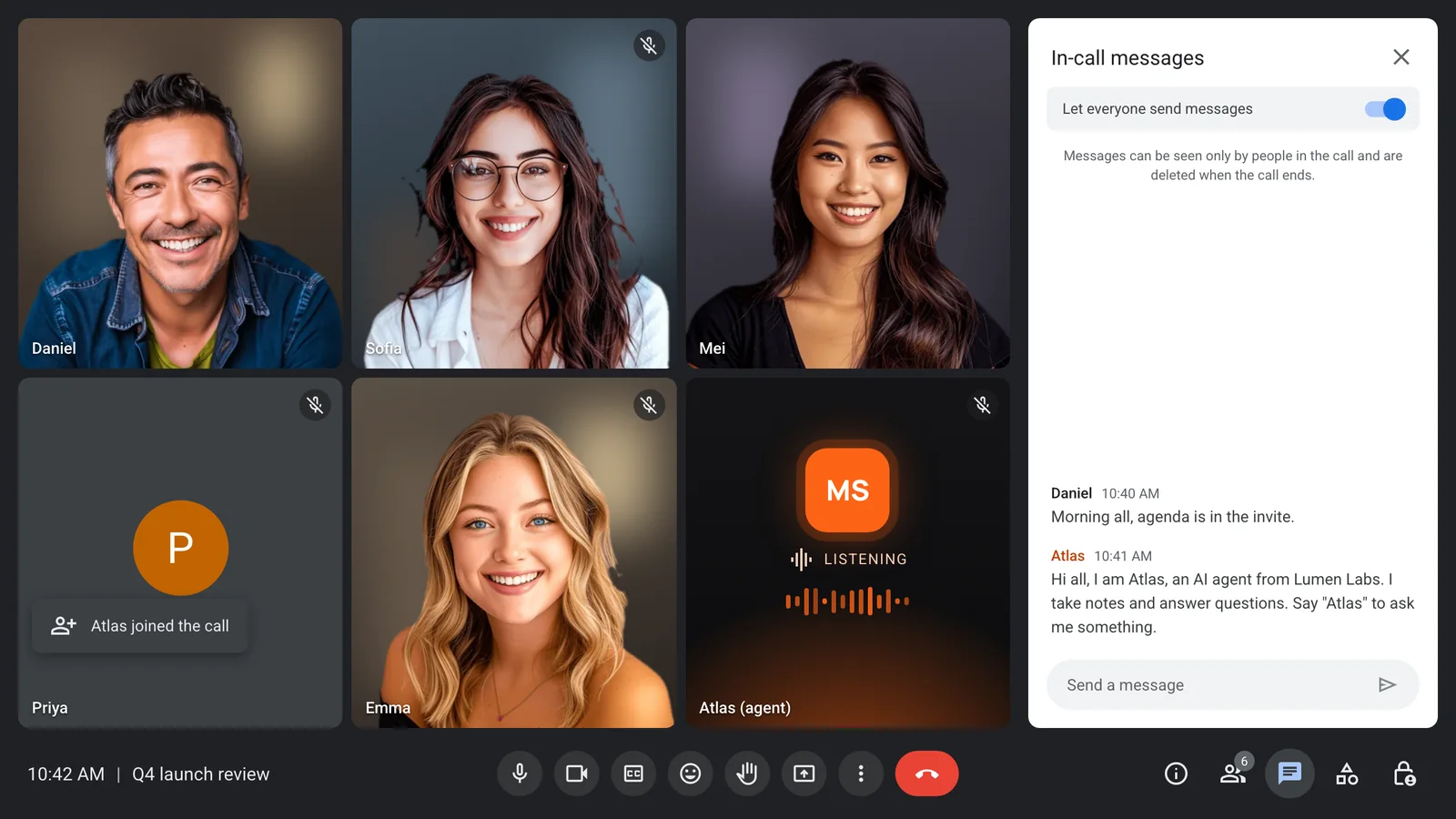
The bot name is yours, and bot_message posts in the meeting chat when the bot joins, so people know what it is. Lifecycle webhooks, bot.joining, bot.inmeeting and bot.stopped with a reason, tell you whether the bot got in. automatic_leave rules include a waiting room timeout, so a bot that nobody admits does not wait indefinitely.
Admission is where the signed-in options matter. On Google Meet, the bot can join signed in through a Google Workspace domain you register for it. On Teams, it can join through a Microsoft 365 tenant you register. Otherwise it joins as a guest that the host admits. Our Teams integration page covers the Teams side. Zoom needs no setup: send the meeting link with your MeetStream API key, and the API documentation covers the rest.
Scheduling works across all three platforms. Calendar auto-join covers Google and Outlook calendars, and join_at schedules a bot up to 90 days ahead. WhatsApp calls are in Beta. MeetStream covers Zoom, Google Meet and Microsoft Teams, with WhatsApp calls in Beta, so calls on Discord, X Spaces, Webex or Slack huddles need a different route.
Unlike Grok Bot as documented, a MeetStream agent can also speak in the call, with a Grok model if you want one. Our piece on the speaking question covers how. Whatever you build, tell participants before an agent joins; our consent guide covers notices and external guests. For how Claude Meetings handled the same platform rules, see our Claude Meetings article.
What to take away
Grok Bot on Zoom, Google Meet and Teams follows one simple flow: paste the link, approve the card, get admitted, answer in the chat. That flow works today on all three documented platforms, and not on Discord, X Spaces or Webex.
The platforms are the part to watch. Zoom's OBF token, the retirement of the Meet Media API and the Teams bot-blocking policy all landed in 2026, and each one changes how meeting bots join. On MeetStream, Zoom still needs no setup on your side. If your agent has to work across customers' meetings on all three platforms, inside your own product, get started free at meetstream.ai.
Frequently asked questions
Does Grok Bot work with Zoom?
Yes. Zoom is one of the three documented platforms as of 13 November 2026. You paste the Zoom link into your chat with the Bot, approve the card, and the host admits it. A private message to the Bot in Zoom chat gets a private answer.
Does Grok Bot work on Microsoft Teams?
Yes, Teams meetings are supported, separately from Grok Bot in Teams chat. The host admits the Bot from the lobby. A Teams admin can enable a meeting policy that blocks detected external bots, so a call outside your own organisation may behave differently.
How do I add Grok Bot to Google Meet?
Paste the Google Meet link into your chat with the Bot, ask it to join and take notes, and approve the card. Admit it when it asks to join the call. It appears as "Bot name (your first name's Bot) - transcribing" and answers questions in the meeting chat when you name it.
Can Grok Bot join Discord calls or X Spaces?
Not according to xAI's documentation as of 13 November 2026. The supported platforms are Google Meet, Zoom and Microsoft Teams, and nothing else is documented. Webex is not listed either.
What languages does Grok Bot support in meetings?
xAI has not documented supported languages for Grok Bot meetings, or which transcription engine it uses. If your meetings are in a language other than English, test it on a real call and check names and numbers in the summary before relying on it.


