
WebRTC vs RTMP: Which to Use for Meeting Bots

For interactive meeting bots that require immediate, two-way communication, WebRTC is the correct protocol choice. Its sub-second latency is a requirement for use cases like real-time transcription and conversational agents. In contrast, the older RTMP protocol introduces delays of several seconds, making it a poor fit for interactivity but a standard for one-way broadcast streaming.
This distinction matters for developers building on top of meeting platforms. All major platforms like Zoom, Google Meet, and Microsoft Teams use WebRTC (Web Real-Time Communication) for their core audio and video transport. A bot must participate in this WebRTC session to access live media. However, a common requirement is to re-stream a meeting to a broadcast service like YouTube Live, which uses RTMP (Real-Time Messaging Protocol) for ingest. The two protocols solve different problems.
WebRTC was standardized in 2011 to enable low-latency, peer-to-peer communication directly in browsers. RTMP was developed in the early 2000s for Flash Player and has survived as a reliable, TCP-based protocol for sending video to a media server. The choice is not about which is better in the abstract, but which one fits a specific part of your application's architecture.
This article provides a technical comparison of WebRTC vs RTMP, covering transport, latency, and common use cases in the context of building meeting bots. We will look at how each protocol works and where it fits in a modern stack.
How WebRTC Works for Real-Time Communication
WebRTC is a framework built into all modern browsers that manages the full lifecycle of a real-time media connection. It handles signaling to establish the connection, network traversal to get through firewalls, and the secure transport of media. These are handled by distinct components.
The signaling layer uses Session Description Protocol (SDP), an offer and answer exchange between two peers that describes their media capabilities, like supported codecs and transport addresses. SDP is just a format for the description. It is typically exchanged over a WebSocket connection before the direct media connection is established.
Network traversal is handled by Interactive Connectivity Establishment (ICE). ICE finds the best possible path for media to flow between peers by gathering candidate IP addresses from the local network and from STUN and TURN servers, which help navigate network address translators (NATs). This process allows for direct peer-to-peer connections in many network environments.
Media itself is transported using the Secure Real-Time Transport Protocol (SRTP) over UDP. Using UDP is an intentional design choice for live media. If a video packet is lost, retransmitting it a few hundred milliseconds later would be useless. Instead, WebRTC uses techniques like forward error correction and adaptive bitrate to handle packet loss gracefully. The result is end-to-end latency that is typically below 500 milliseconds.
// Simplified WebRTC offer/answer example in a browser
const pc = new RTCPeerConnection({
  iceServers: [{ urls: 'stun:stun.l.google.com:19302' }]
});

// Add local media from camera and microphone
const stream = await navigator.mediaDevices.getUserMedia({ audio: true, video: true });
stream.getTracks().forEach(track => pc.addTrack(track, stream));

// Create offer (SDP) to send to the other peer
const offer = await pc.createOffer();
await pc.setLocalDescription(offer);

// Exchange the offer via your signaling channel, receive an answer,
// and then set the remote description to establish the connection.
// ICE candidates are gathered and exchanged in parallel.
How Meeting Platforms Use WebRTC
Google Meet, Zoom, and Microsoft Teams all use WebRTC as the underlying transport for participant audio and video. Instead of creating a direct peer-to-peer mesh between all participants, which does not scale, they use a centralized server model. These media servers are called Selective Forwarding Units (SFUs).
An SFU receives each participant's encoded media stream and then forwards it to the other participants in the meeting. It does not mix or transcode the video, which keeps server load low and latency minimal. When a meeting bot joins a call, it acts as just another WebRTC client in this SFU architecture, receiving the same media streams as a human participant.
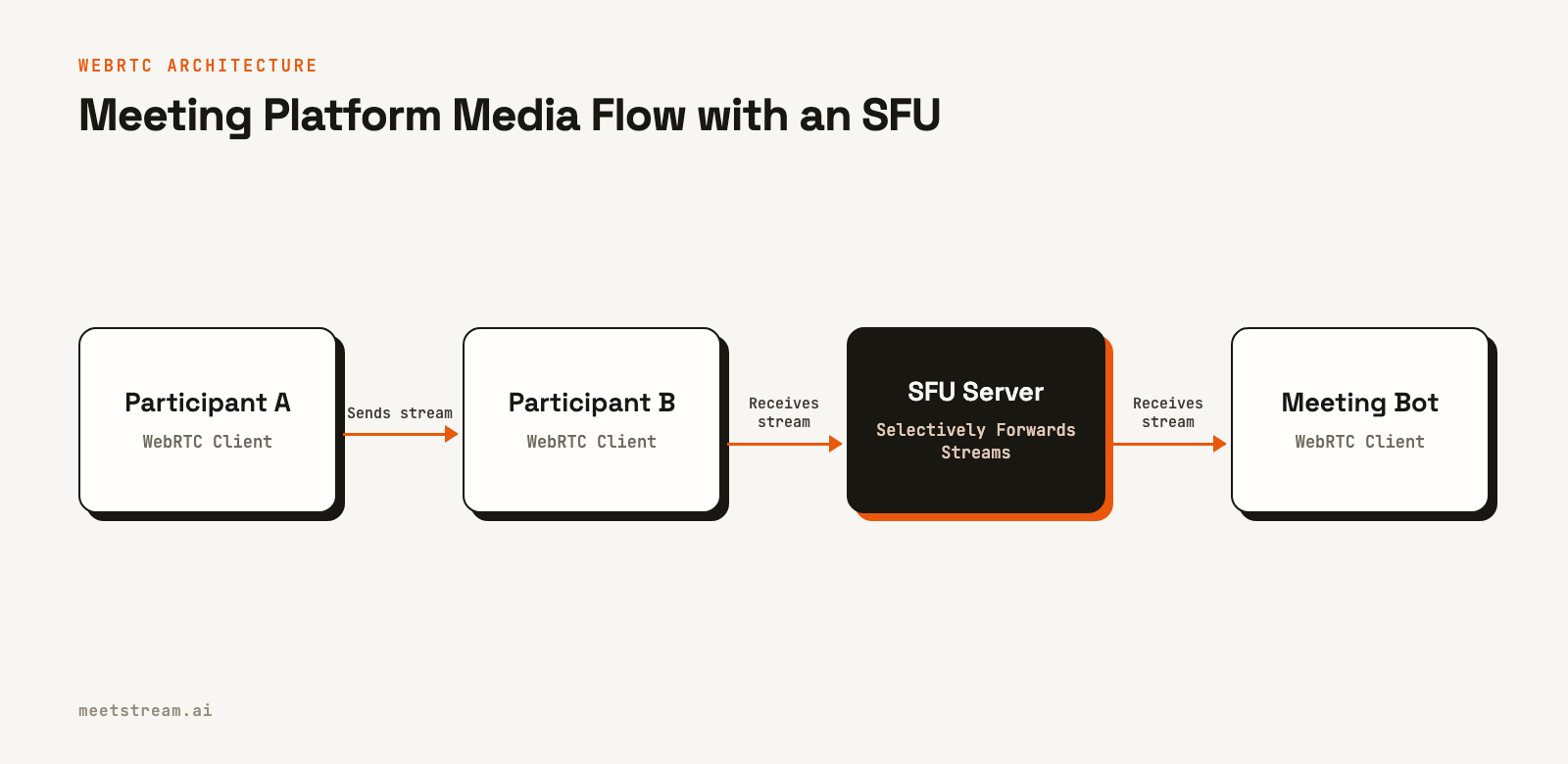
This architecture is why a bot can access high-quality media. For developers, managing the complexities of a WebRTC session, including signaling and ICE, for each platform is a significant task. An API abstracts this away, providing a stable interface to the underlying media without exposing the raw WebRTC stack.
How RTMP Works for Broadcast Ingest
RTMP is a TCP-based protocol that sends audio and video from an encoder to a media server over a persistent connection. While it is no longer used for delivering video to viewers in browsers since the end of Flash, it remains the most common ingest protocol for live streaming platforms like YouTube Live, Twitch, and AWS IVS.
An RTMP workflow typically uses H.264 for video and AAC for audio. The encoder, such as OBS or FFmpeg, pushes the stream to the media server. The server then repackages the stream into a modern format like HLS or MPEG-DASH for delivery to viewers. This repackaging step, combined with TCP's retransmission of lost packets, introduces significant latency. A typical RTMP-to-HLS pipeline has an end-to-end delay of 10 to 30 seconds.
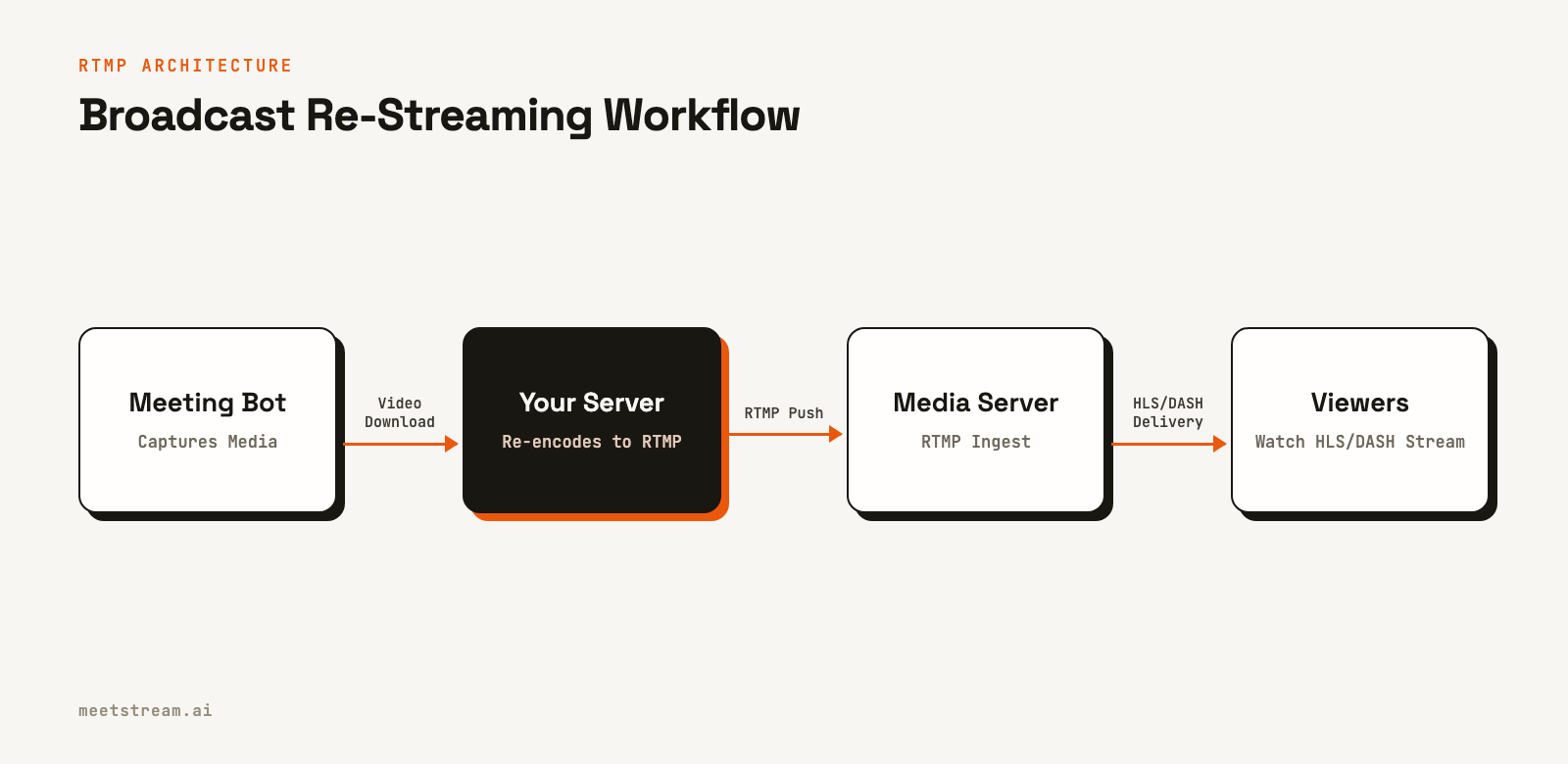
For meeting bot use cases, RTMP is only relevant when you need to re-stream a meeting for broadcast. The bot captures the meeting's media via WebRTC, and then a separate process on your server uses a tool like FFmpeg to push that media to an RTMP endpoint.
# Example FFmpeg command to push video and audio to an RTMP server
# This assumes you have raw video and audio files as input.
ffmpeg \
  -f rawvideo -pix_fmt yuv420p -s 1280x720 -r 30 -i video_input.raw \
  -f s16le -ar 48000 -ac 1 -i audio_input.raw \
  -vcodec libx264 -preset veryfast -tune zerolatency \
  -acodec aac -ar 44100 \
  -f flv rtmp://a.rtmp.youtube.com/live2/YOUR_STREAM_KEY
WebRTC vs RTMP: A Technical Comparison
The differences between WebRTC and RTMP stem from their transport protocols and intended use cases. WebRTC prioritizes low latency for real-time interaction, while RTMP prioritizes reliability for one-way streaming. The following table breaks down the key distinctions.
| Dimension | WebRTC | RTMP |
|---|---|---|
| Transport | UDP (SRTP/DTLS) | TCP |
| End-to-end Latency | Under 500ms | 2-5 seconds (direct), 10-30 seconds (via HLS) |
| Browser Native | Yes, in all modern browsers | No, requires a plugin or server |
| NAT Traversal | Built-in via ICE/STUN/TURN | Requires firewall configuration |
| Primary Use Case | Real-time, two-way communication | One-way broadcast ingest |
| Codec Flexibility | VP8, VP9, H.264, AV1, Opus | H.264 video, AAC audio (de facto) |
| Use in Meeting Platforms | Universal (Zoom, Meet, Teams) | Not used for core transport |
When to Use Each Protocol for Meeting Bots
For most meeting bot applications, such as building an AI meeting notetaker or a conversation intelligence tool, you do not directly choose between WebRTC and RTMP. The bot must use WebRTC to join the meeting and access the media. The important part is how you process that media afterward.
The RTMP use case is specific: re-streaming a meeting to a broadcast platform. For example, a company might want to stream an all-hands meeting to YouTube. The workflow involves a bot joining the meeting, capturing the video, and making it available for download. Your application server then fetches the video file, re-encodes it, and pushes it to an RTMP ingest URL. This is an asynchronous, post-call process, not a live re-stream.
The WebRTC use case applies when you need real-time, bidirectional communication. Building AI voice agents that can listen and respond within a few hundred milliseconds requires a low-latency audio stream. This is possible because the bot is a native WebRTC participant in the meeting.
How MeetStream Fits In
MeetStream manages the complexity of joining meetings across Zoom, Google Meet, and Teams. Our platform handles the entire WebRTC session lifecycle, including signaling, ICE negotiation, and media decryption for each platform. We have processed over one million meeting minutes, giving us deep experience with the operational challenges of running this infrastructure at scale.
Instead of exposing raw WebRTC connections, we provide a stable API. For real-time applications, you can receive live, mixed audio from a meeting over a WebSocket connection. This provides the low-latency stream needed for real-time meeting agents without requiring you to build and maintain your own WebRTC stack. For other use cases, you can get full transcripts, speaker-diarized audio, and high-quality video recordings via webhooks after the meeting ends.
This approach lets you focus on your application's logic. If you need to re-stream a meeting, you can use the post-call video recording as the source for your RTMP pipeline. If you need to build a live agent, you can use our real-time audio streaming API. You get the benefits of WebRTC's low latency without the implementation overhead.
Conclusion
WebRTC and RTMP are designed for different jobs. WebRTC is the protocol that makes real-time, interactive communication in meeting platforms possible. RTMP is a legacy but still dominant protocol for ingesting live streams into broadcast infrastructure. For developers building meeting bots, the platform's internal protocol is always WebRTC. The decision to use RTMP comes later, and only for the specific use case of re-streaming recorded content. Understanding this distinction helps you architect your application correctly from the start. See the full API reference at docs.meetstream.ai.
Frequently Asked Questions
What is the main difference between WebRTC and RTMP?
The main difference is their transport protocol and latency. WebRTC uses UDP to achieve sub-500ms latency for real-time, two-way communication. RTMP uses TCP and is designed for reliable, one-way streaming to a media server, which typically results in several seconds of latency.
Do Zoom and Google Meet use WebRTC?
Yes, all major meeting platforms, including Zoom, Google Meet, and Microsoft Teams, use WebRTC for their core audio and video transport. They use SFU servers to efficiently route media streams between all participants, including bots that join the call.
When should I use RTMP for a meeting bot?
Use RTMP only when you need to re-stream a recorded meeting to a broadcast platform like YouTube Live or Twitch. The process involves using a bot to record the meeting, downloading the video file, and then using a tool like FFmpeg to push it to the platform's RTMP ingest URL.
Is anything replacing RTMP for broadcast ingest?
WHIP (WebRTC-HTTP Ingest Protocol) is an emerging standard designed to replace RTMP. It uses WebRTC for ingest, offering sub-second latency and using modern, browser-native technology. While adoption is growing, RTMP remains the most widely supported ingest protocol today.
What latency can I expect from a meeting bot's audio stream?
A bot participating in a meeting via WebRTC receives audio with an end-to-end latency of around 150-400ms from the speaker. APIs that provide this audio over a WebSocket, like MeetStream's, add a small amount of additional processing delay. This is low enough for building real-time transcription and responsive voice agents.


