
How to Build an OpenClaw Skill for Meeting Data
Build an OpenClaw skill for meeting data that retrieves transcripts, handles live events, and controls meeting bots safely with clear authorization.

An agent is only as useful as the data it can safely access. Much of that data is not in a database an agent can query, but is locked in live customer calls, interviews, and standups. Giving an agent access to this context requires more than just pointing it at a raw API.
MeetStream is an agent-first voice infrastructure platform for meetings. We see developers building skills that let agents join calls, listen, speak, and act as real participants. This requires a clear contract between the agent and the tools it can use. A well-designed skill provides this contract, handling ambiguity, context, and safety so the agent can work effectively with meeting data.
This article walks through the patterns for building a reliable OpenClaw skill for meeting data. We will cover how to structure the tools, write the skill instructions, handle event-driven data, and enforce safety rules. The examples use the MeetStream Meeting Bot API, but the principles apply to any platform that provides bots, transcripts, and webhooks.
Why a Raw API Prompt Is Not Enough
Meeting APIs have powerful endpoints, but they do not solve the ambiguity inherent in natural language. An agent needs a skill to translate a user's intent into a precise, safe API call. For example, the request "remove the bot from my current call" assumes there is only one active bot to remove. If two calls are running, a good skill stops and asks for clarification instead of guessing.
A well-built skill handles four key responsibilities:
- Routing intent. It correctly maps "get the transcript," "who joined," and "send a bot" to different, specific tool calls.
- Holding context. It stores the
bot_idortranscript_idfrom one request to use in the next, avoiding repeated lookups. - Refusing to guess. It never silently picks between two similarly named meetings or two active calls, instead asking the user for an exact identifier.
- Explaining results plainly. It treats sensitive outputs like transcripts and recordings with care, not as generic text to be displayed.
This is the difference between giving an agent a tool and giving it a blank check to act inside a live meeting.
The Core Architecture of a Meeting Skill
A meeting skill is the instruction layer that sits between a user's request and the tool calls that fulfill it. It is not the meeting bot itself. The skill's job is to interpret the request, select the correct tool, and ensure all permissions and identifiers are in place before acting. This creates a clean separation of concerns.
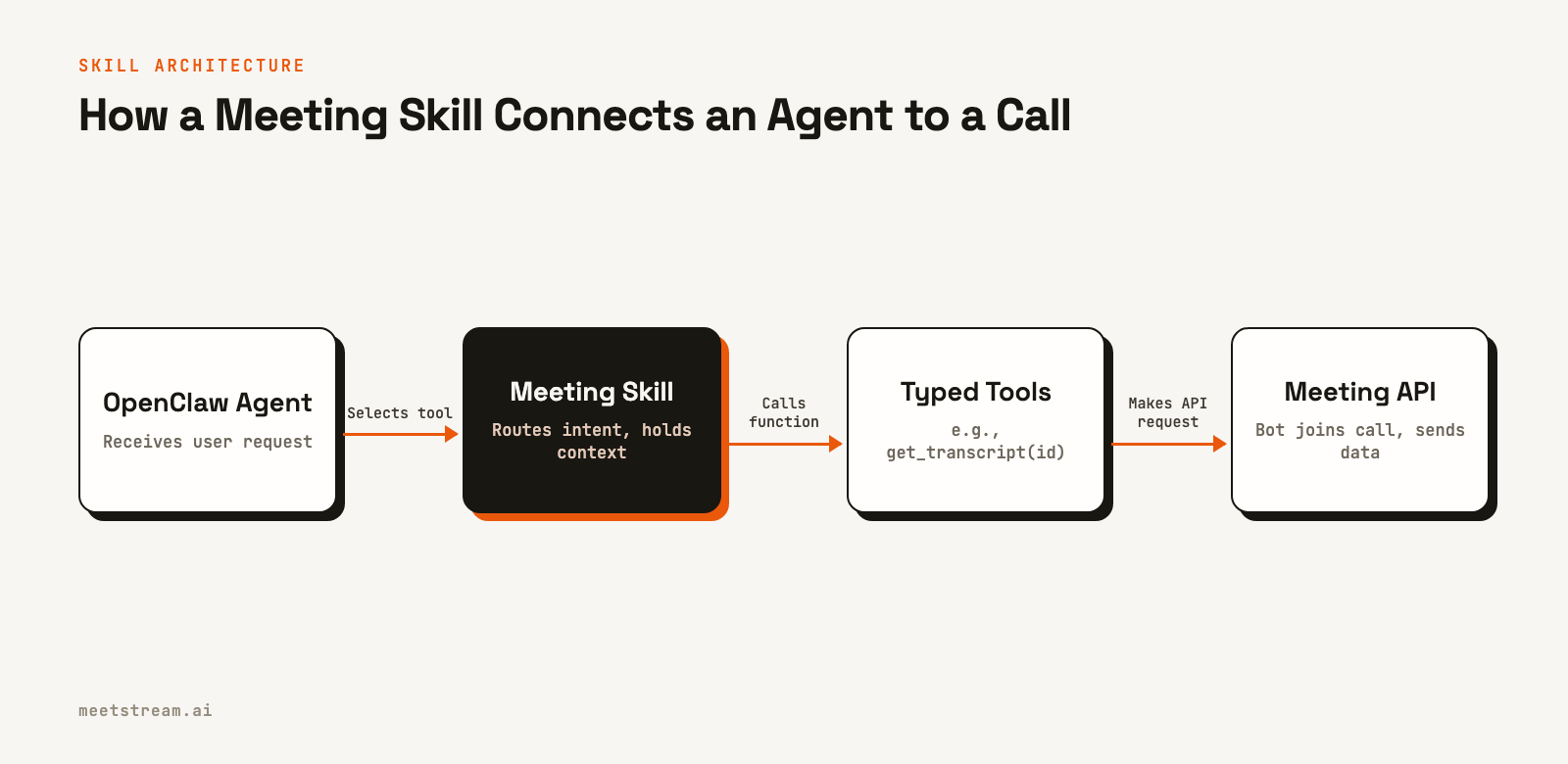
The agent framework, like OpenClaw, handles the language processing. The skill provides the specific instructions and policy. The tool layer exposes a narrow, typed set of functions, like get_transcript(transcript_id). This layer then calls the underlying meeting data provider, which manages the bots and infrastructure for joining Zoom, Google Meet, or Microsoft Teams calls.
Building a Typed Tool Layer
The most durable part of this system is a set of narrow, typed tools exposed to OpenClaw, not a long skill file with raw HTTP calls. You can expose these tools through an MCP server or a small, reviewed command wrapper. A good starting set of tools for meeting data might look like this:
list_bots(status: str = "Active")
get_bot(bot_id: str)
get_transcript(transcript_id: str)
list_participants(bot_id: str)
create_bot(meeting_url: str, bot_name: str, options: dict)
remove_bot(bot_id: str)
send_meeting_chat(bot_id: str, message: str)
Each function should have a literal name that describes its action. Any operation that changes a meeting state, such as joining, leaving, or sending a message, must be clearly identified. For example, the create_bot tool would call the MeetStream API to send a bot to a new meeting.
curl -X POST "https://api.meetstream.ai/api/v1/bots/create_bot" \
  -H "Authorization: Token <YOUR_API_KEY>" \
  -H "Content-Type: application/json" \
  -d '{
    "meeting_link": "https://meet.google.com/abc-defg-hij",
    "bot_name": "Notetaker",
    "callback_url": "https://your-app.com/webhooks/meetstream"
  }'
The API key should be managed securely within OpenClaw's runtime and never exposed in tool results, logs, or chat responses.
Writing Clear Skill Instructions
The front matter of a skill file is a retrieval contract. A vague description like "Helps with meetings" will lead to incorrect tool usage. Instead, name the systems, data types, and specific requests the skill is designed to handle. Here is a starting point for a general meeting-data skill.
---
name: meeting-data
description: >
  Retrieve and manage authorized meeting data from MeetStream. Use for live or
  completed transcripts, summaries, recordings, participants, and bot status.
  Ask for an explicit meeting or bot identifier when multiple matches exist.
  Require clear user approval before joining, leaving, or messaging.
metadata:
  openclaw:
    emoji: "🎙️"
    primaryEnv: MEETSTREAM_API_KEY
---

# Meeting Data

Use read-only tools for transcript, participant, and bot-status requests.
Keep returned IDs for subsequent requests.

For any request that changes a meeting, confirm the user supplied an exact
meeting URL or bot ID and clearly requested the action. Never choose between
multiple active bots or calendar events.
From there, add a few flows for common and high-risk paths to make the agent's behavior predictable.
## "Get the transcript from my meeting"

If the user supplies a bot or transcript ID, retrieve that exact record.
If not, list recent meetings and ask the user to choose if there is more
than one match. Return the transcript with speakers and timestamps.

## "Send a bot to this meeting"

Require a valid Zoom, Google Meet, or Microsoft Teams meeting URL. This is an
external action. Create the bot only after the URL is present, then report
the returned `bot_id`.

## "Remove the bot from the current call"

Resolve the current bot only when exactly one active candidate exists. If zero or
multiple candidates are returned, present the choices and ask for an explicit
`bot_id`.
This provides enough detail for OpenClaw to act consistently without being overly complex.
Handling Real-Time Meeting Data with Webhooks
A chat turn is not the right place to manage live meeting data. For event-driven updates, use webhooks. A webhook receiver should be a durable service that ingests events, stores them, and queues any necessary work. This approach is more reliable than polling an API endpoint repeatedly. You can learn more about the tradeoffs in our guide to webhooks vs polling.
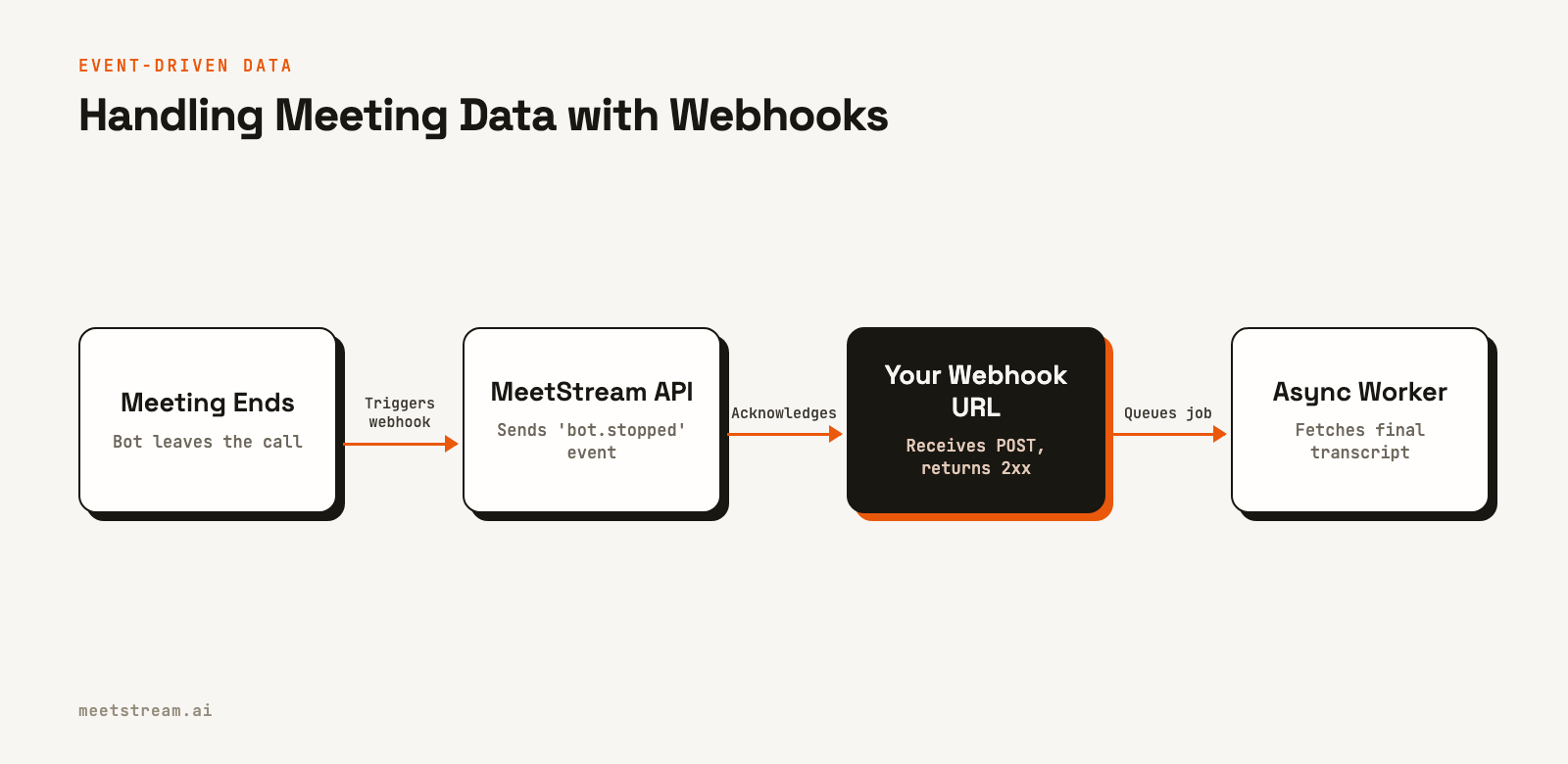
When a bot's status changes, MeetStream sends a payload to your configured callback_url. Your service should authenticate the request, acknowledge it with a 2xx status code quickly, and then process it asynchronously. Here is an example of a webhook payload for a bot joining a meeting.
{
  "bot_event": "bot.inmeeting",
  "bot_id": "604c0a0b-973d-4eb1-a5bf-2c7513f6bbe0",
  "bot_status": "InMeeting",
  "message": "Bot joined the meeting",
  "status_code": 200,
  "timestamp": "2026-02-27T07:11:51+00:00",
  "custom_attributes": {}
}
Your skill can then query your application's state, which is kept up-to-date by these webhooks, rather than trying to get live status directly from the API in the middle of a chat turn.
How MeetStream Provides the Data Layer
Building and maintaining a fleet of meeting bots that can reliably join multiple platforms is a significant infrastructure project. MeetStream provides this layer through a unified API. When you build an OpenClaw skill for meeting data with MeetStream, you are building on top of a platform designed for this purpose.
Our API handles the complexity of connecting to Zoom, Google Meet, and Microsoft Teams. It manages the media capture, processing, and delivery of structured data like transcripts and participant events. This lets you focus on the agent's logic and the user experience, not on bot orchestration. For interactive use cases, our AI Voice Agents can join calls, listen, and respond in real time.
Conclusion
A well-designed skill is the key to giving an agent safe and effective access to meeting data. By creating a layer of typed tools, writing clear instructions, and using an event-driven architecture, you can build a reliable system that avoids ambiguity and handles sensitive information correctly. This approach turns a powerful meeting API into a predictable and useful tool for your agent.
To get started building an OpenClaw skill for meeting data, see the full API reference at docs.meetstream.ai.
Frequently Asked Questions
How do I build an OpenClaw skill for meeting data?
Define a set of narrow, typed tools that wrap a meeting API. Write a skill that maps user intent to these tools, with clear rules for handling ambiguity and requiring explicit user authorization for actions that change a meeting's state.
Can an agent access live meeting transcripts with a skill?
Yes. A skill can provide the agent with a tool to query a real-time transcript source. This source is typically populated by a separate service that consumes live transcription events from a meeting API provider via webhooks or a WebSocket connection.
Does the skill generate the meeting data itself?
No, the skill is an instruction and policy layer. A meeting data API, like MeetStream, does the work of deploying a bot into a call, capturing the audio and video, and producing the transcript, recording, and participant data.
What is the safest way to give an agent access to meeting data?
Use a managed meeting bot API for data collection and an event-driven model for updates. Expose data to the agent through least-privilege tools that require exact identifiers for any action. Build around participant consent and data retention rules from the start.


