
Webhooks vs Polling for Real-Time Meeting Data in AI Apps

For AI applications that must react during a live meeting, webhooks are the primary delivery path and polling is the reconciliation path. A webhook is a push from a provider when an event occurs, while polling is a pull from your application to check for new state. This difference is critical for live coaching, agent triggers, and streaming transcript interfaces where latency is a core feature. Polling remains useful for post-meeting jobs, restricted networks, and recovering from missed webhook deliveries.
The rise of AI agents that participate in meetings has made this architectural choice more important. These agents need to hear the room, understand what is said, and act in real time. MeetStream is an agent-first platform, providing the voice infrastructure for bots to join calls, get low-latency audio, and speak back. For these use cases, a five-second delay from polling is not a minor lag, it is a failed interaction.
The core distinction is simple. Webhooks are event-driven, telling your system that something specific happened, like a bot joining a call or a new transcript segment arriving. Polling is state-driven, repeatedly asking the provider for the current status of a resource and forcing your application to calculate the difference. A resilient system uses both.
This article compares webhooks and polling on latency, scale, and reliability. We cover the best use cases for each, patterns for building a durable ingestion system, and how to use both models with a meeting API. Let's get into it.
Why This Choice Matters for Meeting AI
Meeting bots used to be primarily for post-call analysis. They would join, record, and leave. After the meeting, a webhook might fire to signal that a transcript was ready for download. For this workflow, a few minutes of processing delay was acceptable. The product experience happened after the call, not during it.
Today, developers are building interactive AI agents that act as participants. A sales coaching bot might detect an objection and surface a battle card to the sales rep in real time. A design agent might be asked to generate an image and post it in the chat. These products depend on receiving and processing meeting data with very low latency. We have seen this pattern across thousands of bots deployed on our infrastructure, which has now processed over 1,000,000 meeting minutes.
For these real-time applications, polling is often too slow. If you poll an API every five seconds, the average delay in detecting an event is about 2.5 seconds, plus network and processing time. This is too long for a conversational turn. Webhooks, by contrast, are sent as soon as the event is available, making them the default choice for any in-meeting AI interaction.
Webhooks vs Polling: The Core Difference
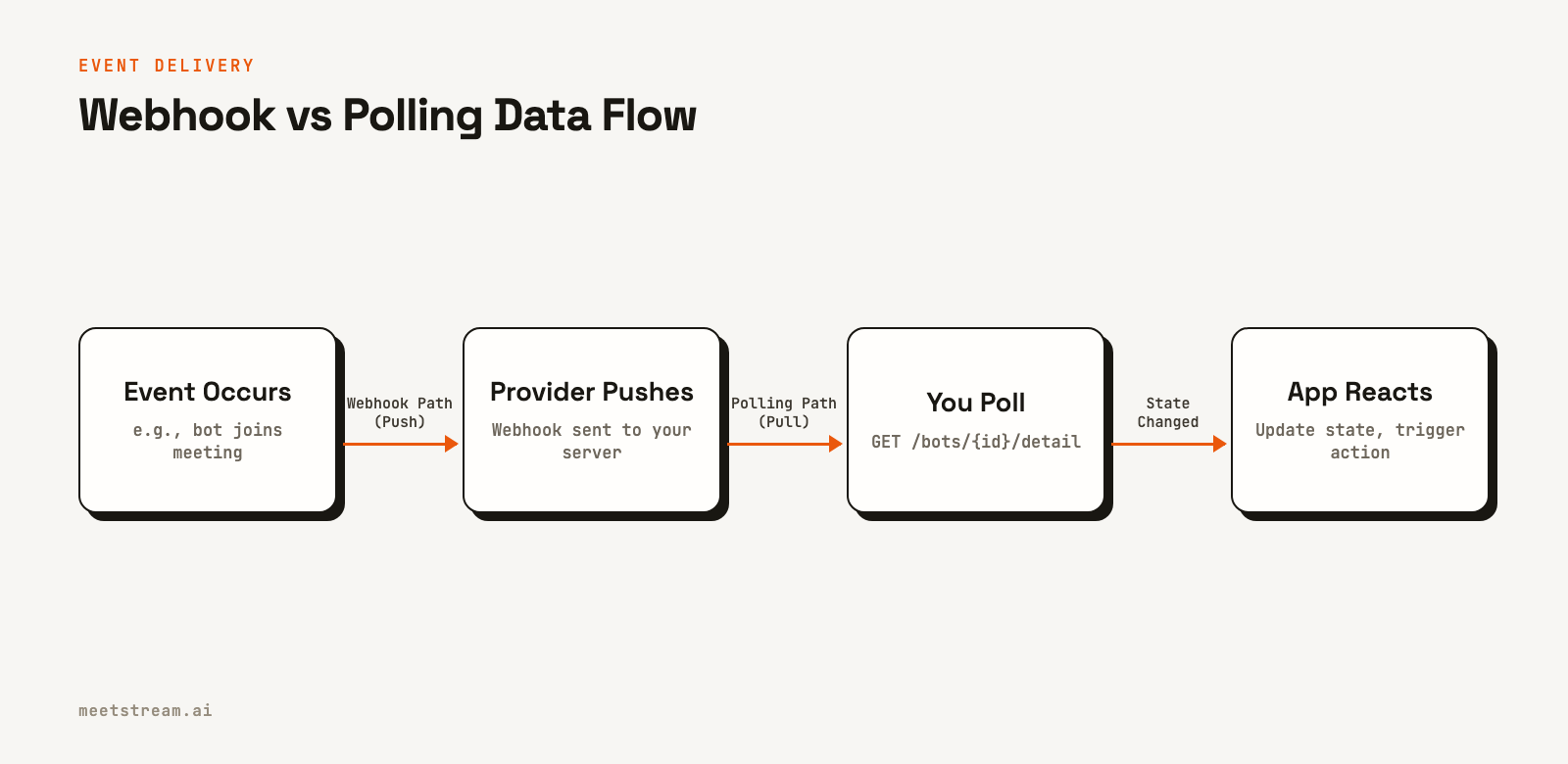
A webhook is an automated, provider-initiated HTTP POST request to a URL you specify. When an event happens on the provider's system, like a new participant joining a meeting, the provider sends a payload with event details to your endpoint. This is a "push" model. Your server is passive until it receives a call.
Polling involves your application making scheduled API requests to the provider to ask for the latest state of a resource. For example, you might call GET /bots/{bot_id}/detail every 10 seconds to see if the bot's status has changed. This is a "pull" model. Your application is responsible for initiating the connection and checking for updates.
| Dimension | Webhooks | Polling |
|---|---|---|
| Delivery Model | Provider pushes each event | Consumer checks for changed state |
| Detection Latency | Starts when the provider emits the event | Average of half the polling interval |
| Idle Cost | No traffic when nothing changes | Requests continue when nothing changes |
| Failure Modes | Duplicate, delayed, or missed delivery | Rate limits, stale reads, missed windows |
| Receiver Requirement | Publicly reachable HTTPS endpoint | Outbound API access only |
| Best Fit | Live transcripts, agent triggers, alerts | Batch sync, private networks, backfills |
Building a Reliable Webhook Ingestion System
While webhooks are faster, they require careful implementation to be reliable. Network failures can cause events to be delayed, duplicated, or dropped. A production webhook consumer must be designed to handle these realities. Here are a few key patterns.
1. Verify, Persist, then Acknowledge
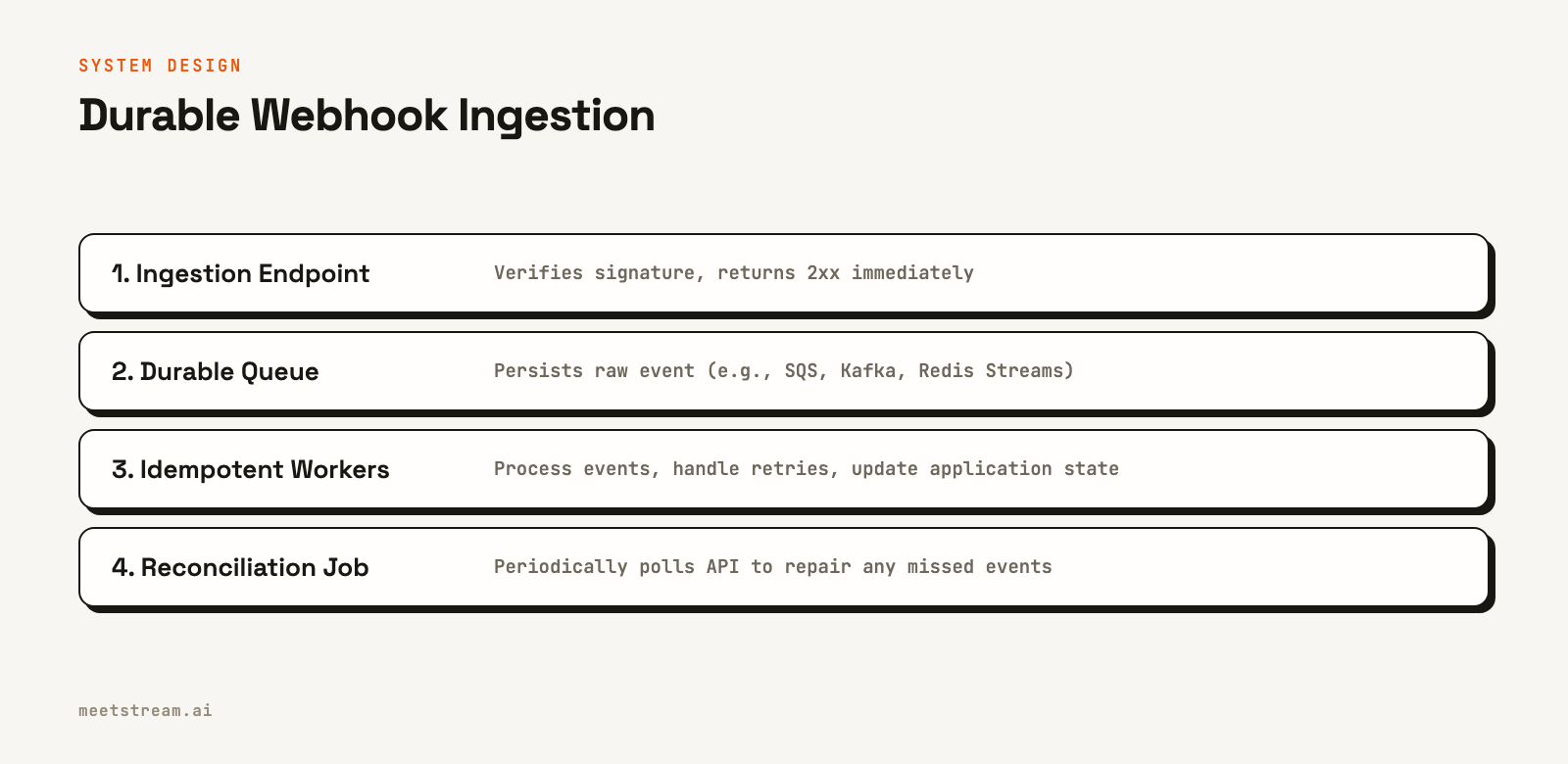
Your public endpoint should do the minimum work required to validate and save the incoming request. For production systems where authenticated delivery is important, we strongly recommend using a workspace webhook endpoint. These are configured in your MeetStream dashboard and include a signature in the X-MeetStream-Signature header for verification. Then, in a single database transaction, save the raw event to an "inbox" table. Only after the transaction commits should you return a 200 or 202 status code. This ensures you have durably accepted the event before telling the provider it is safe to stop sending it.
2. Make Consumers Idempotent
Because webhooks can be delivered more than once, your processing logic must be idempotent, meaning that processing the same event multiple times has the same effect as processing it once. Use a unique identifier from the event payload, or create a stable hash of the payload itself, and use it as a primary key or unique constraint in your database. This turns a duplicate delivery into a harmless database conflict.
3. Handle Mutable, Out-of-Order Data
Live speech recognition is not static. Words can be revised as more context becomes available. A real-time transcription webhook payload reflects this. MeetStream's live transcript payload includes fields like speakerName, timestamp, transcript, and a words array with detailed timing. Use the timestamps to correctly order events and avoid a late-arriving event overwriting newer state. Treat interim results as provisional for UI updates, and only commit text or trigger actions based on final results.
4. Use Queues for Asynchronous Processing
Separate ingestion from processing using a message queue. The endpoint's only job is to put the verified event onto a queue. Separate worker processes can then pull events from the queue to perform heavier tasks like calling an large language model (LLM) or updating a database. This allows your endpoint to respond quickly, preventing provider timeouts, and lets you scale your processing workers independently.
5. Reconcile from the Source of Truth
No webhook system is perfect. To handle any events that might be missed during a brief outage, implement a reconciliation job. This job periodically polls the provider's API for a recent time window, compares the results to the events you have stored locally, and fetches any missing data. This hybrid approach gives you the low latency of webhooks with the data integrity of polling.
When to Use Polling Instead
Despite its higher latency, polling is the right tool for certain jobs. It is simpler to implement for a quick prototype and is necessary in environments where you cannot expose a public endpoint.
The most common valid use cases for polling are:
- Reconciliation and Backfills: As described above, polling is the ideal way to audit your data and repair any gaps left by the real-time webhook path.
- Post-Meeting Syncs: If your application only needs the final transcript after a meeting ends, you can use a single
bot.stoppedwebhook to trigger a one-time API call to fetch the full transcript. This is an event-triggered fetch, not continuous polling. - Restricted Network Environments: Some enterprise environments do not allow inbound connections from the public internet. In these cases, an egress-only polling model is the only option.
- APIs Without Webhooks: Sometimes the specific event or resource you need simply is not available via a webhook from the provider.
How MeetStream Supports Both Models
MeetStream's API is designed for building agent-first applications and provides both webhook and polling mechanisms. When you create a bot using the Create Bot endpoint, you can provide a callback_url to receive bot lifecycle events.
For live, speaker-diarized transcripts, you provide a live_transcription_required.webhook_url. MeetStream then pushes transcript segments to your endpoint as they are generated. For lower-level access, our real-time audio streaming API uses WebSockets for even lower latency data transfer.
curl -X POST "https://api.meetstream.ai/api/v1/bots/create_bot" \
  -H "Authorization: Token <YOUR_API_KEY>" \
  -H "Content-Type: application/json" \
  -d '{
    "meeting_link": "https://meet.google.com/abc-defg-hij",
    "bot_name": "Notetaker",
    "callback_url": "https://your-app.com/webhooks/meetstream",
    "live_transcription_required": {
      "webhook_url": "https://your-app.com/transcripts"
    },
    "recording_config": {
      "transcript": {
        "provider": { "meetstream": {} }
      }
    }
  }'
For reconciliation, you can use our REST API endpoints. After receiving a bot.stopped event, you can fetch the final transcript using its ID. You can also poll the GET /api/v1/bots/{bot_id}/detail endpoint to check a bot's status if you suspect a webhook was missed. This combination allows you to build responsive, real-time features on a reliable foundation. See our guide on meeting bot webhooks for more detail.
Conclusion
When building AI apps that need real-time meeting data, start with a webhook-first architecture. The low latency is essential for creating interactive agents that feel responsive. Augment this real-time path with scheduled polling for reconciliation to ensure data completeness. This hybrid approach balances the speed of webhooks with the reliability of polling, providing a solid foundation for any in-meeting AI product. By understanding the tradeoffs of webhooks vs polling, you can make the right architectural choice for your application's needs.
See the full API reference at docs.meetstream.ai.
Related guides
- MIA Real-Time vs Pipeline: Two Voice Agent Modes Compared
- Build an Interactive Meeting Agent That Responds in Real Time
- Build a Teams Transcription Bot: Real-Time Speaker-Labelled Audio
Frequently Asked Questions
Should I use webhooks or polling for real-time meeting data?
Use webhooks for live product behavior like in-meeting coaching or agent actions. Use polling for reconciliation, backfills, or in network environments that cannot accept inbound traffic. A hybrid design is the strongest choice for production systems.
Are webhooks guaranteed to arrive exactly once and in order?
No. You should always design your system to handle duplicate, delayed, and out-of-order webhook deliveries. Use idempotency keys and timestamps to process events correctly, as providers typically do not guarantee exactly-once, in-order delivery.
How often should a reconciliation job poll an API?
The frequency depends on your recovery time objective and the provider's API rate limits. A common pattern is to run a job every few hours that scans a bounded recent time window, checks for missing records, and fetches only what is needed.
How should an app handle partial live transcripts?
Treat incoming transcript words as provisional state, suitable for updating a user interface. Do not trigger irreversible actions until you receive a signal from the provider, such as a final-word flag or an end-of-turn event, that the text is stable.
Is polling always cheaper to implement?
Polling can be faster for an initial prototype, but a webhook system is often more efficient and scalable. Polling generates constant traffic, even when there are no updates, and can lead to challenges with API rate limits. A well-designed webhook system only uses resources when events actually occur.


