
Zoom Waiting Room and Bot Admission: How to Handle It

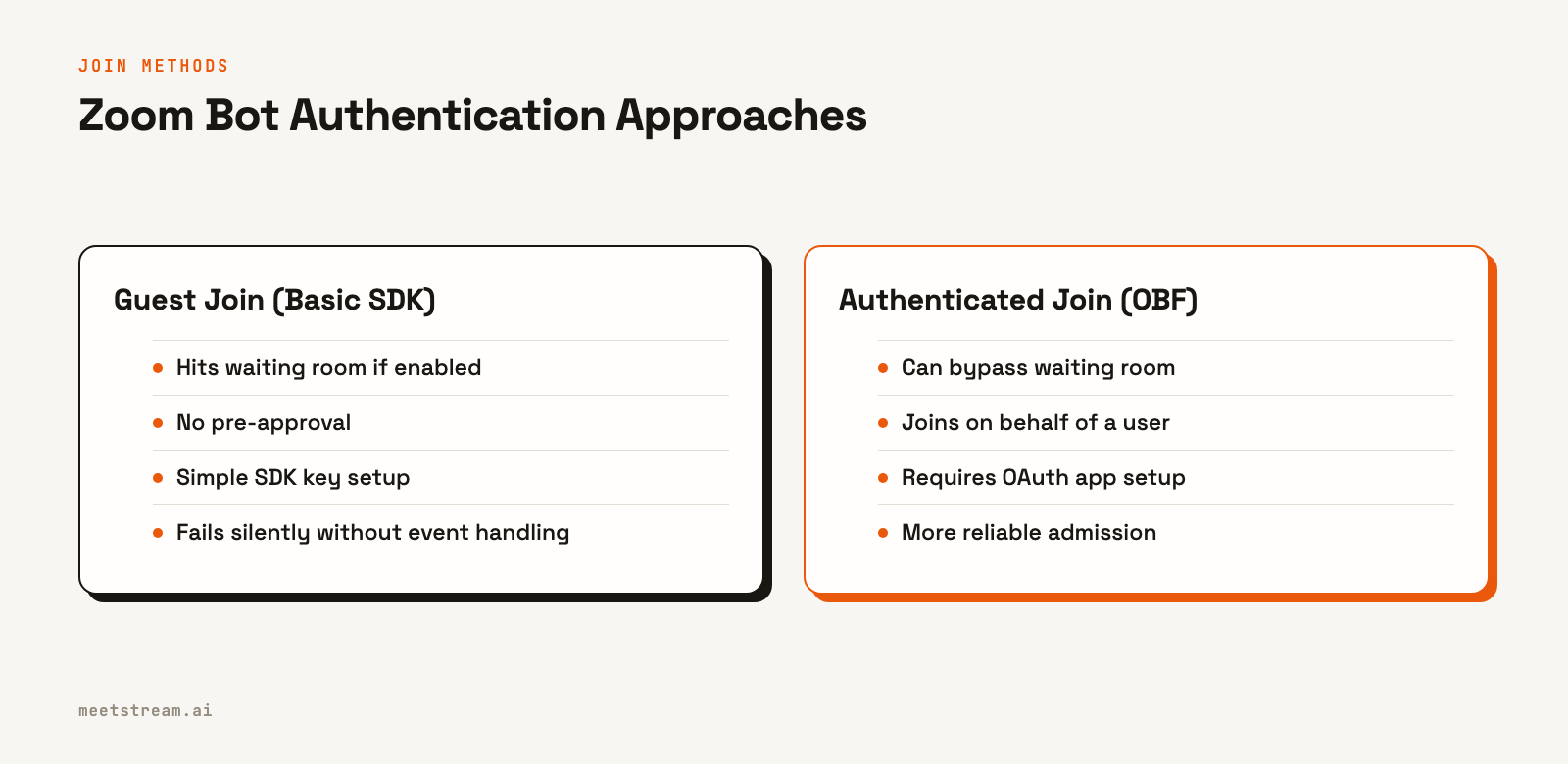
A bot can bypass the Zoom waiting room if the meeting host’s settings allow authenticated users to join directly, and the bot joins using an authenticated method like an On-Behalf-Of (OBF) token. There is no API call to force entry through an enabled waiting room for a guest bot. Without the right configuration, the bot will wait for manual admission from the host, just like a human participant.
This is a frequent failure point for developers building on Zoom. Your bot works in testing, but fails in production because a customer has a waiting room enabled. The bot authenticates, tries to join, and then stalls without a clear error. For teams building AI voice agents, this is a critical problem; an agent that cannot reliably enter a meeting cannot listen, speak, or act. The entire product experience depends on solving this admission challenge.
At MeetStream, we have processed over a million meeting minutes, and waiting rooms are one of the most common and difficult-to-debug issues. The problem is that the bot often fails silently, leaving you with empty audio files and confused customers. This is not a simple bug, but a fundamental interaction between your bot's authentication method and the host's security settings.
Why Zoom Waiting Rooms Block Bots
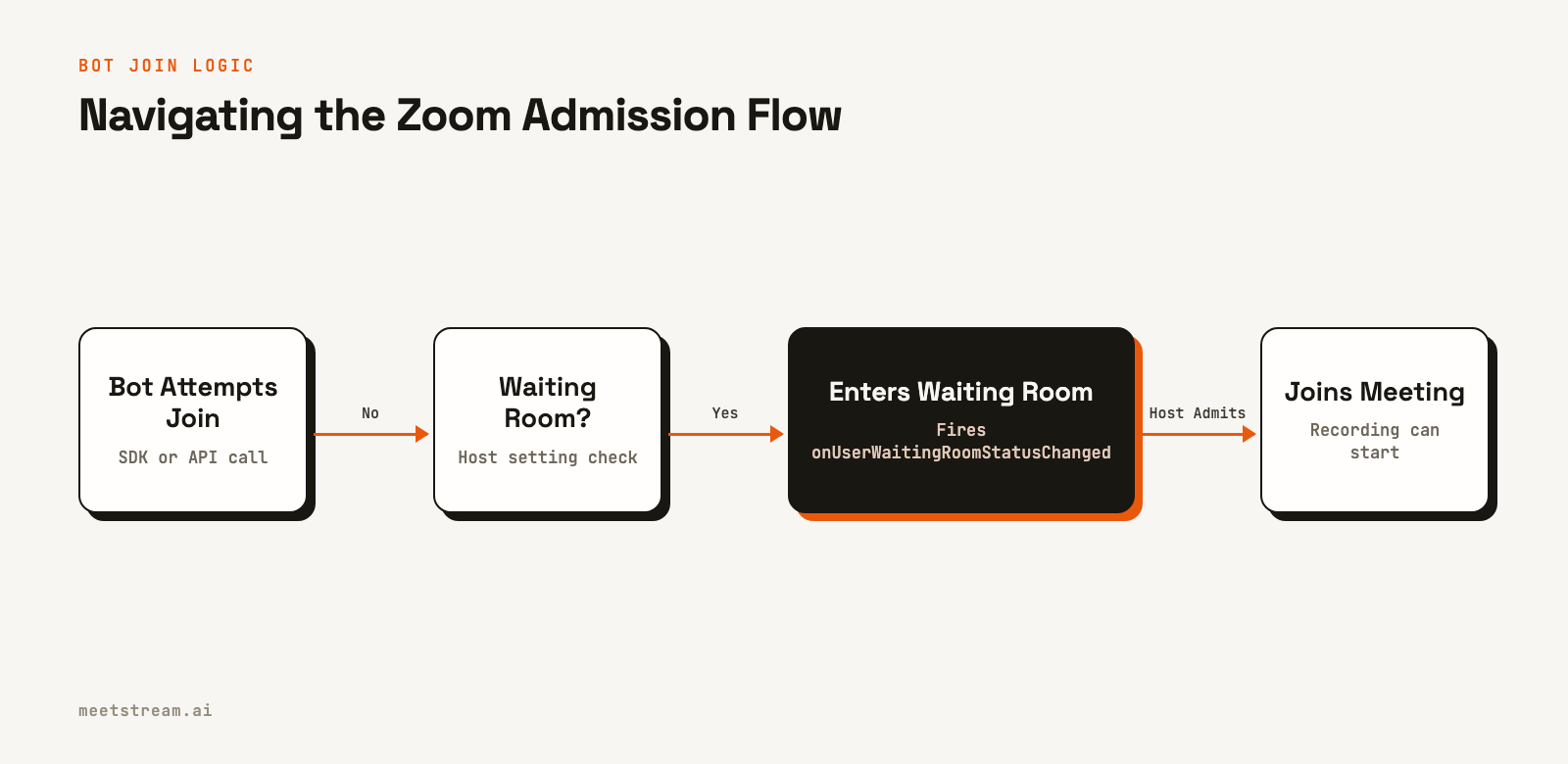
When a host enables the waiting room, every participant is held in a pre-meeting state until admitted. For a person, this is a minor delay. For an automated bot joining via the Zoom Meeting SDK, it can be a silent, terminal failure. The bot is not rejected; it is simply held in limbo.
Most integrations are built with the assumption that a successful connection means the bot is in the main session. When a waiting room intercepts this flow, any downstream logic for recording or transcription starts, but it processes an empty stream. There is no audio, no video, and no participant data because the bot never made it past the virtual door.
This creates a frustrating debugging cycle. Your logs show a successful connection, but the output is empty. The root cause is not in your code, but in a meeting setting you have no direct API visibility into before attempting to join.
The SDK Event You Need to Handle
The core technical issue is that the Zoom Web Meeting SDK does not treat the waiting room as an error. It is considered a valid state in the connection lifecycle. To handle it, you must explicitly listen for the onUserWaitingRoomStatusChanged event.
When your bot is placed in the waiting room, this event fires with a status payload. Many developers either do not subscribe to this event or do not build logic to manage the waiting state. Without an event handler, your application has no idea the bot is stuck.
Here is a minimal example of what the event listener looks like in JavaScript:
// Initialize the Zoom Web SDK client
const client = ZoomMtg.createClient();

// ... client init configuration ...

client.join({
  // ... join parameters ...
  success: (res) => {
    console.log('Join call success');

    // Listen for waiting room status changes
    client.on('onUserWaitingRoomStatusChanged', (payload) => {
      console.log('Bot waiting room status:', payload);
      if (payload.action === 'put-in-waiting-room') {
        // Update your application state to "waiting"
        // Start a timeout timer for admission
      } else if (payload.action === 'admit-to-meeting') {
        // Update your application state to "in-meeting"
        // Now it's safe to start recording/transcription
      }
    });
  },
  error: (res) => {
    console.error('Join call error', res);
  }
});
If you do not implement this handler, the bot enters a silent failure state. The SDK will not retry, and it will not send any other notification that it is waiting for the host.
Host Configurations and Authentication Tradeoffs
The problem is made worse by Zoom's layered configuration options. A host can enable the waiting room at the account, group, or individual meeting level. This means a bot that works in one meeting can fail in another, even with the same host, if they use a different meeting template.
The "Waiting room options" allow hosts to specify who gets held. Common settings include "Everyone" or "Users not in your account." Since most SDK bots join as unauthenticated guests, they are almost always caught by these rules. There is no API endpoint to query if a waiting room will be active for a given meeting ahead of time.
Authentication adds another wrinkle. The SDK requires a signature to join, which has an expiration time. If a bot sits in the waiting room for too long, its signature can expire. The host might finally admit the bot, only for it to be immediately disconnected due to invalid credentials. This is a particularly confusing failure, as logs show a successful admission followed by an immediate error.
Strategies for Reliable Bot Admission
A reliable solution requires a combination of in-code handling and choosing the right authentication strategy. While you cannot control the host's settings, you can build your bot to be more resilient.
- Handle the SDK Event: As shown above, always subscribe to
onUserWaitingRoomStatusChanged. Use this event to manage your application's state and avoid starting data capture until the bot is confirmed to be in the main session. - Use Generous Signature Expiry: When generating the SDK signature, set a longer expiration window. A 30-minute or even 1-hour expiry provides a buffer in case the host is late to start the meeting or admit participants.
- Use Authenticated Joins: The most reliable method is to have the bot join on behalf of an authenticated user. The Zoom OBF token mechanism allows a bot to join as an authenticated participant. If the host's settings are configured to "Allow signed-in users to bypass the waiting room," an OBF-authenticated bot can join directly. This requires setting up a Zoom OAuth app but is the most effective way to avoid the waiting room problem.
Building a Resilient Join Flow
In production, you will encounter edge cases that go beyond basic event handling. Based on the patterns we see at MeetStream, a production join flow should account for a few scenarios.
First is the "host has not joined" case. If your bot joins before the host, it will be placed in the waiting room. Your application cannot distinguish this from being intentionally held by the host. Implement a reasonable timeout, for example, 10-15 minutes. If the bot is not admitted within that window, you can assume the meeting is not starting and stop the bot.
Second, implement bounded retries. If a join attempt fails or times out in the waiting room, you might want to retry. However, aggressive retries can trigger Zoom's rate limits. A simple strategy is to try a maximum of three times, with a delay between attempts. After the final attempt, mark the session as failed.
Finally, handle the case where the meeting ends while the bot is still waiting. If you are subscribed to Zoom's meeting webhooks, you can listen for the meeting.ended event and use it to cancel any pending join attempts for that meeting ID.
How MeetStream Manages Zoom Admission
If you are building an AI agent that needs to reliably join meetings to listen, speak, and act, this admission challenge is a critical piece of infrastructure. MeetStream provides a managed API layer that handles these complexities.
Instead of managing the SDK lifecycle yourself, you make a single API call to send a bot to a meeting. We handle the join flow, authentication, and state management. You receive clear, real-time webhooks for each stage of the bot's lifecycle. You will get a bot.in_waiting_room event when the bot is held, and a bot.inmeeting event upon successful admission. If the bot is denied entry or fails to join after multiple retries, you will receive a terminal event like bot.denied or bot.failed with a clear reason.
This event-driven model allows you to build your application logic without worrying about the low-level details of the Zoom bot API. Here is how you would send a bot and subscribe to these events:
curl -X POST "https://api.meetstream.ai/api/v1/bots/create_bot" \
  -H "Authorization: Token <YOUR_API_KEY>" \
  -H "Content-Type: application/json" \
  -d '{
    "meeting_link": "<YOUR_ZOOM_MEETING_LINK>",
    "bot_name": "My AI Agent",
    "callback_url": "https://yourapp.com/webhooks/meetstream"
  }'
Your callback_url will then receive POST requests with payloads like {"bot_event": "bot.in_waiting_room", ...}, giving you full visibility into the admission process.
Conclusion
Zoom waiting rooms are a common and silent failure point for SDK-based bots. The solution is to handle the onUserWaitingRoomStatusChanged event, use long-lived signatures, and adopt authenticated join methods like OBF to bypass the waiting room when host settings permit. Building a resilient join flow with timeouts and retries is essential for production reliability.
For developers building applications that depend on reliable meeting access, a managed API can abstract away this complexity. See the full API reference at docs.meetstream.ai.
Frequently Asked Questions
How does a meeting bot detect that it is stuck in a Zoom waiting room?
A bot using the Zoom SDK must listen for the onUserWaitingRoomStatusChanged event. With an API like MeetStream, your application receives a bot.in_waiting_room webhook, which explicitly signals the bot is waiting for host admission. This avoids ambiguity and allows for clean state management.
What happens when the host never admits the bot from the waiting room?
The SDK connection will eventually time out. A reliable integration should handle this timeout, log the failure, and stop trying to join. The MeetStream API manages this automatically, eventually sending a bot.stopped webhook with a status indicating the join timed out or failed.
Can a bot bypass the Zoom waiting room?
Yes, if the host's settings allow signed-in users to bypass it and the bot authenticates on behalf of a user in that account, typically via an OBF token. For bots joining as guests into external meetings, bypassing an active waiting room is not possible; admission requires host action.
How do I handle a bot being admitted late to a meeting?
When a bot joins late, it will miss the initial part of the conversation. Your system should acknowledge this gap in the data. One strategy is to use the Zoom cloud recording as a backup to capture the full meeting audio and process it after the call to fill in the missing transcript.


