
Trigger Real-Time Actions from Live Meeting Events

To trigger actions from live meeting events, you need a stable, low-latency stream of structured data from the meeting. This is typically done by connecting to an API over a WebSocket for continuous data like audio and transcription, and receiving Webhooks for discrete events like a participant joining or leaving. This combination provides the foundation for building real-time features.
This problem has become more common as developers build AI agents that act as participants in meetings. Unlike post-call analysis where accuracy is the main goal, a live agent needs to respond within the natural rhythm of a human conversation. MeetStream is an agent-first platform, providing the voice infrastructure for AI to join calls, listen, speak, and act. This starts with a reliable stream of real-time meeting events.
A real-time meeting event is any piece of data that signals a state change inside a live call. This can be a lifecycle event like bot.inmeeting, a content event like a new line of transcription, or a metadata event like a change in the active speaker. Building applications on these events allows for features like live coaching dashboards, AI-powered sales assistance, or voice-controlled actions.
The Challenge of Real-Time Meeting Data
Getting a simple recording of a meeting is a solved problem. Getting a reliable, low-latency stream of events that you can build a product on is much harder. The core challenge is managing the "conversational turn," the moment-to-moment flow of speech. For an AI agent to participate naturally, its total response time, from the end of a user's sentence to the start of its own, needs to be under a second.
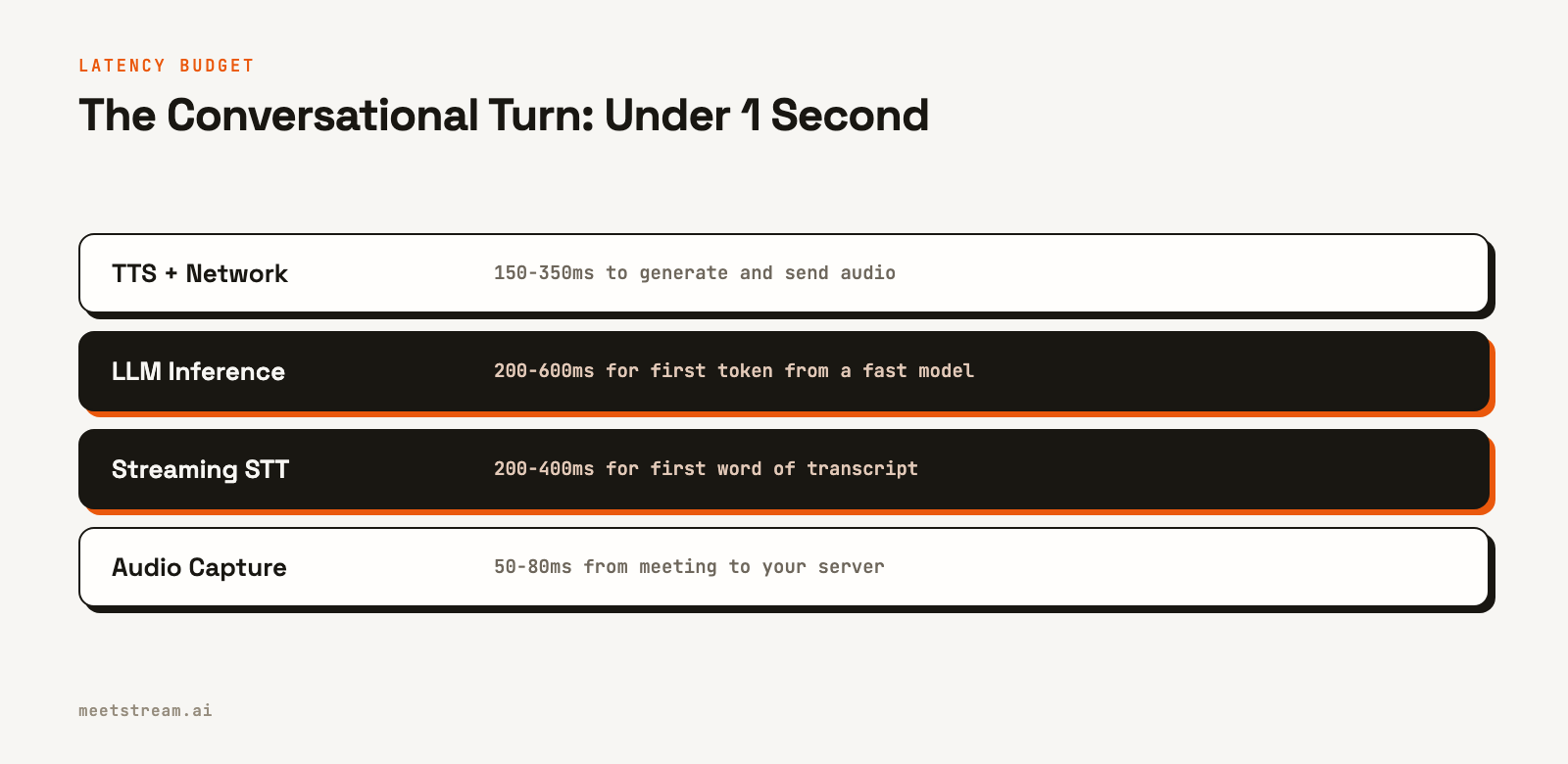
This tight latency budget means every component in the pipeline matters. This includes audio capture from the meeting platform, network transit to your server, speech-to-text processing, any business logic or Large Language Model (LLM) inference, and finally, sending a response back into the meeting. A delay in any one of these stages can make an agent feel slow and unhelpful.
Another challenge is platform diversity. Zoom, Google Meet, and Microsoft Teams each have different APIs and data formats. A reliable solution needs to abstract these differences away, providing a single, consistent stream of events regardless of the meeting source. This is where a unified API becomes critical for developers who don't want to build and maintain three separate integrations.
Core Architecture: WebSockets and Webhooks
The architecture for processing real-time meeting events relies on two primary communication patterns: WebSockets and Webhooks. Each serves a distinct purpose.
WebSockets are used for continuous, bidirectional data streams. This is ideal for high-frequency data like raw audio or live transcription. Your application opens a persistent connection to the API server, and data is pushed to you as it becomes available. This is far more efficient than constantly polling an HTTP endpoint for updates.
Webhooks are used for discrete, one-off events. When something specific happens, like a bot successfully joining a call or a post-call recording finishing processing, the API sends a single HTTP POST request to an endpoint you provide. This is a reliable way to get notified of important lifecycle changes without maintaining an open connection.
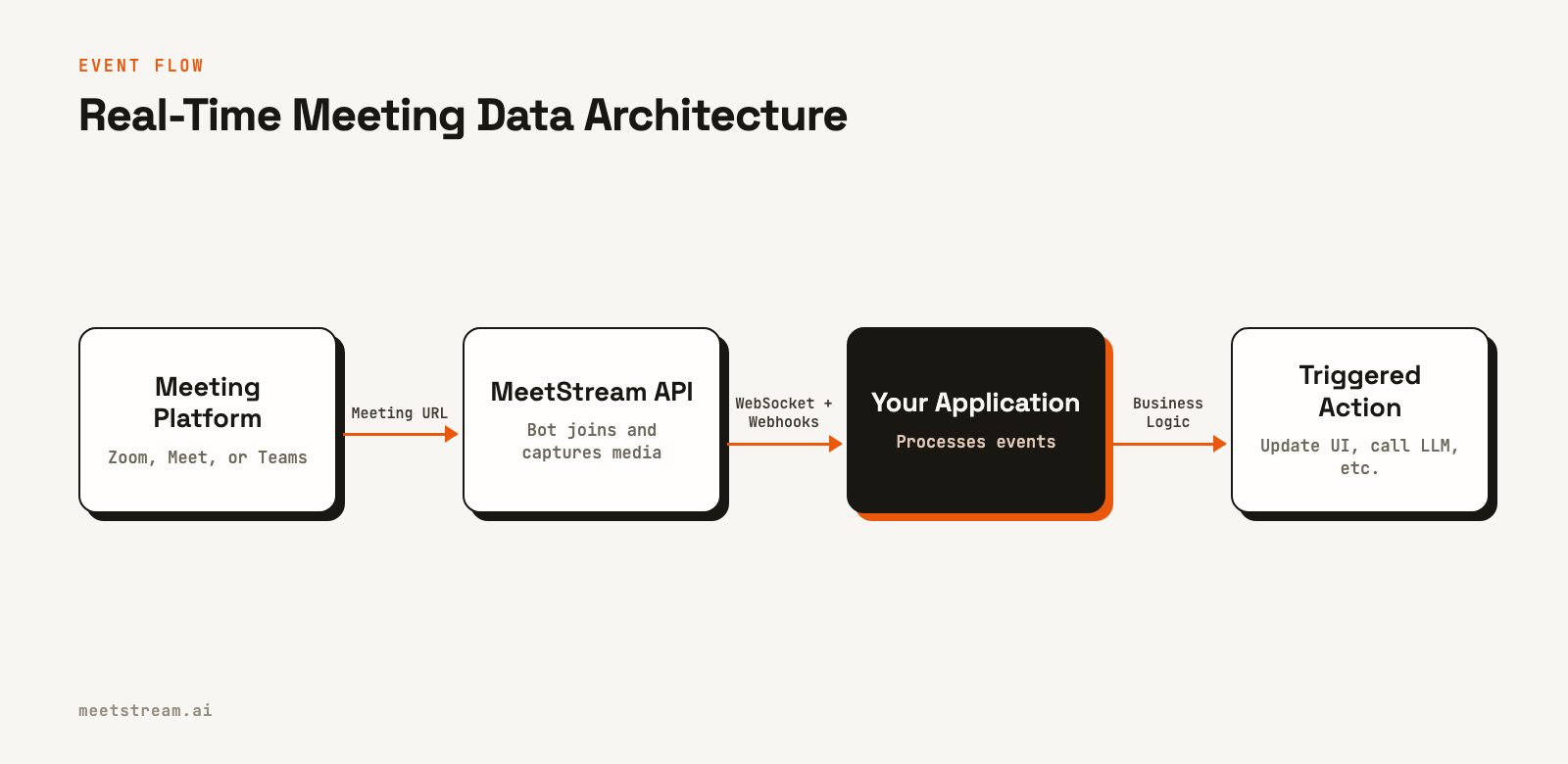
In practice, this means your application will have a WebSocket handler for the audio and transcription stream, and a separate HTTP endpoint to receive webhook payloads for lifecycle events. You can see our guide on Webhooks vs Polling for more detail on this pattern.
Implementing the Audio Processing Loop
Let's walk through a practical implementation. First, you create a bot and tell it to connect to your application's WebSocket endpoints for audio and control, and to send lifecycle events to your webhook URL.
You enable these connections in the POST /api/v1/bots/create_bot call. The key parameters are live_audio_required for the raw audio stream, socket_connection_url for sending commands back to the bot, and callback_url for lifecycle webhooks.
curl -X POST "https://api.meetstream.ai/api/v1/bots/create_bot" \
  -H "Authorization: Token <YOUR_API_KEY>" \
  -H "Content-Type: application/json" \
  -d '{
    "meeting_link": "https://meet.google.com/abc-defg-hij",
    "bot_name": "EventBot",
    "live_audio_required": {
      "websocket_url": "wss://your-app.com/audio"
    },
    "socket_connection_url": {
      "websocket_url": "wss://your-app.com/control"
    },
    "callback_url": "https://your-app.com/webhooks/meetstream"
  }'
Once the bot joins the meeting, it will connect to your wss://your-app.com/audio endpoint and begin streaming audio frames. Each binary message contains speaker metadata and raw Pulse-Code Modulation (PCM) audio data. The audio is mono, at 48kHz on Google Meet and Teams; Zoom frames carry their sample rate in the header. You will typically need to downsample it for use with most speech-to-text services.
Example: A Python Event Handler
The following Python code shows a basic server that can receive and process this audio stream. It resamples the audio to 16kHz, a common requirement for speech-to-text models, and prepares it for further processing.
Note the audio processing function resample_to_16k. It correctly handles mono audio, as provided by the MeetStream API. It avoids heavy libraries like SciPy in favor of a more direct NumPy implementation for better performance in a real-time loop.
import asyncio
import json
import base64
import numpy as np
import websockets

# This would be set from a bot.inmeeting webhook event
BOT_SPEAKER_ID = "speaker-id-of-your-bot"

def parse_audio_frame(message: bytes):
    """Parses a binary audio frame from MeetStream."""
    try:
        # Simplified parser for illustration. See docs for full spec.
        # msg_type (1 byte: 0x01 Google Meet/Teams at 48 kHz, 0x04 Zoom)
        # + Zoom only: sample rate (4 bytes) + channels (1 byte)
        # + speaker_id_len (2 bytes) + speaker_id + ...
        if message[0] == 0x01:
            sample_rate, start = 48000, 1
        elif message[0] == 0x04:
            sample_rate, start = int.from_bytes(message[1:5], 'little'), 6
        else:
            return None
        id_len = int.from_bytes(message[start:start+2], 'little')
        speaker_id = message[start+2:start+2+id_len].decode('utf-8')

        name_len_offset = start + 2 + id_len
        name_len = int.from_bytes(message[name_len_offset:name_len_offset+2], 'little')

        audio_offset = name_len_offset + 2 + name_len
        audio_data = message[audio_offset:]

        return {'speaker_id': speaker_id, 'sample_rate': sample_rate, 'audio': audio_data}
    except (IndexError, UnicodeDecodeError):
        return None

def resample_to_16k(pcm_bytes: bytes, src_rate: int) -> bytes:
    """Resamples mono PCM16 audio at src_rate to 16kHz mono."""
    samples = np.frombuffer(pcm_bytes, dtype=np.int16).astype(np.float32)
    # Simple linear interpolation (48 kHz on Google Meet and Teams; Zoom gives its rate)
    n = int(len(samples) * 16000 / src_rate)
    samples_16k = np.interp(np.arange(n) * src_rate / 16000, np.arange(len(samples)), samples)
    return samples_16k.astype(np.int16).tobytes()

async def audio_handler(websocket):
    """Receives audio frames and processes them."""
    async for message in websocket:
        if not isinstance(message, bytes):
            continue

        frame = parse_audio_frame(message)
        if frame is None:
            continue

        # Filter out the bot's own audio to prevent feedback loops
        if frame['speaker_id'] == BOT_SPEAKER_ID:
            continue

        # Downsample for STT
        pcm_16k = resample_to_16k(frame['audio'], frame['sample_rate'])

        # Here you would forward pcm_16k to a streaming STT service
        # print(f"Received {len(pcm_16k)} bytes of 16kHz audio from {frame['speaker_id']}")

async def main():
    async with websockets.serve(audio_handler, "localhost", 8765):
        await asyncio.Future() # run forever

if __name__ == "__main__":
    asyncio.run(main())
This code provides the starting point. From here, you would connect to a streaming transcription provider like Deepgram or AssemblyAI to get a live text feed. You can find more details in our guide to real-time audio processing.
Handling Interruptions and Taking Turns
A common failure mode for conversational agents is talking over a human participant. If a user starts speaking while the bot is responding, the bot must stop immediately. This requires a low-latency way to detect that a human has started talking.
The most effective way to handle this is with local Voice Activity Detection (VAD) on the incoming audio stream. A VAD algorithm can detect the presence of speech in milliseconds, long before a full transcript is available from an STT service. When your VAD detects human speech while the bot is active, you can send an interrupt command over the control WebSocket to clear the bot's audio playback queue.
This VAD-driven interruption is critical for a natural-feeling interaction. Relying on a transcript event to detect an interruption adds hundreds of milliseconds of delay, resulting in awkward and jarring overlaps in conversation.
How MeetStream Fits In
MeetStream provides the core infrastructure for building applications on top of real-time meeting events. Our unified API gives you a single integration point for Zoom, Google Meet, and Microsoft Teams.
You can use our primitive APIs, like the real-time audio streaming WebSocket and control socket, to build your own custom agent logic. This gives you full control over the STT, LLM, and TTS components. For developers who want a managed solution, our MIA (MeetStream Infrastructure Agent) platform handles the entire real-time pipeline. By specifying an agent_config_id when creating a bot, you can deploy a conversational agent without managing the underlying audio and AI infrastructure yourself. You can learn more about our AI Voice Agents on our site.
Conclusion
Building applications that react to real-time meeting events requires a shift from post-call batch processing to low-latency stream processing. The architecture centers on using WebSockets for continuous data like audio and Webhooks for discrete lifecycle events. By managing the latency at each step and implementing reliable turn-taking logic, you can build AI agents and tools that feel truly interactive. See the full API reference at docs.meetstream.ai.
Frequently Asked Questions
What is the difference between a WebSocket and a Webhook for meeting events?
A WebSocket provides a persistent, two-way connection for continuous data streams like live audio or transcription. A Webhook is a one-way HTTP POST sent from the API to your server to notify you of a specific, discrete event like bot.stopped or transcription.processed.
How can I get a live transcript of a meeting?
You can get a live transcript by enabling real-time audio streaming and forwarding the audio to a third-party streaming speech-to-text service. Alternatively, you can use MeetStream's live_transcription_required parameter with a provider like Deepgram Streaming to receive transcript events directly via webhook. See our documentation for live transcription for more details.
How do I prevent a meeting bot from responding to its own audio?
When the bot joins a meeting, you will receive a bot.inmeeting event containing its unique speaker ID. In your audio processing pipeline, you should check the speaker ID of each incoming audio frame and ignore any frames that match the bot's own ID to prevent feedback loops.
What is the typical latency for receiving audio from a live meeting?
With a properly configured WebSocket connection, the latency from a participant speaking in a meeting to your server receiving the corresponding audio frame is around 200ms. This includes all processing and network transit time through the meeting platform and the MeetStream infrastructure.
Can I send events or commands back into the meeting?
Yes. By establishing a socket_connection_url, your application can send JSON commands to the bot. This allows you to play audio using sendaudio, post chat messages with the POST /bots/{bot_id}/send_message REST endpoint, or change the bot's video frame with POST /bots/{bot_id}/send_image, enabling it to be an active participant.


