
10 AI Meeting Agent Use Cases You Can Build Today
Explore 10 AI meeting agent use cases you can build on Zoom, Google Meet and Teams, from live sales coaching to CRM updates and voice agents.

When Anthropic put Claude into Google Meet calls on 12 November 2026, the demo that travelled was a team planning an event while Claude drafted the plan beside them. It was a good demo because it showed something concrete. An AI meeting agent is only as interesting as the job you give it.
That job is rarely "take notes". Notes are the default because they are easy, not because they are where the value is. The agents worth building act on what they hear: they coach a rep in the moment, update the system of record before anyone has to, or answer the question that would otherwise stall the call.
Every use case below is something teams build today on meeting infrastructure, across Zoom, Google Meet and Microsoft Teams. Each one names the capability it depends on, so you can see what it actually takes rather than just what it promises. Where we have written a deeper guide, it is linked.
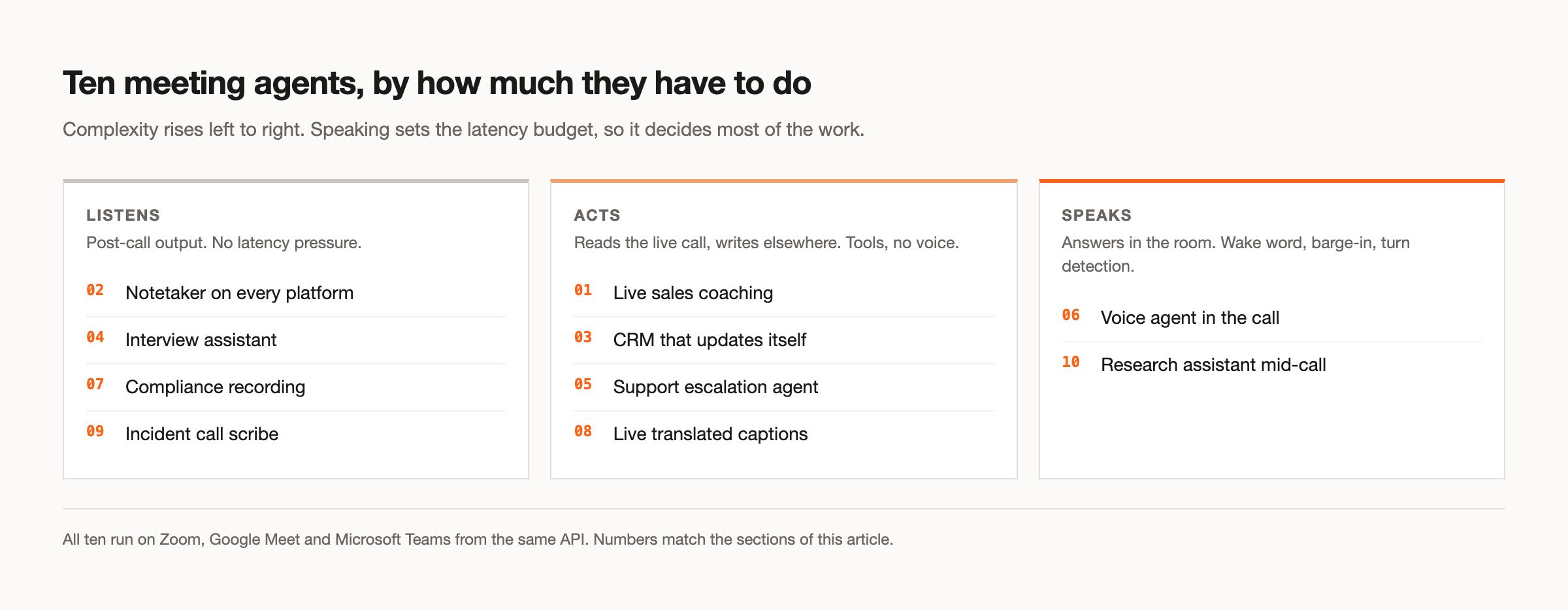
In this guide we will cover ten AI meeting agent use cases, from the simplest listening agents to ones that speak and act, and then how to decide which to build first. Let's get into it.
1. Live sales coaching
A rep is on a discovery call and the prospect raises pricing. A coaching agent hears it in the live transcript, recognises the objection, and puts a short prompt in front of the rep while the conversation is still open. The value is timing: the same advice in a post-call summary arrives after the moment has passed.
This depends on a streaming transcript rather than a post-call file, and on a private channel back to the rep rather than the shared meeting chat. The agent should never be visible to the prospect. Our guide to real-time coaching covers the architecture.
2. A notetaker that works on every platform
The most common starting point, and still a real one when it is done properly. The bot joins, records, and delivers a speaker-attributed transcript and summary when the call ends. The difference between a good one and a frustrating one is coverage: a notetaker that works on Google Meet but not on the Zoom link a customer sent is not a notetaker your users can rely on.
The capability that decides quality here is speaker attribution. Separate per-participant audio turns "who said what" into a label rather than a guess, which is what makes the action items trustworthy.
3. Updating the CRM before anyone has to
After a sales call, someone spends ten minutes typing what they heard into a CRM. An agent can do that from the transcript: deal stage, next steps, competitors mentioned, the budget figure the buyer gave. The best version runs silently and writes the fields directly.
This is what the action response modality is for. The agent produces no voice and no chat; it only calls tools. A custom function pointed at your CRM's API, with the agent set to end its turn silently after the write, gives you a record that updates itself. Our guide to extracting action items covers the extraction side.
4. An interview assistant
Recruiting calls produce a lot of signal that gets lost between the interviewer's notes and the hiring decision. An interview agent captures the conversation, attributes every answer to the right person, and drafts a structured scorecard against the role's criteria.
Attribution matters more here than almost anywhere, because mixing up the candidate's answer with the interviewer's question corrupts the record. It also raises consent questions that deserve a clear answer before you build: candidates should know the call is being transcribed.
5. A support agent that joins when a ticket escalates
Some support issues need a live call. An agent can join that call with the ticket's history already loaded, listen for the specifics, look things up in your knowledge base while the customer is still talking, and write the resolution back to the ticket afterwards.
This leans on tool access during the call. MCP servers or custom functions give the agent read access to the ticket and the knowledge base, scoped by an allow-list so it can only touch what it should. We wrote more about support meeting agents separately.
6. A voice agent that answers in the room
This is the closest to what people picture when they think of an AI in a meeting: someone says the agent's name, asks a question, and it answers out loud. It is also the hardest to get right, because a voice agent that talks at the wrong moment is worse than none.
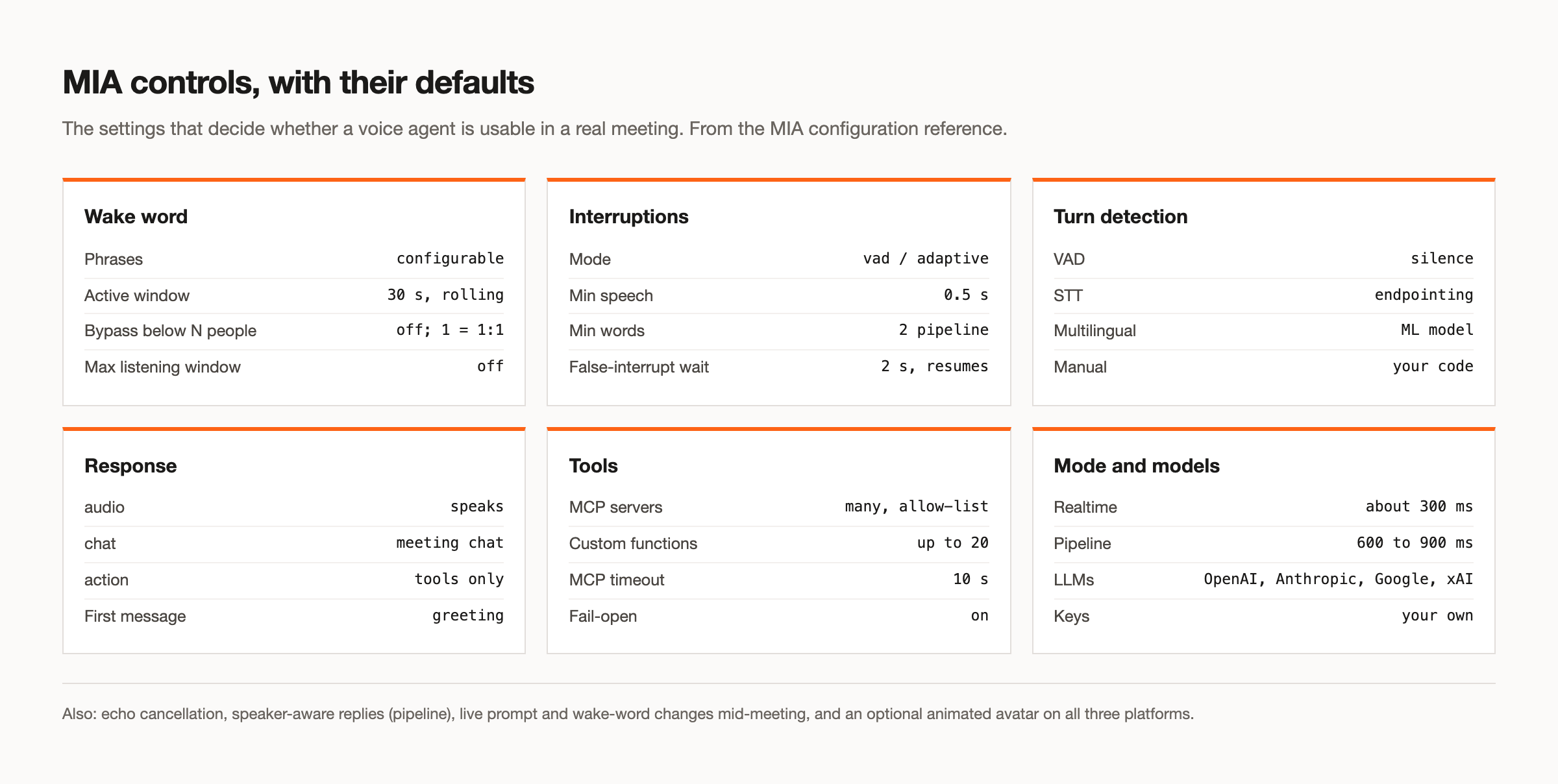
Three controls do most of the work. A wake word so it only responds when addressed, with a bypass for one to one calls where a wake word is just friction. Interruption handling that tells a real interruption from an "uh-huh". And turn detection that knows when a person has actually finished. The model behind it can be whichever you prefer, including Claude, GPT, Gemini or Grok. The voice agents page covers the configuration.
7. Compliance recording
Regulated teams often need every client conversation recorded and retained under their own control. The agent here does almost nothing visible. It joins, records the audio and video, and writes them to storage the organisation owns, with a retention period it sets.
The interesting requirement is where the data lives. This is one of the cases that rules out a workspace feature entirely, because the recording has to land in the organisation's own bucket rather than a vendor's workspace. Our piece on compliance requirements goes into the detail.
8. Live translation and captions
A meeting with participants who do not share a first language can run with live translated captions. The agent takes the streaming transcript, translates each utterance as it arrives, and presents it, either in the meeting chat or in a separate view.
The constraint is latency. Translation added on top of transcription has to keep up with speech, or the captions trail the conversation by enough to be useless. We built an example of translated captions that shows the pipeline.
9. An incident call scribe
During an outage, the call is chaotic and the decisions made in it matter. An incident agent keeps a timestamped log of what was tried, what was decided and who owns what, and turns that into the start of a postmortem and a set of tickets the moment the call ends.
This works well with a coding agent on the other end, since the decisions often belong in the repository. The Codex guide covers that pairing.
10. A research assistant mid-call
Meetings stall when someone asks a factual question nobody can answer: what did the competitor announce, what was last quarter's number, what does the contract actually say. A research agent can look it up and answer in the chat, with a source, while the conversation continues.
The useful refinement is speaking during execution. A slow lookup otherwise leaves an awkward silence, and an agent that says "one moment while I check" feels considerably more natural. We covered a research agent built this way.
What every one of these needs first
Ten different jobs, but the first problem is the same for all of them: getting into the call reliably. It sounds like the easy part and it is where most of the failures actually happen.
The lobby is the biggest one. One open-source meeting bot project publishes its own failure data, and of 430 sessions that did not complete, 227 ended in a waiting room nobody answered. The agent worked; nobody let it in. Whatever you build, set an explicit waiting room timeout, record "not admitted" as its own outcome rather than an error, and give the person who dispatched the bot a way to know it is waiting.
The second is platform rules, which tightened through 2026. Zoom now requires Meeting SDK apps to carry a token minted on behalf of an authorising user to join a meeting outside the app's own account, and such a bot cannot join before that user does. Microsoft gave Teams administrators a switch that blocks detected external bots. Neither is a reason not to build, but both are reasons to put infrastructure underneath rather than write three integrations yourself.
The third, for anything that listens, is attribution. Every use case above that produces a record, from the notetaker to the interview assistant, is only as good as its answer to who said what.
Which one to build first
Start with the use case where acting on the meeting saves someone the most time, not the one that demos best. A voice agent is the most impressive and the most work. A CRM updater is unglamorous and often the fastest to show real value, because it removes a task someone does after every single call.
Two questions narrow it quickly. Does the agent need to speak, or only listen and act? Speaking sets your latency budget and most of your complexity. And does it need to work on platforms your users choose, or only ones you control? If the answer includes Zoom or Microsoft Teams, that decides your infrastructure before anything else does.
Claude Meetings covers a team's own Google Meet calls with nothing to build. Everything on this list that has to live inside your own product, or reach Zoom and Teams, needs meeting infrastructure underneath. Our build guide walks through the order to do it in, and you can get started free at meetstream.ai.
Frequently asked questions
What can an AI meeting agent do?
Listen and transcribe with speaker labels, summarise, extract action items, update other systems from what it hears, answer questions in the meeting chat, and speak out loud when addressed. The more useful agents act on the meeting rather than just recording it.
Can an AI agent attend a meeting on my behalf?
Yes. A bot participant joins the call the way a person does and appears in the participant list. It can record, transcribe, post in the chat and speak if you give it a voice. How it gets admitted differs by platform. On MeetStream, Zoom needs no setup: send the meeting link with your MeetStream API key.
What is the best AI tool for meetings?
For a team's own internal calls on Google Meet, a workspace feature such as Claude Meetings needs nothing built. For an agent inside your own product, or one that must work on Zoom and Microsoft Teams, you need meeting infrastructure with an API, and the best tool is the one that covers the platforms your users choose.
How do I add an AI agent to a Teams meeting?
Through a meeting bot API that supports Microsoft Teams. You pass the Teams meeting link and a bot joins as a participant. Teams administrators can enable a policy that blocks detected external bots, so it is worth confirming your customer's tenant allows it.
Which meeting agent use case is easiest to build?
A post-call notetaker or a CRM updater. Neither needs to speak, so neither needs a tight latency budget, and both deliver value from a single API call plus a webhook that fires when the transcript is ready.


