
Real-Time Audio Processing in Python for Meeting Bots

Real-time audio processing in Python requires handling a continuous stream of raw PCM frames from a WebSocket, not static audio files. For a meeting bot, the latency budget from when an audio frame arrives to when a transcript is ready is often under two seconds. Every data copy, synchronous call, or non-vectorized loop consumes that budget.
This kind of workload is different from batch audio processing. While the tools like NumPy and SciPy are the same, the constraints demand a different approach. You parse binary frame headers with Python’s struct module, buffer incomplete frames across messages, and resample audio to 16kHz without calling an external process. This is the foundation for building agent-first voice infrastructure for meetings, where AI agents can join calls, hear the room, and act in the moment.
MeetStream's real-time audio streaming API delivers audio over a WebSocket. When your server accepts a connection, the first message you receive is a JSON text handshake, like {"type": "ready", "bot_id": "..."}. After this handshake, all subsequent messages are binary frames. Each frame contains a one-byte message type, a two-byte speaker ID length, the speaker ID string, a two-byte speaker name length, the speaker name string, and then raw PCM (Pulse Code Modulation) audio. Zoom frames (type 0x04) also carry a four-byte sample rate and a one-byte channel count right after the message type. The audio is int16 little-endian mono: 48kHz in Google Meet and Teams frames (type 0x01), and the rate in the header for Zoom frames. This is the format you will parse and process.
This article shows how to build a complete asyncio WebSocket server to receive this stream. The server will parse frames, run NumPy operations, resample audio with scipy.signal, and feed chunks to a speech recognition model. The code includes latency measurements at each step.
Where This Code Sits in a Meeting Media Pipeline
Every real-time meeting bot moves audio through four stages, and latency adds up at each one:
- Capture. The bot joins the meeting and receives media from the platform's real-time stack.
- Decode. The compressed audio from the meeting is decoded into raw PCM samples.
- Process. Your code normalizes, filters and resamples the audio into the format your speech model expects.
- Forward. The processed audio goes to a transcription model or an agent, with the speaker attached.
MeetStream runs capture and decoding for Zoom, Google Meet and Microsoft Teams and streams decoded, speaker-tagged PCM to your server. The rest of this article covers stages three and four, the part that runs in your Python process.
Parsing the PCM Frame Format with Python's struct Module
The Python struct module unpacks binary data based on a format string. Because the MeetStream frame format includes variable-length strings for speaker metadata, you must parse it sequentially. A single unpack call cannot handle the entire frame.
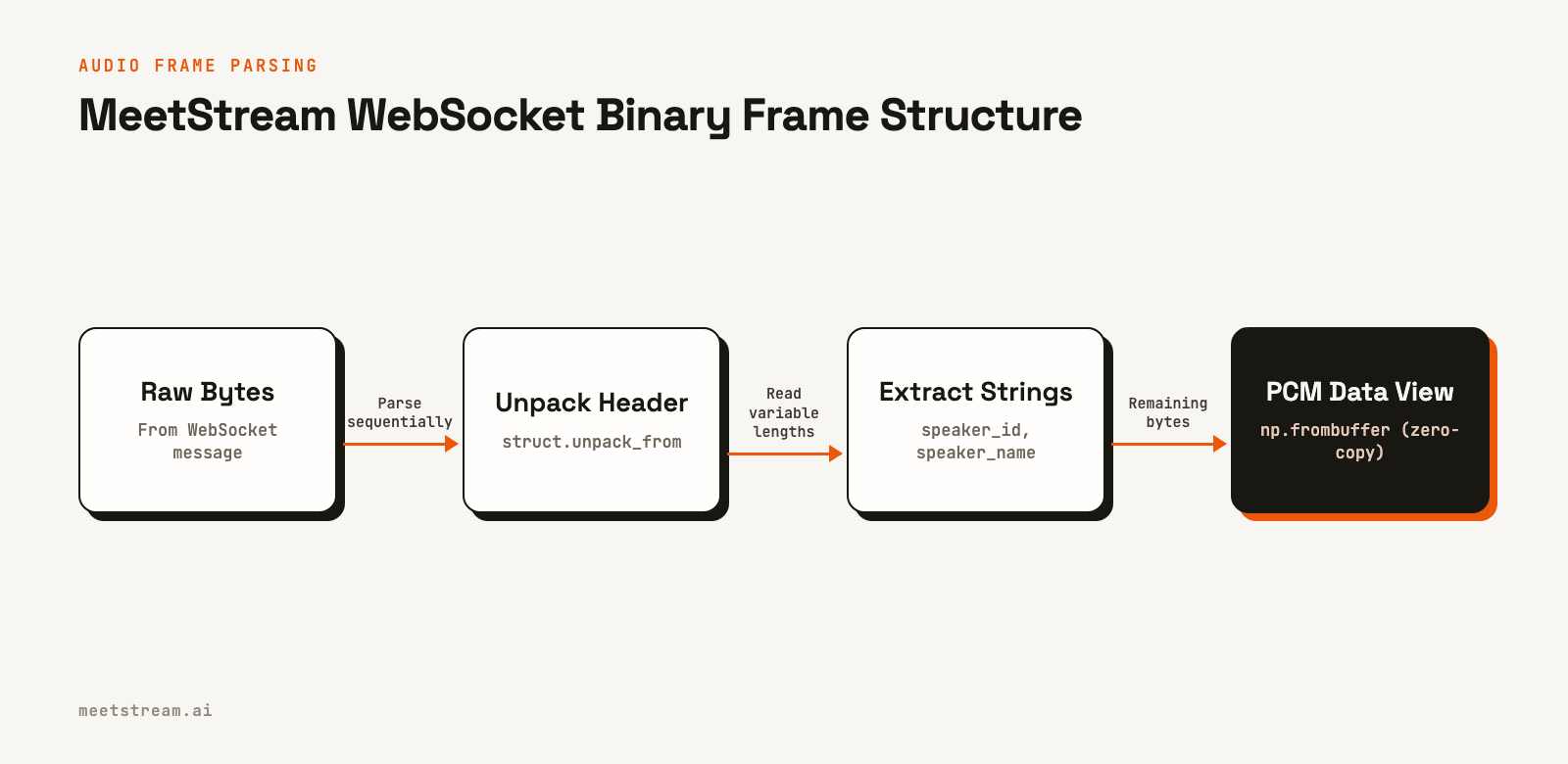
The following code defines a data structure for an audio frame and a function to parse the raw bytes from a WebSocket message. Notice the use of an offset to read through the byte string piece by piece.
import struct
from dataclasses import dataclass
from typing import Optional
import numpy as np

@dataclass
class AudioFrame:
    msg_type: int
    sample_rate: int
    speaker_id: str
    speaker_name: str
    pcm_data: np.ndarray  # int16, mono

def parse_audio_frame(raw: bytes) -> Optional[AudioFrame]:
    if len(raw) < 5:
        return None

    # 1 byte: message type
    msg_type = struct.unpack_from("<B", raw, 0)[0]
    if msg_type == 0x01:
        # Google Meet and Microsoft Teams: 48kHz mono
        sample_rate, offset = 48000, 1
    elif msg_type == 0x04:
        # Zoom: 4 bytes LE sample rate, then 1 byte channel count
        sample_rate = struct.unpack_from("<I", raw, 1)[0]
        offset = 6
    else:
        return None  # skip message types you do not handle

    # 2 bytes LE: speaker_id length
    sid_len = struct.unpack_from("<H", raw, offset)[0]
    offset += 2

    # N bytes: speaker_id
    speaker_id = raw[offset:offset+sid_len].decode("utf-8")
    offset += sid_len

    # 2 bytes LE: speaker_name length
    sname_len = struct.unpack_from("<H", raw, offset)[0]
    offset += 2

    # M bytes: speaker_name
    speaker_name = raw[offset:offset+sname_len].decode("utf-8")
    offset += sname_len

    # Remaining bytes are PCM data
    pcm_bytes = raw[offset:]
    pcm_data = np.frombuffer(pcm_bytes, dtype=np.int16)

    return AudioFrame(msg_type, sample_rate, speaker_id, speaker_name, pcm_data)
The np.frombuffer call with dtype=np.int16 creates a zero-copy view into the bytes object on most systems. This is critical for performance. At 48kHz, a 20ms frame contains 960 samples, and copying this data for every frame creates significant overhead.
Using NumPy for PCM Audio Operations
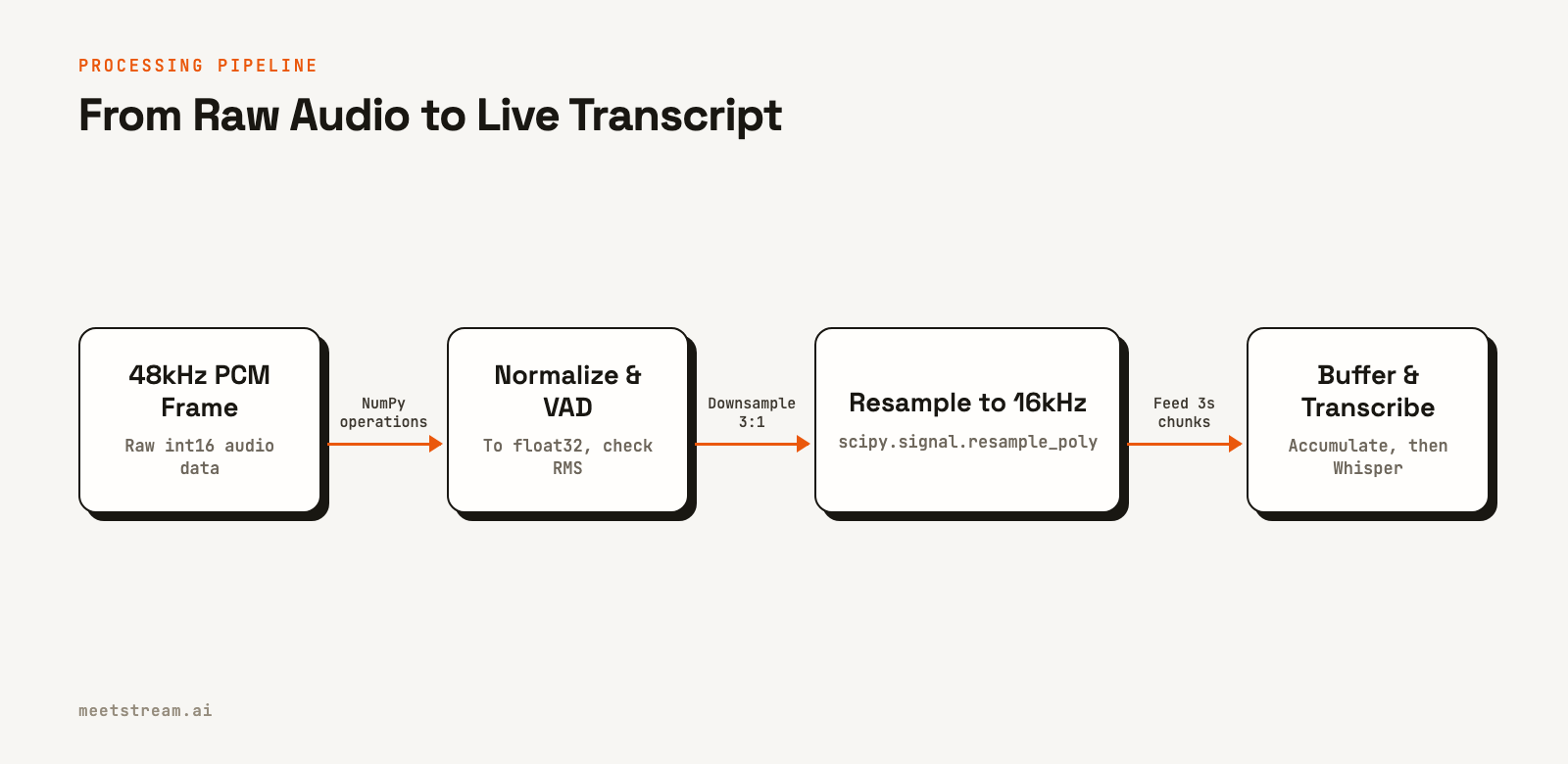
Raw int16 PCM data has a value range from -32768 to 32767. Most speech recognition models, including Whisper, expect float32 audio normalized to a range of -1.0 to 1.0. This conversion is a fast, vectorized operation in NumPy.
You can also perform a simple form of Voice Activity Detection (VAD) by calculating the Root Mean Square (RMS) of the signal. This gives a measure of the audio energy in a frame, which helps filter out silence.
def normalize_pcm(pcm_int16: np.ndarray) -> np.ndarray:
    # Convert to float32 and normalize to [-1.0, 1.0]
    return pcm_int16.astype(np.float32) / 32768.0

def compute_rms(pcm_float32: np.ndarray) -> float:
    # Root mean square: a measure of signal energy
    return float(np.sqrt(np.mean(pcm_float32 ** 2)))

VAD_THRESHOLD = 0.01  # Below this RMS, frame is likely silence

def is_speech(pcm_float32: np.ndarray) -> bool:
    return compute_rms(pcm_float32) > VAD_THRESHOLD
This RMS-based VAD is a quick first-pass filter. Frames with energy below the threshold are probably silence or background noise. By skipping these frames before resampling and transcription, you can reduce the inference load by 40-60% in a typical meeting where people pause between speaking.
Skip Your Bot's Own Voice
If your agent speaks into the meeting, for example with text-to-speech, make sure it never transcribes or reacts to itself. Every frame carries the speaker's display name, so a guard right after parsing is enough:
BOT_NAME = "Transcription Bot"  # the bot_name you sent to create_bot

def should_process(frame: AudioFrame) -> bool:
    return frame.speaker_name != BOT_NAME
Run the check before resampling, so the frames you drop cost nothing downstream.
Resampling from 48kHz to 16kHz with SciPy
Whisper and many other models require 16kHz input audio. MeetStream delivers high-fidelity audio: 48kHz from Google Meet and Teams, and from Zoom the rate in the frame header (32kHz). Both convert with an integer ratio, 1:3 and 1:2. The scipy.signal.resample_poly function is ideal for this, as it uses a fast polyphase filter for integer-ratio conversions.
from math import gcd
from scipy import signal

def resample_polyphase(pcm_float32: np.ndarray, sample_rate: int) -> np.ndarray:
    # resample_poly(x, up, down) is efficient for integer ratios.
    # 48kHz (Google Meet, Teams) -> 16kHz: up 1, down 3.
    # 32kHz (Zoom) -> 16kHz: up 1, down 2.
    g = gcd(16000, sample_rate)
    return signal.resample_poly(pcm_float32, up=16000 // g, down=sample_rate // g)
Using resample_poly is better than the more general signal.resample for this specific task. It avoids a slower FFT-based computation, making it the correct choice for processing clean audio streams from MeetStream.
Buffering Frames for Speech Recognition
Speech recognition models work best on audio chunks of a few seconds. Individual PCM frames from a WebSocket stream are much shorter, usually 10-20ms. You need a buffer that collects frames for each speaker and sends the combined audio for transcription when it reaches a target duration or detects a pause.
from collections import defaultdict
from typing import Dict, List
import time

class SpeakerAudioBuffer:
    def __init__(self, target_seconds: float = 3.0, sample_rate: int = 16000):
        self.target_samples = int(target_seconds * sample_rate)
        self.buffers: Dict[str, List[np.ndarray]] = defaultdict(list)
        self.sample_counts: Dict[str, int] = defaultdict(int)
        self.last_activity: Dict[str, float] = defaultdict(float)

    def add_frame(self, speaker_id: str, pcm_16k: np.ndarray) -> Optional[np.ndarray]:
        self.buffers[speaker_id].append(pcm_16k)
        self.sample_counts[speaker_id] += len(pcm_16k)
        self.last_activity[speaker_id] = time.monotonic()

        if self.sample_counts[speaker_id] >= self.target_samples:
            return self.flush(speaker_id)
        return None

    def flush(self, speaker_id: str) -> Optional[np.ndarray]:
        if speaker_id not in self.buffers or not self.buffers[speaker_id]:
            return None
        combined = np.concatenate(self.buffers[speaker_id])
        self.buffers[speaker_id] = []
        self.sample_counts[speaker_id] = 0
        return combined

    def flush_stale(self, timeout_seconds: float = 1.5) -> Dict[str, np.ndarray]:
        now = time.monotonic()
        stale = {}
        for speaker_id, last in list(self.last_activity.items()):
            if now - last > timeout_seconds and self.sample_counts[speaker_id] > 0:
                flushed = self.flush(speaker_id)
                if flushed is not None:
                    stale[speaker_id] = flushed
        return stale
Feeding Buffered Audio to a Transcription Model
The whisper Python package can transcribe a NumPy float32 array directly from memory. This avoids the latency of writing audio to disk and is the most efficient way to get a transcript from a live stream. For more details on transcription options, see our guide on real-time vs post-call transcription.
import whisper

# Load a small, English-only model for speed
model = whisper.load_model("base.en")

def transcribe_chunk(audio_float32: np.ndarray) -> str:
    # whisper.transcribe expects a float32 NumPy array at 16kHz
    result = model.transcribe(
        audio_float32,
        language="en",
        fp16=False,  # Set to True if a CUDA GPU is available
        no_speech_threshold=0.4
    )
    return result["text"].strip()
How MeetStream Fits In
This entire pipeline for real-time audio processing in Python is built to consume a live audio feed. MeetStream provides that feed as a managed service. Our meeting bot API deploys a bot into a Zoom, Google Meet, or Microsoft Teams call with a single API request. By specifying a WebSocket URL in the live_audio_required parameter, you instruct the bot to stream low-latency, speaker-attributed audio directly to your server.
This infrastructure handles the complexities of joining meetings, capturing media, and managing scale. It lets you focus on building your application's core logic, like the transcription and analysis pipeline shown here. We've processed over a million meeting minutes, giving us direct experience with the patterns that work in production.
# Example of how to start a MeetStream bot to feed this pipeline
curl -X POST "https://api.meetstream.ai/api/v1/bots/create_bot" \
  -H "Authorization: Token <YOUR_API_KEY>" \
  -H "Content-Type: application/json" \
  -d '{
    "meeting_link": "<YOUR_MEETING_LINK>",
    "bot_name": "Transcription Bot",
    "live_audio_required": {
      "websocket_url": "wss://your-server.com/audio"
    }
  }'
Conclusion and Next Steps
Effective real-time audio processing in Python depends on byte-level parsing, vectorized operations, and non-blocking I/O. By combining struct for parsing, NumPy for math, SciPy for resampling, and asyncio for concurrency, you can build a pipeline that handles live meeting audio with low latency. This approach is fundamental for creating applications that require immediate understanding of spoken content, from AI notetakers to live sales coaching tools.
To test this Python code with a live meeting, get started free at meetstream.ai.
Frequently Asked Questions
What is the audio format for MeetStream's live streaming?
MeetStream streams audio as binary WebSocket frames. Each frame contains a small header with speaker metadata followed by raw PCM int16 little-endian mono audio: 48kHz on Google Meet and Teams, and on Zoom the rate given in the frame header (32kHz). This format has no container or codec, so the raw samples can be loaded directly into a NumPy array.
How do you resample audio from 48kHz to 16kHz in Python?
The best method is scipy.signal.resample_poly(audio, up=1, down=3). This function is optimized for conversions with integer ratios, like the exact 1/3 ratio between 48kHz and 16kHz. For Zoom's 32kHz frames, use down=2. First, ensure your audio is a float32 NumPy array by normalizing the int16 data.
Can Whisper transcribe a NumPy array directly?
Yes, the Whisper Python library can transcribe a NumPy array from memory without writing to a file. Pass a 16kHz float32 array directly to the model.transcribe() method. This is the fastest and most direct path for transcribing live audio streams.
What is the main cause of latency in real-time audio bots?
The speech recognition model inference is the largest source of latency. On a CPU, a model like Whisper's base.en can take 300-600ms to process a 3-second audio chunk. To prevent this from blocking your application, run the inference in a separate thread or process pool using asyncio.to_thread or loop.run_in_executor.
Does my application act as the WebSocket client or the server?
Your application runs the WebSocket server. When you create a bot with a websocket_url in live_audio_required, MeetStream connects to your server as the client and starts streaming once it has sent the JSON handshake.
How do I stop my bot from transcribing its own speech?
Compare the speaker name on each incoming frame with the bot_name you gave the bot, and drop the frames that match before you resample or transcribe them.
How can I implement simple voice activity detection in Python?
A fast VAD can be done by calculating the Root Mean Square (RMS) energy of each audio frame. Use np.sqrt(np.mean(pcm_frame**2)) on a normalized float32 frame and check it against a threshold. A value around 0.01 works well for filtering silence in typical meeting audio.


