Calendar API: bots that schedule themselves from Google Calendar and Outlook
The MeetStream Calendar API connects a calendar once. Bots then join every meeting on it, on schedule, with nobody sending a link.

Why a calendar should drive your bots
A calendar already knows when every meeting starts. Connect a user once, and it becomes the trigger rather than a copy.

A calendar-scheduled bot is an ordinary meeting bot: same webhooks, same per-participant recordings, same transcription engines.
What does one calendar connection give you?
Nothing is written back to Google or Microsoft.
Google watch channels and Microsoft change notifications.
One, all or rolling, read from the event’s own rule.
Up to 200 connections per MeetStream user.
Build on the calendar API
Connect an account, sync the meetings ahead, and book the ones you choose.
- Read-only calendar accessNothing is written back to the calendar.
- Events with their meeting linksSync reads the link and labels the platform.
- A bot scheduled onto the meetingIt joins one minute before the start.
Google Calendar and Outlook in one API
What each provider gives you, and what you get through MeetStream.
| Capability |  Google Calendar Google Calendar |  Outlook and Microsoft 365 Outlook and Microsoft 365 |  |
|---|---|---|---|
| Read-only calendar access | Yes | Yes | YesNothing written back |
| Events with their meeting links | Yes | Yes | YesPlatform labelled |
| Changes pushed, not polled | Watch channels | Change notifications | YesEvery calendar |
| Recurring series from the rule | Yes | Yes | YesOne, all or rolling |
| A bot scheduled onto the meeting | Calendar data only | Calendar data only | YesA minute before |
| Many accounts, one key | One grant each | One grant each | YesUp to 200 |
| One event contract, both providers | Google format | Microsoft format | YesThe same bot events |
Colour key: green, yes amber, conditional red, provider side only
Where the calendar endpoints live
Calendar endpoints in the API referenceEvery request, response and optionGoogle Calendar OAuth setup guideThe consent flowOutlook calendar setup guideAzure app registrationSchedule a bot for a set time
curl -X POST https://api.meetstream.ai/api/v1/bots/create_bot \
  -H "Authorization: Token $MEETSTREAM_API_KEY" \
  -H "Content-Type: application/json" \
  -d '{
    "meeting_link": "https://meet.google.com/abc-defg-hij",
    "bot_name": "Notetaker",
    "join_at": "2026-12-20T20:00:00+05:30"
}'What happens when a meeting moves?
The join time moves with it. MeetStream listens rather than polling.
- Changes arrive as a pushGoogle watch channels and Microsoft Graph notifications.
- Channels renew themselvesA Google channel lasts about 30 days, renewed two days early.
- Your webhooks still fireThe bot sends its usual lifecycle webhooks.
Connect a Google Calendar or an Outlook calendar and every change arrives as a push.
| Calendar change | What MeetStream does |
|---|---|
| Meeting rescheduled | Scheduled join time moves with it |
| Meeting cancelled | Schedule deleted, bot marked Cancelled |
| Meeting moved into the past | Bot record cancelled |
| Series edited | Existing schedules rebuilt with the new times |
| New meeting added | Picked up by the next auto-schedule run |
What happens to a recurring series?
A weekly call is one event with a recurrence rule. Three ways to cover it.
Daily, weekly, monthly and yearly patterns are all read from the event’s own rule.
To stop future bots, cancel every occurrence or give a start date. The scheduling bots guide has the detail.
Double-booking safeguards
Three things stop a meeting getting two bots.
- The API hands the bot backBook an event that already has a bot and you get that bot to edit.
- Auto-schedule skips booked eventsManual and automatic booking can both run.
- A deduplication keyA retry returns the original bot, and one replay is billed once.
Bots join one minute before the start. On Zoom and Teams a host admits the bot, so allow for the lobby.
Which meeting links are detected
A link on the event is all it takes. Sync reads it and notes the platform.
Bots join Zoom, Google Meet and Microsoft Teams meetings. Events on other platforms sync too, each one labelled.
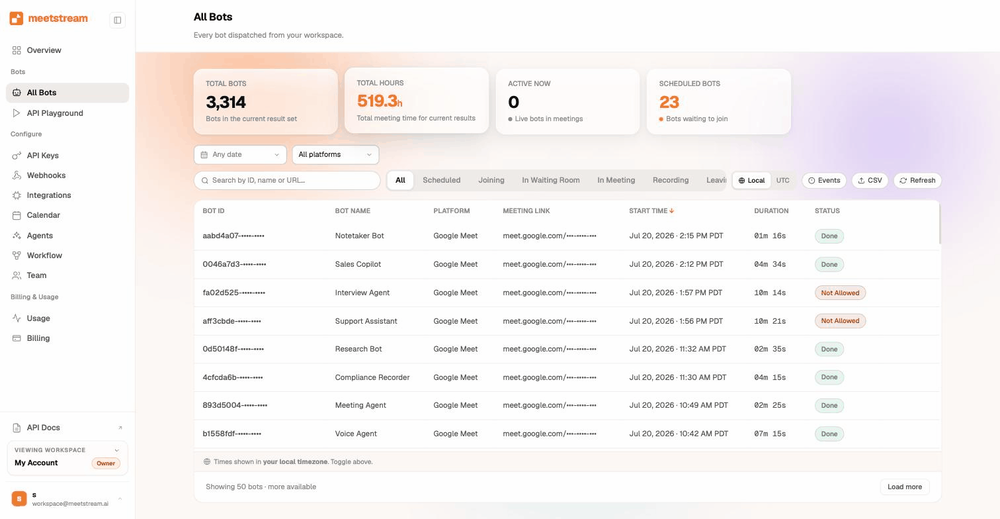
Three ways to schedule a bot
Start simple, and add the calendar when your product needs it.
Enterprise-level security, keep your data private.
Read-only on both providers. MeetStream leaves the calendar exactly as it found it. The security page covers the wider controls.
Google grants read access to events and calendars. Microsoft grants calendar read and user read.
Refresh tokens are encrypted at rest, one set per connection. Synced events are encrypted too.
Credentials, watch channels and scheduled bots go with the connection.



Which calendar permissions do you grant?
| Provider | What is granted |
|---|---|
| Read scopes for events and calendars, plus email and profile | |
| Microsoft | Calendar read, user read, and offline access for a long-lived refresh token |
What are the calendar API limits?
| What to design for | How it behaves |
|---|---|
| The auto-schedule job | Daily at midnight UTC, over the next 24 hours |
| The sync window | 28 days ahead by default. A set join time reaches three months |
| OAuth grants | Watch the connection list, and reconnect through the same flow |
A multi-tenant product holds its customers’ connections under one API key.
Got a question? We got the answer.
Common questions about connecting a calendar, scheduling bots, and what is stored.
What can I build with the Calendar API?
Notetakers, coaching tools, CRM enrichment and meeting analytics. Connect a calendar, and every meeting on it comes back with a recording, a transcript and speaker labels.
Which calendars does the Calendar API support?
Google Calendar (personal or Workspace) and Microsoft 365 Outlook calendars. One MeetStream user can hold up to 200 connections across both. Each one is keyed by provider and account email.
Can one user connect several calendar accounts?
Yes. Up to 200 connections per MeetStream user across Google and Outlook, each keyed by provider and account email, each with its own credentials.
How far ahead can bots be scheduled?
A one-off bot with a set join time can be scheduled up to three months ahead. Calendar sync reads from one day back to 28 days forward by default, and you can widen that window on the request.
What happens when a meeting moves or is cancelled?
Google watch channels and Microsoft Graph change notifications push the change to MeetStream. A reschedule moves the join time; a cancellation deletes the schedule and marks the bot Cancelled.
Can I pick which meetings get a bot?
Yes. Book specific events one at a time from the schedule endpoint. Or turn on auto-schedule to cover every upcoming meeting with a link, then unschedule any you would rather skip.
Does it detect Zoom, Google Meet and Teams links?
Yes. Sync reads the link on each event and labels the platform. Bots join Zoom, Google Meet and Microsoft Teams. Webex, GoToMeeting, BlueJeans and Whereby links are labelled too.
Does it handle recurring meetings?
Yes. Standard iCalendar recurrence rules are read (daily, weekly, bi-weekly, monthly, yearly). Book a single occurrence, or all of them up to a limit of 52 by default. Or let MeetStream set up the next occurrence after each meeting ends.
What calendar permissions are requested?
Read-only on both. Google grants read access to events and calendars, plus email and profile to name the account. Microsoft grants calendar read, user read and offline access. MeetStream reads the calendar and leaves it exactly as it found it.
Where are calendar credentials stored?
OAuth refresh tokens are encrypted at rest, and synced events are stored encrypted too. The flow uses OAuth throughout, so a calendar password never reaches MeetStream.
Why use a calendar API instead of Google and Microsoft directly?
One connection covers both providers: one set of read-only scopes, one push path for changes, one set of bot events.
How do my end users connect their calendars in production?
Your app runs the Google or Microsoft consent flow with your own client ID, then passes the refresh token it receives to the matching connect endpoint. The localhost helper in the docs is there to get your first token while you build, and your own consent flow takes over in production.
Let the calendar decide which meetings get a bot.
Connect once, read-only. Bots are booked, moved and cancelled with the meeting.
Connect a calendar this afternoon
Read-only on Google or Outlook. Every meeting with a link gets a bot.