Meeting Transcription API for Zoom, Google Meet and Microsoft Teams
The MeetStream meeting transcription API sends a bot into a Zoom, Google Meet or Microsoft Teams call with one request, and returns a speaker-labelled transcript to your webhook.
What is a meeting transcription API?
A meeting transcription API turns a live video call into text your code can use. It does two separate jobs that are easy to confuse.
MeetStream sends a bot into the call as a participant, captures the audio and returns the transcript, on the same meeting bot API.
How the meeting transcription API works
- POST a meeting link to the API.
- A bot joins the call. Scheduled bots join on time, and ad hoc bots join in under ten seconds on average.
- Live transcript chunks are pushed to your webhook while the meeting runs, if you chose a streaming engine.
- A webhook fires when the call ends and the finished transcript is available to GET.
curl -X POST https://api.meetstream.ai/api/v1/bots/create_bot \
  -H "Authorization: Token $MEETSTREAM_API_KEY" \
  -H "Content-Type: application/json" \
  -d '{
    "meeting_link": "https://meet.google.com/abc-defg-hij",
    "bot_name": "Notetaker",
    "recording_config": { "transcript": { "provider": { "meetstream": {} } } },
    "callback_url": "https://your-app.example.com/meetstream"
  }'
The response is a list of utterances, each tied to a named participant with start and end times. No separate speaker identification step.
ExamplePost-call transcription guide: request, response and options in the docs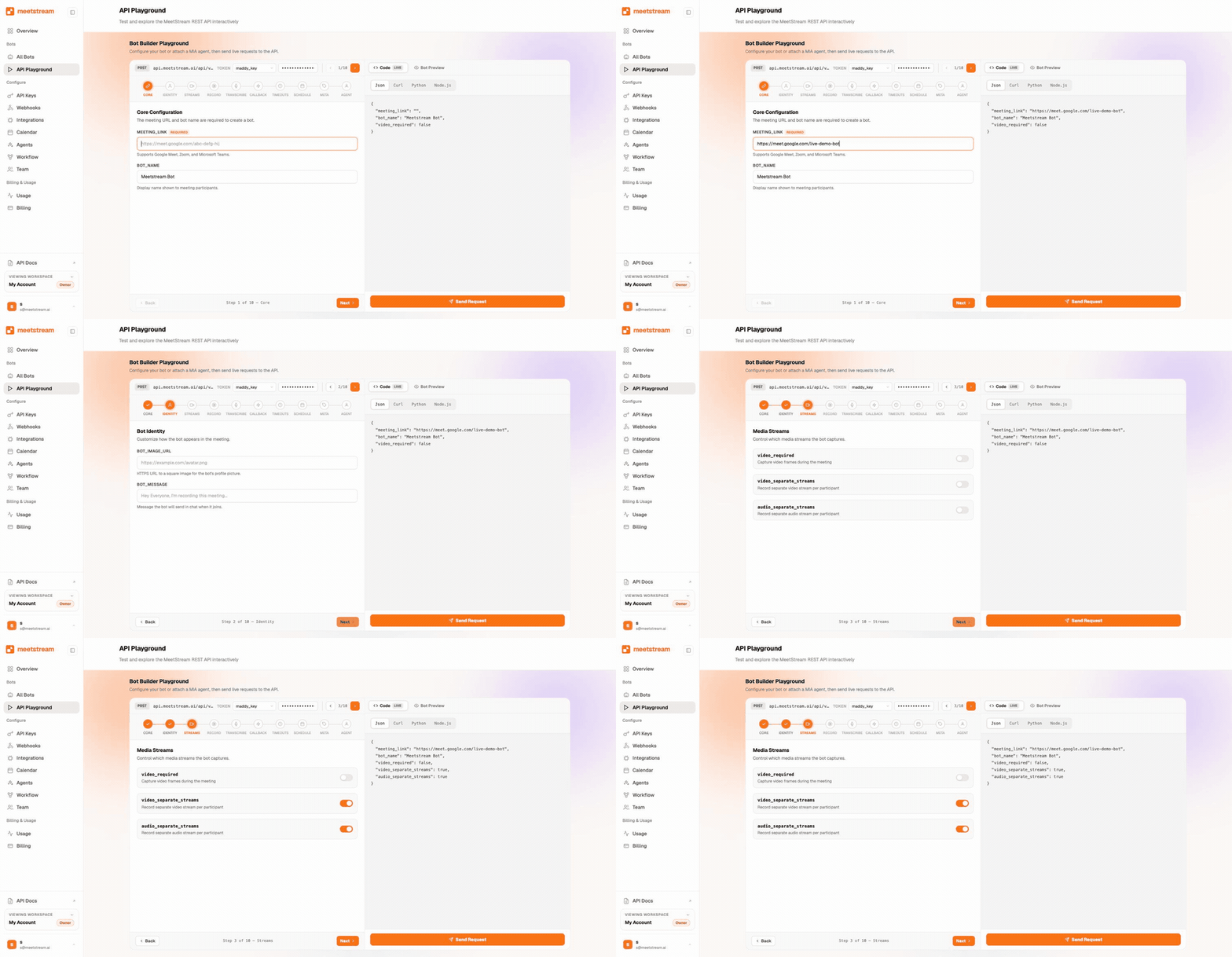
From a meeting link to your product
One request puts a bot in the call. It records and streams while the meeting runs. The webhook tells you when the artefacts are ready, and your product takes it from there.
Speaker labels without diarization
Most transcription products identify speakers with speaker diarization: one mixed track, and a model infers where the voice changed.
That holds up in a quiet two-person call. Cross-talk, similar voices and larger rooms all put more weight on the model.
Nylas publicly scopes its transcription accuracy to meetings with up to 10 participants. That is what a diarization ceiling looks like when it is written down.
MeetStream captures each participant's audio separately on Zoom, Google Meet and Microsoft Teams, so an utterance is tied to a speaker by the channel it arrived on.
The per-participant audio entry explains how each stream gets its name.
Real-time vs post-call meeting transcription
Both come off the same bot. The question is when you need the words.
| Real-time | Post-call | |
|---|---|---|
| When the text arrives | In chunks, while people speak | By webhook, after the call |
| What it is for | Live coaching and in-meeting assistants | Summaries, CRM enrichment, archives and search |
| What you get | The whole transcript, live | A cleaner pass over the whole recording |
The real-time meeting transcription API page covers the streaming interface, and voice agents covers agents that speak back.
For a stored record as well, stream during the call, then re-run the recording through a post-call engine.
Choose your transcription engine
MeetStream ships its own engine, and lets you route audio to a provider you choose. The figures below are each provider's own published numbers, linked to source.
| Engine | Published language support | Real-time | Best for |
|---|---|---|---|
| MeetStream engine | In-house, auto language detection | No, post-call | One vendor, one bill, no extra key |
| AssemblyAI | 99 languages on Universal-2 | Yes | Broadest published language list |
| Gemini | 97 languages on the Live API | Yes | Teams already building on Gemini |
| Deepgram | 10 languages in real-time multilingual mode | Yes | Low-latency streaming workloads |
| Sarvam | 11 Indic languages plus English | No, post-call | Indian languages and accents |
| JigsawStack | Auto-detect or 162 languages | No, post-call | Batch jobs on a Whisper stack |
Two things to plan for. Deepgram's real-time multilingual mode covers ten languages, and its full batch list is wider. JigsawStack streams in English, so pair it with post-call jobs for other languages.
Supported platforms: Zoom, Google Meet and Microsoft Teams
One integration covers all three, and the same code path serves each of them.
| Capability | Zoom | Google Meet | Microsoft Teams |
|---|---|---|---|
| Audio recording | Yes | Yes | Yes |
| Video recording | Yes | Yes | Yes |
| Per-participant audio | Yes | Yes | Yes |
| Per-participant video | Yes | Yes | Yes |
| Real-time transcript stream | Yes | Yes | Yes |
| Meeting chat | Yes | Yes | Yes |
Platform detail lives on the Zoom bot API, Google Meet bots and Teams bots pages.
Each platform has a transcription page of its own: the Zoom transcription API, the Google Meet transcription API and the Teams transcription API.
Zoom is the one with a setup step: a Marketplace app once, plus a one-time OBF consent per user. MeetStream handles the tokens after that.
Why not use native Zoom, Meet or Teams transcripts?
Every platform has some transcript feature of its own, and developers usually try those first. They run into the same four walls.
| Native transcripts | A bot-based API | |
|---|---|---|
| Permission | The host and the account admin decide | The choice sits with your product |
| Plan tier | Tied to paid editions and admin policy | Every account behaves the same |
| Timing | Retrieval generally happens after the meeting | Text arrives while the call runs |
| Integrations | Graph, the Meet APIs and Zoom, three contracts | One integration above all three |
A bot-based transcription API works on any account, on the plans your customers already have, and returns text while the meeting is still live.
Meeting transcription API pricing
Capture costs $0.35 per bot-hour and transcription $0.10 per hour, so a transcribed meeting is $0.45 per hour all-in, dropping toward $0.25 at volume.
Every account starts with $5 of free credit. Full detail on the pricing page.
Here is how that compares against the rates competitors publish. These are their numbers, from their own pricing pages, linked so you can check them.
| Provider | Capture | Transcription | All-in |
|---|---|---|---|
| MeetStream | $0.35/hr | +$0.10/hr | $0.45/hr |
| Recall.ai | $0.50/hr | +$0.15/hr built-in | $0.65/hr |
| MeetingBaaS | 1.00 token/hr | +0.25 token/hr | $0.625/hr at entry pack |
| Nylas | $0.70 per recorded hour, transcription bundled | Not published | Not published |
How to evaluate meeting transcription accuracy
Most buyers reach for Word Error Rate. WER counts the words an engine got wrong, so lower is better. It treats every word as equally important.
AssemblyAI's Universal-2 release reported a WER gain of roughly 3%, while 73% of people preferred the new output in blind evaluation.
The gains they noticed were 24% on rare words, 21% on alphanumerics and 15% on formatting. Almost none of that shows up in a WER headline.
For meeting transcripts specifically, judge four things.
Run your own audio through more than one engine before choosing. That is the reason MeetStream lets you switch providers rather than locking you to one.
Live and final, on one bot
A streaming engine gives you chunks during the call. A post-call engine gives you the stored record.
Products that want both stream during the call, then re-run the recording through a post-call engine.
Stream live, then re-transcribe for the recordLive transcription guide: request, response and options in the docsVocabulary tuning passes straight through, so Deepgram keyword lists and AssemblyAI key terms travel with the request.
Chunk delivery rules are on the webhooks page, and the security page covers what applies to transcripts.
Frequently asked questions
Is there an API that can transcribe audio?
Yes. A meeting transcription API does two jobs: it captures the audio from a live call, then converts that audio to text. MeetStream handles both. One request puts a bot in a Zoom, Google Meet or Microsoft Teams meeting and returns a speaker-labelled transcript.
Can I get transcripts from a Zoom meeting using the Zoom API?
In limited cases. Zoom's own transcript retrieval needs cloud recording turned on, the right account tier and host permission, and it returns the transcript after the meeting. A bot-based API captures the audio directly, works on any account, and streams text while the call is still running.
Is Zoom AI transcription free?
Zoom's AI transcription is tied to paid plans and account settings, and the meeting host controls it. A product built on a bot gets the same transcript from every customer, whatever their plan. That is the usual reason teams move to a bot-based transcription API.
Is Google Meet transcription free?
Google Meet transcription depends on the Workspace edition, and code access is narrower than most developers expect. A meeting bot works on every tier, because it captures audio as a participant.
Can I set Microsoft Teams to automatically transcribe meetings?
Teams can transcribe on its own when the tenant policy allows it. Access through the Graph API then depends on tenant permissions and licensing, and real-time media is the tightest of the three platforms. A bot gives you the same capture behaviour across all three.
What is the difference between real-time and batch transcription?
Real-time transcription streams text while people are still talking, delivered to a webhook, and is what live agents and coaching tools need. Batch or post-call transcription runs after the meeting ends and is better for summaries, CRM writeback and search. MeetStream supports both on the same bot.
Does the transcript identify who is speaking?
Yes. MeetStream asks for a separate audio stream for each participant. Each utterance is then tied to the platform's own participant identity, which is what keeps the names right across every engine.
Can I use my own transcription provider?
Yes. Use the in-house MeetStream engine, or route audio to Deepgram, AssemblyAI, Gemini, Sarvam or JigsawStack. That matters if you already have a contract, a tuned custom vocabulary, or a language one engine handles best.
Is there a free API for speech to text transcription?
Most production engines charge per hour or per minute. MeetStream includes $5 of free credit on signup. That is enough to run real meetings end to end and read the transcripts back before you commit.
Do you store meeting data?
Recordings and transcripts are kept for 30 days by default. If you connect your own S3 bucket, they go into your account instead, and your retention policy applies from the first byte.
Start transcribing meetings
$5 of free credit, self-serve API keys, and no sales call between you and your first transcript.